
SANITMAX Sm1050b
SANITMAX 41.3" Battery-Powered Walk-Behind Floor Sweeper User Manual
Model: Sm1050b
1. ആമുഖം
This manual provides essential information for the safe and efficient operation, maintenance, and troubleshooting of your SANITMAX 41.3" Battery-Powered Walk-Behind Floor Sweeper, Model Sm1050b. Please read this manual thoroughly before operating the machine to ensure proper use and to prevent injury or damage.
2. സുരക്ഷാ നിർദ്ദേശങ്ങൾ
Always adhere to the following safety guidelines to prevent accidents and ensure safe operation.
പൊതു സുരക്ഷ
- ഉപയോഗിക്കുന്നതിന് മുമ്പ് എല്ലാ നിർദ്ദേശങ്ങളും വായിക്കുക.
- Do not operate the sweeper in hazardous environments or near flammable liquids/gases.
- കുട്ടികളെയും അനധികൃത വ്യക്തികളെയും പ്രവർത്തന മേഖലയിൽ നിന്ന് അകറ്റി നിർത്തുക.
- Wear appropriate personal protective equipment (PPE) such as safety glasses and non-slip footwear.
- പ്രവർത്തനത്തിന് മുമ്പ് എല്ലാ ഗാർഡുകളും സുരക്ഷാ ഉപകരണങ്ങളും സ്ഥലത്തുണ്ടെന്നും ശരിയായി പ്രവർത്തിക്കുന്നുണ്ടെന്നും ഉറപ്പാക്കുക.
ഇലക്ട്രിക്കൽ സുരക്ഷ
- Use only the provided battery charger.
- Do not operate the sweeper with a damaged power cord or plug.
- Keep the charger and battery dry. Do not expose to rain or wet conditions.
- Unplug the charger from the outlet before performing any maintenance or cleaning.
ബാറ്ററി സുരക്ഷ
- ബാറ്ററി ടെർമിനലുകൾ ഷോർട്ട് സർക്യൂട്ട് ചെയ്യരുത്.
- തീവ്രമായ താപനിലയിലോ നേരിട്ടുള്ള സൂര്യപ്രകാശത്തിലോ ബാറ്ററി തുറന്നുകാട്ടരുത്.
- പ്രാദേശിക നിയന്ത്രണങ്ങൾ അനുസരിച്ച് ബാറ്ററികൾ നീക്കം ചെയ്യുക.
3. ഘടകങ്ങളുടെയും ഭാഗങ്ങളുടെയും തിരിച്ചറിയൽ
Familiarize yourself with the main components of your SANITMAX floor sweeper.

ചിത്രം 3.1: മൊത്തത്തിൽ view of the SANITMAX floor sweeper with its included battery charger.
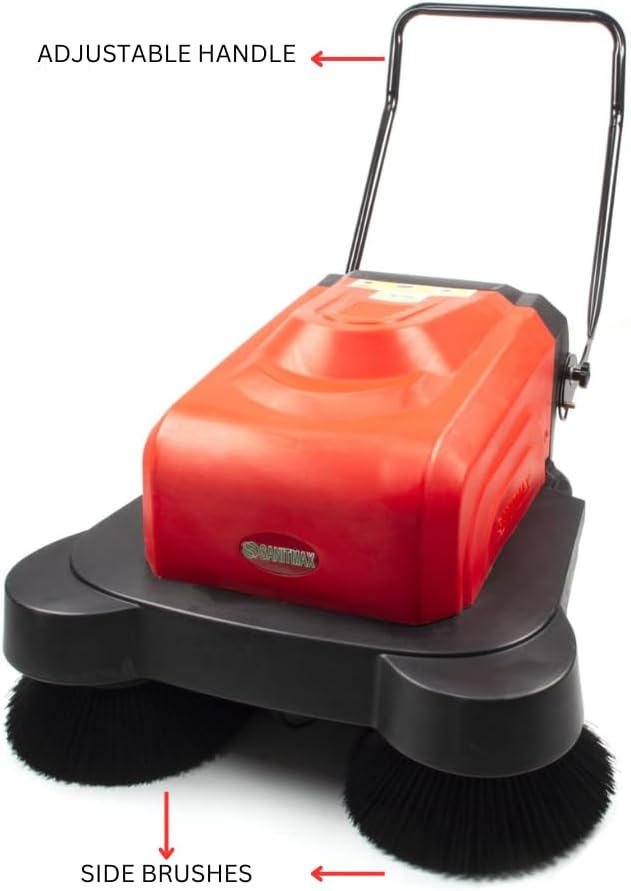
Figure 3.2: Key external components including the adjustable handle and side brushes.

ചിത്രം 3.3: വിശദമായി view of the control panel with battery capacity display, main brush switch, side brush switch, watering switch, and key ignition.

ചിത്രം 3.4: വശം view highlighting the overload protection switches, charger interface, removable trash can, and water tank inlet.

ചിത്രം 3.5: അടിവശം view showing the side brushes and the integrated water spray nozzles for dust suppression.
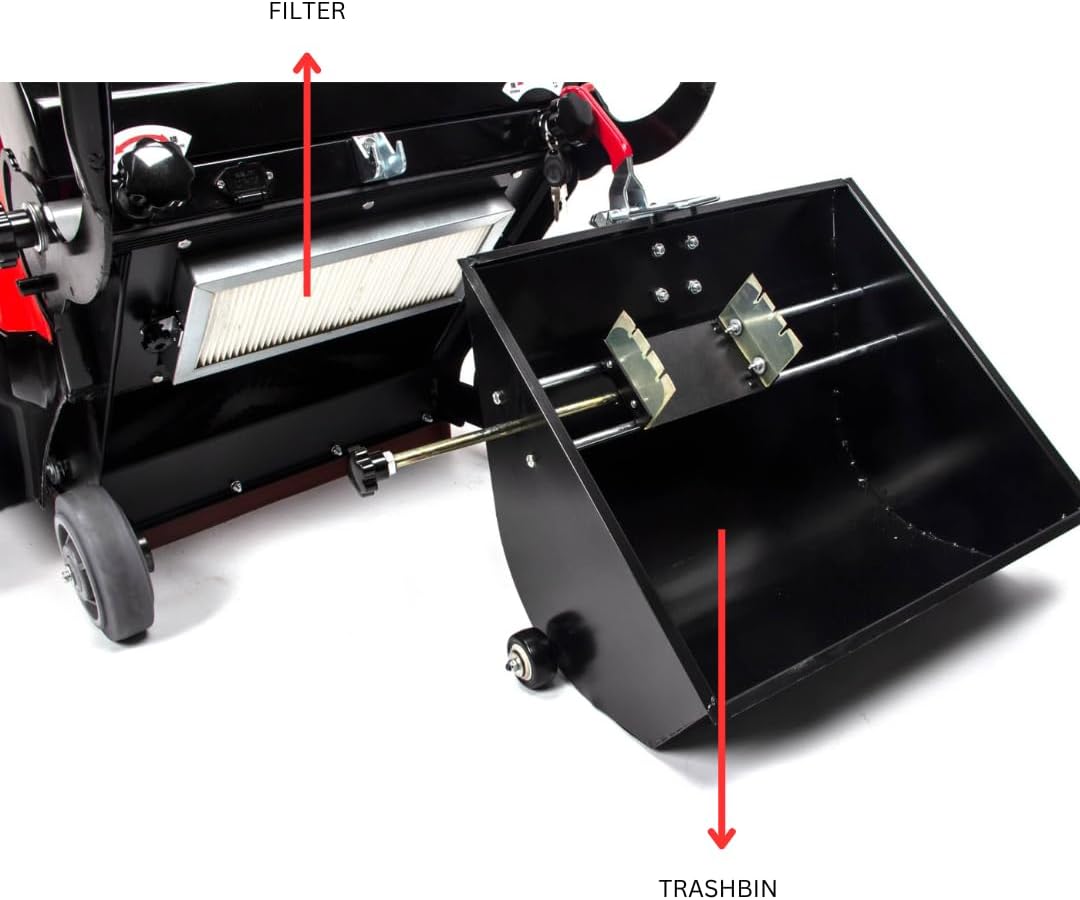
ചിത്രം 3.6: ആന്തരിക view revealing the air filter and the large capacity trashbin.
4. സജ്ജീകരണം
പ്രാരംഭ അസംബ്ലി
- പാക്കേജിംഗിൽ നിന്ന് എല്ലാ ഘടകങ്ങളും അൺപാക്ക് ചെയ്യുക.
- Attach the adjustable handle to the main body of the sweeper, securing it with the provided fasteners. Ensure it is firmly in place.
- Verify that the side brushes are correctly installed and rotate freely.
- Ensure the trashbin is properly seated within its compartment.
ബാറ്ററി ചാർജ് ചെയ്യുന്നു
- Locate the charger interface on the side of the sweeper (refer to Figure 3.4).
- Connect the provided battery charger to the charger interface.
- ഒരു സാധാരണ ഇലക്ട്രിക്കൽ ഔട്ട്ലെറ്റിലേക്ക് ചാർജർ പ്ലഗ് ചെയ്യുക.
- Allow the battery to charge fully before first use. The battery capacity display on the control panel (Figure 3.3) will indicate the charge level. A full charge typically takes approximately 4 hours.
- Once fully charged, disconnect the charger from both the sweeper and the outlet.
വാട്ടർ ടാങ്ക് നിറയ്ക്കൽ
- Locate the water tank inlet (refer to Figure 3.4).
- Open the cap and fill the tank with clean water. Do not overfill.
- പൂരിപ്പിച്ച ശേഷം തൊപ്പി സുരക്ഷിതമായി അടയ്ക്കുക.
5. പ്രവർത്തന നിർദ്ദേശങ്ങൾ
Starting the Sweeper
- ബാറ്ററി ആവശ്യത്തിന് ചാർജ്ജ് ചെയ്തിട്ടുണ്ടെന്ന് ഉറപ്പാക്കുക.
- Insert the key into the ignition on the control panel (Figure 3.3) and turn it to the "ON" position.
- Press the "Main Brush" switch to activate the main sweeping brush.
- Press the "Side Brush" switch to activate the side brushes, which help sweep debris from edges and corners into the path of the main brush.
- If dust suppression is desired, press the "Watering" switch to activate the water spray nozzles.
സ്വീപ്പിംഗ് ഓപ്പറേഷൻ
- Push the sweeper forward at a steady, comfortable pace.
- Overlap each pass slightly to ensure complete coverage.
- For heavily soiled areas, a slower pace or multiple passes may be required.
- The sweeper is designed for hard floor surfaces such as concrete, tile, hardwood, and linoleum.
Stopping the Sweeper
- Turn off the "Watering" switch, then the "Side Brush" switch, and finally the "Main Brush" switch.
- കീ "ഓഫ്" സ്ഥാനത്തേക്ക് തിരിക്കുക, അത് നീക്കം ചെയ്യുക.
6. പരിപാലനം
Regular maintenance ensures optimal performance and extends the lifespan of your sweeper.
Emptying the Trashbin
- Empty the trashbin after each use or when it is full (refer to Figure 3.6).
- Pull out the trashbin, dispose of collected debris, and reinsert it securely.
ഫിൽട്ടർ വൃത്തിയാക്കുന്നു
- Regularly inspect and clean the air filter (refer to Figure 3.6).
- Remove the filter and gently tap it to dislodge dust. For deeper cleaning, use compressed air or wash with water if the filter type allows (consult product specifications for filter type). Ensure it is completely dry before reinstallation.
ബ്രഷ് പരിശോധനയും മാറ്റിസ്ഥാപിക്കലും
- Periodically check the main and side brushes for wear or damage.
- Replace brushes when bristles are significantly worn or damaged to maintain effective sweeping performance.
ബാറ്ററി കെയർ
- ഓരോ ഉപയോഗത്തിനും ശേഷവും ബാറ്ററി പൂർണ്ണമായി ചാർജ് ചെയ്യുക.
- If storing the sweeper for an extended period, ensure the battery is fully charged and recharge it every 1-2 months to prevent deep discharge.
ജനറൽ ക്ലീനിംഗ്
- Wipe down the exterior of the sweeper with a damp തുണി.
- കഠിനമായ രാസവസ്തുക്കളോ ഉരച്ചിലുകൾ ഉപയോഗിക്കരുത്.
7. പ്രശ്നപരിഹാരം
പൊതുവായ പ്രശ്നങ്ങളും അവയുടെ പരിഹാരങ്ങളും അറിയാൻ ഈ വിഭാഗം കാണുക.
| പ്രശ്നം | സാധ്യമായ കാരണം | പരിഹാരം |
|---|---|---|
| സ്വീപ്പർ ഓണാകുന്നില്ല. | ബാറ്ററി ഡിസ്ചാർജ് ചെയ്തു. Key not fully inserted/turned. ഓവർലോഡ് സംരക്ഷണം സജീവമാക്കി. | ബാറ്ററി ചാർജ് ചെയ്യുക. Ensure key is fully inserted and turned to "ON". Check overload protection switches (Figure 3.4) and reset if tripped. |
| Brushes not rotating. | ബ്രഷ് സ്വിച്ച് ഓഫ്. Obstruction in brushes. മോട്ടോർ പ്രശ്നം. | Ensure main/side brush switches are "ON". Inspect brushes for tangled debris and remove. മോട്ടോർ തകരാർ സംശയിക്കുന്നുവെങ്കിൽ ഉപഭോക്തൃ പിന്തുണയുമായി ബന്ധപ്പെടുക. |
| Water spray not working. | വാട്ടർ ടാങ്ക് ശൂന്യമാണ്. Watering switch off. നോസിലുകൾ അടഞ്ഞുപോയി. | വാട്ടർ ടാങ്ക് വീണ്ടും നിറയ്ക്കുക. Ensure watering switch is "ON". Clean water spray nozzles (Figure 3.5) to remove blockages. |
| Poor sweeping performance. | Trashbin full. Brushes worn or dirty. ഫിൽട്ടർ അടഞ്ഞു. | Empty trashbin. Clean or replace brushes. ഫിൽട്ടർ വൃത്തിയാക്കുക അല്ലെങ്കിൽ മാറ്റിസ്ഥാപിക്കുക. |
8 സ്പെസിഫിക്കേഷനുകൾ
Key technical specifications for the SANITMAX Sm1050b Floor Sweeper.
| ഫീച്ചർ | വിശദാംശങ്ങൾ |
|---|---|
| മോഡലിൻ്റെ പേര് | എസ്എം1050ബി |
| വൃത്തിയാക്കൽ പാത | 41.3 ഇഞ്ച് |
| പവർ ഉറവിടം | ബാറ്ററി-പവർ |
| പ്രവർത്തന സമയം | 4 മണിക്കൂർ വരെ (തുടർച്ചയായി) |
| വൃത്തിയാക്കൽ കാര്യക്ഷമത | Up to 64,500 sq ft/hr |
| ഡസ്റ്റ്ബിൻ കപ്പാസിറ്റി | 9.25 ഗാലൻ |
| പ്രത്യേക സവിശേഷതകൾ | Triple Brushes, Water Sprinklers For Dust Control |
| ശുപാർശ ചെയ്യുന്ന ഉപരിതലങ്ങൾ | Hardwood, Tile and Grout, Vinyl and Linoleum, Concrete, Marble and Natural Stone, Laminated Floors |
| ഉൽപ്പന്ന അളവുകൾ | 41.3"ആംശം x 55"ആംശം |
| ഇനത്തിൻ്റെ ഭാരം | 178.5 പൗണ്ട് |
| മെറ്റീരിയൽ | പ്ലാസ്റ്റിക്, മെറ്റൽ |
| ഉൾപ്പെടുത്തിയ ഘടകങ്ങൾ | ബാറ്ററി ചാർജർ |
9. വാറൻ്റിയും പിന്തുണയും
For warranty information and customer support, please contact SANITMAX directly or refer to your purchase documentation.
- റിട്ടേണുകൾ: This product typically offers a 30-day easy return policy. Please refer to your retailer's return policy for specific details.
- നിർമ്മാതാവ്: Sanitmax
- കസ്റ്റമർ സർവീസ്: For technical assistance, parts, or service, please visit the official SANITMAX store on Amazon or contact their customer support channels.
Ask a question about this manual
Ask about setup, troubleshooting, compatibility, parts, safety, or missing instructions. Manuals+ will review the question and use this page’s manual context to help answer it.