
ആമുഖം
This manual provides comprehensive instructions for the JIARUIXIN JR1839 2.4G Bluetooth Remote Control, designed for use with children's electric ride-on cars. Please read this manual carefully before use to ensure proper operation and safety.
സജ്ജമാക്കുക
1. ബാറ്ററി ഇൻസ്റ്റാളേഷൻ
The remote control requires two AAA (1.5V) batteries. To install, locate the battery compartment on the back of the remote, loosen the screw, and insert the batteries according to the polarity markings. Secure the cover by tightening the screw.
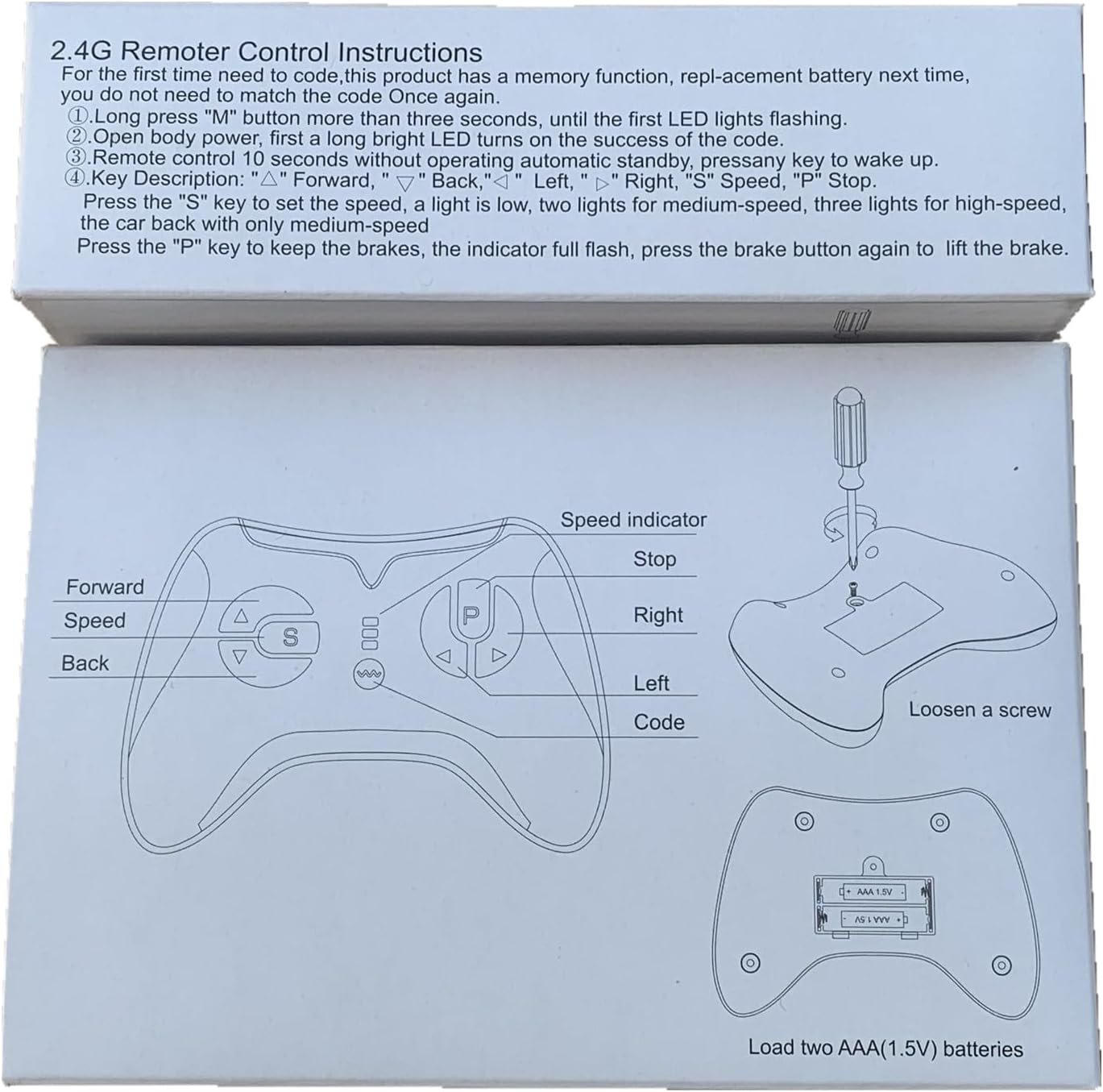
Figure 1: Remote control diagram illustrating battery compartment and button functions.

ചിത്രം 2: പിൻഭാഗം view of the remote control, highlighting the battery cover.
2. Pairing (Match Code) Instructions
Follow these steps to pair the remote control with your electric ride-on car:
- റിമോട്ട് കൺട്രോളിൽ പുതിയ ബാറ്ററികൾ ഇൻസ്റ്റാൾ ചെയ്തിട്ടുണ്ടെന്ന് ഉറപ്പാക്കുക.
- Turn off the power switch on the electric ride-on vehicle.
- On the remote control, press and hold the "▲" (Forward) and "▼" (Back) keys simultaneously for 3 seconds. The first LED indicator on the remote will begin to flicker, indicating it is in pairing mode.
- While the remote's LED is flickering, turn on the power switch of the electric ride-on vehicle.
- The red indicator light on the remote should stop flashing and remain solid, indicating successful pairing.
- If pairing is unsuccessful, turn off both devices and repeat the steps. The remote control has a memory function, so re-pairing is generally not required after battery replacement.

Figure 3: Detailed pairing instructions and remote control layout.
പ്രവർത്തന നിർദ്ദേശങ്ങൾ
Familiarize yourself with the remote control buttons and their functions:

ചിത്രം 4: മുൻഭാഗം view of the JR1839 remote control.
- ▲ (Forward): Moves the vehicle forward.
- ▼ (Back): Moves the vehicle backward.
- ◀ ◀ വർഗ്ഗീകരണം (Left): Turns the vehicle left.
- ▶ (Right): Turns the vehicle right.
- S (Speed): Press this button to cycle through speed settings.
- 1 LED lit: Low speed
- 2 LEDs lit: Medium speed
- 3 LEDs lit: High speed
- P (Brake/Stop): Press and hold this key to engage the brake. All LED indicators will flicker while the brake is active. Release the key to disengage the brake.
The remote control is intended for use by adults to supervise and control the ride-on vehicle for children.
മെയിൻ്റനൻസ്
- Keep the remote control dry and away from moisture.
- Clean the remote control with a soft, dry cloth. Do not use harsh chemicals or abrasive cleaners.
- Replace batteries promptly when the remote's performance degrades. Always use new AAA (1.5V) batteries.
- Store the remote control in a safe place when not in use, away from extreme temperatures.
ട്രബിൾഷൂട്ടിംഗ്
- റിമോട്ട് പ്രതികരിക്കുന്നില്ല:
- ബാറ്ററികൾ ശരിയായി ഇൻസ്റ്റാൾ ചെയ്തിട്ടുണ്ടോ എന്നും ആവശ്യത്തിന് ചാർജ് ഉണ്ടോ എന്നും പരിശോധിക്കുക. ആവശ്യമെങ്കിൽ മാറ്റിസ്ഥാപിക്കുക.
- Ensure the remote is properly paired with the ride-on car by following the "Pairing Instructions" section.
- Verify that the ride-on car's power switch is on and its battery is charged.
- Interference issues:
- ഈ ഉപകരണം FCC നിയമങ്ങളുടെ ഭാഗം 15 പാലിക്കുന്നു. പ്രവർത്തനം ഇനിപ്പറയുന്ന രണ്ട് വ്യവസ്ഥകൾക്ക് വിധേയമാണ്: (1) ഈ ഉപകരണം ദോഷകരമായ ഇടപെടലിന് കാരണമായേക്കില്ല, കൂടാതെ (2) അനാവശ്യമായ പ്രവർത്തനത്തിന് കാരണമായേക്കാവുന്ന ഇടപെടൽ ഉൾപ്പെടെയുള്ള ഏത് ഇടപെടലും ഈ ഉപകരണം സ്വീകരിക്കണം.
- ഇടപെടൽ സംഭവിക്കുകയാണെങ്കിൽ, സ്വീകരിക്കുന്ന ആൻ്റിന പുനഃക്രമീകരിക്കുകയോ മാറ്റി സ്ഥാപിക്കുകയോ ചെയ്യുക.
- ഉപകരണങ്ങളും റിസീവറും തമ്മിലുള്ള വേർതിരിവ് വർദ്ധിപ്പിക്കുക.
- റിസീവർ ബന്ധിപ്പിച്ചിരിക്കുന്നതിൽ നിന്ന് വ്യത്യസ്തമായ ഒരു സർക്യൂട്ടിലെ ഒരു ഔട്ട്ലെറ്റിലേക്ക് ഉപകരണങ്ങൾ ബന്ധിപ്പിക്കുക.
- സഹായത്തിന് ഡീലറെയോ പരിചയസമ്പന്നനായ റേഡിയോ/ടിവി ടെക്നീഷ്യനെയോ സമീപിക്കുക.
- Remote control not pairing:
- Ensure the ride-on car is turned off before initiating the pairing sequence.
- Hold the "▲"ഒപ്പം"▼" keys for the full 3 seconds until the LED flickers.
- Turn on the car's power switch immediately after the remote enters pairing mode.
പ്രധാനപ്പെട്ടത്: Changes or modifications to this unit not expressly approved by the party responsible for compliance could void the user's authority to operate the equipment.
സ്പെസിഫിക്കേഷനുകൾ
| മോഡൽ | JR1839 |
| ബ്രാൻഡ് | ജിയാറുയിക്സിൻ |
| കണക്റ്റിവിറ്റി ടെക്നോളജി | 2.4G ബ്ലൂടൂത്ത് |
| കൺട്രോളർ തരം | ഗെയിംപാഡ് |
| നിറം | കറുപ്പ് |
| വൈദ്യുതി വിതരണം | DC 3.0V (2 x 1.5V AAA ബാറ്ററികൾ, ഉൾപ്പെടുത്തിയിട്ടില്ല) |
| ആവൃത്തി | 2.407GHz-2.473GHz (പീക്ക് ഔട്ട്പുട്ട് പവർ: 5dBm) |
| ഉൽപ്പന്ന അളവുകൾ | 4.9 x 3.8 x 2 ഇഞ്ച് |
| ഇനത്തിൻ്റെ ഭാരം | 2.88 ഔൺസ് |
വാറൻ്റിയും പിന്തുണയും
For warranty information or technical support, please contact the manufacturer or your retailer. Ensure you have your product model number (JR1839) and purchase details available when seeking assistance.
The remote controller is only to be used with adult's guidance.
FCC കംപ്ലയൻസ് സ്റ്റേറ്റ്മെൻ്റ്
ഈ ഉപകരണം FCC നിയമങ്ങളുടെ 15-ാം ഭാഗം പാലിക്കുന്നു. പ്രവർത്തനം ഇനിപ്പറയുന്ന രണ്ട് നിബന്ധനകൾക്ക് വിധേയമാണ്:
- ഈ ഉപകരണം ദോഷകരമായ ഇടപെടൽ ഉണ്ടാക്കിയേക്കില്ല.
- അനാവശ്യമായ പ്രവർത്തനത്തിന് കാരണമായേക്കാവുന്ന ഇടപെടൽ ഉൾപ്പെടെ, ലഭിച്ച ഏതൊരു ഇടപെടലും ഈ ഉപകരണം അംഗീകരിക്കണം.
കുറിപ്പ്: എഫ്സിസി നിയമങ്ങളുടെ 15-ാം ഭാഗം അനുസരിച്ച്, ക്ലാസ് ബി ഡിജിറ്റൽ ഉപകരണത്തിൻ്റെ പരിധികൾ പാലിക്കുന്നതായി ഈ ഉപകരണം പരിശോധിച്ചു. ഒരു റെസിഡൻഷ്യൽ ഇൻസ്റ്റാളേഷനിൽ ഹാനികരമായ ഇടപെടലിനെതിരെ ന്യായമായ സംരക്ഷണം നൽകുന്നതിനാണ് ഈ പരിധികൾ രൂപകൽപ്പന ചെയ്തിരിക്കുന്നത്. ഈ ഉപകരണം റേഡിയോ ഫ്രീക്വൻസി എനർജി ഉത്പാദിപ്പിക്കുകയും ഉപയോഗിക്കുകയും വികിരണം ചെയ്യുകയും ചെയ്യുന്നു, കൂടാതെ നിർദ്ദേശങ്ങൾക്കനുസൃതമായി ഇൻസ്റ്റാൾ ചെയ്യുകയും ഉപയോഗിക്കുകയും ചെയ്തില്ലെങ്കിൽ, റേഡിയോ ആശയവിനിമയങ്ങളിൽ ഹാനികരമായ ഇടപെടലിന് കാരണമായേക്കാം. എന്നിരുന്നാലും, ഒരു പ്രത്യേക ഇൻസ്റ്റാളേഷനിൽ ഇടപെടൽ ഉണ്ടാകില്ലെന്ന് ഉറപ്പില്ല. ഈ ഉപകരണം റേഡിയോ അല്ലെങ്കിൽ ടെലിവിഷൻ റിസപ്ഷനിൽ ഹാനികരമായ ഇടപെടൽ ഉണ്ടാക്കുന്നുവെങ്കിൽ, അത് ഉപകരണം ഓഫാക്കിയും ഓണാക്കിയും നിർണ്ണയിക്കാവുന്നതാണ്, ഇനിപ്പറയുന്ന ഒന്നോ അതിലധികമോ നടപടികളിലൂടെ ഇടപെടൽ ശരിയാക്കാൻ ഉപയോക്താവിനെ പ്രോത്സാഹിപ്പിക്കുന്നു:
- സ്വീകരിക്കുന്ന ആൻ്റിന പുനഃക്രമീകരിക്കുക അല്ലെങ്കിൽ മാറ്റി സ്ഥാപിക്കുക.
- ഉപകരണങ്ങളും റിസീവറും തമ്മിലുള്ള വേർതിരിവ് വർദ്ധിപ്പിക്കുക.
- റിസീവർ ബന്ധിപ്പിച്ചിരിക്കുന്നതിൽ നിന്ന് വ്യത്യസ്തമായ ഒരു സർക്യൂട്ടിലെ ഒരു ഔട്ട്ലെറ്റിലേക്ക് ഉപകരണങ്ങൾ ബന്ധിപ്പിക്കുക.
- സഹായത്തിന് ഡീലറെയോ പരിചയസമ്പന്നനായ റേഡിയോ/ടിവി ടെക്നീഷ്യനെയോ സമീപിക്കുക.
പൊതുവായ RF എക്സ്പോഷർ ആവശ്യകതകൾ നിറവേറ്റുന്നതിനായി ഉപകരണം വിലയിരുത്തി. നിയന്ത്രണമില്ലാതെ പോർട്ടബിൾ എക്സ്പോഷർ അവസ്ഥയിൽ ഉപകരണം ഉപയോഗിക്കാൻ കഴിയും.