
ആമുഖം
Thank you for choosing the R-MUSIC KARADUO Complete Karaoke Pack. This manual provides detailed instructions for the safe and efficient use of your new karaoke system, which includes a portable RGB speaker and two wireless microphones. Please read this manual thoroughly before operation and retain it for future reference.
പാക്കേജ് ഉള്ളടക്കം
അൺപാക്ക് ചെയ്യുമ്പോൾ എല്ലാ ഇനങ്ങളും ഉണ്ടെന്നും നല്ല നിലയിലാണെന്നും ഉറപ്പാക്കുക:
- 1 x R-MUSIC KARADUO Portable RGB Speaker
- 2 x വയർലെസ് മൈക്രോഫോണുകൾ
- 1 x യുഎസ്ബി-സി ചാർജിംഗ് കേബിൾ
- 1 x ഉപയോക്തൃ മാനുവൽ (ഈ പ്രമാണം)

Image: The R-MUSIC KARADUO portable RGB speaker and two wireless microphones, as included in the package.
ഉൽപ്പന്നം കഴിഞ്ഞുview
സ്പീക്കർ ഘടകങ്ങളും നിയന്ത്രണങ്ങളും

ചിത്രം: മുകളിൽ view of the R-MUSIC KARADUO speaker, showing the control buttons.
- LED Animation Button: Press to cycle through 5 different LED light animations.
- വോളിയം + / അടുത്ത ഗാന ബട്ടൺ: Short press to increase volume. Long press to skip to the next song.
- ON / OFF / Pause / Play Button: Long press to power the speaker on or off. Short press to play or pause music.
- വോളിയം - / മുൻ ഗാന ബട്ടൺ: Short press to decrease volume. Long press to go to the previous song.
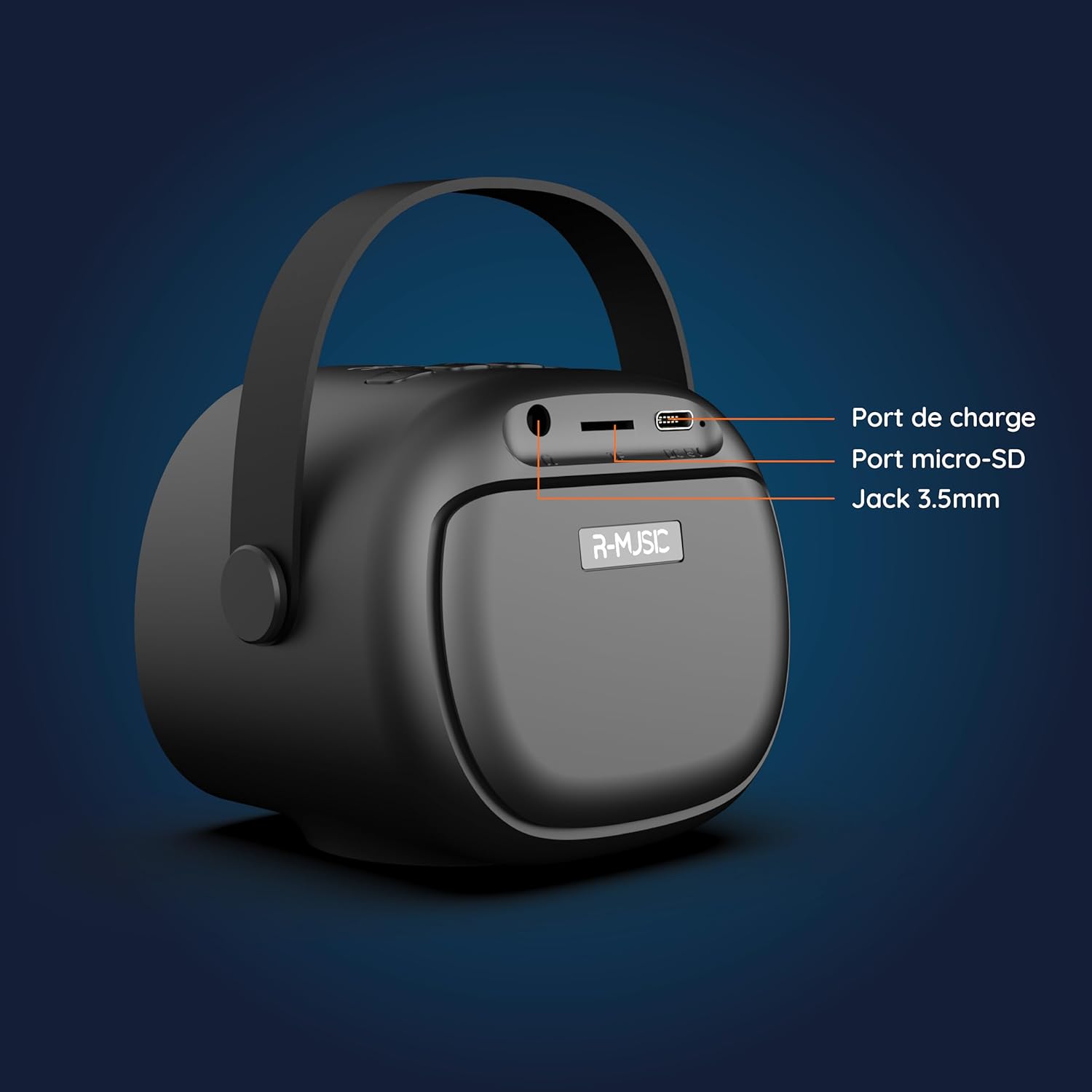
ചിത്രം: പിന്നിലേക്ക് view of the R-MUSIC KARADUO speaker, highlighting the charging port, Micro-SD card slot, and 3.5mm Jack port.
- ചാർജിംഗ് പോർട്ട് (USB-C): Connect the provided USB-C cable for charging.
- മൈക്രോ-എസ്ഡി കാർഡ് സ്ലോട്ട്: Insert a Micro-SD card for direct music playback.
- 3.5mm AUX പോർട്ട്: Connect external audio devices using a 3.5mm audio cable (not included).
മൈക്രോഫോൺ നിയന്ത്രണങ്ങൾ

Image: Close-up of the R-MUSIC wireless microphones, illustrating the power, volume, and mode buttons.
- പവർ ബട്ടൺ: Long press to power the microphone on or off.
- വോളിയം + ബട്ടൺ: മൈക്രോഫോൺ ശബ്ദം വർദ്ധിപ്പിക്കുക.
- വോളിയം - ബട്ടൺ: മൈക്രോഫോൺ വോളിയം കുറയ്ക്കുക.
- മോഡ് ബട്ടൺ (M): Short press to cycle through 5 voice deformation effects and 3 karaoke modes.
സജ്ജമാക്കുക
1. സ്പീക്കറും മൈക്രോഫോണുകളും ചാർജ് ചെയ്യുന്നു
Before first use, fully charge the speaker and both microphones.
- സ്പീക്കർ: Connect the provided USB-C charging cable to the speaker's charging port and a compatible USB power adapter (not included). The charging indicator will show the charging status.
- മൈക്രോഫോണുകൾ: Each microphone has its own charging port (usually Micro-USB, check the microphone itself). Connect them to a USB power source using appropriate cables (not included, or check if included with microphones).
A full charge provides approximately 14 hours of speaker playback without LED lights, or 7 hours with LED lights activated.
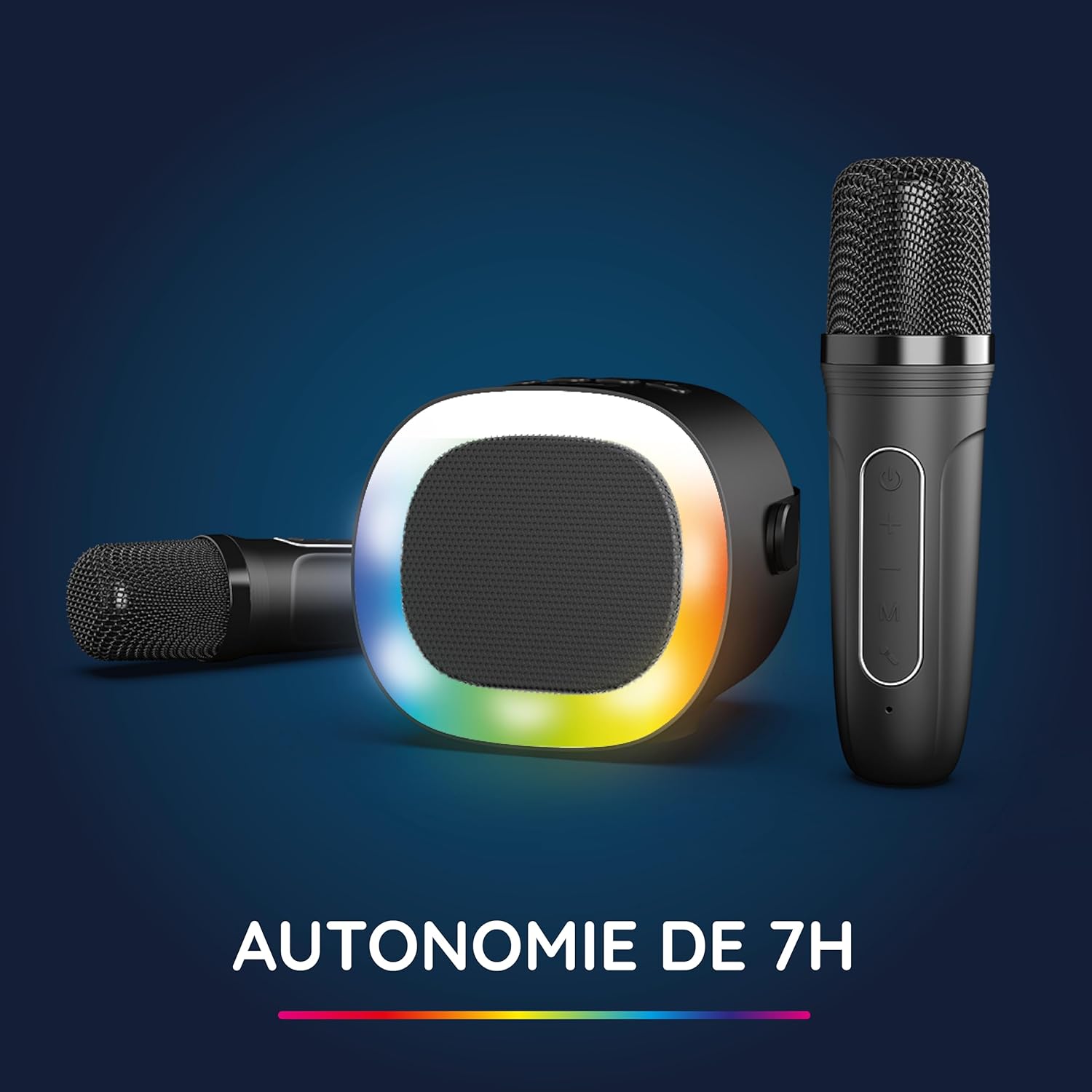
Image: The R-MUSIC speaker and microphones, illustrating the battery life with LED lights active.
2. Powering On and Pairing Microphones
- പവർ ഓൺ സ്പീക്കർ: Long press the ON/OFF button on the speaker until it powers on.
- മൈക്രോഫോണുകൾ പവർ ഓൺ ചെയ്യുക: Long press the Power button on each microphone until they power on.
- The microphones should automatically pair with the speaker. If not, ensure they are within close proximity and try powering them off and on again.
പ്രവർത്തന നിർദ്ദേശങ്ങൾ
1. ഓഡിയോ ഉറവിടങ്ങളുമായി ബന്ധിപ്പിക്കുന്നു
The KARADUO speaker offers multiple connectivity options:
- ബ്ലൂടൂത്ത് 5.0:
- സ്പീക്കർ ഓണാണെന്ന് ഉറപ്പാക്കുക.
- Activate Bluetooth on your smartphone, tablet, PC, or other compatible device.
- ഇതിനായി തിരയുക "KARADUO" in your device's Bluetooth settings and select it to pair. A confirmation sound will indicate a successful connection.
- The Bluetooth 5.0 technology ensures optimal sound quality and a stable connection up to 10 meters.
- AUX ഇൻപുട്ട്:
- Connect a 3.5mm audio cable (not included) from your audio device's headphone jack to the speaker's 3.5mm AUX port.
- സ്പീക്കർ സ്വയമേവ AUX മോഡിലേക്ക് മാറും.
- Micro-SD Card Playback:
- Insert a Micro-SD card containing MP3 audio files into the Micro-SD card slot on the back of the speaker.
- സ്പീക്കർ കാർഡ് സ്വയമേവ കണ്ടെത്തി സംഗീതം പ്ലേ ചെയ്യാൻ തുടങ്ങും.
2. Speaker Operation
- പ്ലേ/താൽക്കാലികമായി നിർത്തുക: Short press the ON/OFF/Pause/Play button.
- വോളിയം ക്രമീകരണം: വോളിയം + അല്ലെങ്കിൽ വോളിയം - ബട്ടണുകൾ ഹ്രസ്വമായി അമർത്തുക.
- അടുത്തത് / മുമ്പത്തെ ട്രാക്ക്: Long press the Volume + (next) or Volume - (previous) buttons.
- LED ലൈറ്റ് മോഡുകൾ: Press the LED Animation button to cycle through 5 different LED light animations.

Image: The R-MUSIC speaker showcasing its dynamic LED light animations.
3. Microphone Operation
- മൈക്രോഫോൺ വോളിയം: Use the Volume + and Volume - buttons on the microphone to adjust your vocal volume.
- Voice Deformation Effects: Short press the 'M' (Mode) button on the microphone to cycle through 5 different voice deformation effects.
- കരോക്കെ മോഡുകൾ: Continue pressing the 'M' button to cycle through 3 distinct karaoke modes.
മെയിൻ്റനൻസ്
To ensure the longevity and optimal performance of your R-MUSIC KARADUO system, follow these maintenance guidelines:
- വൃത്തിയാക്കൽ: സ്പീക്കറും മൈക്രോഫോണുകളും വൃത്തിയാക്കാൻ മൃദുവായതും ഉണങ്ങിയതുമായ തുണി ഉപയോഗിക്കുക. അബ്രസീവ് ക്ലീനറുകൾ, ലായകങ്ങൾ, അല്ലെങ്കിൽ കഠിനമായ രാസവസ്തുക്കൾ എന്നിവ ഉപയോഗിക്കരുത്.
- സംഭരണം: ഉപയോഗത്തിലില്ലാത്തപ്പോൾ നേരിട്ടുള്ള സൂര്യപ്രകാശത്തിൽ നിന്നും കടുത്ത താപനിലയിൽ നിന്നും മാറി തണുത്തതും വരണ്ടതുമായ സ്ഥലത്ത് ഉപകരണം സൂക്ഷിക്കുക.
- വാട്ടർ എക്സ്പോഷർ: ഈ ഉൽപ്പന്നം വാട്ടർപ്രൂഫ് അല്ല. വെള്ളത്തിലോ അമിതമായ ഈർപ്പത്തിലോ സമ്പർക്കം ഒഴിവാക്കുക.
- ചാർജിംഗ്: Only use the provided charging cable and a compatible USB power adapter. Do not overcharge the device.
ട്രബിൾഷൂട്ടിംഗ്
If you encounter issues with your KARADUO system, please refer to the following common problems and solutions:
| പ്രശ്നം | സാധ്യമായ കാരണം | പരിഹാരം |
|---|---|---|
| ശക്തിയില്ല | ബാറ്ററി കുറവാണ് അല്ലെങ്കിൽ ഉപകരണം ഓഫാണ്. | Charge the speaker/microphones. Long press the power button to turn on. |
| സ്പീക്കറിൽ നിന്ന് ശബ്ദമില്ല | Volume too low, incorrect input mode, or device not connected. | Increase speaker volume. Ensure correct input (Bluetooth, AUX, Micro-SD). Reconnect Bluetooth or check AUX cable. |
| മൈക്രോഫോണുകൾ പ്രവർത്തിക്കുന്നില്ല | മൈക്രോഫോണുകൾ ഓഫാണ്, ബാറ്ററി കുറവാണ്, അല്ലെങ്കിൽ ജോടിയാക്കിയിട്ടില്ല. | Ensure microphones are charged and powered on. They should automatically pair with the speaker. If not, power cycle them. |
| ബ്ലൂടൂത്ത് വിച്ഛേദിക്കൽ | Device out of range, interference, or low battery. | Move the connected device closer to the speaker (within 10m). Ensure no major obstacles. Recharge the speaker. |
If the problem persists after trying these solutions, please contact R-MUSIC customer support.
സ്പെസിഫിക്കേഷനുകൾ
| ഫീച്ചർ | വിശദാംശങ്ങൾ |
|---|---|
| ബ്രാൻഡ് | ആർ-മ്യൂസിക് |
| മോഡൽ നമ്പർ | RM484437 |
| നിറം | കറുപ്പ് |
| കണക്റ്റിവിറ്റി ടെക്നോളജി | ബ്ലൂടൂത്ത് 5.0 |
| കണക്ഷൻ പോർട്ടുകൾ | 3.5mm Jack, USB Type-C (charging), Micro-SD Card Slot |
| പ്രത്യേക സവിശേഷതകൾ | 2 Wireless Microphones, Universal Connectivity, 5 Voice Deformation Effects, LED Lights |
| അനുയോജ്യമായ ഉപകരണങ്ങൾ | PC, Smartphone, Tablet, TV (via AUX) |
| പവർ ഉറവിടം | ബാറ്ററി പവർ |
| Speaker Battery Life | Up to 14 hours (without LED), 7 hours (with LED) |
| ബ്ലൂടൂത്ത് ശ്രേണി | 10 മീറ്റർ വരെ |

Image: Technical dimensions of the R-MUSIC KARADUO speaker, showing its height, width, and depth.
വാറൻ്റിയും പിന്തുണയും
Information regarding specific warranty terms and conditions for the R-MUSIC KARADUO Complete Karaoke Pack is not available in this document. Please refer to the product packaging or the retailer's webവാറന്റി വിശദാംശങ്ങൾക്കായുള്ള സൈറ്റ്.
For technical support or further assistance, please contact R-MUSIC customer service through their official webനിങ്ങളുടെ വാങ്ങലിനൊപ്പം നൽകിയിരിക്കുന്ന സൈറ്റ് അല്ലെങ്കിൽ ബന്ധപ്പെടാനുള്ള വിവരങ്ങൾ.