
Kenwood KDC-130UG
Kenwood KDC-130UG CD Car Radio User Manual
Model: KDC-130UG | Brand: Kenwood
1. ആമുഖവും അവസാനവുംview
The Kenwood KDC-130UG is a versatile CD car radio designed to enhance your in-car audio experience. It features a high-performance tuner with RDS, multiple audio playback options including CD, USB, and AUX input, and advanced sound customization capabilities.
പ്രധാന സവിശേഷതകളിൽ ഇവ ഉൾപ്പെടുന്നു:
- White LC display with large, 13-digit screen sections for clear visibility.
- AOA 2.0 support for connecting compatible Android smartphones (Android 4.1 to 7.X) via USB.
- Front USB port and AUX input for convenient connectivity.
- Integrated decoder for playing WAV, MP3, and WMA audio fileയുഎസ്ബി വഴി.
- Non-volatile fixed station memory for 24 stations (18xFM/3xMW/3xLW).
- 3-band audio control and 7 pre-programmed sound patterns for optimal audio adjustment.
- Bass Boost and Loudness functions.
- Switchable pre-amplifier output (rear/sub) with 2.5 V.
- MOS-FET പവർ amplifier with a maximum output of 4 x 50 watts.
- Removable control panel with green button illumination.
- Prepared for factory-installed steering wheel remote control.
2. സജ്ജീകരണവും ഇൻസ്റ്റാളേഷനും
This section provides general guidelines for installing your Kenwood KDC-130UG car radio. Professional installation is recommended for optimal performance and safety.
2.1 പാക്കേജ് ഉള്ളടക്കം
ഇൻസ്റ്റാളേഷൻ ആരംഭിക്കുന്നതിന് മുമ്പ്, എല്ലാ ഘടകങ്ങളും ഉണ്ടെന്ന് ഉറപ്പാക്കുക:
- Kenwood KDC-130UG Main Unit
- ഫ്രണ്ട് പാനൽ
- ഫ്രണ്ട് ഫ്രെയിം
- മൌണ്ടിംഗ് ബ്രാക്കറ്റ്
- ISO Cable Harness
- Unlocking Hooks (2x)
2.2 ഇൻസ്റ്റലേഷൻ ഘട്ടങ്ങൾ
- ബാറ്ററി വിച്ഛേദിക്കുക: Before any electrical work, disconnect the negative terminal of your vehicle's battery to prevent short circuits.
- മൗണ്ടിംഗ് സ്ലീവ്: Install the mounting bracket into your vehicle's dashboard opening. Bend the tabs outward to secure it.
- വയറിംഗ് കണക്ഷനുകൾ:
- Connect the ISO cable harness to the corresponding wires in your vehicle (power, ground, accessory, antenna, speaker outputs). Refer to your vehicle's wiring diagram.
- If using a subwoofer or external amplifier, connect the pre-amplifier output (RCA cables) from the KDC-130UG to your ampജീവൻ.
- Slide in Unit: Carefully slide the KDC-130UG main unit into the mounting bracket until it locks into place.
- മുൻവശത്തെ പാനൽ ഘടിപ്പിക്കുക: Align the front panel with the main unit and gently push it until it clicks securely into place.
- ബാറ്ററി വീണ്ടും ബന്ധിപ്പിക്കുക: നിങ്ങളുടെ വാഹനത്തിന്റെ ബാറ്ററിയുടെ നെഗറ്റീവ് ടെർമിനൽ വീണ്ടും ബന്ധിപ്പിക്കുക.
- ടെസ്റ്റ് പ്രവർത്തനം: Turn on the unit and test all functions (radio, CD, USB, AUX, sound settings) to ensure proper installation.
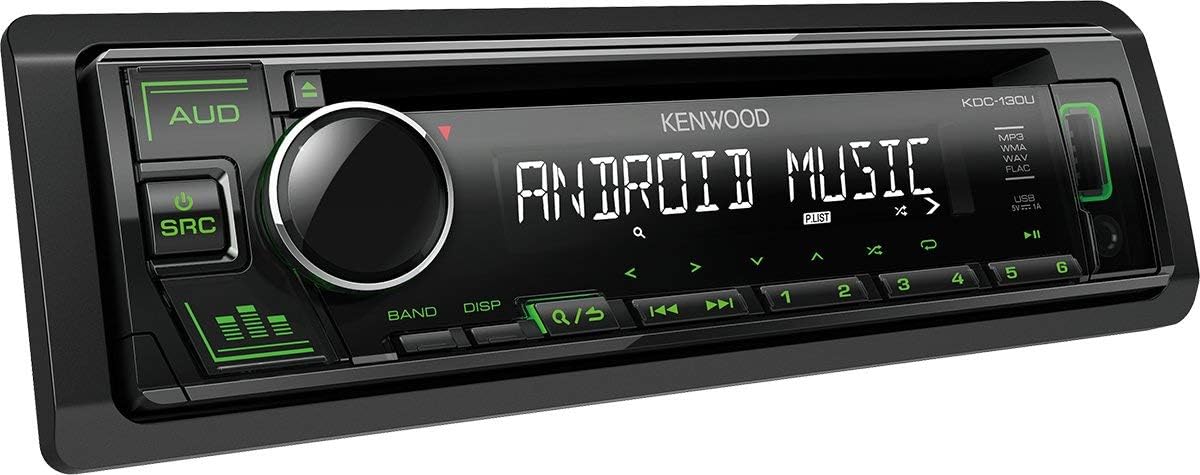 ചിത്രം 1: മുൻഭാഗം view of the Kenwood KDC-130UG CD Car Radio. The display shows "ANDROID MUSIC", and the unit features a large rotary knob, source (SRC) and audio (AUD) buttons, and numbered preset buttons.
3. പ്രവർത്തന നിർദ്ദേശങ്ങൾ
This section details the basic operation of your Kenwood KDC-130UG car radio.
3.1 അടിസ്ഥാന നിയന്ത്രണങ്ങൾ
- Power On/Off (SRC button): അമർത്തുക SRC button to turn the unit on. Press and hold the SRC യൂണിറ്റ് ഓഫ് ചെയ്യാനുള്ള ബട്ടൺ.
- Source Selection (AUD button): അമർത്തുക ഓ.യു.ഡി button repeatedly to cycle through available sources (Tuner, CD, USB, AUX).
- വോളിയം നിയന്ത്രണം: വോളിയം ലെവൽ ക്രമീകരിക്കുന്നതിന് വലിയ മധ്യ നോബ് തിരിക്കുക.
- Display (DISP button): അമർത്തുക ഡി.എസ്.പി. സ്ക്രീനിൽ പ്രദർശിപ്പിച്ചിരിക്കുന്ന വിവരങ്ങൾ മാറ്റുന്നതിനുള്ള ബട്ടൺ.
3.2 റേഡിയോ പ്രവർത്തനം
- Band Selection (BAND button): അമർത്തുക ബാൻഡ് button to switch between FM, MW (AM), and LW bands.
- ട്യൂണിംഗ്: ഉപയോഗിക്കുക ◀◀ (seek down) and ▶▶ (seek up) buttons to automatically search for stations.
- പ്രീസെറ്റ് സ്റ്റേഷനുകൾ: The unit can store 24 stations (18 FM, 3 MW, 3 LW). To store a station, tune to the desired frequency, then press and hold one of the numbered preset buttons (1-6) until you hear a beep. To recall a stored station, simply press the corresponding preset button.
3.3 CD/USB/AUX Playback
- സിഡി പ്ലേബാക്ക്: ഡിസ്ക് സ്ലോട്ടിൽ ഒരു സിഡി ഇടുക. പ്ലേബാക്ക് സ്വയമേവ ആരംഭിക്കും.
- യുഎസ്ബി പ്ലേബാക്ക്: Connect a USB device containing WAV, MP3, or WMA audio files to the front USB port. The unit will automatically switch to USB source and begin playback.
- AUX ഇൻപുട്ട്: Connect an external audio device (e.g., smartphone, portable music player) to the front AUX input using a 3.5mm stereo cable. Select AUX as the source.
- Android AOA 2.0: Connect a compatible Android smartphone (Android 4.1 to 7.X) via the USB port to control music playback directly from the head unit.
3.4 ഓഡിയോ ക്രമീകരണങ്ങൾ
- ശബ്ദ നിയന്ത്രണം: Access the audio menu to adjust the 3-band audio control (Bass, Mid, Treble).
- Sound Patterns: Select from 7 pre-programmed sound patterns (e.g., Rock, Pop, Jazz) to optimize audio for different music genres.
- ബാസ് ബൂസ്റ്റ്: Activate the Bass Boost function for enhanced low-frequency response.
- ഉച്ചത്തിലുള്ളത്: Enable the Loudness function to improve sound quality at low volume levels.
- പ്രീ-ampലൈഫയർ ഔട്ട്പുട്ട്: If connected, adjust the subwoofer level or rear speaker output via the audio settings.
4. പരിപാലനം
Proper maintenance ensures the longevity and optimal performance of your Kenwood KDC-130UG.
4.1 യൂണിറ്റ് വൃത്തിയാക്കൽ
- Use a soft, dry cloth to wipe the front panel and display.
- കഠിനമായ അഴുക്കിന്, ചെറുതായി dampen the cloth with water. Never use abrasive cleaners, solvents, or alcohol-based cleaners, as they can damage the surface.
- Do not spray water or cleaning solutions directly onto the unit.
4.2 Handling CDs
- Handle CDs by their edges to avoid fingerprints on the playing surface.
- Keep CDs clean and free from scratches. Use a soft, lint-free cloth to wipe from the center outwards if cleaning is necessary.
- Do not use irregularly shaped CDs or those with adhesive labels, as they can damage the CD mechanism.
4.3 Removable Control Panel
- When removing the control panel, store it in a protective case to prevent scratches or damage.
- Avoid exposing the control panel to direct sunlight or high temperatures for extended periods.
5. പ്രശ്നപരിഹാരം
If you encounter issues with your Kenwood KDC-130UG, refer to the following common problems and solutions.
| പ്രശ്നം | സാധ്യമായ കാരണം | പരിഹാരം |
|---|---|---|
| ശക്തിയില്ല | തെറ്റായ വയറിംഗ്; ഫ്യൂസ് പൊട്ടി; വാഹന ബാറ്ററി പ്രശ്നങ്ങൾ. | Check power and ground connections. Inspect vehicle's fuse box and the unit's fuse. Ensure battery is charged. |
| ശബ്ദമില്ല | Volume too low; Mute activated; Incorrect speaker wiring; Source not selected. | Increase volume. Deactivate mute. Verify speaker connections. Select correct audio source. |
| Poor radio reception / Skipped stations | Antenna not connected or damaged; Weak signal area; Interference. | Ensure antenna is securely connected. Check antenna for damage. Try tuning manually or in a different location. Consider a new antenna if issues persist. |
| USB ഉപകരണം തിരിച്ചറിഞ്ഞില്ല. | Incompatible format; Damaged USB device; Incorrect file സിസ്റ്റം. | ഉറപ്പാക്കുക files are WAV, MP3, or WMA. Try a different USB device. Format USB device to FAT32. |
| CD does not play or skips | Dirty or scratched CD; CD inserted incorrectly; Moisture condensation. | Clean or replace CD. Insert CD correctly. Allow unit to acclimate to temperature if condensation is suspected. |
If the problem persists after trying these solutions, contact Kenwood customer support or a qualified service technician.
6 സ്പെസിഫിക്കേഷനുകൾ
Detailed technical specifications for the Kenwood KDC-130UG CD Car Radio.
| ബ്രാൻഡ് | കെൻവുഡ് |
| മോഡൽ | KDC-130UG |
| പരമാവധി പവർ ഔട്ട്പുട്ട് | 4 x 50 Watts (MOS-FET) / 200 Watts total |
| സിഗ്നൽ-ടു-നോയിസ് അനുപാതം | 92 ഡി.ബി |
| പിന്തുണയ്ക്കുന്ന ഓഡിയോ ഫോർമാറ്റുകൾ | FLAC, MP3, WAV, WMA |
| കണക്റ്റിവിറ്റി | Front USB, Front AUX (3.5mm jack), RCA Pre-out (Rear/Sub) |
| ഡിസ്പ്ലേ തരം | LCD (White, 13-digit) |
| റേഡിയോ ബാൻഡുകൾ | AM, FM, LW, MW |
| അനുയോജ്യമായ ഉപകരണങ്ങൾ | Smartphone (Android AOA 2.0 via USB) |
| അളവുകൾ (W x H x D) | 18.2 x 5.3 x 15.8 സെ.മീ (ഏകദേശം 7.17 x 2.09 x 6.22 ഇഞ്ച്) |
| ഭാരം | 1.3 കി.ഗ്രാം (ഏകദേശം. 2.87 പൗണ്ട്) |
| പവർ ഉറവിടം | AC (Vehicle Power) |
7. വാറൻ്റിയും പിന്തുണയും
Your Kenwood KDC-130UG is covered by a manufacturer's warranty. Please refer to the warranty card included with your product for specific terms and conditions, including warranty period and coverage details.
For technical assistance, troubleshooting beyond this manual, or warranty claims, please contact Kenwood customer support. Contact information can typically be found on the Kenwood official webസൈറ്റ് അല്ലെങ്കിൽ നിങ്ങളുടെ വാങ്ങലിനൊപ്പം നൽകിയിരിക്കുന്ന ഡോക്യുമെൻ്റേഷനിൽ.
It is recommended to have your product model number (KDC-130UG) and serial number ready when contacting support.
Ask a question about this manual
Ask about setup, troubleshooting, compatibility, parts, safety, or missing instructions. Manuals+ will review the question and use this page’s manual context to help answer it.