
1. Kupu Whakataki
Mauruuru koe mo te hokoasing the Audizio Laredo Bluetooth Turntable. This manual provides essential information for the safe and correct operation of your device. Please read it thoroughly before use and keep it for future reference.
Āhuatanga matua:
- Integrated HiFi speakers with 160W total power output.
- Bidirectional Bluetooth for wireless audio streaming (in and out).
- High-quality Audio Technica cartridge for precise playback.
- Supports 7, 10, and 12-inch vinyl records at 33 and 45 RPM.
- Adjustable counterweight on the aluminum tonearm.
- RCA Line Out for external ampkaikōrero.
- AUX Input for connecting external audio sources.
- Elegant bamboo finish.
He aha kei roto i te Pouaka:
- Audizio Laredo Turntable Unit
- Pukapuka Tohutohu
- Pūurutau Hiko
- 45 RPM Adapter for singles
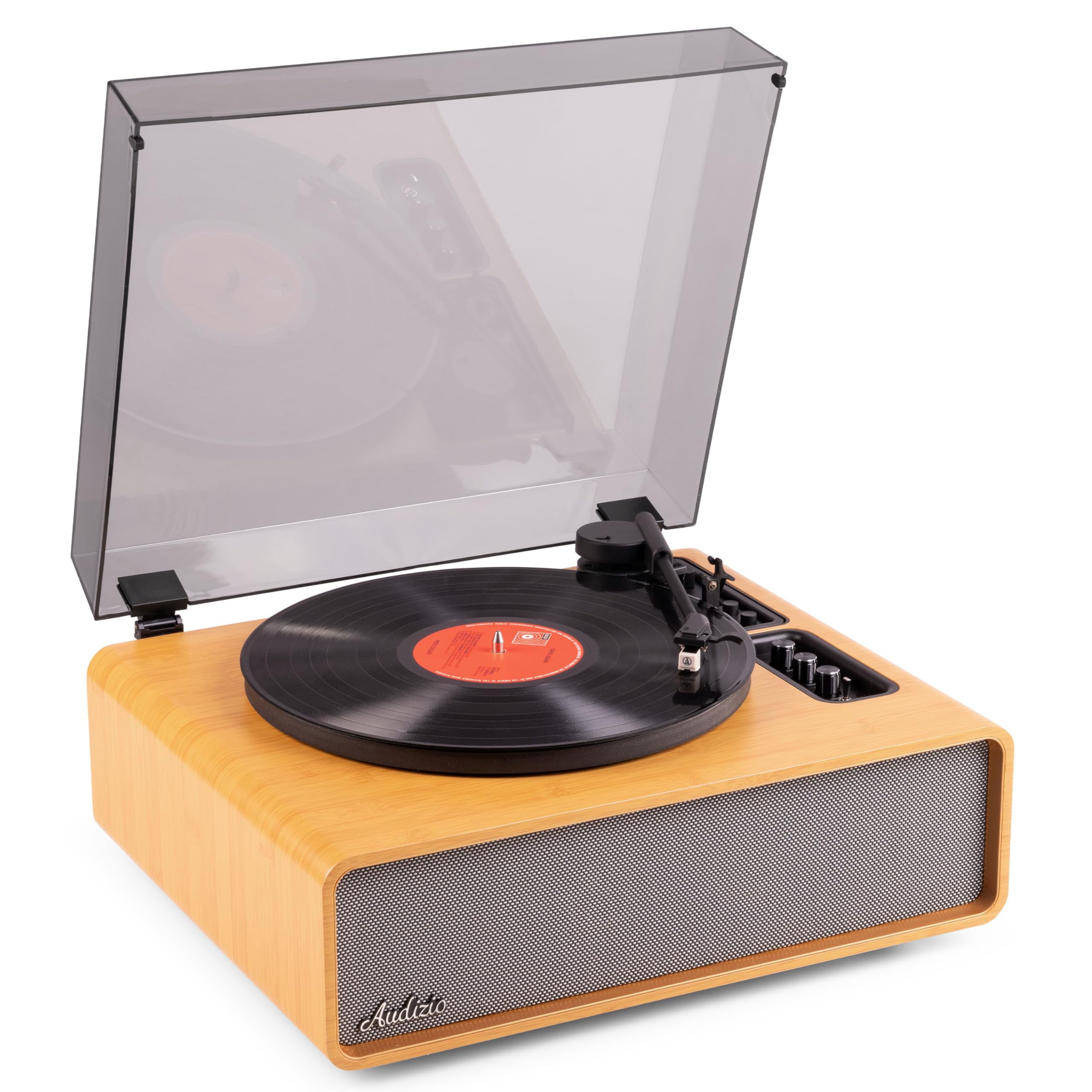
Figure 1.1: Audizio Laredo Turntable, overall view.
2. Nga Tohutohu Haumaru
Please read and follow these safety instructions carefully to prevent damage to the unit and ensure your safety.
- Kaua e tukuna te waahanga ki te ua, ki te makuku ranei hei aukati i te ahi me te ru hiko.
- Kaua e whakatuwheratia te casing. Kaore he waahanga e taea ana e te kaiwhakamahi ki roto. Tukuna atu nga ratonga katoa ki nga kaimahi whai tohu.
- Place the unit on a stable, level surface to prevent it from falling.
- Tiakina te waeine mai i te ra tika, nga puna wera, me te puehu nui.
- Me whakarite kia tika te hau huri noa i te waahanga. Kaua e araia nga whakatuwheratanga hau.
- Whakamahia anake te urutau hiko kua whakaratohia.
- Wewetehia te waeine i te wa e uira ana te tupuhi, i te kore ranei e whakamahia mo te wa roa.
3. Hua Neke Atuview
Familiarize yourself with the components and controls of your Audizio Laredo turntable.
Wae Matua:
- Pereti: Tautokohia te rekoata winīri.
- Tonearm: Ka pupuri i te kariri me te stylus.
- Cartridge & Stylus: Reads the grooves of the record. (Audio Technica ATN-3600)
- Uhi Puehu: Protects the platter and tonearm from dust.
- Kaikōrero whakauru: Mō te purei tika i te oro.
- Paewhiri Mana: For power, volume, tone, and mode selection.
- Hononga Whakamuri: RCA Line Out, AUX In, Power Input.

Whakaahua 3.1: Runga view of the turntable with key components visible.

Figure 3.2: Control Panel for volume, bass, and treble adjustments.

Figure 3.3: Audio Technica ATN-3600 Cartridge and Stylus.

Figure 3.4: Tonearm base with speed and auto-stop controls.

Figure 3.5: Rear connection panel.
4. Tatūnga
4.1 Te Wetewete
- Āta tango i te ripa takahuri mai i tōna tākai.
- Remove all protective materials, including the stylus guard.
- Pupuritia te takai mo te kawe me te rokiroki a muri ake nei.
4.2 Whakanoho
- Place the turntable on a stable, level surface to prevent vibrations and ensure proper playback.
- Avoid placing the unit near strong magnetic fields, heat sources, or areas with high humidity.
4.3 Dust Cover Installation
- Align the hinges of the dust cover with the slots on the back of the turntable.
- Gently push down until the cover is securely in place.
- The dust cover can be removed for playback if desired.

Figure 4.1: Turntable with dust cover.
4.4 Hononga Hiko
- Connect the power adapter to the DC IN port on the rear of the turntable.
- Plug the adapter into a suitable wall outlet (220V).
4.5 Te Tatūnga Tonearm me te Kāritere
- The Audio Technica cartridge is pre-installed.
- The tonearm features an adjustable counterweight. Refer to the detailed instructions in the included manual for precise counterweight adjustment to optimize tracking force.
5. Nga Tohutohu Whakahaere
5.1 Te purei Rekoata
- Place a vinyl record on the platter. If playing a 7-inch single, use the included 45 RPM adapter.
- Select the appropriate speed (33 or 45 RPM) using the speed selector switch near the tonearm base.
- Whakaarahia marietia te tonearm ma te whakamahi i te tohu tohu.
- Position the tonearm over the desired track of the record.
- Slowly lower the tonearm using the cueing lever. The stylus will make contact with the record, and playback will begin.
- I te mutunga o te rekoata, ka mutu aunoa te hurihanga o te pereti mā te mahi aukati-aunoa. Hikihia te ringaringa oro ka whakahokia ki tōna okiokinga.

Figure 5.1: Playing a vinyl record.
5.2 Bluetooth Operation (Bidirectional)
The Laredo turntable supports both Bluetooth input (receiving audio from a device) and Bluetooth output (sending audio to a Bluetooth speaker/headphones).
Bluetooth Input (BT IN):
- Press the MODE/POWER button to select Bluetooth mode. The LED indicator will flash.
- On your smartphone or tablet, enable Bluetooth and search for 'Audizio Laredo'.
- Select the turntable to pair. Once connected, the LED will glow solid.
- You can now stream audio from your device to the turntable's integrated speakers.
Bluetooth Output (BT OUT):
- Me mohio kei te aratau takirua o waea taringa Nihokikorangi, kaikorero ranei.
- Set the BT OUT switch (located near the tonearm base) to 'ON'.
- The turntable will automatically search for and connect to the nearest Bluetooth audio device.
- Once connected, the audio from your vinyl record will be transmitted to your Bluetooth device.

Figure 5.2: Bidirectional Bluetooth functionality.
5.3 AUX Whakauru
- Connect an external audio device (e.g., MP3 player, CD player) to the AUX IN port on the rear of the turntable using a 3.5mm audio cable.
- Press the MODE/POWER button to select AUX mode.
- Audio from the external device will play through the turntable's speakers.
5.4 RCA Line Out
- Hei hono i te papa hurihuri ki te pūoko o waho amplifier or powered speakers, use an RCA cable (not included) to connect the LINE OUT ports on the rear of the turntable to the corresponding input on your audio system.
- Ensure the 'Speaker ON/OFF' switch on the rear is set to 'OFF' if you only want sound from external speakers.
5.5 Te Rōrahi me te Mana oro
- Use the VOLUME knob on the control panel to adjust the overall playback volume.
- Adjust the BASS and TREBLE knobs to fine-tune the audio output to your preference.
6. Tiaki
6.1 Te Whakapai i te Waeine
- Wipe the dust cover and cabinet with a soft, dry cloth.
- Kaua e whakamahia nga kai horoi, te wax, te whakarewa ranei.
- For the platter, use a slightly damp kakahu me te maroke rawa.
6.2 Stylus Care and Replacement
- Ko te stylus he waahanga ngawari. Whakahaerehia ma te tupato.
- Horoia te pene pene i ia wā mā te whakamahi i te paraihe ngohengohe i hangaia mō te horoi i te pene pene, me te paraihe mai i muri ki mua.
- A stylus typically lasts for approximately 300-500 hours of playback. If you notice a decrease in sound quality or increased skipping, it may be time to replace the stylus.
- Replacement styli (e.g., Audio Technica ATN-3600L or compatible) can be purchased from authorized dealers. Refer to the detailed instructions provided with the replacement stylus for installation.
7. Te Raru
If you encounter issues with your turntable, please consult the following table before contacting support.
| Raruraru | Take pea | Rongoā |
|---|---|---|
| Karekau he kaha | Ko te urutau hiko kaore i te hono; Ko te putanga hiko kaore e mahi. | Me whakarite kei te hono tika te urutau hiko ki te waeine me te putanga hiko e mahi ana. |
| Kaore he tangi mai i nga kaikorero | Volume too low; Speaker ON/OFF switch is OFF; Incorrect mode selected. | Increase volume; Set 'Speaker ON/OFF' switch to ON; Select correct input mode (Phono, BT IN, AUX). |
| Skipping records | Record is dirty or damaged; Stylus is worn or dirty; Turntable not level; Tracking force incorrect. | Clean record; Clean or replace stylus; Place turntable on a level surface; Adjust tonearm counterweight. |
| Nga take takirua Nihokikorangi | Device too far; Turntable not in pairing mode; Interference. | Ensure devices are within range; Re-enter pairing mode; Turn off other Bluetooth devices. |
| Paorooro oro | Volume too high; Stylus worn; Record damaged. | Reduce volume; Replace stylus; Try a different record. |
8. Whakatakotoranga
Technical specifications for the Audizio Laredo Turntable.
| Āhuahira | Whakatakotoranga |
|---|---|
| Ingoa Tauira | Laredo (101.537) |
| Ahu (L x W x H) | 43.2 x 43.2 x 21 cm (17 x 17 x 8.3 inihi) |
| Taumaha Hua | 7.65 kg (16.86 lbs) |
| Rauemi | Wood (Bamboo finish) |
| Tere Hurihuri | 33 RPM, 45 RPM |
| Momo Pataata | Audio Technica (ATN-3600) |
| Momo Motuka | He Peara Tere |
| Hōputu Tohu | Tauritenga |
| Kaikōrero Whakakotahi | Yes, 160W total output |
| Putanga Nihokikorangi | 5.4 (Ahunga-rua) |
| Hononga | Bluetooth (In/Out), RCA Line Out, AUX In |
| Puna Mana | Waea Hiko |
| Voltage | 220 Volts |
| Pūrere Hototahi | Speakers, Headphones, Smartphone, Tablet |
9. Pūtāhui me te Tautoko
9.1 Nga Korero Whakaputanga
This Audizio Laredo Turntable comes with a 2-tau pūtāhui from the date of purchase. This warranty covers manufacturing defects and faults under normal use. It does not cover damage caused by misuse, accidents, unauthorized modifications, or normal wear and tear (e.g., stylus wear).
Tena koa pupurihia to tohu mo te hoko mo nga kereme whakamana.
9.2 Tautoko Kiritaki
If you have any questions, require technical assistance, or need to make a warranty claim, please contact your retailer or visit the official Audizio webpae mo nga rauemi tautoko me nga korero whakapā.
Official Audizio Webpae: www.audizio.com