
TAGRY X88 Hybrid Active Noise Cancelling Wireless Earbuds User Manual
Tauira: X88
Ka mutu te huaview
Ko te TAGRY X88 Hybrid Active Noise Cancelling Wireless Earbuds offer a premium audio experience with advanced noise cancellation and transparency modes. Designed for comfort and durability, these earbuds are suitable for various activities, from daily commutes to intense workouts.
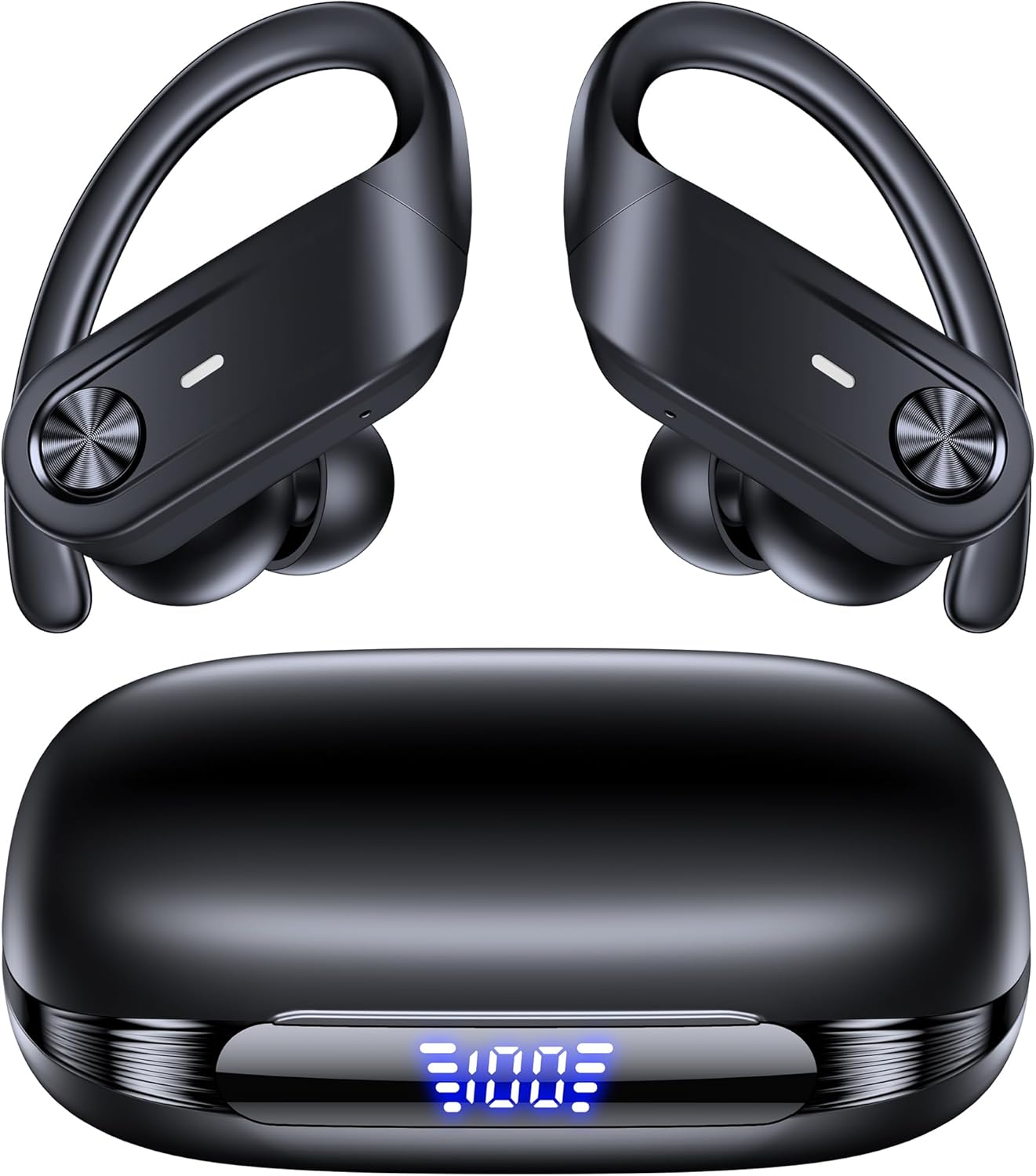
Whakaahua: Te TAGRY X88 Hybrid Active Noise Cancelling Wireless Earbuds, showcasing ratou hoahoa kiko.
He aha kei roto i te Pouaka
Me whakarite kei roto katoa ngā taonga i te wā e wetewetehia ai:
- X88 Active Noise Cancelling Earbuds (1 pair)
- Wireless Charging Case (1)
- Taumata (S/M/L rahi)
- Pukapuka Kaiwhakamahi (tenei tuhinga)
- Uira Whakatau (Momo-C)

Whakaahua: Te TAGRY X88 earbuds inside their charging case, displaying the LED battery indicator.
Tatūnga
1. Whakataki Tuatahi
Before first use, fully charge the earbuds and the charging case. Connect the provided Type-C cable to the charging case and a power source. The LED display on the case will indicate the charging status and battery level.
2. Te Whakapai i nga Puka-taringa
Select the appropriate eartip size (S, M, L) for a comfortable and secure fit. The earhook design ensures stability, especially during physical activity. Insert the earbud into your ear canal and adjust the earhook over your ear.

Image: A close-up of a TAGRY X88 earbud properly fitted in an ear, demonstrating the earhook design.
3. Tauhoa ki to Pūrere
- Whakatuwherahia te putea utu. Ka uru aunoa nga taringa ki te aratau takirua.
- On your device (phone, tablet, etc.), enable Bluetooth.
- Rapua available devices and select "X88" from the list.
- Once connected, the earbuds are ready for use. They will automatically reconnect to the last paired device when removed from the case.

Image: An illustration showing the simple one-step pairing process of the TAGRY X88 earbuds with a smartphone.
Video: An official product video demonstrating the features of the TAGRY Active Noise Cancelling Wireless Earbuds X88, including pairing and usage scenarios.
Nga Tohutohu Whakahaere
Mana Patene
The X88 earbuds feature a multi-function button on each earbud for easy control:
- Paato Kotahi: Purei/Tatari waiata, Whakautu/Whakamutua nga waea.
- Paoa Taurua (Punarongo Mauī): Te ara o mua.
- Paoa Taurua (Punarongo Matau): Te ara o muri.
- Pato Takitoru (Puna taringa maui): Cycle through ANC Mode & Transparency Mode.
- Pato Takitoru (Pono Whakamatau): Whakahohe Kaiāwhina Reo.
- Pēhi Roa (Taringa Mauī): Rōrahi Whakararo.
- Pēhi Roa (Tari taringa matau): Rōrahi Whakarunga.

Image: A visual guide to the one-button, multiple actions control scheme for the TAGRY X88 earbuds.
Active Noise Cancelling (ANC) & Transparency Modes
The earbuds feature hybrid ANC technology to reduce ambient noise by up to 90%. To switch between ANC and Transparency modes, triple-tap the left earbud. Transparency mode allows you to hear your surroundings while still enjoying your audio.

Image: A graphic illustrating the noise reduction capability of the TAGRY X88 earbuds' Active Noise Cancelling mode.
Video: An official product video highlighting the ANC and Transparency modes of the TAGRY X88 earbuds, showing users in various environments.
Nga Mahi Waea
The earbuds provide clear call quality. Use the single tap control to answer or end calls. The integrated microphone ensures your voice is transmitted clearly.

Image: A person using the TAGRY X88 earbuds to make a phone call, emphasizing exceptional call clarity.
Te tiaki
Te horoi
Regularly clean your earbuds and charging case to maintain optimal performance and hygiene. Use a soft, dry, lint-free cloth. For eartips, remove them and clean with a mild soap solution, then rinse and dry thoroughly before reattaching.
Ātete wai
The earbuds are IPX7 waterproof, meaning they can withstand immersion in water up to 1 meter for 30 minutes. However, the charging case is not waterproof. Ensure earbuds are dry before placing them back in the charging case.

Whakaahua: Te TAGRY X88 earbuds with water droplets, illustrating their IPX7 waterproof rating.
Raparongoā
- Karekau e honoa nga taringa: Ensure both earbuds are charged and removed from the case. Turn off Bluetooth on other nearby devices. Forget "X88" from your device's Bluetooth list and try pairing again.
- Karekau he oro mai i tetahi pukoro: Place both earbuds back in the charging case, close it, then open it again. This often resets the connection.
- Nga take utu: Check the charging cable and power source. Ensure the charging contacts on the earbuds and inside the case are clean and dry.
- He pai te kounga oro: Ensure eartips are correctly sized and sealed in your ear. Clean any debris from the earbud speakers.
Whakatakotoranga
| Āhuahira | Taipitopito |
|---|---|
| Waitohu | TAGRY |
| Ingoa Tauira | X88 |
| Tae | Pango |
| Te Whakanoho Taringa | I te Taringa |
| Tauwehe Puka | I te Taringa |
| Te aukati | 32 Ohm |
| Hangarau Hononga | Ahokore |
| Hangarau Ahokore | Nihokikorangi |
| Putanga Nihokikorangi | 5.4 |
| Awhe Nihokikorangi | 10 mita (33 putu) |
| Mana Haruru | Whakakore Haruru Hohe |
| Awhe Auautanga | 20 - 20000 Hz |
| Rahi Atekōkiri Ororongo | 13 Mirimita |
| Pūhiko Wawaenga Te Ora | 80 haora (me te putea utu) |
| Wā Utu Pūhiko | 1 haora |
| Taumata Atete Wai | Parewai (IPX7) |
| Momo Mana | Mana Patene |
| Taumaha Tūemi | 131 Karamu |
Pūtāhui me te Tautoko
For warranty information and customer support, please refer to the official TAGRY webpae, whakapā atu ranei ki to kaihoko. Puritia to tohu hoko mo etahi kereme whakamana.