
1. Kupu Whakataki
This manual provides detailed instructions for the setup, operation, maintenance, and troubleshooting of your GMKtec G3 Pro Mini PC. Please read this guide thoroughly before using your device to ensure optimal performance and longevity.
The GMKtec G3 Pro is a compact desktop computer designed for various applications, including office work, business, multimedia, and online learning. It features an Intel Core i3-10110U processor, 16GB DDR4 RAM, and a 512GB PCIe M.2 SSD, offering efficient performance in a small form factor.
2. He aha kei roto i te Pouaka
Manatokona kei roto katoa nga mea kei roto i te kete:
- GMKtec Nucbox G3 Pro Mini PC (16GB RAM, 512GB SSD)
- Tauera HDMI
- Pūurutau Hiko
- Pukapuka Kaiwhakamahi
- VESA Mount with Screws

3. Hua Neke Atuview
The GMKtec G3 Pro Mini PC is designed for compact and efficient computing. It features a robust set of ports and internal components to support various tasks.
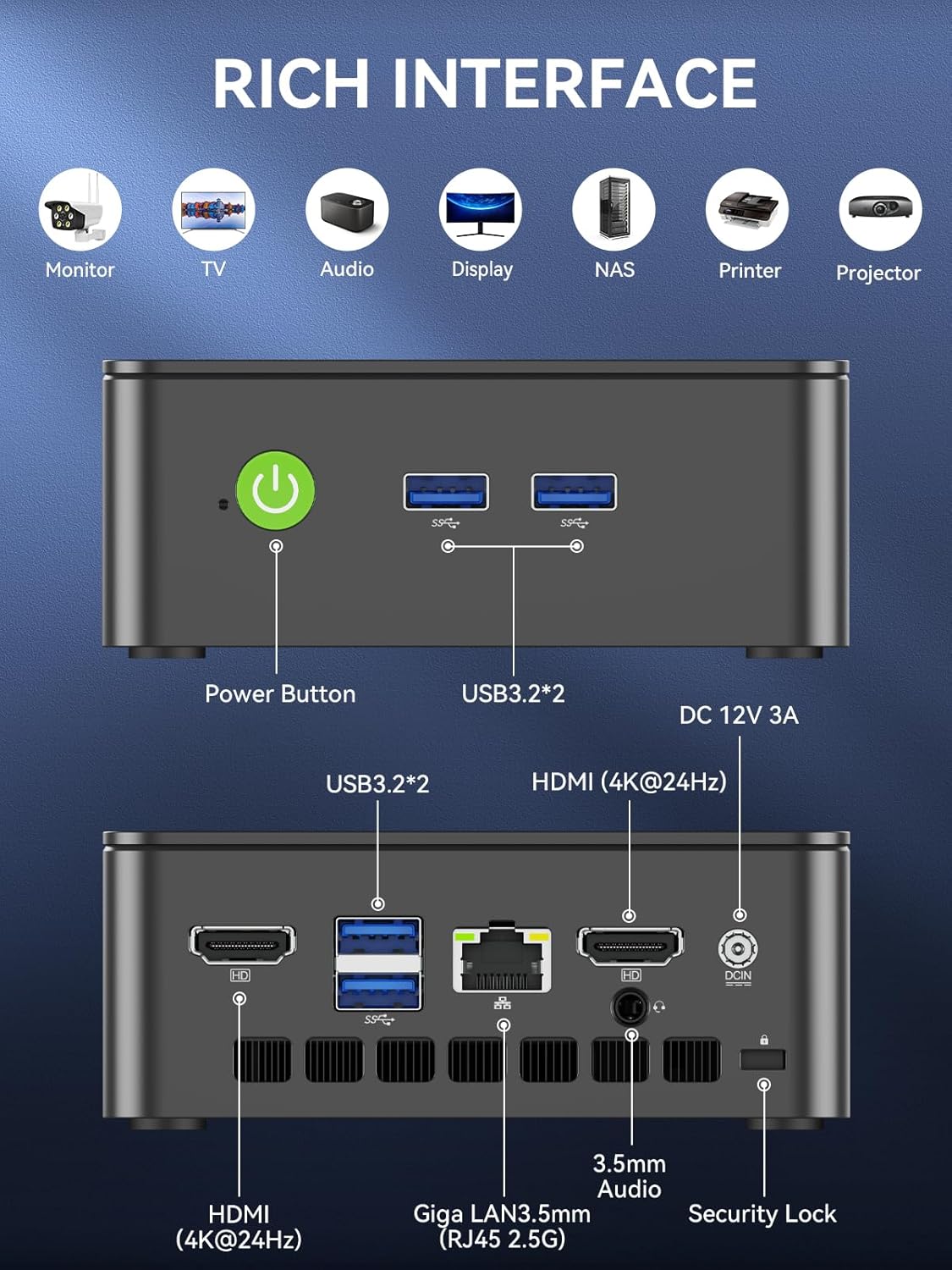
Paepae Mua
- Pātene Hiko: Hei whakakā/whakaweto i te taputapu.
- USB 3.2 x 2: Hei hono i ngā taputapu tāpiri pēnei i ngā papapātuhi, kiore, ngā pūrere rokiroki o waho rānei.
Paewhiri Whakamuri
- HDMI (4K@60Hz) x 2: For connecting to displays, supporting dual 4K output.
- USB 3.2 x 2: Nga tauranga taapiri mo nga taputapu taapiri.
- 3.5mm Jack Ororongo: Mo te hono i nga taringa, i nga kaikorero o waho ranei.
- Giga LAN (RJ45 2.5GbE): Mo te hononga whatunga waea.
- DC IN: Tauranga urunga hiko.
- Mokamoka Maukati Haumarutanga: For securing the device to a desk.
Wae-roto
- Dual DDR4 RAM Slots: Supports up to 64GB RAM.
- M.2 2280 PCIe Gen3*4 Slot: For NVMe SSDs, supporting up to 8TB.
- M.2 2242 SATA3.0 Slot: For SATA SSDs, supporting up to 1TB.
- Cooling Fan & Vents: Integrated cooling system to maintain optimal operating temperatures.

4. Aratohu Tatūnga
A pee i enei taahiraa mo te tatūnga tuatahi:
- Tūhono Pikitia: Connect your keyboard, mouse, and any other necessary USB devices to the available USB 3.2 ports.
- Tuhono Whakaatu: Use an HDMI cable to connect your monitor(s) to the HDMI ports on the rear panel. The device supports dual 4K@60Hz displays.
- Hono Hono: Plug the power adapter into the DC IN port on the mini PC, then plug the adapter into a power outlet.
- Whakahiko: Patohia te paatene mana i runga i te papa o mua hei whakakorikori i te PC paku.
- Te Tatūnga Pūnaha Whakahaere Tuatahi: Whāia ngā tohutohu kei te mata hei whakaoti i te tatūnga o te Windows 11 Pro.
- Hononga Whatunga: For faster setup, avoid connecting to a wired LAN initially. Connecting LAN might trigger long updates, delaying desktop access. Connect to Wi-Fi 6 or connect to the 2.5GbE LAN port after initial setup is complete.

5. Nga Tohutohu Whakahaere
Te Hiko / Whakaweto
- Hei Whakahiko: Patohia te paatene mana kotahi.
- Hei Whakaweto: From the operating system, select 'Shut down'. Alternatively, press and hold the power button for 5 seconds to force a shutdown (use only when necessary).
BIOS Settings and Performance Modes
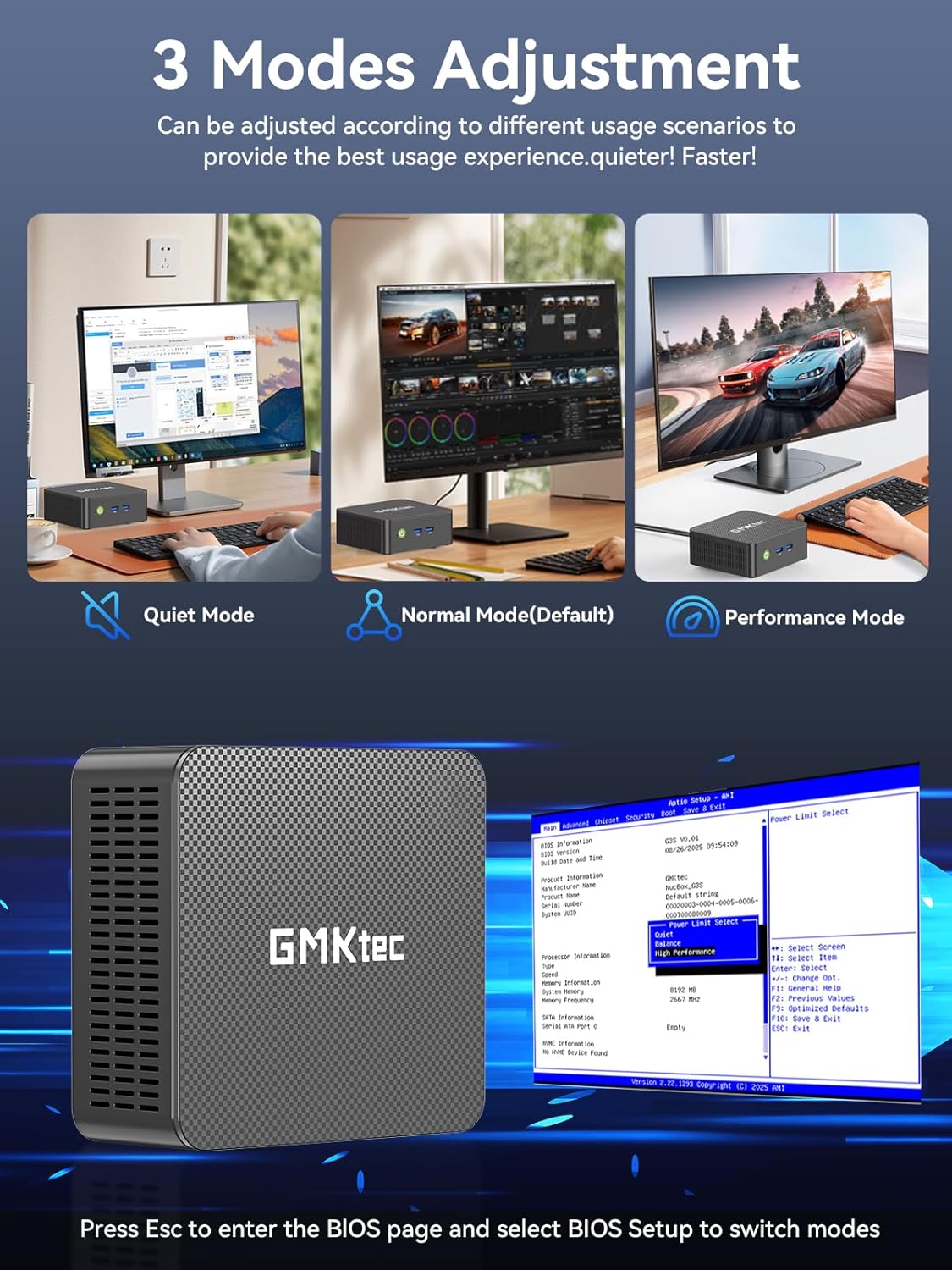
The GMKtec G3 Pro supports different performance modes that can be adjusted via the BIOS settings to optimize for quiet operation, normal use, or maximum performance.
- Te urunga atu ki te BIOS: Press the 'Esc' key repeatedly during startup to enter the BIOS page.
- Whakatika Aratau: Navigate to the BIOS Setup and select your desired mode (Quiet Mode, Normal Mode, Performance Mode) based on your usage scenario.
6. Roha Rokiroki
The GMKtec G3 Pro offers flexible storage expansion options:
- M.2 2280 NVMe PCIe Slot: Supports high-speed NVMe SSDs up to 8TB for primary storage or additional high-performance storage.
- M.2 2242 SATA Slot: Supports SATA SSDs up to 1TB for additional storage capacity.
To install or upgrade storage, refer to the detailed instructions in the full user manual or consult a qualified technician.
7. Hononga
The Mini PC provides comprehensive connectivity options:
- Ipurangi Ahokore 6 (802.11ax): Offers high-speed wireless internet access up to 600Mbps.
- Nihokikorangi 5.2: For connecting wireless devices such as keyboards, mice, and headphones.
- 2.5GbE Ethernet (RJ45): Provides ultra-fast wired network speeds, up to 2.5 times faster than standard Gigabit Ethernet.

8. Tatūnga Whakaaturanga Takirua
The GMKtec G3 Pro supports connecting two 4K@60Hz displays simultaneously via its two HDMI 2.0 ports. This allows for an extended desktop experience, enhancing productivity for multitasking, content creation, or entertainment.
Simply connect two monitors using HDMI cables to the respective ports on the rear of the mini PC. The operating system will automatically detect the displays, and you can configure their arrangement and resolution through the display settings.

9. Pūnaha whakamatao
The GMKtec G3 Pro is equipped with a smart quiet cooling fan and strategically placed cooling vents to ensure efficient heat dissipation. This design allows for ultra-quiet operation, typically below 38dB, even under load, providing a comfortable working environment.

10. Whakatakotoranga
| Āhuahira | Whakatakotoranga |
|---|---|
| Waitohu | GMKtec |
| Ingoa Tauira | G3Pro |
| Pūnaha Mahi | Windows 11 Pro |
| Tauira PTM | Intel Core i3-10110U |
| Tere PTM | Tae atu ki te 4.1 GHz |
| Kaitukatuka Whakairoiro | Intel UHD Graphics 1200MHz |
| Kua Tāutahia te Mahara RAM | 16 GB DDR4 (Dual Channel) |
| Mahara RAM Rahi Morahi | 64 GB |
| Whakaahuatanga Kōpae Mārō | 512 GB M.2 2280 PCIe Gen3*2 + 1*M.2 2242 SATA |
| Hangarau Hononga | Bluetooth 5.2, WiFi 6, Ethernet (2.5GbE), HDMI (4K@60Hz) |
| Putanga Ataata | Atanga x 2 |
| Whakaatu Taumira Morahi | 4096 × 2160 Pika |
| Tauranga USB katoa | 4 (USB 3.2) |
| Whakamahi Hiko | 6 Watts (te tikanga) |
| Nga waahanga motuhake | Wake On LAN, PXE Boot, RTC Wake, Auto Power On |
11. Tiaki
To ensure the longevity and optimal performance of your GMKtec G3 Pro Mini PC, consider the following maintenance tips:
- Pupuri Ma: Regularly clean the exterior of the mini PC with a soft, dry cloth. Ensure cooling vents are free from dust and obstructions.
- Whakahōu Pūmanawa: Kia whakahoutia tonutia tō pūnaha whakahaere me ngā taraiwa ki ngā putanga hou rawa hei whakapai ake i te haumarutanga me te mahi.
- Whakaweto Tika: Me whakaweto tika te rorohiko iti mā te pūnaha whakahaere hei ārai i te pirau o ngā raraunga.
- Nga Tikanga Taiao: Operate the mini PC in a well-ventilated area, away from direct sunlight, excessive heat, and moisture.
12. Te Raru
If you encounter issues with your GMKtec G3 Pro Mini PC, try the following basic troubleshooting steps:
- Kore Mana: Me whakarite kei te hono pai te urutau hiko ki te PC iti me te putanga hiko e mahi ana. Whakamātauria tētahi atu putanga mēnā e tika ana.
- Kore Whakaatu: Verify that the HDMI cables are securely connected to both the mini PC and the monitor(s). Ensure monitors are powered on and set to the correct input source.
- Kaore he Hononga Ipurangi: For Wi-Fi, check your router and network settings. For wired Ethernet, ensure the cable is properly connected and the network adapter is enabled in the operating system.
- Mahinga Puturi: Close unnecessary applications, check for background processes, and ensure sufficient free storage space. Consider adjusting performance modes in BIOS.
- Nga take tahataha: Try connecting USB devices to different ports. Ensure drivers are installed correctly for specialized peripherals.
For more complex issues, refer to the comprehensive troubleshooting section in the full user manual or contact customer support.
13. Pūtāhui me te Tautoko
Your GMKtec G3 Pro Mini PC comes with a 1-tau iti pūtāhui from the date of purchase, covering defects due to design and workmanship.
For any questions, technical assistance, or warranty claims, please utilize the following support channels:
- Tautoko Īmēra: Contact the professional after-sales team at support@gmktec.com.
- Tautoko Aipurangi: Visit the GMKtec store on Amazon or the official GMKtec webpae mo nga FAQ me etahi atu rauemi.
- 24/7 Client Support: Dedicated support is available to assist you with your needs.