
Nga Tiaki Nui
I te wa e whakamahi ana i nga taputapu hiko, me whai tonu nga tikanga tiaki haumaru hei whakaiti i te tupono o te ahi, te wiri hiko, me te whara o te tangata, tae atu ki enei:
- Panuihia nga tohutohu katoa.
- Kaua e pa ki nga waahi wera. Whakamahia he kakau, he puku ranei.
- Hei ārai i te ru hiko, kaua e waiho te taura, ngā mono, te mīhini kawhe rānei ki roto i te wai, i tētahi atu wai rānei.
- Me kati te tirotiro ina whakamahia e nga tamariki tetahi taputapu e tata ana ranei.
- Wewetehia mai i te putanga ka kore e whakamahia ana i mua i te horoi. Tukua kia whakamatao i mua i te whakakakahu, te tango ranei i nga waahanga, i mua i te horoi i te taputapu.
- Kaua e whakahaere i tetahi taputapu me te taura kua pakaru, te mono ranei, i muri ranei i nga mahi kino o te taputapu, kua pakaru ranei i tetahi ahuatanga. Whakahokia te taputapu ki te waahi ratonga whaimana tata mo te whakamatautau, te whakatika, te whakatikatika ranei.
- Ko te whakamahi i nga taputapu taapiri kaore i te taunakihia e te kaihanga taputapu ka pa he ahi, he wiri hiko, he whara tangata ranei.
- Kaua e whakamahi i waho.
- Kaua e tukua te taura kia whakairi ki runga i te taha o te teepu, te porotiti ranei, ka pa ranei ki nga papa wera.
- Kaua e tuu ki runga, ki te tata ranei ki te hau wera, ki te mura hiko ranei, ki roto ranei i te oumu kua wera.
- I nga wa katoa, whakapiri i te mono ki te taputapu i te tuatahi, katahi ka honoa te taura ki te putanga o te pakitara. Hei momotu, huri i tetahi mana ki te "whakaweto", ka tango i te mono mai i te putanga o te pakitara.
- Kaua e whakamahi i te taputapu mo etahi atu mea ke atu.
- Kua hoahoatia te kaarai mo te whakamahi me tenei taputapu. Kaua rawa e whakamahia ki runga awhe.
- Kaua e utaina he kawhe wera ki runga i te mata makuku, matao ranei.
- Kaua e whakamahi i te kaaka kapiti, i te kaaka ranei he kakau wetekina, he ngoikore ranei.
- Kaua e horoi i nga miihini horoi horoi, i nga papa huruhuru maitai, i etahi atu mea kino ranei.
Ka mutu te huaview me te Tohu Wahi
Familiarize yourself with the components of your 12-Cup Programmable Coffee Maker.

Atahanga: He mutuview of the coffee maker, pointing out its main features such as the 24-hour programmable timer, adjustable brew strength settings (Regular, Gourmet, Bold), Keep Warm mode for up to 4 hours, Clean mode, and its 12-cup capacity.
Nga Waahanga Kei roto:
- Waehanga Kawhe
- Karāhe Karahehe
- Reusable Gold-Tone Filter
- Ine Scoop

Atahanga: The reusable gold-tone filter and the measuring scoop, which are included with the coffee maker for convenience and to reduce waste.
I mua i te Whakamahinga Tuatahi
Before using your coffee maker for the first time, it is recommended to clean all removable parts and run a brewing cycle with water only.
- Wash the carafe, lid, and reusable filter in warm, soapy water. Rinse thoroughly and dry.
- Whakakīia te ipu wai ki te wai matao, wai māori, tae atu ki te 12 kapu.
- Place the reusable filter into the filter basket. Do not add coffee grounds.
- Whakatakotoria te ipu karaihe me tōna taupoki ki runga i te pereti whakamahana.
- Monohia te mīhini kawhe ki tētahi putanga hiko paerewa.
- Press the Brew/Off button to start a brewing cycle.
- Tukua kia oti te huringa. Makahia te wai i roto i te ipu.
- Repeat this process once more to ensure the unit is thoroughly cleaned.
Tatūnga me te Mahi Taketake
Whakaritea te Karaka:
- Plug in the coffee maker. The display will show "12:00 AM" or flash.
- Patohia te paatene "Karaka".
- Use the "+" and "-" buttons to set the current hour. Pay attention to AM/PM indicator.
- Press "Clock" again to confirm the hour.
- Use the "+" and "-" buttons to set the current minute.
- Press "Clock" one last time to confirm the minute and set the clock.
Tipu kawhe:
- Open the lid and fill the water reservoir with fresh, cold water to your desired level (up to 12 cups).
- Place the reusable gold-tone filter into the filter basket.
- Add your desired amount of ground coffee to the filter. A general guideline is one tablespoon of coffee per cup.
- Katia te taupoki kia mau.
- Me whakarite kei te tika te whakanoho o te ipu kau me tōna taupoki ki runga i te pereti whakamahana.
- Press the "Brew/Off" button to start brewing. The indicator light will illuminate.
- The coffee maker will automatically turn off after the brewing cycle and the Keep Warm period (up to 4 hours).
Te Whakatikatika i te kaha o te waipiro:
This coffee maker offers Regular, Gourmet, and Bold brew strength options.
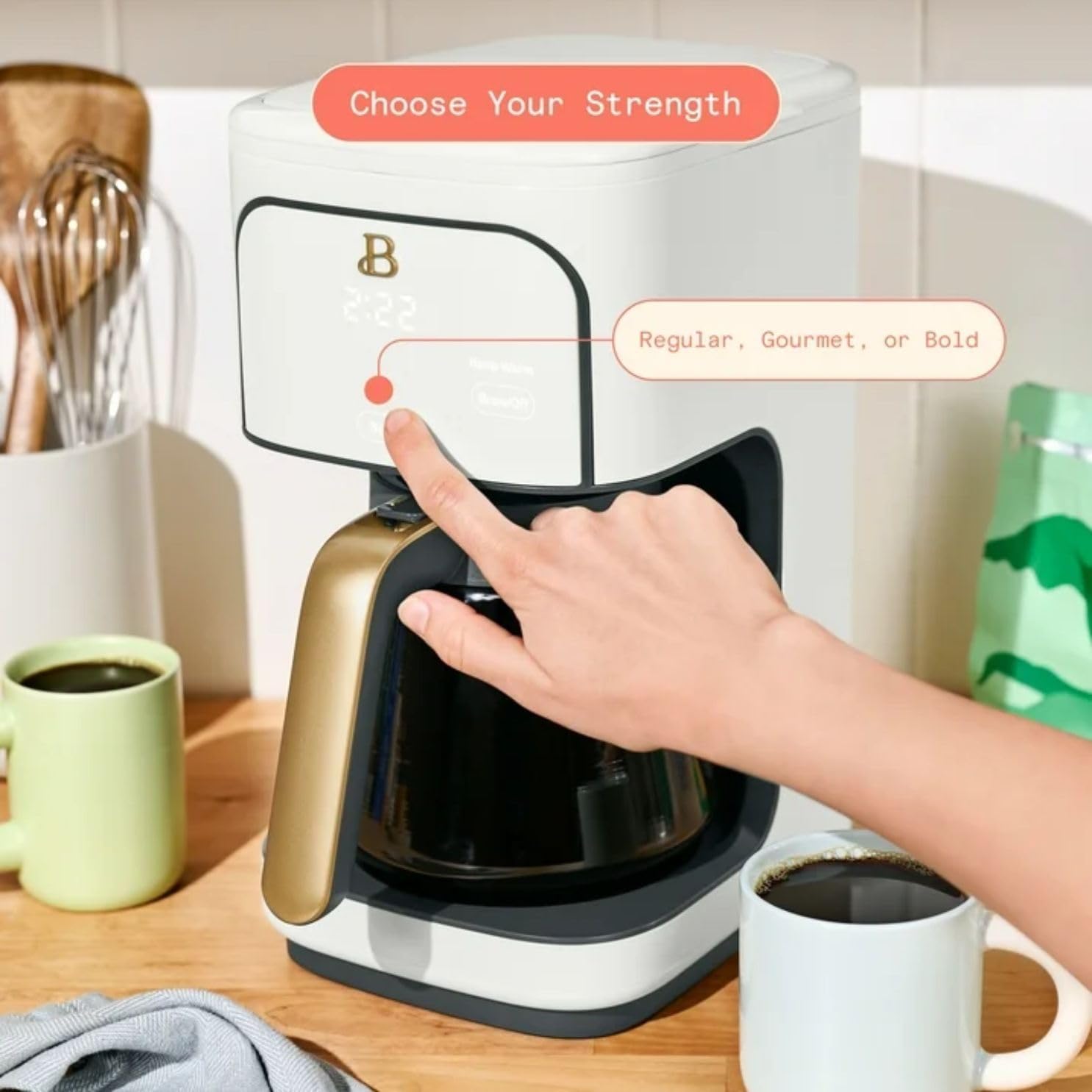
Atahanga: A user's hand interacting with the control panel to select the desired brew strength, showing options for Regular, Gourmet, or Bold coffee.
- Before starting a brew cycle, press the "Strength" button repeatedly until your desired strength (Regular, Gourmet, or Bold) is displayed.
- Proceed with brewing as described above.
1-4 Cup Mode for Small Servings:
For brewing smaller quantities (1-4 cups), activate the 1-4 cup mode to ensure optimal flavor extraction.

Atahanga: The coffee maker's display indicating "1-4 cup mode," designed to deliver bold flavor even when brewing smaller quantities of coffee, avoiding the need to brew a full carafe.
- After adding water and coffee grounds, press the "1-4 Cup" button. An indicator light will confirm activation.
- Then, press the "Brew/Off" button to start brewing.
Setting the 24-Hour Programmable Timer:
Program your coffee maker to start brewing at a specific time within a 24-hour period.
- Kia tika te whakatakotoranga o te wā o nāianei (tirohia "Te Tautuhi i te Karaka").
- Prepare the coffee maker with water and coffee grounds as you would for a regular brew.
- Press the "Program" button. The display will show "PROG" and flash.
- Use the "+" and "-" buttons to set your desired brew start time (hour). Observe the AM/PM indicator.
- Press "Program" again to confirm the hour.
- Use the "+" and "-" buttons to set the desired brew start time (minute).
- Press "Program" one last time to confirm the minute and activate the program. The "PROG" indicator will remain lit.
- Ka timata te hanga kawhe i te wa i whakaritea.
Pause & Serve Function:
This feature allows you to pour a cup of coffee before the entire brewing cycle is complete.
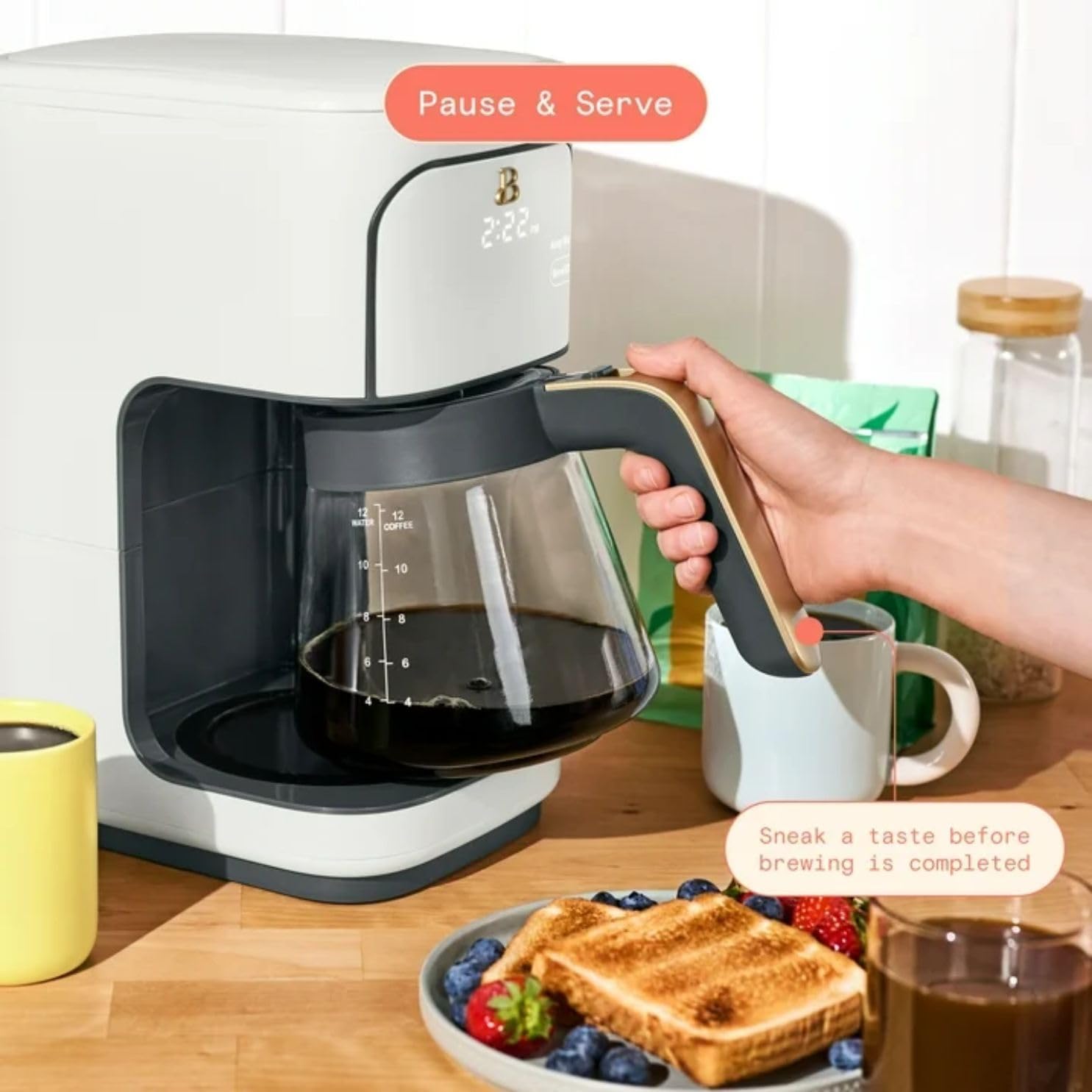
Atahanga: A user demonstrating the Pause & Serve feature by temporarily removing the carafe during the brewing process to pour a cup of coffee.
- During a brewing cycle, you can remove the carafe from the warming plate for up to 20 seconds.
- The brewing will pause automatically.
- Return the carafe to the warming plate within 20 seconds to resume brewing and prevent overflow.
Taumahi Mahana:
After brewing, the warming plate will keep your coffee hot for up to 4 hours.
- The Keep Warm function activates automatically after brewing.
- The coffee maker will automatically shut off after 4 hours.
Te tiaki me te horoi
Regular cleaning ensures optimal performance and taste.
Whakapai ia rā:
- Wewetehia te hanga kawhe i nga wa katoa i mua i te horoi ka tuku kia whakamatao katoa.
- Discard used coffee grounds and rinse the reusable filter.
- Wash the carafe, carafe lid, and reusable filter in warm, soapy water. These parts are also dishwasher-safe (top rack recommended).
- Horoia te taha o waho o te hanga kawhe ki te ngohengohe, damp kakahu. Kaua e whakamahi i nga taputapu horoi, i nga papa horoi ranei.
- Do not immerse the coffee maker unit, cord, or plug in water or any other liquid.
Whakakore i te kirikiri (Porohanga Horoi):
Mineral deposits from water can build up over time and affect coffee taste and brewing performance. The coffee maker has a "Clean-auto reminder" and a dedicated cleaning cycle.
- When the "Clean" indicator light illuminates, it's time to descale.
- Whakakīia te ipu wai ki te ranunga o te 1 wāhanga winika mā me te 2 wāhanga wai matao. Hei tauiraample, 2 cups of vinegar and 4 cups of water.
- Whakatakotoria te ipu kau me tōna taupoki ki runga i te pereti whakamahana.
- Press the "Clean" button. The indicator light will flash, and the cleaning cycle will begin.
- Allow the cycle to complete (approximately 45-60 minutes). The unit will automatically shut off.
- Maka atu te otinga winika i te ipu.
- Run 2-3 full brewing cycles with fresh, cold water only to rinse out any remaining vinegar taste.
Raparongoā
| Raruraru | Take pea | Rongoā |
|---|---|---|
| Kare te kawhe e mahi. |
|
|
| He ngoikore te reka o te kawhe. |
|
|
| Ka puhake te kawhe mai i te kete tātari. |
|
|
| "Clean" indicator light is on. | Mineral buildup in the water reservoir. | Perform a descaling cycle as described in the "Maintenance and Cleaning" section. |
Whakatakotoranga
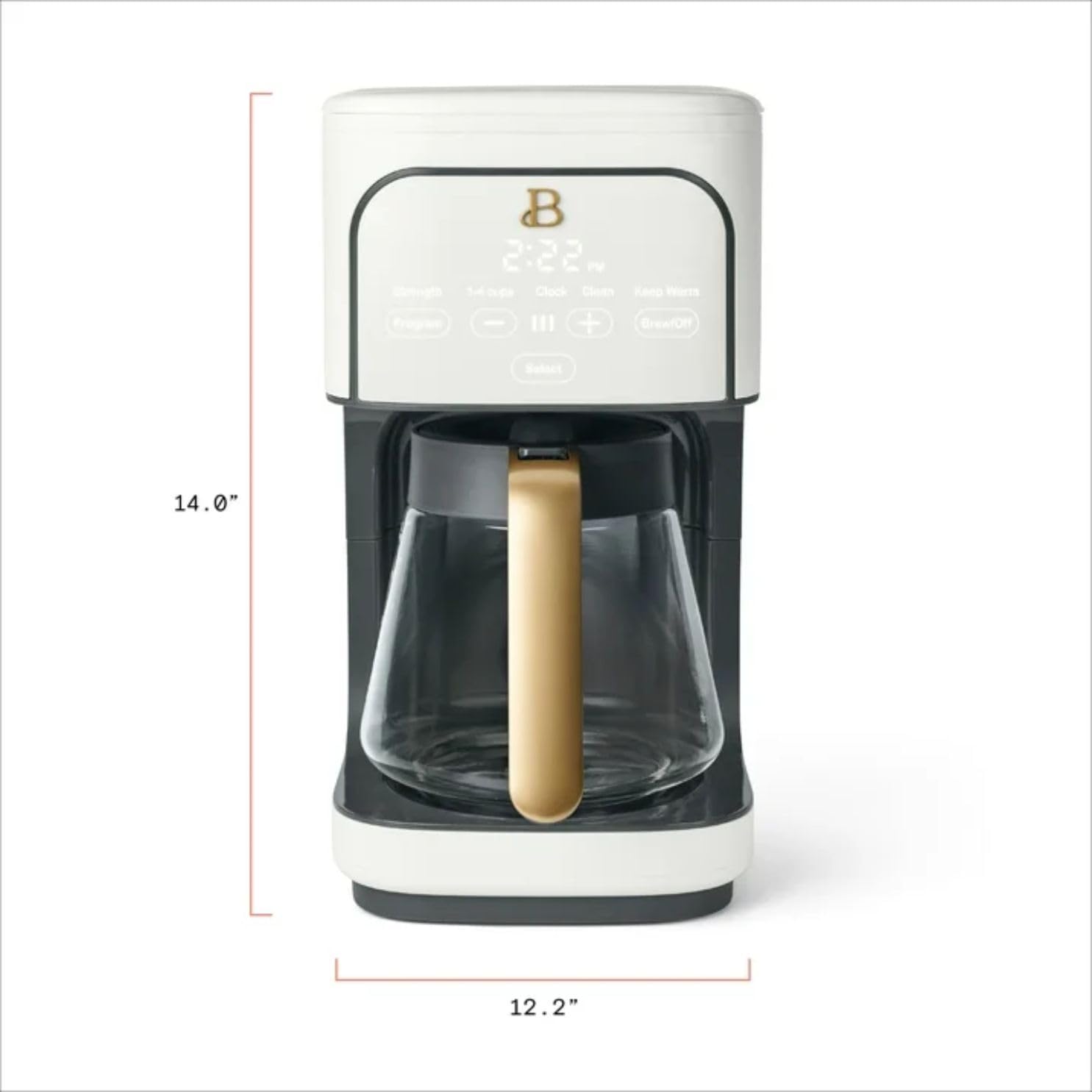
Atahanga: A diagram illustrating the key dimensions of the coffee maker, with a height of approximately 14.0 inches and a width of 12.2 inches.
| Āhuahira | Taipitopito |
|---|---|
| Waitohu | Whakanuia |
| Tau tauira | 2001261 |
| Te kaha | 12 Cups (standard 5oz servings) |
| Tae | White Icing |
| Rahi Hua (D x W x H) | 7.68"D x 12.24"W x 13.98"H |
| Wattage | 1200 watts |
| Voltage | 120 Volts |
| Nga waahanga motuhake | Programmable 24h timer, Adjustable brew strength (Regular/Gourmet/Bold), Pause & Serve, Auto shut-off, Keep Warm mode (up to 4 hours), Touch-activated display, Clean-auto reminder |
| Nga Waahanga kei roto | Carafe, Reusable Gold-Tone Filter, Measuring Scoop |
Tautoko Kiritaki
For further assistance or inquiries, please refer to the retailer's customer service information or the manufacturer's official webpae.
Tēnā koa, me whakaatu mai tō nama tauira (2001261) me ASIN (B0GDWSXT7Y) ready when contacting support.