
Kupu Whakataki
Thank you for choosing the Sainlogic SA6 Professional Weather Station. This manual provides detailed instructions for the setup, operation, and maintenance of your new weather station. The SA6 is designed to provide accurate and comprehensive weather data, including temperature, humidity, wind speed and direction, rainfall, and atmospheric pressure, all displayed on a clear 6.5-inch HD color LCD.
He aha kei roto i te Pouaka
- Papatohu (Wāhanga Whakaatu)
- External Sensor Array
- Pūurutau Hiko
- Pukapuka Kaiwhakamahi (tenei tuhinga)
- Mounting Hardware (screws, bolts, mounting pole support)
Tatūnga
1. Tāuta Pūoko waho
The external sensor array measures wind speed, wind direction, rainfall, temperature, and humidity. Proper placement is crucial for accurate readings.
- Kōwhiria he Tauwāhi: Select an open area free from obstructions like trees or buildings that could interfere with wind or rain measurements. Ensure it is within 100 meters (330 feet) of the display console.
- Whakauruhia nga Pataha: The external sensor requires 3 AA batteries (not included) for operation. Open the battery compartment, insert the batteries according to polarity, and secure the cover.
- Maunga te Pūoko: The sensor can be mounted on a fence, roof, or pole using the provided mounting hardware. Ensure the sensor is level using the integrated bubble level for accurate rain and wind measurements. The wind vane should point North for correct wind direction readings.

Figure 1: Outdoor Sensor Mounting Options

Figure 2: Outdoor Sensor Components
2. Tatūnga Papatohu Whakaaturanga
- Tāutahia ngā Pūhiko Tārua: The display console requires 3 AAA batteries (not included) to retain settings and data during power outages. Open the battery compartment on the back, insert the batteries, and close the cover.
- Tūhono Pūurutau Hiko: Plug the provided power adapter into the DC port on the back of the console and then into a standard wall outlet. The display will illuminate.
- Tukutahitanga Tuatahi: Once powered on, the console will automatically begin searching for the outdoor sensor. This process may take a few minutes. Ensure both units are within range.
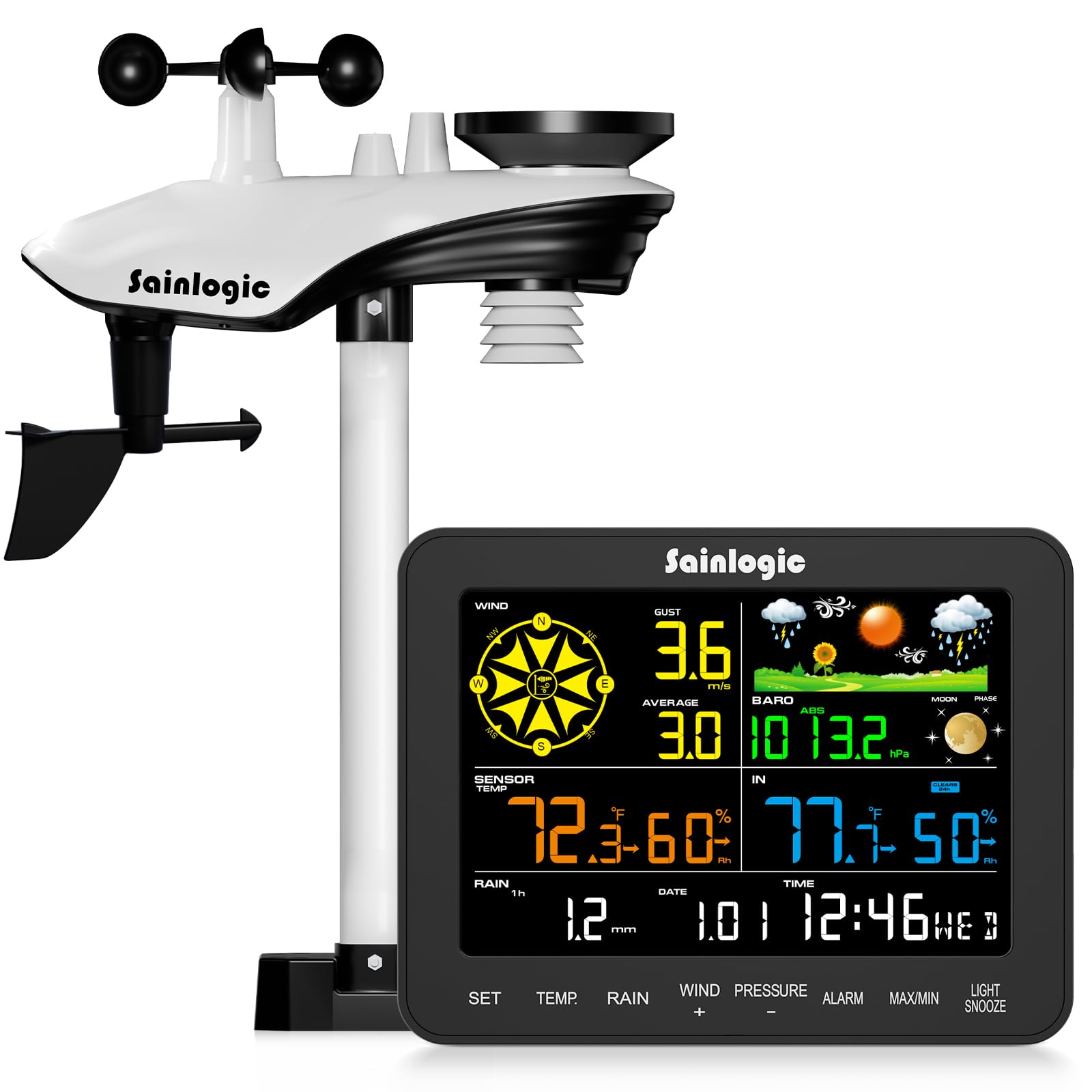
Whakaahua 3: Whakaatu Papatohu
Nga Tohutohu Whakahaere
1. Whakaatu Atuview
The 6.5-inch HD color LCD provides a clear, at-a-glance view of all current weather conditions. The display is divided into several sections, each showing specific data points.

Figure 4: Display Layout and Data Points
- Hau: Displays current wind speed, gust, and average wind speed, along with wind direction.
- Raraunga waho: Shows external temperature, humidity, dew point, and felt temperature.
- Raraunga Roo: Displays internal temperature and humidity.
- Te ua: Tracks hourly, daily, weekly, monthly, and total rainfall.
- Pēhanga: Indicates current atmospheric pressure.
- Matapae: Provides a 12-hour weather forecast using intuitive icons.
- Wā me te Ra: Current time, date, and moon phase.
2. Nga Mahi Patene
The console features several buttons for navigation and settings adjustment:
- ROHE: Ka uru ki te aratau tatūnga, ka whakau ranei i nga whiringa.
- TEMP: Toggles temperature units (°C/°F) or cycles through temperature data.
- ua: Displays different rainfall periods (hourly, daily, weekly, monthly, total).
- WIND (+): Adjusts wind settings or increases values during setup.
- PRESSURE (-): Adjusts pressure settings or decreases values during setup.
- PANUI: Sets or activates alarms for various weather conditions.
- MAX / MIN: Views maximum and minimum recorded values.
- KAMAMA/MAHI: Adjusts backlight brightness or activates snooze for alarms.
3. Customizable Alerts
The weather station supports customizable alerts for specific weather conditions, such as high/low temperature, strong winds, or heavy rainfall. When an alert condition is met, the console will provide visual (flashing) and audible notifications.

Figure 5: Intelligent Weather Alerts
Te tiaki
1. Cleaning the Sensor Array
Periodically inspect and clean the outdoor sensor array to ensure accurate readings. Dust, debris, or insects can affect performance.
- Ine ua: Clear any leaves or debris from the rain collector funnel.
- Anemometer Cups & Wind Vane: Ensure they spin freely. Gently remove any obstructions.
- Thermo-Hygrometer Radiation Shield: Keep the vents clear for proper air circulation.
2. Whakakapinga Pūhiko
Replace batteries in both the outdoor sensor and display console as needed. Low battery indicators will appear on the display. Always use fresh, high-quality batteries of the specified type (3 AA for sensor, 3 AAA for console backup).
Raparongoā
| Raruraru | Take pea | Rongoā |
|---|---|---|
| No outdoor data on display | Kei waho o te awhe te pūoko, iti te pākahiko o te pūoko, pokanoa. | Move sensor closer to console, replace sensor batteries, check for strong electronic interference. |
| Kore tika te pāmahana/makuku | Sensor exposed to direct sunlight/heat source, blocked vents. | Relocate sensor to a shaded area, clear radiation shield vents. |
| Nga panui hau e kore e tika | Obstructions near sensor, wind vane not pointing North. | Ensure clear path for wind, verify wind vane orientation. |
| Inaccurate rainfall | Rain collector blocked, sensor not level. | Clear debris from collector, ensure sensor is perfectly level. |
| Display console not powering on | Power adapter disconnected, faulty adapter, no backup batteries. | Check power connection, try a different outlet, ensure backup batteries are installed. |
Whakatakotoranga

Whakaatu 6: Nga Ahua o te Hua me nga Whakaritenga
- Tau tauira: SA6
- Whakaatu: 6.5-inch HD Color LCD
- Outdoor Sensor Batteries: 3 x AA (kaore i whakauruhia)
- Console Backup Batteries: 3 x AAA (kaore i whakauruhia)
- Puna Hiko: AC Adapter / Battery
- Rauemi: Acrylonitrile Butadiene Styrene (ABS)
- Awhe Tuku Ahokore: Tae atu ki te 100m (330ft)
- Awhe Pawera o waho: -40°F ki te 140°F (-40°C ki te 60°C)
- Awhe Pawera o Roto: 32°F ki te 140°F (0°C ki te 60°C)
- Rangi Whanonga: 10% ki te 99% RH
- Awhe Pēhanga Pae: 300 ki te 1100 hPa
- Te tika o te ua: ±1 mm (for <15 mm), ±7% (for 15-9999 mm)
- Nga waahanga motuhake: Customizable alerts, adjustable brightness, portable, wireless, alarm clock.
- Rahi Hua: Console: 2.5 x 17 x 13.2 cm; Sensor: 12.9 x 18.5 x 4.25 cm (approximate)
- Taumaha Tūemi: 2.74 Kirokaramu (tapeke kete)
Pūtāhui me te Tautoko
The Sainlogic SA6 Professional Weather Station comes with a standard manufacturer's warranty. For specific warranty details, please refer to the documentation included with your purchase or contact Sainlogic customer support. If you encounter any issues or require assistance, please reach out to our support team via the contact information provided on our official webpae tukutuku, tō pūhara hoko rānei.