
1. Kupu Whakataki
Te Whare Wānangaview UAC-T122-AF28LM is a 2MP high-definition analog turret security camera designed for reliable surveillance in various environments. This camera features ColorHunter technology for 24/7 full-color imaging, a built-in microphone for audio capture, and versatile 4-in-1 video output compatibility (TVI/AHD/CVI/CVBS) for integration with existing DVR systems. Its robust IP67-rated housing ensures durability in outdoor conditions.
2. Nga Hua o te Hua
- 2MP High-Definition Imaging: Captures clear 1080P video resolution.
- ColorHunter Technology: Provides 24/7 full-color night vision using a warm white light illuminator up to 40m (131ft).
- 4-in-1 Video Output: Supports TVI, AHD, CVI, and CVBS formats, switchable via OSD menu.
- Puoro-roto: Records high-quality audio over coaxial cable (requires compatible DVR).
- Whānui Viewing Koki: Equipped with a 2.8mm fixed lens for broad area coverage.
- IP67 parerangi: Durable metal housing resistant to water and dust.
- Te Mahi Pawera Tino: Functions reliably from -30°C to 60°C (-22°F to 140°F).
- 4kV Surge Protection: Safeguards the device against electrical spikes.
3. Tatūnga me te Tāuta
3.1 Ihirangi mokete
Manatokona kei te noho nga waahanga katoa:
- UAC-T122-AF28LM Turret Camera
- Nga Tiu Whakapiri me nga Mono Taiepa
- Tātauira Tāuta
- Pukapuka Kaiwhakamahi (tenei tuhinga)
3.2 Whakauru i te Kamera
The camera is designed for wall mounting. Use the provided installation template to mark drill holes. Secure the camera firmly to the mounting surface using the supplied screws and wall plugs.
Tuhipoka: Ensure the mounting surface can support the camera's weight and is free from obstructions.
3.3 Waea me nga Hononga
Connect the camera to your Digital Video Recorder (DVR) using a coaxial cable. The camera requires a DC 12V power supply (not included, typically supplied by the DVR or a separate adapter).
The camera supports 4-in-1 video output. If your DVR requires a specific video format (TVI, AHD, CVI, or CVBS), you may need to switch the camera's output mode via the On-Screen Display (OSD) menu. This is typically done by accessing the OSD menu through your DVR's controls.

Image: The camera's 4-in-1 compatibility allows seamless integration with various DVR systems. The OSD menu provides options to switch between TVI, AHD, CVI, and CVBS video modes, ensuring compatibility with your existing coaxial infrastructure.
4. Nga Tohutohu Whakahaere
4.1 Te Whakakaha
Once connected to a compatible DVR and powered, the camera will automatically begin operation. Refer to your DVR's manual for initial setup and channel configuration.
4.2 Night Vision (ColorHunter Technology)
The UAC-T122-AF28LM utilizes ColorHunter technology to provide full-color video even in low-light or complete darkness. Unlike traditional IR cameras that switch to black and white, this camera employs a warm white light illuminator to capture vivid color details 24/7. This feature is crucial for identifying specific details like clothing colors or vehicle characteristics at night.
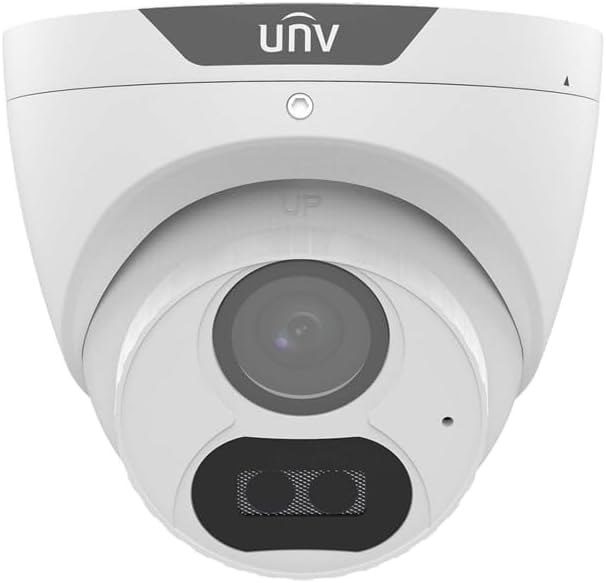
Image: A visual comparison demonstrating the superior clarity and detail of 24/7 full-color night vision provided by the ColorHunter technology, as opposed to standard black and white infrared night vision.
4.3 Aroturuki Ororongo
The camera includes a built-in microphone for audio surveillance. To utilize this feature, your DVR must support audio-over-coaxial (AoC) functionality. Consult your DVR's manual for instructions on enabling and recording audio.
4.4 Te Motini Te Motini
While the camera provides the video feed, motion detection and alert functionalities are typically configured through your connected DVR system. Refer to your DVR's user manual for setting up motion detection zones, sensitivity, and notification preferences.

Image: This illustration shows how the camera's video feed can be used by a DVR system to detect motion and trigger real-time notifications to a connected device, enhancing security monitoring.
5. Tiaki
5.1 Environmental Durability
The camera features an IP67 rating, indicating high resistance to dust and water ingress. It is designed to operate effectively in harsh weather conditions, including rain, snow, and extreme temperatures ranging from -30°C to 60°C (-22°F to 140°F).

Image: The camera's IP67 weatherproof rating ensures reliable operation in challenging outdoor environments, protecting it from water, dust, and extreme temperatures.
5.2 Te horoi
To maintain optimal image clarity, periodically clean the camera lens and housing. Use a soft, damp cloth. Avoid abrasive cleaners or solvents that could damage the surface or lens coating.
5.3 Parenga Ngaru
The camera is equipped with 4kV surge protection to shield it from electrical spikes and power fluctuations, enhancing its longevity and reliability. However, it is recommended to use appropriate surge protectors for your entire surveillance system.
6. Te Raru
- Kore he Putanga Ataata:
- Check all cable connections (coaxial and power).
- Ensure the camera is receiving adequate DC 12V power.
- Verify the camera's video output mode matches your DVR's input settings via the OSD menu.
- Kounga Atahanga Kino:
- Horoia te arotahi kamera.
- Check coaxial cable for damage or interference.
- Ensure sufficient lighting for optimal ColorHunter performance.
- Kore Ororongo:
- Confirm your DVR supports audio-over-coaxial (AoC).
- Check DVR settings to ensure audio recording is enabled for the camera's channel.
7. Whakatakotoranga
| Āhuahira | Whakatakotoranga |
|---|---|
| Ingoa Tauira | UAC-T122-AF28M-W |
| Pūoko | 1/2.9-inch 2MP CMOS |
| Whakatau | 1920 x 1080 (1080P) |
| Arotahi | 2.8mm Wide Angle Fixed Lens |
| Matakitenga Po | White Light up to 40m (131ft) - Full Color |
| Ororongo | Puoro-roto |
| Putanga Ataata | TVI/AHD/CVI/CVBS (Switchable) |
| Mana | DC 12V (+/- 25%) |
| Taiao Mahi | -30°C ki te 60°C (-22°F ki te 140°F) |
| Parenga Ingress | IP67 (Atete Wai me te Puehu) |
| Parenga Ngaru | 4kV |
| Momo Maunga | Maunga Taiepa |
| Tae | Mā |
8. Pūtāhui me te Tautoko
8.1 Nga Korero Whakaputanga
This product is covered by a 3-year manufacturer warranty. This warranty protects against defects in materials and workmanship under normal use. Please retain your proof of purchase for warranty claims.
8.2 Tautoko Hangarau
For technical assistance, troubleshooting beyond this manual, or warranty inquiries, please contact your retailer or the manufacturer's customer support. Refer to the product packaging or manufacturer's webpae mo nga korero whakapiri.


