
1. Kupu Whakataki
The Lilytech ZL-6210A+ is a high-performance temperature controller designed for precise temperature management. Featuring a robust 30A relay output, it is suitable for a wide range of heating or cooling applications. This manual provides essential information for the safe installation, operation, and maintenance of your ZL-6210A+ controller.

Whakaahua 1: Mua view of the ZL-6210A+ Temperature Controller, showing the display and control buttons.
2. Nga korero haumaru
Please read all safety instructions carefully before installation and operation. Failure to follow these instructions may result in electric shock, fire, or damage to the device.
- Pūmate Hiko: Ka mahi tenei taputapu me te voli teiteitage (185-245Vac). Installation should only be performed by qualified personnel.
- Momotu Mana: Always disconnect power to the circuit before performing any wiring or maintenance.
- Whakapapa Tika: Me whakarite kei te tika te hononga whenua o te taputapu, kia rite ki ngā waehere hiko ā-rohe.
- Nga Tikanga Taiao: Do not expose the controller to excessive moisture, dust, or corrosive environments beyond its specified working conditions.
- Raukaha Uta: Do not exceed the maximum current rating of the relay (30A for R1, 5A for R2).
3. Whakatakotoranga
| Tawhā | Uara |
|---|---|
| Tuku Hiko | 185 ~ 245Vac, 50/60Hz |
| Momo Pūoko | NTC (2 meters long) |
| Output Relay R1 | 30A / 250Vac (resistive load) |
| Output Relay R2 | 5A / 250Vac (resistive load) |
| Awhe Tautuhinga | -40 ~ 120°C |
| Awhe Whakaatu | -40 ~ 130°C |
| Taiao Mahi | -10 ~ 45°C, 5 ~ 90%RH (non-condensing) |
| Ahu (W x H x D) | 78 x 34.5 x 71 mm |
| Installation Drilling (W x H) | 71 x 29 mm |
| Rauemi Take | PC + ABS tohu ahi |
| Taumata Tiaki | IP65 (Taha Mua anake) |
| Taumaha Tūemi | 1.76 hekere (tata ki te 50g) |
NTC Sensor Selection
The ZL-6210A+ uses NTC sensors. Different sensor types are available, varying in seal material, wire length, resistance, and B-value. Ensure the correct sensor type is used for your application.
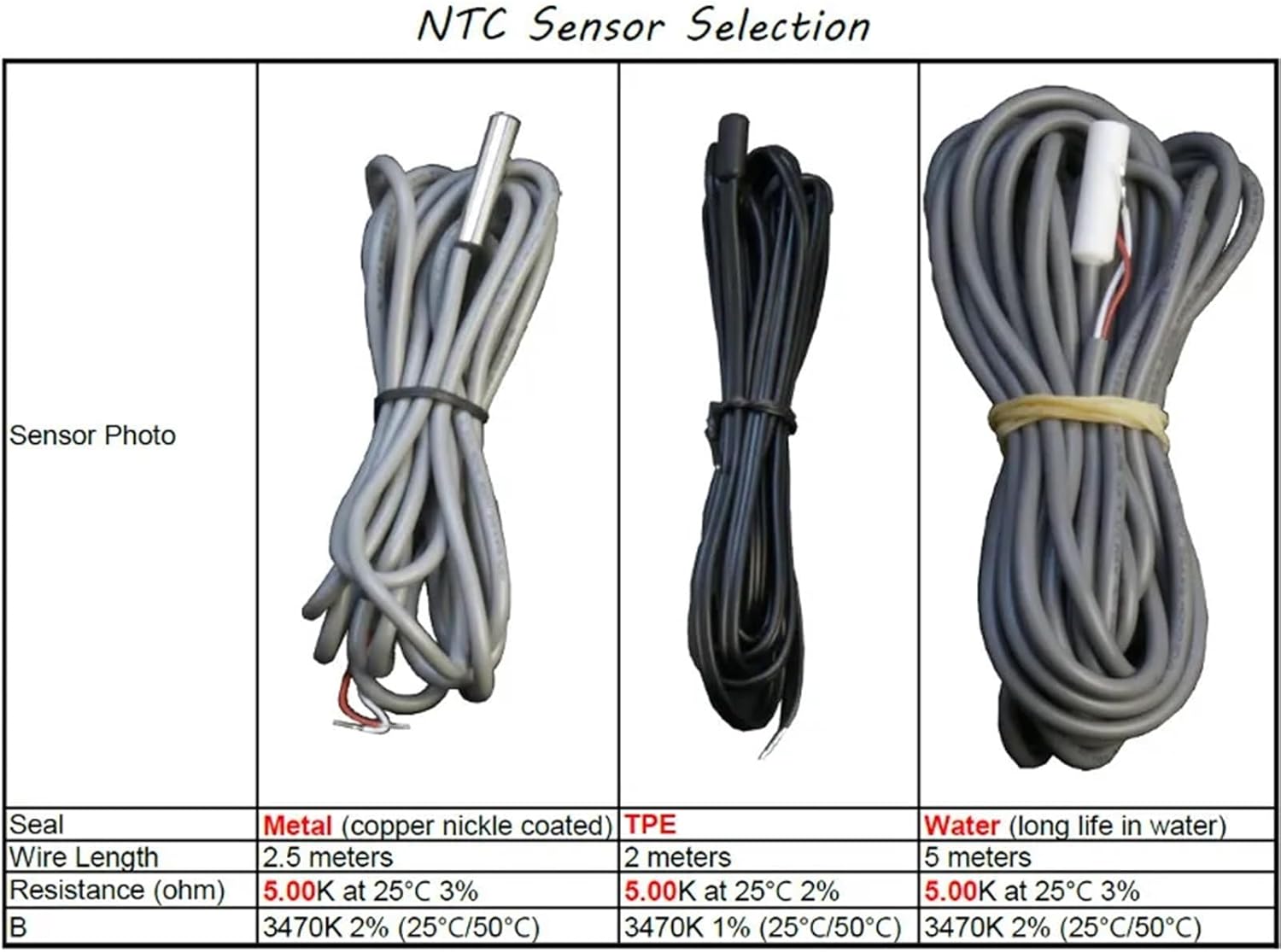
Figure 2: NTC Sensor Selection table, detailing specifications for Metal, TPE, and Water sealed sensors.
4. Tāutanga
4.1 Whakapiki
The ZL-6210A+ is designed for panel mounting. Create an opening in your panel with the dimensions of 71 mm (width) x 29 mm (height). Insert the controller into the opening and secure it using the provided clips.
4.2 Waea Whakahoahoa
Refer to the wiring diagrams below for proper connection. Ensure all connections are secure and comply with local electrical codes. The main power input is 185-245Vac. The primary temperature output (R1) is rated for 30A.

Whakaahua 3: Whakamuri view of the ZL-6210A+ showing the terminal block layout. Terminals 1-2 are for R1 Temp. Output, 3-6 for 220V~ power (L, N), and 7-10 for Alarm Input and Temp. Sensor.
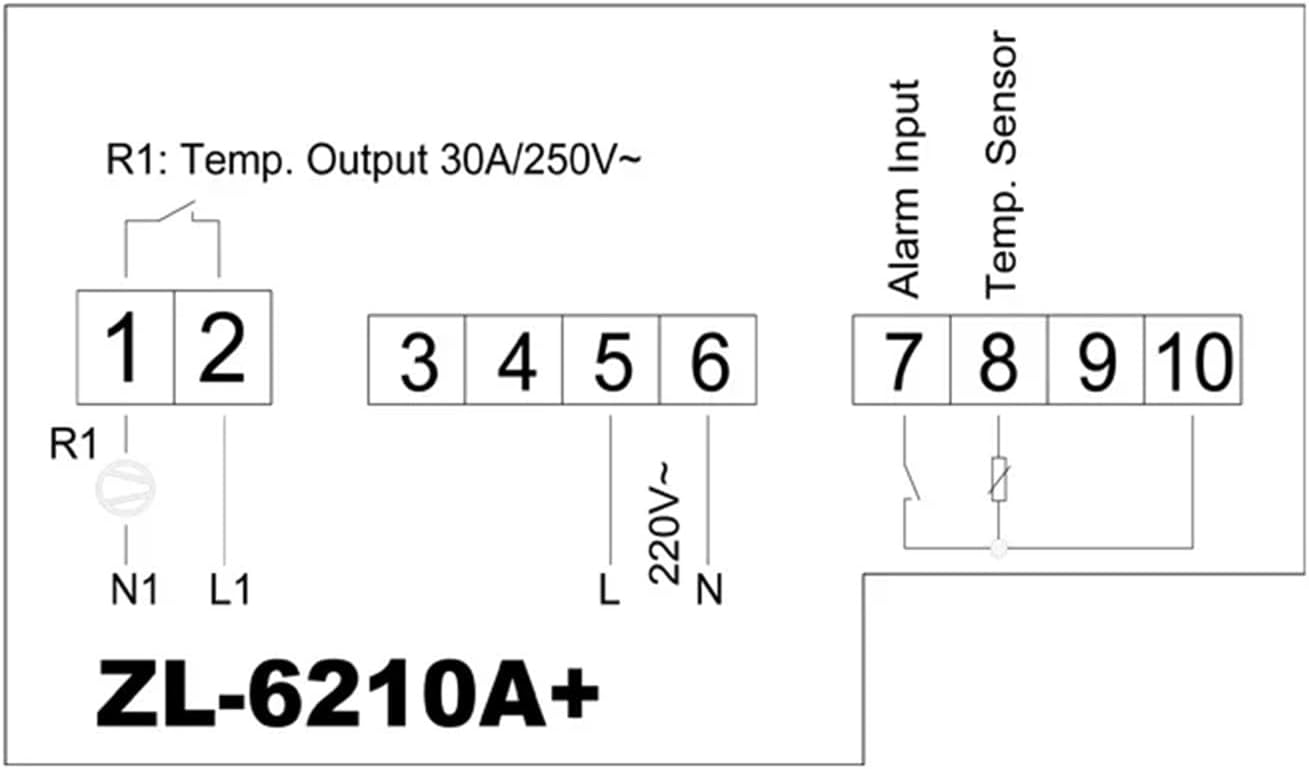
Figure 4: Simplified wiring diagram. Connect power to terminals 5 (L) and 6 (N). Connect the temperature sensor to terminals 9 and 10. The main relay output (R1) is connected to terminals 1 and 2. An alarm input can be connected to terminals 7 and 8.
Hononga Kapeka:
- 1, 2: R1 Temperature Output (30A / 250V~)
- 3, 4: (Not explicitly labeled in diagram, often for auxiliary functions or R2 if present)
- 5 (L), 6 (N): Power Supply Input (220V~)
- 7, 8: Inputata Whakaoho
- 9, 10: Temperature Sensor Input (NTC)
5. Mahi
The ZL-6210A+ features a digital display and control buttons for setting parameters. Specific operational details, including setting the desired temperature, hysteresis, and alarm functions, are typically accessed via a menu system. Refer to the detailed manual available from the manufacturer for complete programming instructions.

Whakaahua 5: Roto view showing the digital display and buttons (S1, S2, S3, S4) used for parameter setting and navigation.
Nga Mahi Taketake:
- Whakaaturanga Temperature: Shows the current measured temperature.
- Tautuhi Whakaritenga Ira: Allows users to set the desired target temperature.
- Kōwhiringa Aratau: Typically allows selection between heating and cooling modes.
- Tautuhinga whakaoho: Configures high/low temperature alarms.
6. Tiaki
Regular maintenance ensures optimal performance and longevity of your temperature controller.
- Te horoi: Horoia te papa o mua ki te ngohengohe, damp kakahu. Kaua e whakamahi i nga kai horoi me nga whakarewa. Me whakarite kia kore he wai e uru ki te taputapu.
- Taki Taiao: Periodically inspect the installation environment to ensure it remains within the specified temperature and humidity ranges.
- Tirohanga Waea: Check all wiring connections periodically for tightness and signs of wear or corrosion.
- Āhua o te Pūoko: Ensure the temperature sensor is clean and free from damage.
7. Te Raru
If you encounter issues with your ZL-6210A+, refer to the following common problems and solutions:
| Raruraru | Take pea | Rongoā |
|---|---|---|
| Controller does not power on | Karekau he hiko; waea hē; Ka pupuhihia | Check power connections; Verify wiring against diagram; Check for internal fuse (if accessible, consult professional) |
| He he te panui pāmahana | Faulty sensor; Sensor not connected properly; Sensor placed incorrectly | Check sensor wiring; Replace sensor if damaged; Relocate sensor to a representative area |
| Output relay (R1) not switching | Temperature not within set range; Incorrect parameter settings; Faulty relay | Verify set point and hysteresis; Check operating mode (heating/cooling); Consult professional for relay replacement |
| Ko te whakaaturanga e whakaatu ana i te waehere hapa | Sensor error; Internal fault | Refer to the full manufacturer's manual for specific error code meanings and solutions. |
8. Pūtāhui me te Tautoko
For warranty information, please refer to the terms provided by your retailer or the manufacturer at the time of purchase. For detailed technical support, additional documentation, or specific programming instructions, please visit the official Lilytech webpaetukutuku, whakapā atu ranei ki ta raatau ratonga kaihoko.
A comprehensive manual can be found at: www.suzhoulily.com/pdf/ZL-62x0A(plus)_en_2.0d.pdf