
1. Hua Neke Atuview
The PGST Solar Motion Sensor Alarm E10D is a self-sustaining security device designed for outdoor use. It integrates a motion sensor, a loud siren, and a strobe light to deter intruders and alert users. Its solar-powered design ensures continuous operation without external power sources, making it suitable for various locations.
- Mahi-a-ra: Equipped with a high-efficiency solar panel and a rechargeable battery, it charges during the day for continuous operation.
- Whakarato Hiko Karekau: Operates independently of the electrical grid, providing 24/7 protection even during power outages.
- Effective Detection and Deterrence: Advanced PIR (Passive Infrared) motion sensors detect movement, activating a powerful 120dB siren and strobe light.
- Robust Weatherproof Construction: IP65 rated design ensures protection against dust and water, allowing reliable function in harsh weather.
- Simple Wire-Free Installation: Designed for easy setup without complex wiring, offering flexible placement options.
2. Nga korero haumaru
- Ensure the device is mounted securely to prevent falling.
- Kaua e ngana ki te wetewete, ki te whakarerekē rānei i te pūrere, nā te mea ka whakakorea pea te pūtāhui, ka pakaru rānei.
- Kia ma te panera rā, kia kore he arai, kia pai ai te utu.
- Avoid directing the siren or strobe light directly at people or animals from close range.
- Makahia te pākahiko kia rite ki nga ture o te rohe.
3. Ihirangi mokete
Manatokona kei roto katoa nga mea kei roto i te kete:
- 1x PGST Solar Motion Sensor Alarm (Model E10D)
- 1x Mana Mamao
- Whakaekenga Taonga (tuuuri, punga pakitara)
- 1x Tiki Panui USB XNUMXx
- 1x Manual Kaiwhakamahi
4. Nga ahuatanga
The PGST Solar Motion Sensor Alarm E10D offers a range of features for enhanced security:
- Whakataua Takirua: Solar charging for daily power and USB charging for initial setup or low light conditions.
- Rōrahi Whakaritea: 3 levels of volume for the alarm sound.
- Aratau Mahi Maha: Three distinct modes to suit different security needs (All-day, Daytime, Night).
- High-Decibel Alarm: Produces a 120dB loud sound to effectively deter intruders.
- Awhe Rapunga Whānui: Motion sensor covers a 110-degree angle with a range of up to 15 meters.
- Mana Mamao: Conveniently arm, disarm, adjust settings, and trigger SOS from a distance.

Image: The PGST Solar Motion Sensor Alarm with its remote control, highlighting key features like solar charging, USB charging, 3-level volume, 3 working modes, IP65 waterproof rating, and 120dB sound.

Image: The alarm device shown in a rainy environment, illustrating its IP65 weatherproof capability to withstand various weather conditions.
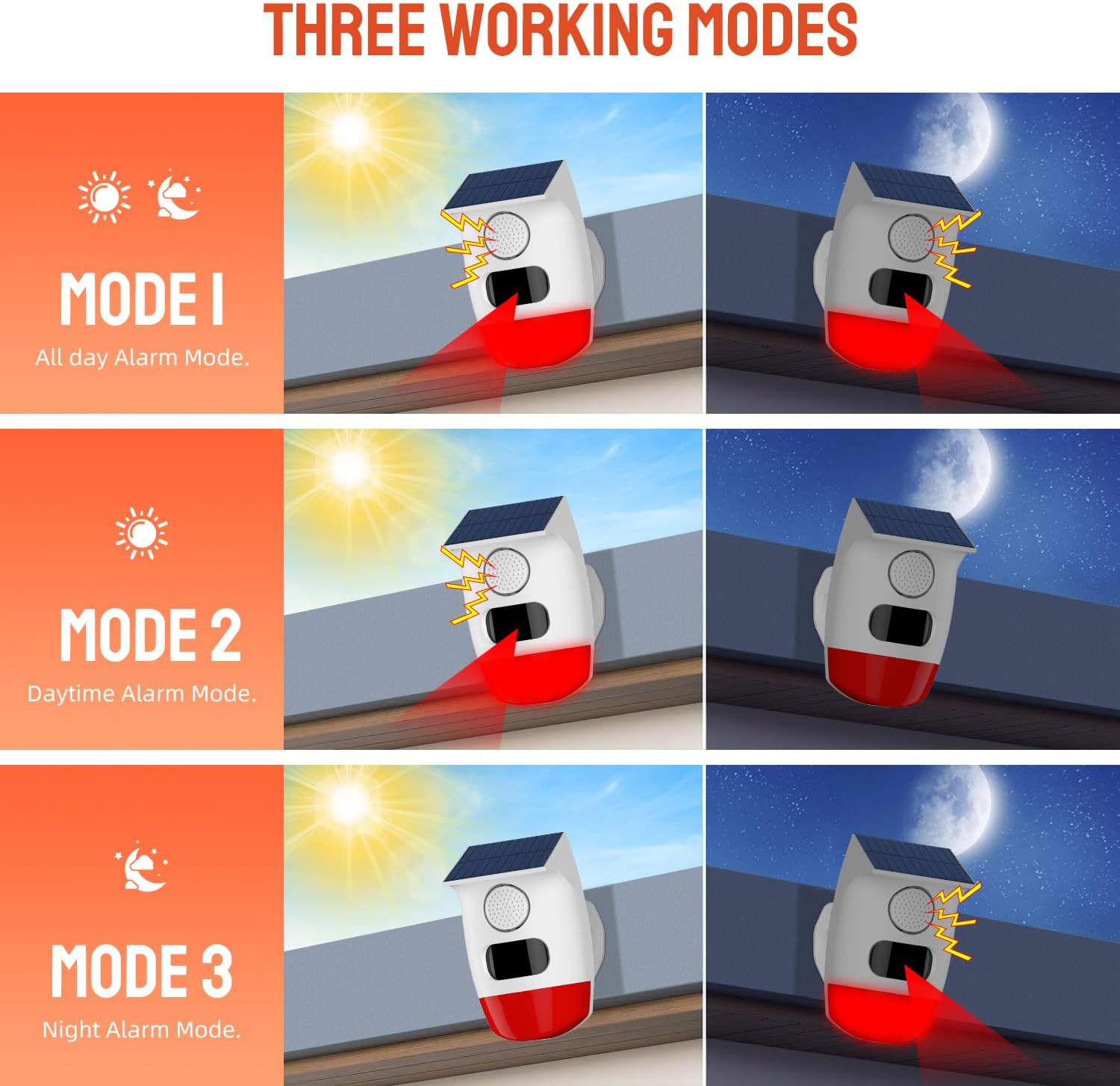
Image: A visual representation of the three working modes: Mode 1 (All-day Alarm), Mode 2 (Daytime Alarm), and Mode 3 (Night Alarm), showing how the alarm functions under different light conditions.

Image: An illustration demonstrating the alarm's 110-degree wide detection range and a detection distance of 6 meters, highlighting its panoramic coverage.

Image: The alarm device with a visual representation of its 120dB high-pitched alarm, indicating its strong deterrent effect.

Image: A hand holding the remote control, demonstrating its use for smart control functions like arm/disarm, volume levels, working modes, alarm ringtones, and sound/light on/off, with a remote range of 5 meters (16 feet).

Whakaahua: Examples of the alarm's multipurpose use in different settings such as a garage, courtyard, indoors, and by a doorway.
5. Tatūnga
5.1 Whakataki Tuatahi
Before first use, it is recommended to fully charge the device. The alarm can be charged via its solar panel or using the provided USB cable.
- Whakatauhia te ra: Place the device in direct sunlight for at least 24 hours to ensure a full charge.
- Whakatau USB: Connect the USB cable to the device and a 5V USB power adapter. Charge for approximately 8 hours until the charging indicator light changes (refer to device for specific indicator behavior).
5.2 Whakapiki i te Pūrere
The PGST Solar Motion Sensor Alarm is designed for wall mounting. Choose a location that receives ample sunlight for the solar panel and provides the desired detection coverage.
- Select a suitable mounting location, ensuring the solar panel faces the sun.
- Use the provided mounting accessories (screws and wall anchors) to securely attach the device to a wall or post.
- Adjust the device angle if necessary to optimize solar exposure and motion detection area.

Image: Detailed dimensions of the PGST Solar Motion Sensor Alarm and its remote control, useful for planning installation space.
6. Mahi
The alarm is controlled using the included remote control. Ensure you are within 5 meters (16 feet) of the device for optimal remote functionality.
6.1 Nga Mahi Mana Mamao
| Patene Ata | Mahi | Whakaahuatanga |
|---|---|---|
| 🔒 | ringa | Activates the alarm system. |
| 🔓 | Wewetehia | Ka whakaweto i te pūnaha whakaoho. |
| SOS | Whakaoho SOS | Triggers an immediate alarm regardless of arm/disarm status. |
| 🔊 | Rōrahi Whakarunga | Increases alarm volume. |
| 🔉 | Rōrahi Whakararo | Decreases alarm volume. |
| 🔇 | Wahangu | Mutes the alarm sound. |
| 24 | Mode 1 (24-hour) | All-day alarm mode. Detects motion and alarms 24/7. |
| ☀️ | Mode 2 (Daytime) | Daytime alarm mode. Detects motion and alarms during daylight hours. |
| 🌙 | Mode 3 (Night) | Night alarm mode. Detects motion and alarms during nighttime hours. |
| 🎯 High | Sensitivity High | Sets motion detection sensitivity to high. |
| 🎯 Low | Iti te Iti | Sets motion detection sensitivity to low. |
| 🎤 | Whakawhiti Reo | Switches between different voice prompts/tones (if available). |
| ❌ Off | Alarm Sound Off | Turns off the alarm sound. |
| ✅ On | Alarm Sound On | Turns on the alarm sound. |
| 💡 Off | Alarm Light Off | Turns off the strobe light. |
| 💡 On | Alarm Light On | Turns on the strobe light. |
7. Tiaki
- Te horoi: Regularly wipe the solar panel and motion sensor lens with a soft, damp kakahu hei tango i te puehu me ngā paru. Kaua e whakamahia he horoi whakakoi.
- Tiaki Pūhiko: Ensure the device receives adequate sunlight for charging. If stored for extended periods, fully charge the device every 3 months to maintain battery health.
- Tirotiro: Periodically check the mounting for stability and ensure all connections are secure.
8. Te Raru
| Raruraru | Take pea | Rongoā |
|---|---|---|
| Device not alarming/detecting motion. | Low battery, device not armed, sensor obstructed, incorrect mode. | Charge the device (solar or USB). Ensure the device is armed using the remote. Clear any obstructions from the sensor. Verify the correct working mode is selected. |
| Kaore e mahi te mana mamao. | Out of range, remote battery low, signal interference. | Move closer to the device (within 5 meters). Replace the remote control battery. Ensure no major obstructions are between the remote and the alarm. |
| Puoho teka. | High sensitivity, environmental factors (e.g., strong wind, small animals). | Reduce the motion sensor sensitivity using the remote control. Adjust the device's position to avoid areas with frequent environmental disturbances. |
| Alarm sound is too low or off. | Volume setting, sound turned off. | Increase the volume using the remote control. Ensure the 'Alarm Sound On' button has been pressed. |
9. Whakatakotoranga
| Āhuahira | Taipitopito |
|---|---|
| Waitohu | PGST |
| Tau tauira | E10D |
| Tae | Mā |
| Puna Mana | Ko te hiko o te ra |
| Taumaha Tūemi | 3.2 hekere |
| Awhe Rapunga Morahi | 15 Mita |
| Momo Whakaeke | Maunga Taiepa |
| Whakaahuatanga Pūhiko | Rechargeable battery charged by solar panel |
| Te maha o nga pākahiko | 1 He pākahiko e hiahiatia ana (kei roto) |
| Rahi Tūemi (D x W x H) | 1"D x 1"W x 1"H |
| Kaihanga | PGST |
10. Pūtāhui me te Tautoko
For warranty information and technical support, please refer to the contact details provided on the product packaging or the official PGST webpae. Puritia to riiki hoko hei tohu mo te hoko.