
1. Kupu Whakataki
This manual provides comprehensive instructions for the installation, operation, and maintenance of your SOYO X99 Motherboard Set. This kit includes a SOYO X99 Motherboard, an LGA2011-3 Xeon E5 2650 V4 CPU, and 16GB DDR4 RAM. Please read this manual carefully before proceeding with installation to ensure proper setup and optimal performance.
The SOYO X99 Motherboard Set is designed for high-performance desktop computers, offering robust capabilities for demanding applications, gaming, and professional tasks.
2. Ihirangi mokete
Please verify that all items listed below are present in your package. If any items are missing or damaged, contact your retailer immediately.
- Papaaho Matua SOYO X99
- Intel Xeon E5 2650 V4 Processor (LGA2011-3)
- 16GB DDR4 RAM Module(s)
- Ngā Taura Raraunga SATA
- I / O Te Shield
- Pukapuka Kaiwhakamahi (tenei tuhinga)
3. Nga waahanga matua
- LGA2011-3 Socket: Supports Intel Xeon E5 2650 V4 series processors for high-performance computing.
- Tautoko Mahara DDR4: Includes 16GB DDR4 RAM for efficient multitasking and enhanced system speed.
- NVMe M.2 Support: Provides high-speed storage options for faster data transfer and system responsiveness.
- Hoahoa pakari: Engineered for stability and durability in demanding desktop environments.
- Hononga maha: Offers a range of ports and expansion slots for various peripherals and upgrades.
4. Tatūnga me te Tāuta
Before beginning installation, ensure your workspace is clean, well-lit, and static-free. It is recommended to wear an anti-static wrist strap to prevent damage to components.
4.1 Papa Matuaview
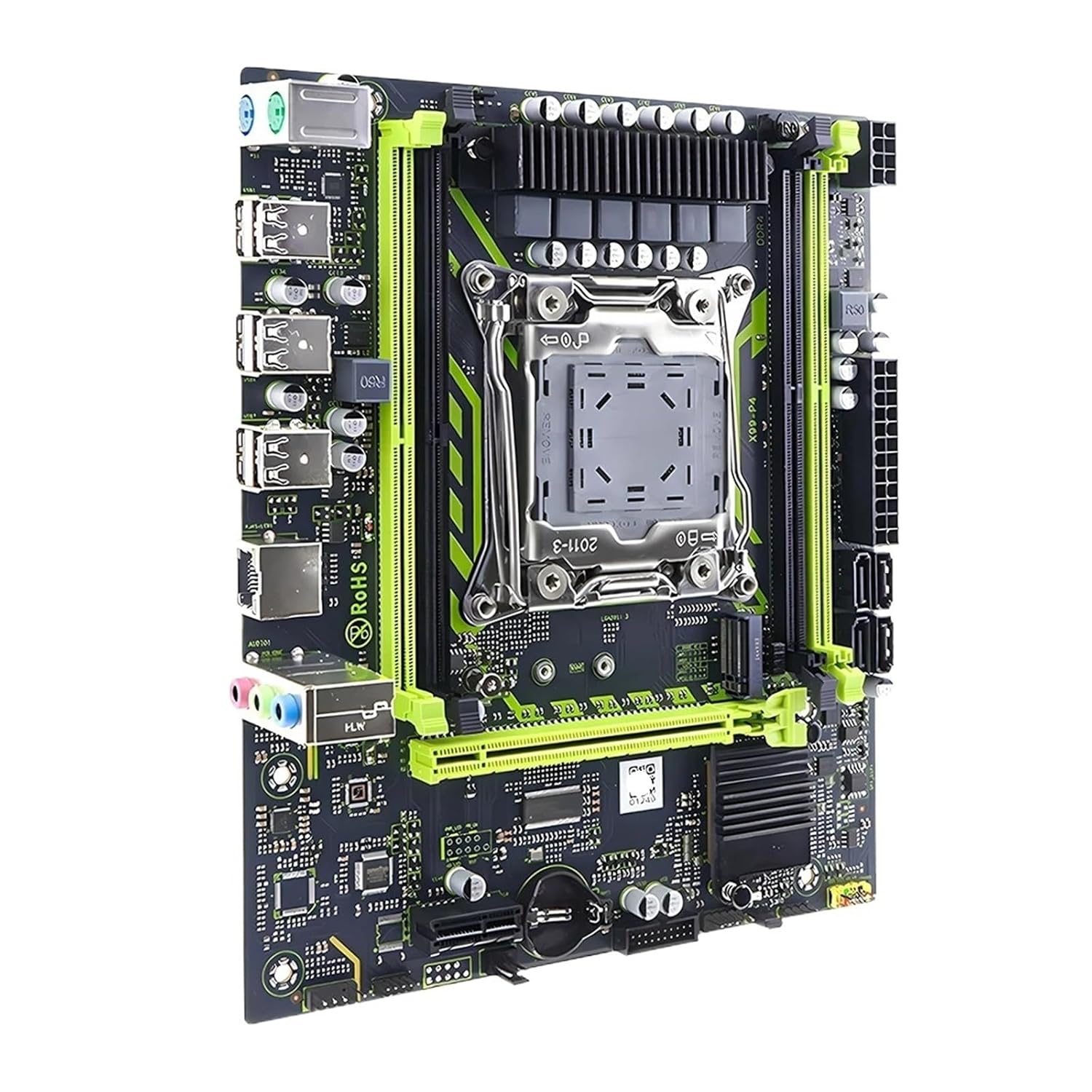
Whakaahua 1: Runga-raro view of the SOYO X99 Motherboard, highlighting the LGA2011-3 CPU socket, DDR4 RAM slots, PCIe slots, and I/O ports.
4.2 Te whakauru i te PTM
- Locate the LGA2011-3 CPU socket on the motherboard.
- Gently push down the metal retention arm and swing it open.
- Carefully align the Intel Xeon E5 2650 V4 CPU with the socket, matching the gold triangle on the CPU with the corresponding mark on the socket. Do not force the CPU into place.
- Once seated, close the retention arm until it clicks into place.
- Hoatu he paparanga angiangi, ara o te whakapiri waiariki ki runga o te PTM.
- Tāutahia te whakamatao CPU kia rite ki nga tohutohu a te kaihanga.

Whakaatu 2: Taipitopito view of the LGA2011-3 CPU socket on the SOYO X99 Motherboard, showing the retention bracket.
4.3 Installing the RAM
- Locate the DDR4 RAM slots on the motherboard.
- Whakatuwheratia ngā topenga i ngā pito e rua o te mokamoka RAM.
- Align the 16GB DDR4 RAM module with the slot, ensuring the notch on the module matches the key in the slot.
- Patohia ki raro i nga pito e rua o te waahanga RAM kia mau ra ano nga topenga.
4.4 Te whakaurunga o te papa matua ki roto i te keehi
- Tāutahia te parepare I/O ki te tuwhera o muri o to pouaka rorohiko.
- Whakahāngaihia te papahoahoa ki ngā ārai i roto i te pouaka.
- Whakaorangia te papahoa papa ki nga wiri, kia mau tonu te noho.
- Connect the necessary power cables (24-pin ATX and 8-pin CPU power) from your power supply to the motherboard.
- Connect front panel connectors (power switch, reset switch, USB, audio) to the corresponding headers on the motherboard. Refer to your case manual for specific pin assignments.
- Connect SATA data cables to storage devices and the motherboard.

Whakaahua 3: Koki view of the SOYO X99 Motherboard, detailing the rear I/O panel with USB ports, audio jacks, and Ethernet port.
5. Nga Tohutohu Whakahaere
5.1 Whakaara Tuatahi
- After all components are installed and connected, ensure your monitor, keyboard, and mouse are connected.
- Kia kaha to punaha.
- Access the BIOS/UEFI setup by pressing the designated key (usually DEL or F2) during startup.
- Configure boot order, set system time, and verify component recognition.
- Tiakina ngā huringa ka puta atu i te BIOS/UEFI.
5.2 Tāuta Pūnaha Whakahaere
Insert your operating system installation media (USB drive or DVD) and follow the on-screen prompts to install your preferred operating system. Ensure all necessary drivers for the motherboard, chipset, and other components are installed after the OS installation is complete. Drivers can typically be found on the manufacturer's webpae.
6. Tiaki
- Tango Puehu: Regularly clean dust from inside your computer case using compressed air. Pay attention to CPU cooler fins, RAM modules, and motherboard surfaces.
- Whakahōu BIOS/UEFI: Tirohia i ia wa i te kaihanga webpae mō ngā whakahōutanga BIOS/UEFI. Ka taea e ngā whakahōutanga te whakapai ake i te pumau, te hototahi, me te mahi. Āta whai i ngā tohutohu whakahōu.
- Whakahōu Atekōkiri: Keep all system drivers (chipset, audio, network, etc.) updated to ensure optimal performance and compatibility.
- Nga Tikanga Taiao: Operate the system in a well-ventilated area, away from direct sunlight, excessive heat, and moisture.
7. Te Raru
| Raruraru | Take pea | Rongoā |
|---|---|---|
| Kaore te punaha i te hiko. | Power cables not connected, faulty power supply, front panel connector issue. | Check 24-pin ATX and 8-pin CPU power connections. Verify power supply functionality. Recheck front panel power switch connection. |
| Kaore he putanga whakaatu. | Monitor cable loose, graphics card not seated, RAM not seated correctly. | Ensure monitor cable is secure. Reseat graphics card (if applicable). Reseat RAM modules. |
| Ka pakaru, ka kati rānei te pūnaha. | Overheating, unstable overclock, faulty RAM, outdated drivers. | Monitor temperatures. Reset BIOS to default. Test RAM modules. Update drivers. |
| Operating system not detected. | Incorrect boot order, faulty storage drive, loose SATA cable. | Check BIOS boot order. Verify storage drive connections. Test storage drive. |
For further assistance, consult the manufacturer's support resources or a qualified technician.
8. Whakatakotoranga
| Waehanga | Taipitopito |
|---|---|
| Tauira Papamatua | SOYO X99 |
| Putunga PTM | LGA2011-3 |
| PTM kua whakaurua | Intel Xeon E5 2650 V4 |
| Momo Mahara | DDR4 |
| Included RAM | 16GB DDR4 |
| Tautoko Rokiroki | NVMe M.2, SATA |
| Tauira Tuemi | SVCBYUYUU-MOTHERBOARD+CPU+RAM |
| Ahu mōkihi | 0.39 x 0.39 x 0.39 inihi |
| Taumaha Tūemi | 12.38 hekere |
9. Pūtāhui me te Tautoko
This product is covered by a standard manufacturer's warranty. Please refer to the warranty card included with your purchase or visit the manufacturer's official website for detailed warranty terms and conditions. For technical support, driver downloads, or further assistance, please contact your retailer or the product manufacturer directly.
Puritia to tohu hoko mo nga kereme whakamana.