
1. Kupu Whakataki
This manual provides detailed instructions for the setup, operation, and maintenance of your WOOPKER AK50 Stereo Amplifier. Please read this manual thoroughly before using the product to ensure proper functionality and to extend its lifespan.
1.1 Hua Neke atuview
The WOOPKER AK50 is a multi-function 2-channel stereo amplifier designed for home audio systems. It features Bluetooth 5.0 connectivity, FM radio, USB and SD card playback, and multiple input options for various audio sources. It is suitable for driving passive speakers in home theater, studio, or karaoke setups.

Image 1.1: WOOPKER AK50 Stereo Ampkaiwhakaora me te Mana Mamao
This image displays the WOOPKER AK50 stereo amplifier, a compact black unit with blue illuminated knobs, alongside its black remote control. The amplifier features a central LED display, USB and SD card slots, microphone inputs, and controls for volume, bass, and treble.
1.2 Nga waahanga matua
- Mana Putanga: Provides a maximum output of 400W + 400W, compatible with 4-16 inch passive speakers.
- Kōwhiringa Tāuru Whānui: Supports Bluetooth, AUX, MIC, USB, and SD card inputs. Connects to external devices such as CD/DVD players, TVs, PCs, smartphones, and projectors.
- Nihokikorangi 5.0: Integrated Bluetooth 5.0 for stable wireless audio streaming. Optimal connection range is within 30 feet (10 meters) without obstructions.
- Mana oro: Independent knobs for adjusting Bass, Treble, Microphone Volume, and Echo effects.
- Mana Mamao: Includes a remote for convenient adjustment of input modes and volume from a distance.
2. Nga Tohutohu Haumaru Nui
Hei whakaiti i te mōrearea o te ru hiko, te ahi, te whara rānei, me whai i ēnei mahi ārai haumaru:
- Kaua e tukuna tenei taputapu ki te ua, ki te makuku ranei.
- Kaua e whakatuwheratia te casing. Tukuna atu nga ratonga katoa ki nga kaimahi whai tohu.
- Me whakarite kia tika te hau. Kaua e araia nga whakatuwheratanga hau.
- Whakanohoia te waeine ki runga i te mata papatahi.
- Tiakina te waeine mai i te ra tika, nga puna wera, me te puehu nui.
- Disconnect the power cord from the wall outlet if the unit is to be left unused for a long period.
- Kaua e whakahaerehia te waahanga me nga ringa maku.
3. Ihirangi mokete
Manatokohia ko nga mea katoa kei raro nei kei roto i to kete:
- WOOPKER AK50 Stereo Ampkaikawe
- Mana Mamao
- Waea Hiko
- Antenna FM
- Pukapuka Kaiwhakamahi (tenei tuhinga)
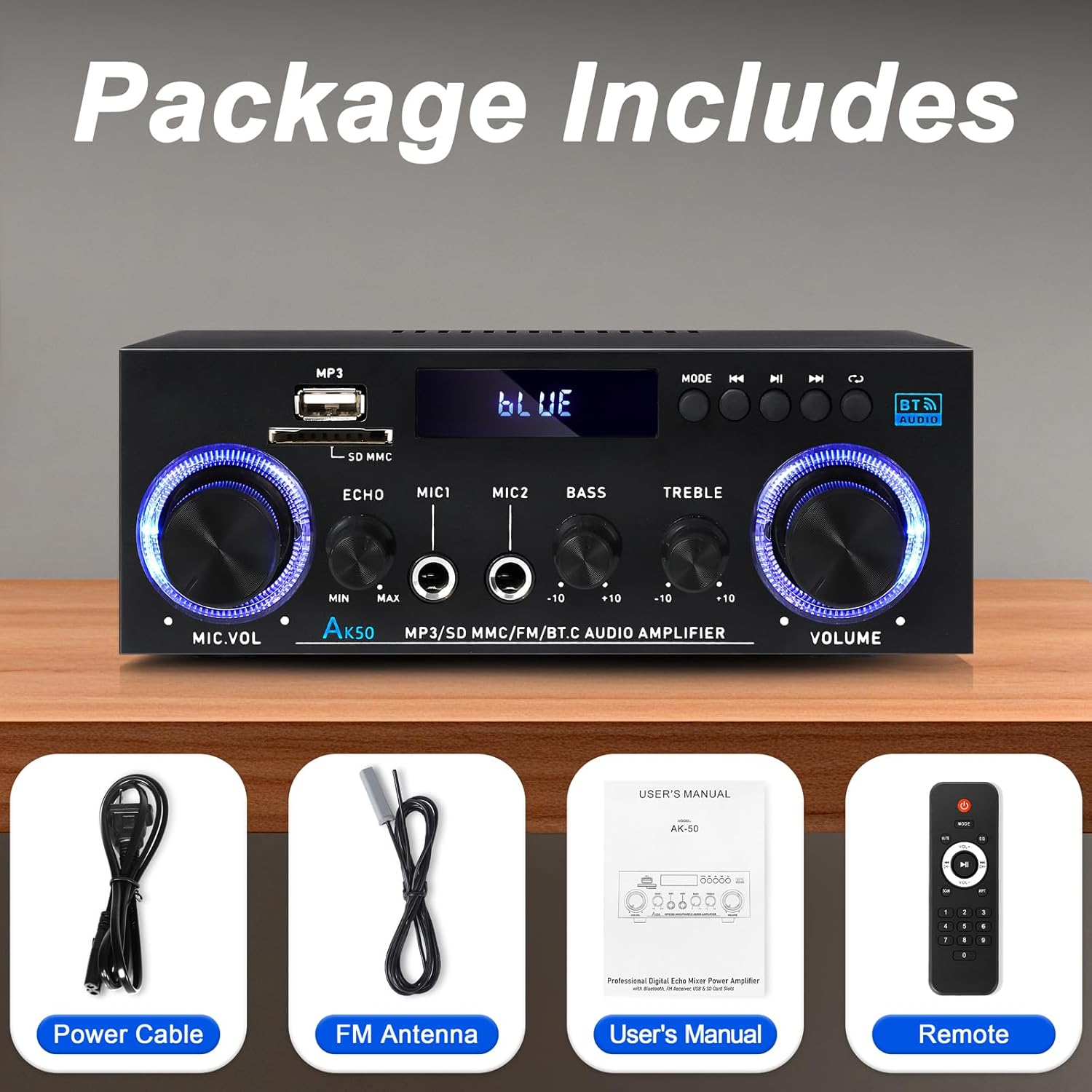
Atahanga 3.1: Nga Taonga Kei roto
This image shows the items included in the WOOPKER AK50 package: the amplifier unit, a power cable, an FM antenna, a user's manual, and a remote control.
4. Tahora Hua
4.1 Paewhiri Mua

Image 4.1: Front Panel Controls and Indicators
This diagram illustrates the front panel of the AK50 amplifier, highlighting its various controls and ports. Key features include the USB/SD port, LED display, mode selection buttons, microphone inputs, and rotary knobs for microphone volume, echo, bass, treble, and master volume.
- Tauranga USB/SD: Mo te whakatangi ororongo files from USB drives or SD cards.
- Whakaatu LED: He whakaatu i te aratau o naianei, i nga korero aroturuki, me etahi atu tohu mana.
- Patene Aratau: Switches between input modes (Bluetooth, AUX, USB, SD, FM).
- Pātene o Mua: Navigates to the previous track/station.
- Pātene Purei/Tatari: Controls playback for USB/SD/Bluetooth.
- Pātene Panuku: Navigates to the next track/station.
- Patene Porohita: Repeats playback mode for USB/SD.
- Pupu Rōrahi Mic: Whakaritea te rōrahi o ngā hopuoro tūhonohono.
- Echo Knob: Whakaritea ai te awe oro mo nga hopuoro.
- Mic Input Jacks (MIC1, MIC2): Ngā hononga 6.35mm hei hono i ngā hopuoro.
- Pūpāpaoro: Whakaritea te putanga ororongo iti-auau.
- Kīpi Tātoru: Whakaritea te putanga ororongo auau teitei.
- Pupu Rōrahi Matua: Whakahaerehia te rōrahi whakaputa whānui.
4.2 Paewhiri Whakamuri

Whakaahua 4.2: Ngā Hononga Paewhiri o Muri
This diagram details the rear panel of the AK50 amplifier, showing the various input and output terminals. It includes the FM antenna jack, power switch, audio input/output jacks, speaker output terminals, and power input ports.
- FM Antenna Jack: Connects to the included FM antenna for radio reception.
- Whakawhiti Kaha: Ka huri te ampwhakaahuru ON, OFF ranei.
- Audio Input Jacks (AUX/LINE): RCA jacks for connecting external audio sources (e.g., CD player, TV).
- Nga Kapeka Huaputa Tukuoro: Ka hono atu ki ngā kaikōrero kore mahi (ātete 4-16Ω).
- Tāuru Mana DC 12V/5A: For DC power supply (if applicable, check model specifications).
- AC 90-240V Power Input: Ka hono ki te pūtake hiko matua mā te whakamahi i te taura hiko kua whakaratohia.
5. Aratohu Tatūnga
Follow these steps to set up your AK50 Stereo AmpKaiwhakaora:
5.1 Hononga Tukuoro
- Me whakarite te amplifier is turned OFF and unplugged from the power outlet.
- Tūhonohia ō kaikōrero hāngū ki te Kaihoko Putanga Tukuoro on the rear panel. Ensure correct polarity (red to red, black to black) for each speaker.
- Ko te amplifier supports speakers with an impedance of 4-16Ω.
5.2 Audio Source Connection
You can connect various audio sources to the AK50 ampKaiwhakaora:
- AUX/LINE Input: Use RCA cables to connect devices like CD players, DVD players, TVs, or PCs to the Audio Input Jacks i runga i te papa o muri.
- USB/Kari SD: Insert a USB flash drive or SD card (pre-loaded with audio files) into the respective port on the front panel.
- Nihokikorangi: Refer to Section 6.3 for Bluetooth pairing instructions.
- Antenna FM: Honoa te antenna FM kua whakauruhia ki te Jack Antenna FM on the rear panel for radio reception. Extend the antenna for better signal.
5.3 Hononga Hiko
- Honoa te taura hiko kua whakaratohia ki te AC 90-240V Whakauru Mana i runga i te papa o muri.
- Monohia tetahi pito o te taura hiko ki tētahi putanga hiko e tika ana.
- Me whakarite te Whakawhiti Mana on the rear panel is in the OFF position before plugging in.

Whakaahua 5.1: Exampte Hoahoa Hononga
This image illustrates various connection possibilities for the AK50 amplifier, including connecting to speakers, a CD player, a DVD player, a PC/laptop, and a TV/Blu-ray player. It also shows the FM antenna and power connections.
6. Nga Tohutohu Whakahaere
6.1 Hiko / Whakaweto
Kia oti ngā hononga katoa, hurihia te Whakawhiti Mana on the rear panel to the ON position. The LED display on the front panel will illuminate.
6.2 Kōwhiringa Aratau
Pehia te Patene Aratau on the front panel or the remote control to cycle through the available input modes: Bluetooth, AUX, USB, SD, and FM.
6.3 Te Rōrahi me te Mana oro
- Rōrahi Matua: Hurihia te Tohunga Volume Volume to adjust the overall sound level.
- Panguru/Turi: Whakamahia te Rongonui Bass a Kopi Treble to fine-tune the low and high frequencies of the audio output.
- Te Rōrahi o te Hopuoro/Te Pāorooro: Mena kua honoa ngā hopuoro, whakamahia te Mika Rapu Rapu to adjust their volume and the Echo Knob to add an echo effect.

Image 6.1: Bass and Treble Controls
This image highlights the Bass and Treble control knobs on the front panel of the AK50 amplifier, indicating their function in adjusting audio frequencies.
6.4 Takirua Nihokikorangi
- Hurihia te ampte whakakā ki te aratau Nihokikorangi mā te whakamahi i te Patene Aratau. The LED display will show "BLUE" or a similar indicator, and the unit will enter pairing mode.
- I runga i to taputapu Nihokikorangi-whakahohea (hei tauira, atamai, papa), whakaahei i te Nihokikorangi me te rapu mo nga taputapu e waatea ana.
- Select "AK50" (or similar device name) from the list to pair.
- Kia takirua, te amplifier will indicate a successful connection, and you can play audio from your device.
- Maintain a distance of within 30 feet (10 meters) for optimal Bluetooth performance.

Image 6.2: Bluetooth Connection
This image demonstrates the Bluetooth pairing process, showing a smartphone displaying available Bluetooth devices and the AK50 amplifier in Bluetooth mode, indicating a successful connection.

Image 6.3: Bluetooth Range
This image illustrates the effective Bluetooth range of the AK50 amplifier, indicating a maximum distance of 32 feet (10 meters) for stable wireless connection between the amplifier and a paired device.
6.5 USB/SD Purei
Insert a USB drive or SD card into the corresponding slot. The ampKa huri aunoa te kaiwhakaora ki te aratau USB/SD ka tīmata te purei ororongo files. Whakamahia te Tuhinga o mua, Purei/Tatari, a Whai muri nga paatene hei whakahaere i te purei ano.
6.6 FM Radio Mahi
- Hurihia te amplifier to FM mode using the Patene Aratau.
- Ko te amplifier will automatically scan and store available FM stations.
- Whakamahia te Tuhinga o mua a Whai muri buttons to navigate between stored stations.
- Adjust the FM antenna position for optimal reception.
6.7 Whakamahi Mana Mamao
The included remote control allows for convenient operation of the amplifier from a distance. Ensure the plastic isolation sheet is removed from the battery compartment before first use.

Image 6.4: Remote Control
This image displays the remote control for the AK50 amplifier, showing buttons for power, mode selection, EQ, volume adjustment, track navigation, and numerical input for direct track selection.
7. Tiaki
Ko te tiaki tika ka mau te roa me te tino pai o to mahi ampKaiwhakaora:
- Te horoi: Use a soft, dry cloth to clean the exterior of the unit. Do not use liquid cleaners or abrasive chemicals.
- Whakahau: Me whakarite kia ma te puehu me te paru ngā pūaha hauhautanga hei ārai i te wera nui.
- Rokiroki: Mena kei te penapena te amplifier for an extended period, unplug it from the power outlet and store it in a cool, dry place.
- Waea Hiko: Regularly inspect the power cord for any damage. If damaged, discontinue use and replace it with an appropriate cord.
8. Te Raru
If you encounter issues with your AK50 amplifier, tirohia nga raru me nga otinga e whai ake nei:
| Raruraru | Take pea | Rongoā |
|---|---|---|
| Karekau he kaha | Power cable not connected; Power switch off; Power outlet faulty. | Check power cable connection; Turn power switch ON; Test outlet with another device. |
| Kaore he putanga oro | Speakers not connected; Incorrect input mode; Volume too low; Audio source issue. | Check speaker connections and polarity; Select correct input mode; Increase master volume; Verify audio source is playing. |
| Nihokikorangi kore hono | Amplifier not in Bluetooth mode; Device not in pairing mode; Too far from ampkaikawe | Whakawhiti amplifier to Bluetooth mode; Ensure device Bluetooth is ON and searching; Move device closer to ampkaikawe |
| Ko te mana mamao kaore e mahi | Battery isolation sheet not removed; Batteries depleted; Obstruction between remote and ampkaikawe | Remove plastic sheet; Replace batteries; Ensure clear line of sight to ampte kaiwhiwhi IR a te kaiwhakaora. |
| Te pōhiri FM kino | FM antenna not connected or positioned incorrectly. | Tūhono pūihi FM kia mau; Whakaritea te turanga antenna kia pai ake te tohu. |
Mena ka mau tonu te raru i muri i te whakamatau i enei otinga, tena koa whakapā atu ki te tautoko a te kaihoko.
9. Whakatakotoranga
| Āhuahira | Whakatakotoranga |
|---|---|
| Tau tauira | AK50 |
| Waitohu | WOOPKER |
| Te Mana Putanga | 400 Watts (Tikiake) |
| Whirihoranga Hongere oro a tawhio noa | 2.0 Channel |
| Hangarau Hononga | Bluetooth 5.0, Auxiliary (RCA), USB, SD Card |
| Pūrere Hototahi | Speakers, Smartphones, Tablets, PCs, CD/DVD Players |
| Aratau Putanga Ororongo | Tirooro |
| Tae | Pango |
| Taumaha Tūemi | 1.98 pauna |
| Ahu mōkihi | 8.66 x 7.87 x 3.54 inihi |
10. Pūtāhui me te Tautoko
For warranty information or technical support, please refer to the documentation provided at the time of purchase or contact WOOPKER customer service through their official channels. Keep your purchase receipt as proof of purchase.