
1. Kupu Whakataki
This manual provides detailed instructions for the installation, operation, and maintenance of your Reoshine AA-66 LED Puck Lights. Please read this manual thoroughly before use to ensure proper functionality and safety. These battery-operated lights are designed for various indoor applications, offering convenience and adjustable illumination.
2. Nga korero haumaru
- Do not expose the lights to water or high humidity. This product is for indoor use only.
- Ensure batteries are inserted with correct polarity (+/-). Incorrect insertion can damage the device.
- Kaua e hanumi nga pākahiko tawhito me nga pākahiko hou, nga momo pākahiko rereke ranei.
- Tangohia ngā pākahiko mēnā kāore e whakamahia ngā rama mō te wā roa.
- Kaua e taea e nga tamariki.
3. Ihirangi mokete
Manatokona kei roto katoa nga mea kei roto i to kete:
- 6 x Motion Sensor Lights
- 6 x Pepa Rino Piripiri
- 12 x Screws (2 for each light)
- 1 x Pukapuka Kaiwhakamahi

Image 1: Six Reoshine AA-66 LED Puck Lights, showcasing the product as received in the package.
4. Hua Neke Atuview
The Reoshine AA-66 LED Puck Lights are designed for versatile illumination with motion sensing capabilities. Each light features:
- Tirohanga: Up to 150 Lumens, 3000K Warm White light.
- Ka taea te atarua: Adjustable brightness from 20LM to 150LM.
- Pūoko Nekehanga: Equipped with Reoshine Constant-Sense technology for reliable motion detection.
- Puna Hiko: Me 3 nga pākahiko AA (kaore i whakauruhia).
- Tāutatanga: Magnetic mount or screw mount options.

Image 2: A Reoshine LED Puck Light installed under a kitchen cabinet, illustrating its primary function and key features like 150 Lumens brightness, motion sensor, battery power, and long run time.
5. Tatūnga
5.1 Tāuta Pūhiko
- Me ata whiria te uhi o muri o te rama ki te taha-a-karaka hei whakatuwhera i te wahanga pākahiko.
- Insert 3 AA batteries (not included) into the compartment, ensuring correct polarity (+ and -).
- Whakakapia te uhi o muri mā te whakarārangi i ngā tohu me te takai i te taha matau kia mau ra ano.
5.2 Kōwhiringa Whakaeke
The Reoshine AA-66 LED Puck Lights offer two installation methods:
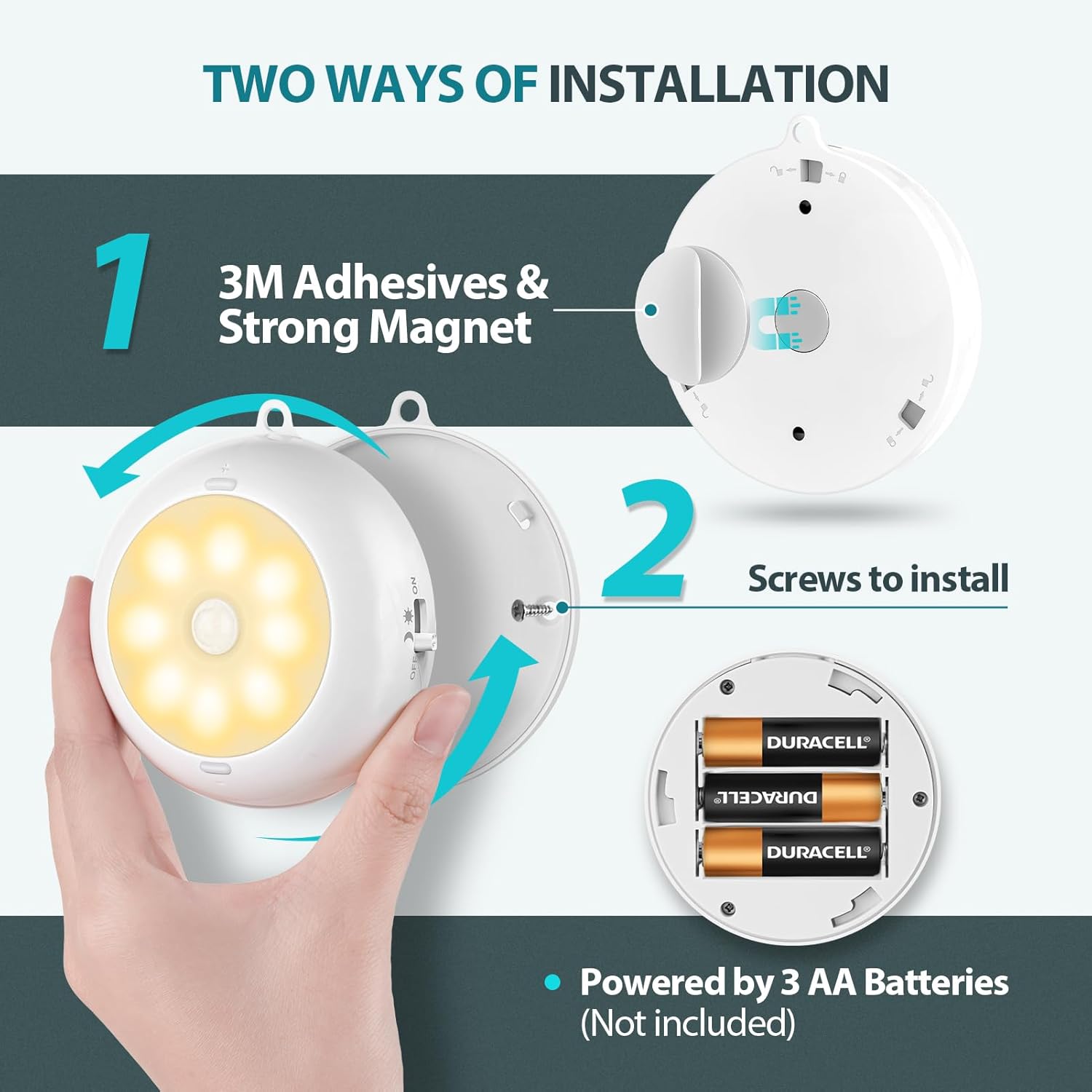
Image 3: A visual guide demonstrating the two installation methods: using 3M adhesive with a strong magnet, and mounting with screws. The image also shows the battery compartment for 3 AA batteries.
Method 1: Magnetic Adhesive Mount
- Clean the desired mounting surface thoroughly to ensure it is dry and free of dust.
- Peel off the protective film from one side of the adhesive iron sheet and attach it to the back of the light.
- Peel off the protective film from the other side of the adhesive iron sheet and firmly press the light onto the desired surface. The strong magnet will hold the light in place.
Method 2: Screw Mount
- Open the back cover of the light to reveal the screw mounting points.
- Mark the desired installation location on the surface.
- Use the provided screws to secure the back cover to the surface.
- Attach the light unit to the secured back cover by twisting it clockwise until it locks.
6. Nga Tohutohu Whakahaere
The Reoshine AA-66 LED Puck Lights feature a multi-mode switch and brightness adjustment buttons.

Whakaahua 4: He taipitopito view of the Reoshine puck light, highlighting the mode switch (OFF, ON, AUTO DAY & NIGHT, AUTO NIGHT) and the '+' and '-' buttons for brightness adjustment.
6.1 Kōwhiringa Aratau
Use the slide switch on the side of the light to select one of the following modes:
- WATE: The light is completely off.
- ON: Ka mau tonu te rama.
- AO ME TE PO: The motion sensor activates the light both during the day and at night when motion is detected. Ideal for closets, cabinets, or areas requiring light regardless of ambient conditions.
- PO AUTOA: The motion sensor activates the light only when it's dark or very dim and motion is detected. Suitable for hallways, stairs, or under cabinet lighting at night.
In motion sensor modes (AUTO DAY & NIGHT, AUTO NIGHT), the light will turn off approximately 20 seconds after motion ceases. Reoshine's Constant-Sense technology ensures the light stays on as long as continuous motion is detected.

Image 5: A split image illustrating the difference between 'Day & Night Motion Sensor Mode' (light activates in both bright and dark conditions) and 'Night Sensor Mode' (light activates only in dark conditions).
6.2 Whakaritenga Tirohanga
When the light is on (either in ON mode or activated by motion in AUTO modes), press the + pātene ki te whakanui i te wherikotanga, te - button to decrease brightness. The brightness can be adjusted from 20 Lumens (minimum) to 150 Lumens (maximum).
7. Tiaki
7.1 Whakakapinga Pūhiko
When the light output becomes dim or the motion sensor responsiveness decreases, it is time to replace the batteries. Follow the battery installation steps in Section 5.1.
7.2 Te horoi
Wipe the light's surface with a soft, dry cloth. Do not use abrasive cleaners or solvents, as these may damage the finish or electronic components.
8. Te Raru
| Raruraru | Take pea | Rongoā |
|---|---|---|
| Kaore e marama te rama. | No batteries, dead batteries, or incorrect battery polarity. | Check battery installation and replace with fresh AA batteries. |
| Kāore te pūoko nekehanga e mahi ana. | Incorrect mode selected (e.g., OFF or ON mode). Ambient light too bright in AUTO NIGHT mode. | Ensure the switch is set to AUTO DAY & NIGHT or AUTO NIGHT. If in AUTO NIGHT, ensure the environment is sufficiently dark. |
| He iti rawa te marama, he kanapa ranei. | Me whakarerekē te taumata kanapa. | Use the + and - buttons to adjust the brightness to your preference. |
| Ka tere rawa te tineia o te rama. | Kāore i kitea he nekehanga tonu. | The light is designed to turn off 20 seconds after motion ceases. Ensure you are within the sensor's range for continuous illumination. |
9. Whakatakotoranga
| Āhuahira | Taipitopito |
|---|---|
| Ingoa Tauira | AA-66 |
| Waitohu | Te reo whiti |
| Putanga Maama Morahi | 150 Lumens |
| Te Paemahana Tae | 3000 Kelvin (Ma mahana) |
| Puna Mana | 3 Pahiko AA (kaore i uru) |
| Nga waahanga motuhake | Battery-Operated, Dimmable with Adjustable Brightness, Motion Sensor |
| Rauemi | Acrylonitrile Butadiene Styrene |
| Hunga Hua | 3.35 x 3.35 x 1.04 inihi |
| Taumaha Tūemi | 12.5 hekere (mō te kete o te 6) |
| Mahinga o roto/waho | Roo-roto |
| Taumata Atete Wai | Ehara i te wai ātete |
10. Pūtāhui me te Tautoko
For warranty information or technical support, please refer to the product packaging or contact Reoshine customer service through the retailer where the product was purchased. Keep your purchase receipt for warranty claims.