
Kupu Whakataki
Welcome to the ACwO DwOTS Flow Open-Ear Earbuds user manual. These earbuds are designed to provide a unique open-ear listening experience with X-Fidelity sound, AI-ENC noise reduction for calls, and versatile dual modes for music and gaming. This manual will guide you through the setup, operation, and maintenance of your new earbuds.
Ka mutu te huaview
The ACwO DwOTS Flow earbuds feature an open-ear design for comfort and environmental awareness. They come with a compact charging case.

Whakaahua 1: Mua view of ACwO DwOTS Flow Open-Ear Earbuds.

Whakaahua 2: Taha view of ACwO DwOTS Flow Open-Ear Earbuds, showing the ear hook design.

Whakaahua 3: Hoki view of ACwO DwOTS Flow Open-Ear Earbuds.
Tatūnga
1. Te Whakataki i nga Paorooro me te Puhi
Before first use, fully charge the ACwO DwOTS Flow earbuds and their charging case.
- Whakanohoia nga purongo ki roto i te pukoro utu, kia tika te noho.
- Honoa te pouaka utu ki tētahi pūtake hiko mā te whakamahi i tētahi taura USB hototahi.
- Mā ngā rama tohu o te pouaka e whakaatu te tūnga utu.
- Mā te utunga 10 meneti ka roa te purei mō te 2.5 hāora. Mā te utunga katoa ka roa te purei mō te 50 hāora me te pouaka utu.
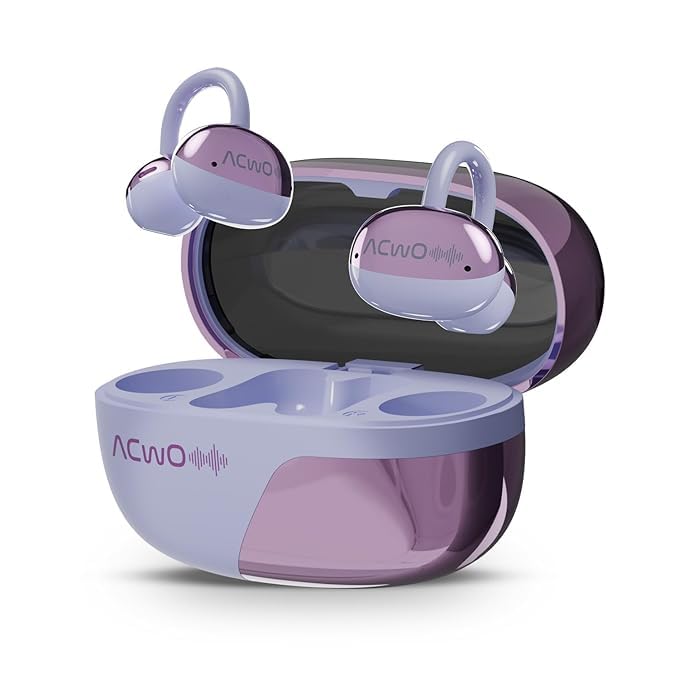
Figure 4: ACwO DwOTS Flow charging case with earbuds inserted.
2. Tauhoa ki te Pūrere
The ACwO DwOTS Flow earbuds use Bluetooth 5.3 for wireless connectivity.
- Whakatuwherahia te putea utu. Ka uru aunoa nga taringa ki te aratau takirua.
- I runga i to taputapu (waea atamai, papa, pona), whakaahei i te Nihokikorangi.
- Rapua "ACwO DwOTS Flow" in the list of available Bluetooth devices.
- Select "ACwO DwOTS Flow" to connect. Once connected, a voice prompt will confirm successful pairing.
Hononga Takirua: These earbuds support connecting to two devices simultaneously. After pairing with the first device, follow the pairing steps for the second device. The earbuds will intelligently switch between devices.

Figure 5: Illustration of ACwO DwOTS Flow connected to two devices simultaneously.
Nga Tohutohu Whakahaere
E mau ana i nga Paorooro
The open-ear design ensures comfort and allows you to remain aware of your surroundings. Gently place the earbuds over your ears, ensuring a stable and comfortable fit.

Figure 6: ACwO DwOTS Flow earbuds demonstrating comfortable and stable fit.

Figure 7: Diagram illustrating the open-ear listening concept for environmental awareness and balanced audio.
Whakahoki Ororongo
Enjoy X-Fidelity Acoustics with balanced highs, mids, and deep bass.
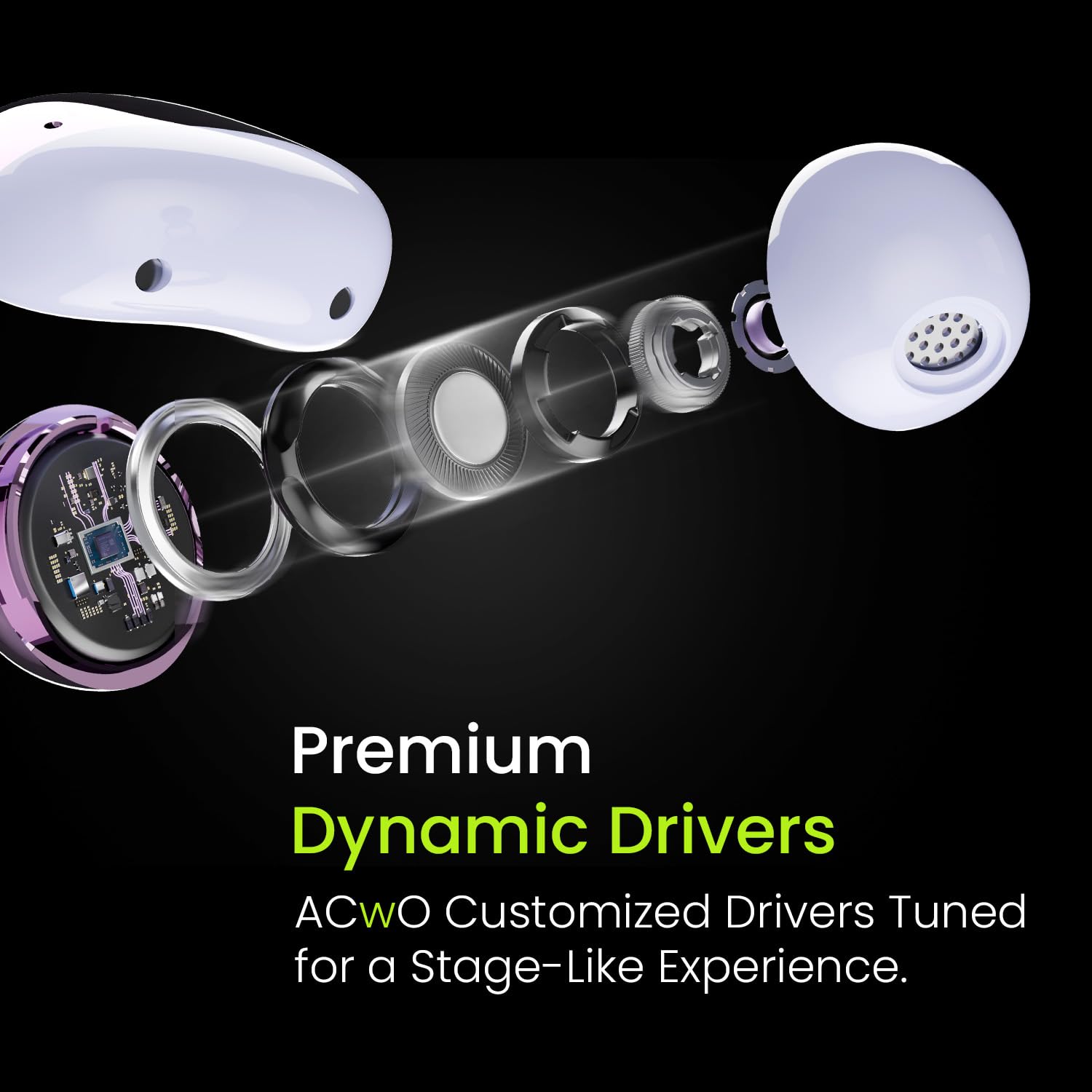
Whakaahua 8: Roto view highlighting the premium dynamic drivers for enhanced sound quality.
Whakahaa Piiraa
The integrated AI-ENC (Environmental Noise Cancellation) microphone ensures clear calls by reducing background noise.
- Whakautu/Whakamutu Waea: Patohia te wāhi mana pā o tētahi o ngā pane taringa kotahi.
- Whakakore Waea: Pēhia me te pupuri i te waahi mana pa ki runga i tetahi purongo mo te 2 hēkona.
Music & Gaming Modes
Switch between modes to optimize your audio experience.
- Aratau Waiata: Provides rich, balanced audio for general listening.
- Aratau petipeti: Offers dynamic sound with reduced latency for an immersive gaming experience.
- Whakawhiti Aratau: Refer to the product's quick start guide or packaging for specific touch control gestures to switch between Music and Gaming modes.
Environmental Awareness Mode
This mode allows you to hear your surroundings clearly while enjoying audio, enhancing safety in various environments. This is a core feature of the open-ear design.
Te tiaki
- Te horoi: Whakamahia he kakahu ngohengohe, maroke hei horoi i ngā pane taringa me te pouaka utu. Kaua e whakamahi i ngā rauemi whakakoi, i ngā matū kino rānei.
- Ātete wai: The earbuds are IPX5 water resistant, meaning they can withstand splashes and sweat. Do not submerge them in water. Ensure they are dry before placing them back in the charging case.
- Rokiroki: Whakaorangia nga purongo i roto i o raatau putea karekau e whakamahia ana hei tiaki me te pupuri i te utu.
Raparongoā
| Raruraru | Rongoa pea |
|---|---|
| Karekau nga taringa e hono ana |
|
| Kaore he tangi, he iti ranei te rahinga |
|
| Poor call clarity (AI-ENC Mic) |
|
| Karekau nga taringa e utu ana |
|
Whakatakotoranga
| Āhuahira | Taipitopito |
|---|---|
| Ingoa Tauira | DwOTS Flow |
| Waitohu | ACwO |
| Hangarau Hononga | Ahokore (Nihokikorangi) |
| Putanga Nihokikorangi | 5.3 |
| Hanga Whakatangitangi | Tuwhera-Tanga |
| Āhuatanga Mana Haruru | AI-ENC Noise Reduction |
| Ora Pūhiko | Tae atu ki te 50 Haora (me te putea utu) |
| Whakatau Tere | 10 meneti te utu mō te 2.5 hāora te wā purei |
| Taumata Atete Wai | IPX5 |
| Momo Atekōkiri Ororongo | Atekōkiri Hihiko |
| Tikanga Mana | Reo (Note: Typically includes touch controls, refer to product packaging for specific gestures.) |
| Pūrere Hototahi | Cellphones, Tablets, Laptops, Gaming Consoles |
| Hunga Hua | 4.5 x 6 x 2.8 cm |
| Taumaha Tūemi | 150 g |
| Rauemi | Kirihou |
| Whenua Taketake | Inia |
Pūtāhui me te Tautoko
For warranty information, technical support, or service inquiries, please refer to the warranty card included with your product or visit the official ACwO webpae. Ka taea hoki e koe te whakapiri tika ki te kaihoko mo te awhina.