
1. Hua Neke Atuview
The Kviflon 36-inch flush mount ceiling fan is designed for modern home decor, featuring a durable, lightweight plastic construction with 3 reversible blades. It includes integrated LED lighting with 3 color temperatures (3000K, 4500K, 6000K) and stepless dimming. Control options include a remote and a smart application for convenient adjustment of fan speed, light settings, and direction. The reversible motor allows for both summer cooling and winter air circulation.
2. Nga korero haumaru
- Whakawetohia i nga wa katoa te toha hiko matua i te waahi ara iahiko i mua i te tiimata o te whakauru, te horoi, te tiaki ranei.
- Ensure all electrical connections comply with local codes and ordinances. If you are unsure about wiring, consult a qualified electrician.
- Mount the fan to a ceiling joist or a securely anchored outlet box capable of supporting the fan's weight.
- Do not bend the blade holders during installation or cleaning.
- Tiakina nga tamariki mai i te powhiriwhiri i te wa e mahi ana.
3. Ihirangi mokete
Manatokohia kei te noho nga waahanga katoa i mua i te whakaurunga:
- Fan Motor Huihui
- Screw Bag (Mounting Hardware)
- Ngā Mata Pā (3 ngā wahi)
- Lampwhakamarumaru
- Kaiwhiwhi
- Mana Mamao
- Pukapuka Tohutohu

Image: All components included in the Kviflon 36-inch ceiling fan package.
4. Aratohu Whakauru
Follow these steps for proper installation. It is recommended to install the fan blades and light fixtures first, then mount the fan to the ceiling.
4.1. Mounting the Fan Blades and Light
- Attach the fan blades to the motor assembly using the pre-installed screws.
- Secure the LED light panel to the fan body.
- Tāutahia te lampshade over the LED light panel.
4.2. Ceiling Mounting and Wiring
Ensure the ceiling is suitable for flush mount installation. The fan is designed for flush mounting, not angle mounting.

Image: Correct flush mount installation is shown on the left, while an incorrect angle mount is on the right.
- Install the hanging board to the ceiling using appropriate screws.
- Connect the fan's wiring to your household electrical wiring. Ensure correct connections for live (black), neutral (white), and ground (yellow/green) wires.
- Secure the fan body to the hanging board.
Video: Detailed installation guide for the Kviflon 3-blade ceiling fan with light.
5. Nga Tohutohu Whakahaere
5.1. Mana Mamao
The included remote control allows for convenient operation of all fan and light functions.

Image: Remote control layout with functions for power, light, fan speed, color temperature, brightness, and timer.
- Hiko Whakaka/Weto: Use the 'All off' or 'Light on/off' buttons.
- Tere Kiri: Select from 6 speeds using buttons 1-6. 'STOP' turns off the fan.
- Mana Maama: Adjust brightness ('Brightness+' / 'Brightness-') and change color temperature ('Color temperature+' / 'Color temperature-').
- Mahi Whakahokia: Press 'F/R' to switch between summer (downward airflow) and winter (upward airflow) modes.
- Matawā: Set a 2-hour timer using the '2H' button.
- Whakaōrite Waehere: Use the 'SETUP' button for pairing the remote with the fan.
5.2. Mana Whakahaere Taupānga Atamai
Control your fan and light settings conveniently from your smartphone using the 'Fan Lamp Pro' application.

Image: Step-by-step guide for connecting the ceiling fan to the 'Fan Lamp Pro' mobile application.
- Tikiake APP: Scan the QR code in the image or visit http://www.jasonghost.com/fanlamppro/ to download the 'Fan Lamp Pro' app.
- Whakahohe Nihokikorangi: Whakakāhia te Nihokikorangi i runga i to waea pūkoro.
- Open APP: Launch 'Fan Lamp Pro' and enter the main page.
- Tāpiri Pūrere: Click the '+' button to add a new fan lamp.
- Takirua: Enter the control page after creating a device. Click the pair button several times within 5 seconds after the fan is powered on. The fan light will blink or beep to confirm successful pairing.
Video: Demonstration of APP control for the Kviflon 36-inch 3-blade ceiling fan.
5.3. Fan Features
- 6 Tere Whakaritea: Choose from 6 wind speeds to suit your comfort level. Speeds 1-2 are suitable for sleep, 3-4 for leisure, and 5-6 for fitness.
- Rere Hau Whakahurihuri: The fan features a reversible motor. In summer mode, blades rotate counter-clockwise for downward airflow, creating a cooling effect. In winter mode, blades rotate clockwise for upward airflow, circulating warm air.
- Mahi Ataahua: Designed for low noise performance, operating at approximately 30 decibels, ideal for bedrooms and living areas.

Image: Illustration of 6 adjustable fan speeds suitable for various activities like sleeping, leisure, and fitness.
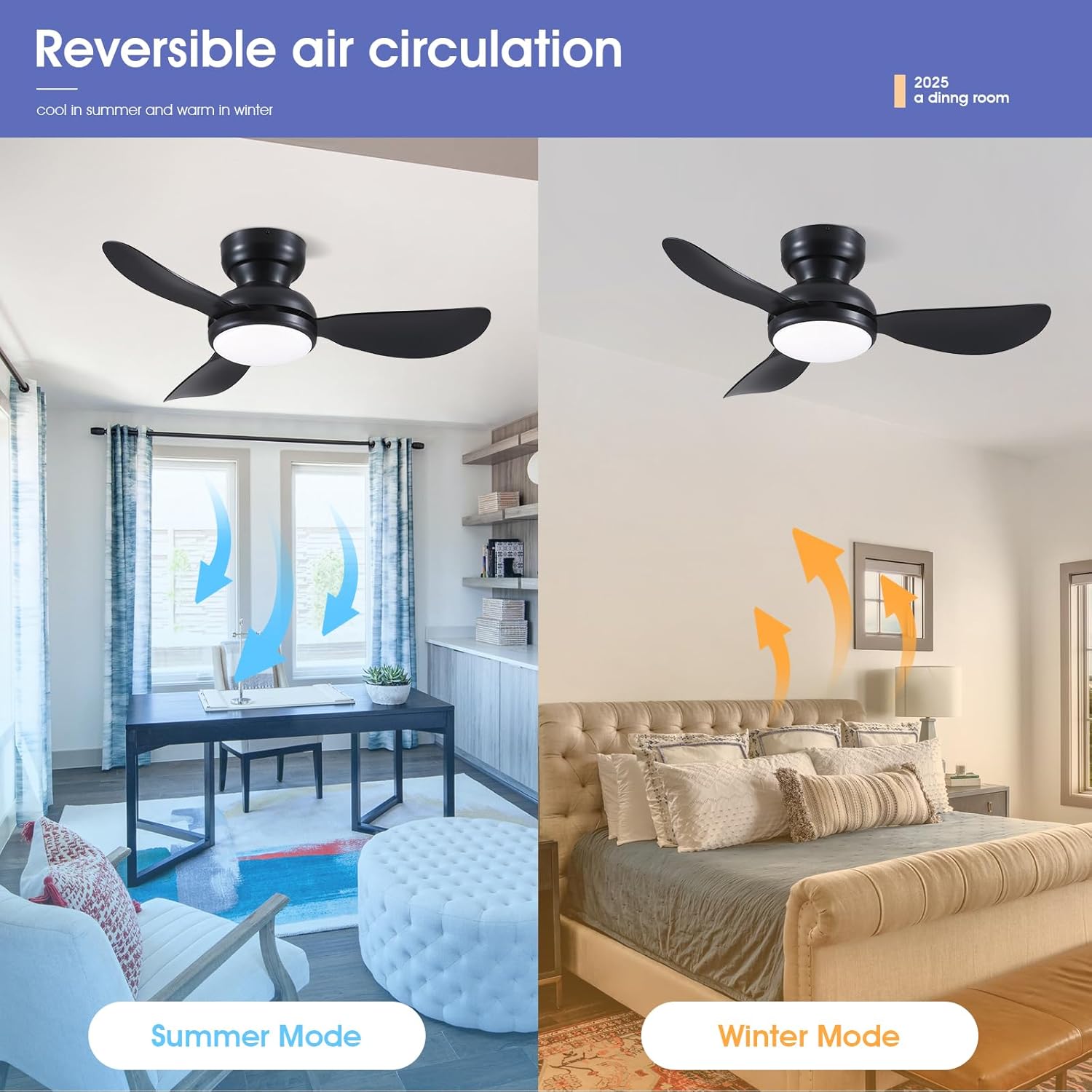
Image: Visual representation of reversible air circulation, with downward airflow for summer and upward airflow for winter.

Image: Features a strong, quiet motor for comfortable environment and includes a 2-hour timer.
5.4. Light Features
- 3 Color Temperatures (CCT): Switch between 3000K (Warm light), 4500K (Natural light), and 6000K (White light) to match your preference or activity.
- Whakarereke-kore: Adjust the light brightness from 20% to 100% smoothly.

Image: The fan light offers three color temperature options: 6000K (White), 4500K (Natural), and 3000K (Warm), with dimming capability.
6. Tiaki
- Te horoi: To avoid electric shock, ensure the power is turned off before cleaning. Use a soft, damp cloth to wipe the fan blades and light fixture. Do not use abrasive cleaners or solvents.
- Tirotiro: Periodically check all connections and screws to ensure they are secure.
7. Te Raru
- Karekau te Fan e mahi: Check power supply, ensure all wires are connected correctly, and verify the remote control batteries.
- Kare te rama e ka ana: Check power supply, ensure light panel connections are secure, and verify remote control batteries.
- Mana mamao kaore e mahi: Replace batteries. If still unresponsive, re-pair the remote with the fan using the 'SETUP' button.
- Pokarekare ana: Ensure all blade screws are tightened and the mounting bracket is securely installed.
8. Whakatakotoranga
| Āhuahira | Whakatakotoranga |
|---|---|
| Waitohu | Kviflon |
| Tau tauira | 8922 |
| Rahi | 36 IN - 3 Blades |
| Tae | Pango |
| Hiko Hiko Hoahoa | Te Peera Taapiri |
| Puna Mana | DC |
| Momo Whakaeke | Maunga Huruhuru |
| Te maha o nga Matatahi | 3 |
| Rauemi Mata | Kirihou |
| Momo Maama | LED |
| Nga waahanga motuhake | Adjustable Color Temperature, App Operable, Dimmable, LED Light, Remote Controlled |
| Momo Kaiwhakahaere | Mana Taupānga, Mana Pātene, Mana Mamao |
| Te maha o nga tere | 6 |
| Taumata Haruru | 30 Decibels |
| Wattage | 24 watts |
| Voltage | 110 Volts |
| Hunga Hua | 36"D x 36"W x 9.45"H |
9. Pūtāhui me te Tautoko
This Kviflon ceiling fan comes with a 1-tau pūtāhui from the date of purchase, covering manufacturing defects. For technical support, installation assistance, or warranty claims, please contact Kviflon customer service.
You can also visit the official Kviflon store for more information and product details: Kviflon Store
10. Additional Product Features
Video: Scene display showcasing the Kviflon 36-inch 3-blade black fan light in various room settings.