
1. Hua Neke Atuview
The ARES WING GDT1006 is a heavy-duty single monitor arm designed for large and ultrawide displays. It features a gas spring system for smooth adjustments and offers versatile mounting options to optimize your workspace.
- Ultrawide Monitor Support: Compatible with 24-inch to 57-inch displays, supporting up to 66 lbs for flat screens and 52.8 lbs for curved screens. Includes VESA adapter kit for 75x75 mm, 100x100 mm, 100x200 mm, 200x100 mm, and 200x200 mm VESA patterns. Note: Non-VESA displays require a separate VESA adapter, typically included with your monitor package.
- Hanganga pakari: Engineered with premium aluminum and steel for enhanced stability and durability. The gas spring system is tested for 20,000 cycles to ensure consistent performance and reduce screen wobble.
- Full-Range Adjustability: Offers extensive positioning flexibility with +70° to -45° tilt, ±90° swivel, and 360° rotation. The height is adjustable up to 22.4 inches via the gas spring system.
- Kōwhiringa Tāuta Tārua: E whakarato ana i te C-clamp mounting for desktops between 0.47 inches and 1.77 inches (1.2-4.5 cm) thick, and grommet mounting.
- Hoahoa Tiaki Mokowā: Frees up valuable desk space and includes an integrated cable management system to keep wires organized.
2. Tatūnga me te Tāuta
Before beginning installation, ensure all parts are present and refer to the included hardware list. It is recommended to install the arm to the desk before attaching the monitor.
2.1 Check Monitor Compatibility
Verify your monitor has VESA mounting holes. If your monitor does not have built-in VESA compatibility or requires a specific adapter (e.g., for Samsung G9), ensure you have the necessary adapter before proceeding.

Image: Check for VESA holes and prepare VESA adapter if needed.
2.2 Kōwhiringa Whakaeke
The monitor arm offers two primary mounting methods: C-clamp me Grommet.

Image: Two mounting options: C-clamp and Grommet. C-clamp supports 0.47"-1.77" desktop thickness. Grommet supports 0.5"-2.0" desktop thickness.
C-Clamp Whakapiki:
Whakauruhia te C-clamp to the edge of your desk. Ensure the desktop thickness is between 0.47 inches and 1.77 inches. Tighten the clamp haumaru.
Whakapiki Grommet:
For grommet mounting, your desktop must have an existing through-hole (diameter 0.4-2.4 inches) or you may need to drill a 3/8 inch (10mm) hole. Ensure the desktop thickness is between 0.5 inches and 2.0 inches.

Image: Desktop thickness compatibility for C-clamp me te whakapuru grommet.
2.3 Nga Mahi Huihuinga
Follow these general steps for assembly. A detailed animation is available in the video section.

Image: Easy 3-step installation overview.
- Mount the base to your desk using either the C-clamp or grommet method.
- Assemble the monitor arm sections, ensuring they are securely connected.
- Attach the VESA plate to your monitor, then slide the monitor onto the arm's mounting head.
2.4 Ngā Ataata Tāutanga
Video: Detailed installation animation for the ARES WING GDT1006 monitor arm.
Video: Installation tips for the GDT1006 heavy-duty monitor arm, including VESA adapter usage and initial tension adjustment.
3. Nga Tohutohu Whakahaere
The ARES WING GDT1006 monitor arm allows for flexible positioning to achieve optimal viewing angles and ergonomic comfort.
3.1 Te Whakatikatika i te Tūnga o te Aroturuki
The arm provides full-range motion for tilt, swivel, and rotation:
- Tapahia: +70° ki te -45°
- Hurihuri: ±90°
- Hurihuri: 360° (portrait to landscape)
- Whakatikatika Teitei: Up to 22.4 inches maximum height.
- Toronga: Up to 23.3 inches maximum extension.

Image: Monitor arm showing full range of motion: tilt, swivel, rotation, max height, and max extension.
3.2 Te Whakarerekētanga o te Kukū o te Puna Hau
The gas spring tension must be adjusted to match the weight of your monitor. This ensures the arm holds its position securely and allows for smooth movement.
- Mena te ringa takataka, turn the adjustment screw in the '+' direction until it remains in a horizontal position.
- Mena te ringa ka maranga, turn the adjustment screw in the '-' direction until it remains in a horizontal position.
Caution: Before adjusting the spring tension and during the adjustment process, position and hold the arm horizontally as shown. Use the supplied Allen key for adjustment. Ask for assistance should you require it.
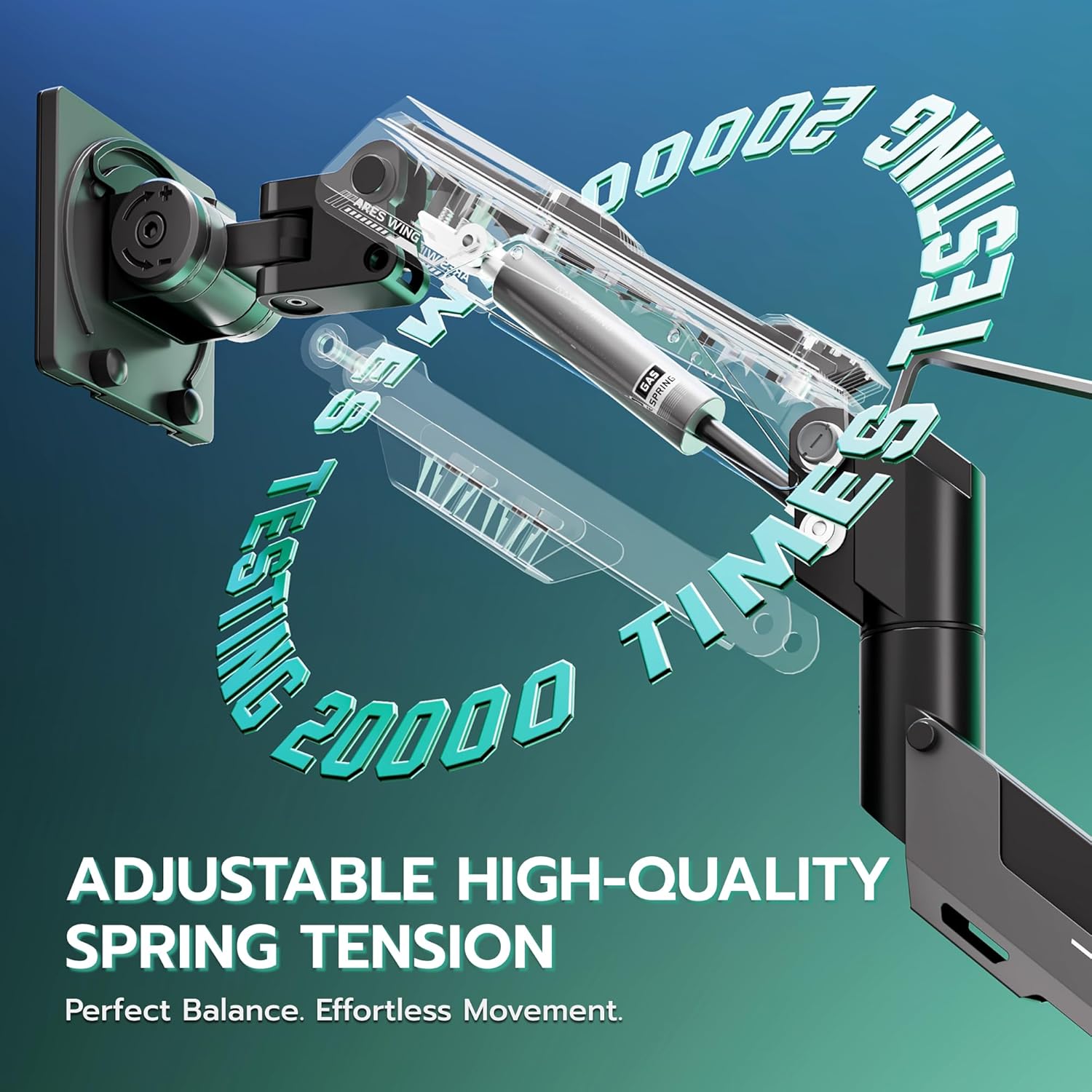
Image: Adjustable high-quality gas spring tension for perfect balance and effortless movement.
3.3 Whakahaere taura
Utilize the integrated cable management system to route and conceal your monitor cables, contributing to a cleaner and more organized workspace.

Image: Integrated cable management for a clean setup.
3.4 Ataata Whakahaere
Ataata: Ka mutuview of the ARES WING heavy-duty monitor arm's features and adjustability for 57-inch ultrawide screens.
4. Tiaki
To ensure the longevity and optimal performance of your ARES WING monitor arm, follow these maintenance guidelines:
- Whakapai auau: Wipe down the arm and base with a soft, damp kakahu. A ape i nga kai horoi me nga whakarewa ka taea te pakaru i te mutunga.
- Taki Hononga: Tirotiro ia ia nga wa katoa nga wiri me nga hononga kia mau tonu. Whakapiri ano mehemea e tika ana.
- Te Whakatikatika i te Puna Hau: If you notice the monitor arm sagging or rising unexpectedly, re-adjust the gas spring tension as described in Section 3.2.
- A ape i te utaina nui: Do not exceed the maximum weight capacity of 66 lbs (flat screen) or 52.8 lbs (curved screen) to prevent damage to the arm and monitor.
5. Te Raru
If you encounter issues with your monitor arm, refer to the following common solutions:
- Monitor Sags or Rises: This is typically due to incorrect gas spring tension. Refer to Section 3.2 for instructions on how to adjust the tension to match your monitor's weight.
- He Wetekina/He Wiriwiri te Ringa: Ensure all mounting screws (both at the desk and the VESA plate) are securely tightened. Check the desk clamp or grommet mount for stability.
- Difficulty Tilting Monitor: If the monitor cannot be tilted, loosen the adjustment screw on the head of the arm until it can be tilted to the desired position.
- Monitor Rotation Issues: If the monitor does not rotate smoothly or is stuck, check for any obstructions and ensure the rotation mechanism is not overly tightened.
- Arm Does Not Move Smoothly: Ensure the gas spring tension is correctly set for your monitor's weight. Lubrication is generally not required for gas springs.
- Morearea Tipa: Tupato: Kaua e hurihia te mata tirotiro ki tua atu i te taha o muri o te tēpu hei karo i tētahi āhuatanga taupatupatu ka taka pea.
6. Whakatakotoranga
| Āhuahira | Whakatakotoranga |
|---|---|
| Waitohu | ARES WING |
| Tauira | GDT1006 |
| Momo Whakaeke | Maunga Papa (C-Cl)amp / Grommet) |
| Momo Nekehanga | Rotate, Tilt, Swivel, Height Adjustment |
| Rauemi | Konumohe |
| Tae | Pango |
| Pūrere Hototahi | Aroturuki |
| Minimum Supported Screen Size | 24 Inihi |
| Maximum Supported Screen Size | 57 Inihi |
| Taumaha Āheinga (Mata Papatahi) | Tae atu ki te 66 lbs |
| Taumaha Āheinga (Mata Piko) | Tae atu ki te 52.8 lbs |
| Koki Honga Morahi | 70 Degrees (Up) / -45 Degrees (Down) |
| Awhe Hurihuri | ±90 Waeine |
| Te hurihanga | 360 Waeine |
| Max Height Adjustment | 22.4 Inihi |
| Toronga Max | 23.3 Inihi |
| Desktop Thickness (C-Clamp) | 0.47"-1.77" (1.2-4.5cm) |
| Desktop Thickness (Grommet) | 0.5"-2.0" |
7. Pūtāhui me te Tautoko
ARES WING products are manufactured with quality and reliability in mind. This product comes with a standard manufacturer's warranty against defects in materials and workmanship.
For warranty claims, technical support, or assistance with installation and operation, please contact ARES WING customer service through the retailer where the product was purchased or visit the official ARES WING webpae mo nga korero whakapā.
Tena koa pupurihia to tohu hoko mo nga kaupapa whakamana.