
Kupu Whakataki
The Nanlite Pico Portable LED Fill Light is a compact and versatile lighting solution designed for photographers, videographers, and content creators. Weighing only 130g, its palm-sized design allows for easy portability, fitting into a pocket for on-the-go shooting. This light offers full-color RGB capabilities, adjustable color temperature, and various special effects to enhance your creative projects. Its intuitive controls and multiple mounting options make it an essential tool for diverse lighting needs.
He aha kei roto i te Pouaka
- Pico Portable LED Fill Light x1
- Magnetic Attraction Diffuser x1
- Cold Shoe Adapter x1

Image: The Nanlite Pico Portable LED Fill Light, a magnetic diffuser, and a cold shoe adapter are included in the product packaging.
Nga waahanga matua
- Kiato me te Mamaa: Weighs only 130g, making it highly portable for outdoor shooting and easy to carry in a pocket.
- Nga Mana Mana: Features a single knob and double button design for one-handed parameter adjustment and mode switching.
- 1.28-inch Round Screen: Provides a clear and intuitive display for monitoring settings and battery life.
- Papa aukume: Allows for convenient magnetic adsorption to metal surfaces for flexible placement.
- Flexible Flipping U-Frame: Offers 12 pitch adjustment angles (30° increments) for precise light positioning.
- Pūhiko Hanga-roto: Integrated 1500mAh lithium battery provides 1.3 to 6.5 hours of battery life depending on brightness.
- Full Color RGB: Supports 0-360 hues and 0-100% saturation adjustment with 36,000 rich colors.
- Ngā Pānga Motuhake: Includes 14 built-in effects to unlock creative lighting possibilities.
Tatūnga
Te utu i te Pūrere
The Nanlite Pico features a built-in 1500mAh lithium battery. To charge, connect a USB Type-C cable (not included) to the charging port on the side of the device. The 1.28-inch round screen will display the charging status and estimated battery life. For continuous power during extended shoots, the device can be powered via USB-C.
Te taapiri i te diffuser
The included magnetic diffuser can be easily attached to the front of the light. Simply align the diffuser with the light panel, and the magnets will secure it in place. This diffuser helps to soften the light output, providing a more even and flattering illumination.

Image: The Nanlite Pico LED light with its magnetic diffuser attached, demonstrating how the diffuser softens the light output.
Kōwhiringa Whakapuru
The Pico light offers multiple mounting solutions:
- Cold Shoe Adapter: Attach the included cold shoe adapter to the 1/4"-20 mount on the light's base. This allows you to mount the Pico directly onto a camera's hot shoe or any accessory with a cold shoe receiver.
- 1/4"-20 Thread: The light features a standard 1/4"-20 thread on its base, enabling direct attachment to tripods, light stands, or ball heads.
- Adsorption autō: The light's base is magnetic, allowing it to be securely attached to any suitable metal surface for quick and flexible positioning.
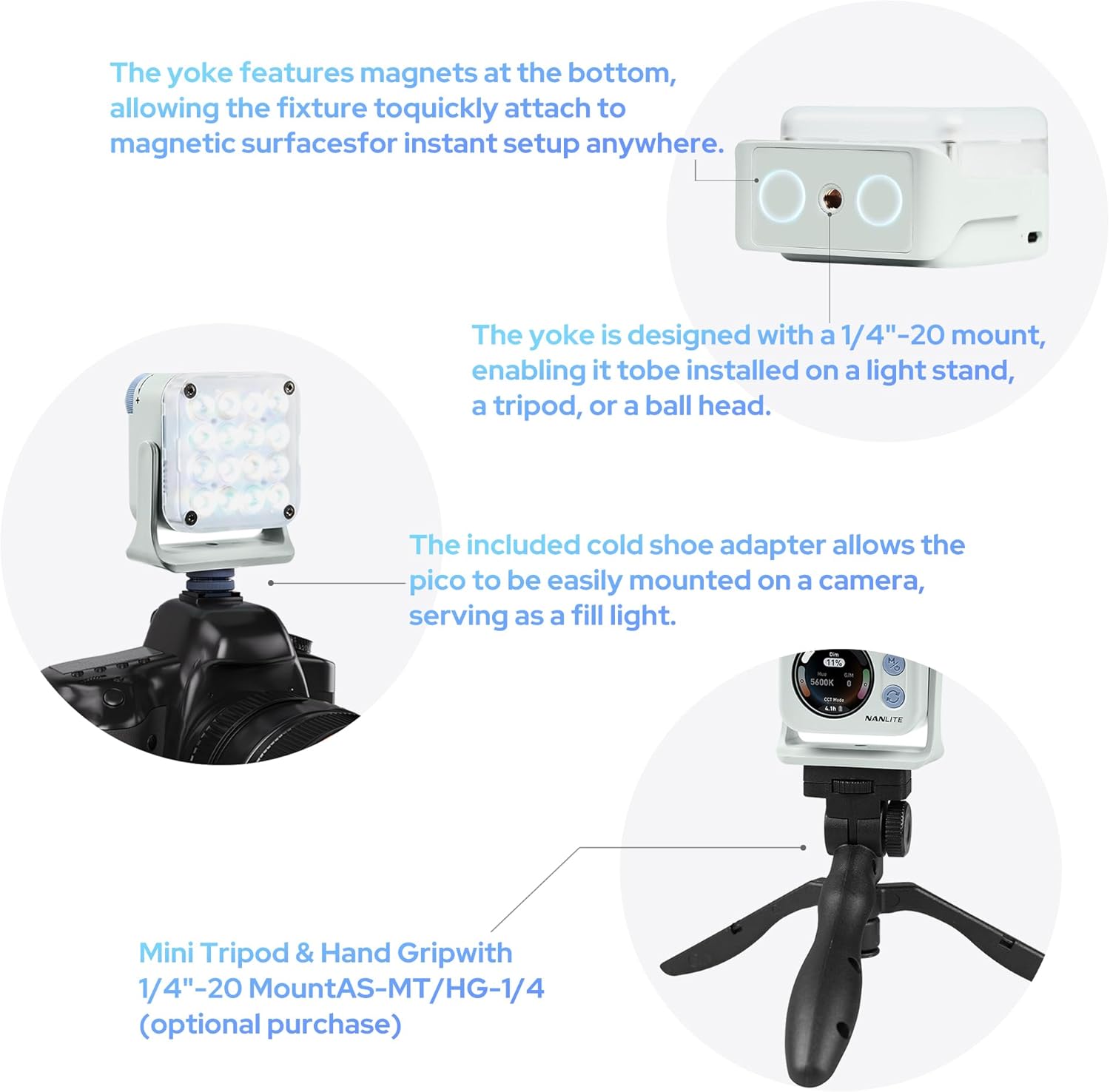
Image: The Nanlite Pico light shown mounted on a camera using the cold shoe adapter and also on a mini tripod, illustrating its versatile attachment options.
Nga Tohutohu Whakahaere
Te Hiko / Whakaweto
To power on the device, press and hold the power button (usually combined with the 'M' mode button) for a few seconds until the screen illuminates. To power off, repeat the process.
Kōwhiringa Aratau
The Nanlite Pico offers multiple operating modes:
- Aratau CCT: Adjusts color temperature from 2700K to 7500K, allowing for warm to cool lighting.
- RGB/HSI Mode: Provides full control over hue (0-360°), saturation (0-100%), and intensity for custom color lighting.
- Aratau FX: Access 14 built-in special effects like Police Car, Fire, Lightning, Paparazzi, and more.
Use the mode button to cycle through these main modes. The 1.28-inch round screen will display the current mode and settings.
Te Whakatikatika Tautuhinga
Use the control knob to adjust parameters within each mode. For example, in CCT mode, rotate the knob to change the color temperature. In RGB/HSI mode, rotate to adjust hue, saturation, or intensity after selecting the parameter with the secondary button.
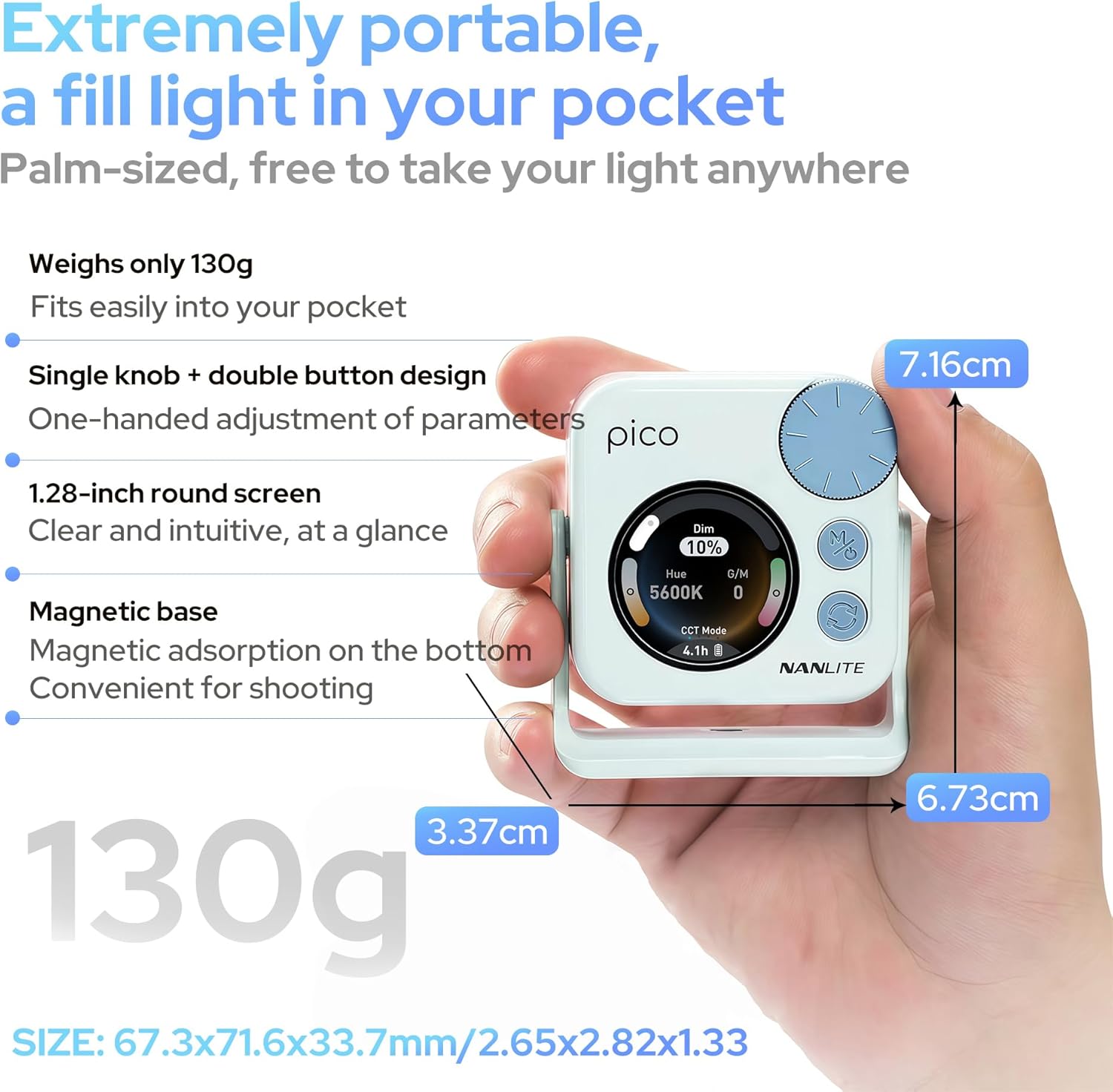
Image: A hand holding the Nanlite Pico light, with a clear view of its 1.28-inch round screen displaying current settings and the control knob for adjustments.
Mana App Mobile
The Nanlite Pico supports Bluetooth connectivity for control via a mobile application. Download the official Nanlite app to access advanced features, remote control, and precise adjustments from your smartphone or tablet.
Video: A demonstration of the Nanlite Pico LED Video Light, highlighting its pocket-sized design, ease of use, and bright output for various creative applications.
Whakatakotoranga
| Waitohu | NANLITE |
| Tau tauira | Pico Light |
| Ahu mōkihi | 3.94 x 2.76 x 1.93 inihi |
| Taumaha Tūemi | 5.9 hekere |
| Pūhiko | 1 nga pākahiko Lithium Ion e hiahiatia ana (kei roto) |
| Hangarau Hononga | Nihokikorangi |
| Atanga Pūmārō | Momo USB C |
Te tiaki
- Kia ma te taputapu ma te muru ki te kakahu ngohengohe, maroke.
- A ape i te tuku i te marama ki nga wera nui, makuku ranei.
- Whakaorangia te taputapu ki te waahi makariri, maroke ina kore e whakamahia.
- Kaua e ngana ki te wetewete, ki te whakatika rānei i te taputapu māu ake, nā te mea ka whakakorea pea te pūtāhui.
Raparongoā
- Kare te rama e ka ana: Ensure the battery is charged. Connect to a USB-C power source to check.
- Mana kore aro: Try powering the device off and on again. If using the app, ensure Bluetooth is enabled and the device is paired.
- Putanga marama koretake: Check for any obstructions on the light panel or diffuser. Ensure the device is not overheating.
Pūtāhui me te Tautoko
For warranty information, technical support, or service inquiries, please refer to the official Nanlite webpaetukutuku, whakapā atu ranei ki ta raatau ratonga kaihoko. Puritia to tohu hoko mo etahi kereme whakamana.