
EMEET PIXY JP
EMEET PIXY 4K AI Auto-Tracking PTZ Webcam Pukapuka Kaiwhakamahi
Model: PIXY JP
Kupu Whakataki
The EMEET PIXY is a state-of-the-art 4K AI auto-tracking PTZ webcam designed to enhance your live streaming, online classes, video conferences, and content creation. Featuring a dual-camera system with PDAF high-speed autofocus, a 1/2.55-inch ultra-sensitive Sony sensor, and three integrated AI chips for superior image processing, AI analysis, and PTZ control, the PIXY delivers unparalleled video quality and intelligent tracking capabilities. Its versatile design and dedicated EMEET STUDIO software provide intuitive control and customization for a professional-grade experience.
He aha kei roto i te Pouaka
Tena koa tirohia nga ihirangi o te kete kia mohio kei te whakauruhia nga taonga katoa:
- EMEET PIXY Camera
- Webcam Clip
- USB-C ki te Pūurutau
- 1.5m Tauera USB-C
- Aratohu Timata Tere
- Kaari Raati
- Pukapuka Kaiwhakamahi

Ka mutu te huaview
The EMEET PIXY features an innovative dual-camera design and advanced AI processing to deliver superior video and audio performance.
Pūnaha Kāmera Tārua
The PIXY integrates a main imaging camera with a 1/2.55-inch Sony sensor for stunning 4K resolution at 30 frames per second (FPS) and 1080P at 60FPS. An auxiliary AI camera assists in precise facial recognition and environmental light adaptation, ensuring optimal focus and exposure.

AI Chips for Enhanced Performance
Three dedicated AI chips manage image processing, AI analysis, and PTZ (Pan-Tilt-Zoom) control. This multi-chip architecture enables rapid autofocus (0.2 seconds), smooth 310° pan and 180° tilt movements, and real-time optimization of video quality based on movement and lighting.

Triple Microphone Array
The PIXY is equipped with three built-in microphones that deliver clear and immersive audio. It offers three distinct audio modes: Live Mode for suppressing constant background noise, Noise Cancelling Mode for reducing sudden sounds, and Original Sound Mode for faithful recording of environmental and musical nuances.

Tatūnga
Tāutanga Tinana
- Whakapirihia te webcam clip to the bottom of the EMEET PIXY.
- Securely mount the PIXY on your monitor, laptop, or a tripod using the clip.
- Connect the PIXY to your computer using the provided USB-C cable. Use the USB-C to A adapter if your computer only has USB-A ports.
Software Installation (EMEET STUDIO)
For full functionality and customization, download and install the EMEET STUDIO software from the official EMEET webpae (www.emeet.com). EMEET STUDIO is compatible with Windows 10 (64-bit) or later and macOS 10.14 or later.

Nga Tohutohu Whakahaere
AI Auto-Tracking and Autofocus
The EMEET PIXY utilizes advanced AI to automatically track your movements and maintain sharp focus. The PDAF high-speed autofocus ensures that you remain clear and in focus even with rapid movements.

EMEET STUDIO Software Features
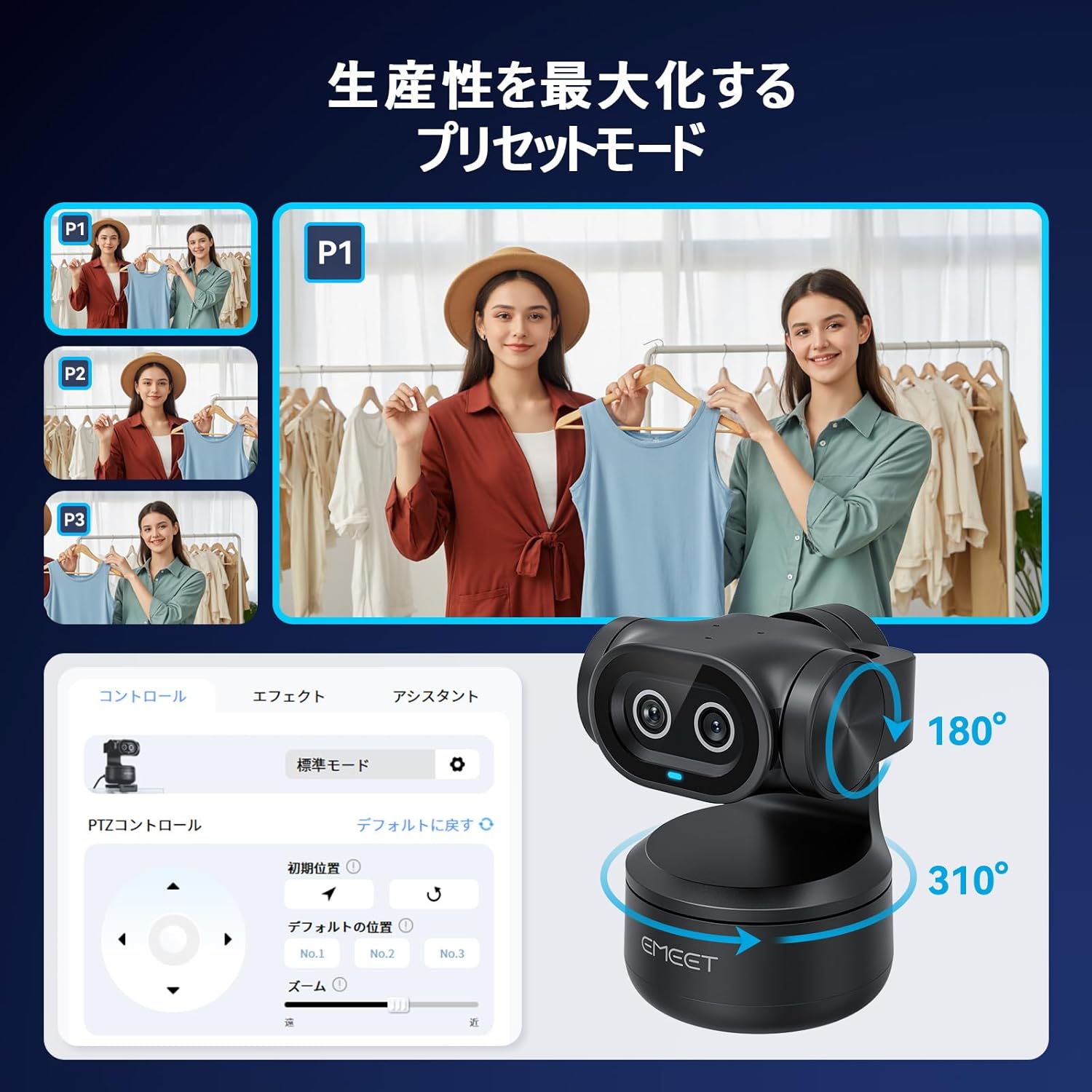
- Aratau Tatūkē: Use EMEET STUDIO to save and switch between different camera angles and zoom levels instantly. This is ideal for presentations or multi-angle streaming.
- Mana Tohu: Control certain camera functions, such as starting/stopping tracking, using simple hand gestures.
- Aratau Papama: Automatically recognizes and corrects whiteboard content, making it clear and legible for viewers without the need for special stickers.
- Aratau Whakaahua: Rotate the camera to a vertical orientation for optimized smartphone-style video content.
- AIGC Function: EMEET's unique AI Generated Content feature can automatically create shot plans tailored to your scene, simplifying complex setups.


Āhuatanga Ororongo
The EMEET PIXY's triple microphone array offers specialized audio modes to suit various environments:
- Aratau Ora: Suppresses constant background noise (e.g., air conditioners, PC fans) for a stable, noise-free streaming environment.
- Noise Cancelling Mode: Reduces sudden sounds (e.g., keyboard clicks, door opening/closing) for clear online classes and web ngā huihuinga.
- Aratau Oro Taketake: Faithfully records environmental sounds and subtle musical nuances, providing studio-quality audio without additional microphones.
Ngā Āhuatanga Tūmataitinga
The EMEET PIXY offers a dedicated Privacy Mode to ensure your privacy when the camera is not in use. This mode can be activated by:
- Tilting the camera unit downwards.
- Manually switching via the EMEET STUDIO application.
- Setting an automatic timer for privacy activation within the software.

Hononga me te Whakataurite
The EMEET PIXY connects via USB and is compatible with a wide range of operating systems and streaming platforms:
- Pūnaha Whakahaere: Windows 10 (64-bit) or later, macOS 10.14 or later, Switch 2.
- Streaming Software: OBS, Twitch, YouTube, Facebook, XSplit, ManyCam, and more.
Whakaaturanga Ataata
Te tiaki
To ensure the longevity and optimal performance of your EMEET PIXY, follow these maintenance guidelines:
- Puritia kia ma te arotahi o te kamera ma te whakamahi i te kakahu ngohengohe, kore-rara. A ape i nga mea abrasive me nga matū kino.
- Whakaorangia te kaamera ki tetahi waahi maroke, hauhautanga kia matara atu i te ra tika me te wera nui.
- Avoid dropping or subjecting the camera to strong impacts.
- Regularly check for firmware updates via the EMEET STUDIO software to ensure you have the latest features and improvements.
Raparongoā
If you encounter any issues with your EMEET PIXY, please refer to the following common troubleshooting steps:
- Kāore he Whakaahua/Ataata: Ensure the USB cable is securely connected to both the camera and your computer. Try a different USB port or cable. Verify that the camera is selected as the video input device in your application settings.
- Nga Take Arotahi Aunoa: Ensure there is adequate lighting. Check for obstructions in front of the lens. Update EMEET STUDIO software and camera firmware.
- Raruraru Ororongo: Confirm the PIXY's microphones are selected as the audio input device in your application. Check microphone levels. Ensure no physical obstructions are blocking the microphones.
- Tracking Not Working: Ensure you are within the recommended tracking range. Check lighting conditions. Verify that AI tracking is enabled in EMEET STUDIO.
- Software Not Recognizing Camera: Restart your computer and the EMEET STUDIO software. Reinstall the EMEET STUDIO software.
For further assistance, please contact EMEET customer support.
Whakatakotoranga
| Āhuahira | Taipitopito |
|---|---|
| Waitohu | EMEET |
| Tau tauira | PIXY JP |
| Whakataunga Hopu Ataata | 4K |
| Hangarau Pūoko Whakaahua | CMOS (1/2.55" Sony Sensor) |
| Roa Arotahi Mōrahi | 3000 mitamano |
| Min Roa Arotahi | 100 mitamano |
| Hōputu Hopu Ataata | MP4 |
| Ngā Hōputu Ororongo Tautokohia | AAC, MP3, PCM |
| Hangarau Hononga | USB |
| Nga waahanga motuhake | Scene Mode, Microphone Input, Face Detection, AI Auto-Tracking, PTZ Control |
| Whakapumau Atahanga | Optical |
| Tauwehe Puka | Palmheld |
| OS tautokona | Windows 10 (64bit) or later, macOS 10.14 or later, Switch 2 Camera |
| Aspect Ratio | 16:9 |
Pūtāhui me te Tautoko
The EMEET PIXY comes with a warranty card included in the package. Please refer to the warranty card for specific terms and conditions. For technical support, product inquiries, or warranty claims, please visit the official EMEET webpaetukutuku, whakapā atu ranei ki ta raatau roopu ratonga kaihoko.