Kupu Whakataki
This manual provides essential information for setting up, operating, maintaining, and troubleshooting your Thunderobot Zero 18 Pro 5070 Ti Gaming Laptop. Please read this guide thoroughly to ensure optimal performance and longevity of your device.
He aha kei roto i te Pouaka
Kia wetewetehia te kete, me tirotiro kei roto katoa ngā tūemi kua whakarārangihia i raro nei:
- THUNDEROBOT Zero Laptop
- Pūurutau Hiko
- Pukapuka Kaiwhakamahi (tenei tuhinga)
- Kaari Raati
If any items are missing or damaged, contact your retailer or Thunderobot customer support immediately.
Tatūnga
Hiko-Whakamatau
- Connect the power adapter to the laptop's power input port and then to a wall outlet.
- Whakatuwheratia te taupoki pona.
- Pēhia te pātene hiko kia whakakāhia te pona.
- Whāia ngā tohutohu kei te mata hei whakaoti i te tatūnga Kāinga Windows 11.
Tuhono Pikitia
Utilize the available ports to connect external devices such as a mouse, keyboard, external display, or other accessories. Refer to the "Connectivity (Ports)" section for port details.
Nga Tohutohu Whakahaere
Te Hiko / Whakaweto
- To power on: Press the power button located on the keyboard deck.
- To shut down: Click the Start button, then Power, and select "Shut down".
- To restart: Click the Start button, then Power, and select "Restart".
- To sleep: Close the laptop lid or click the Start button, then Power, and select "Sleep".
Keyboard and RGB Lighting
The laptop features a full-size keyboard with per-key customizable RGB backlighting and a dedicated numeric keypad.
- Per-Key RGB Backlight: Customize individual key lighting through the AI Intelligent Control Center software.
- Pātuhi Taumahi: Whakamahia te Fn key in combination with other keys for various functions (e.g., volume control, screen brightness, keyboard backlight adjustment).
- Performance Mode Switching: Dedicated keys (Fn+Space) allow for quick toggling between performance profiles.
- One-Click Cooling: A dedicated key (often near the numeric keypad) can activate maximum cooling. Ensure cooling mode is exited before using the first three keys to switch modes.
Whakaatuhia nga waahanga
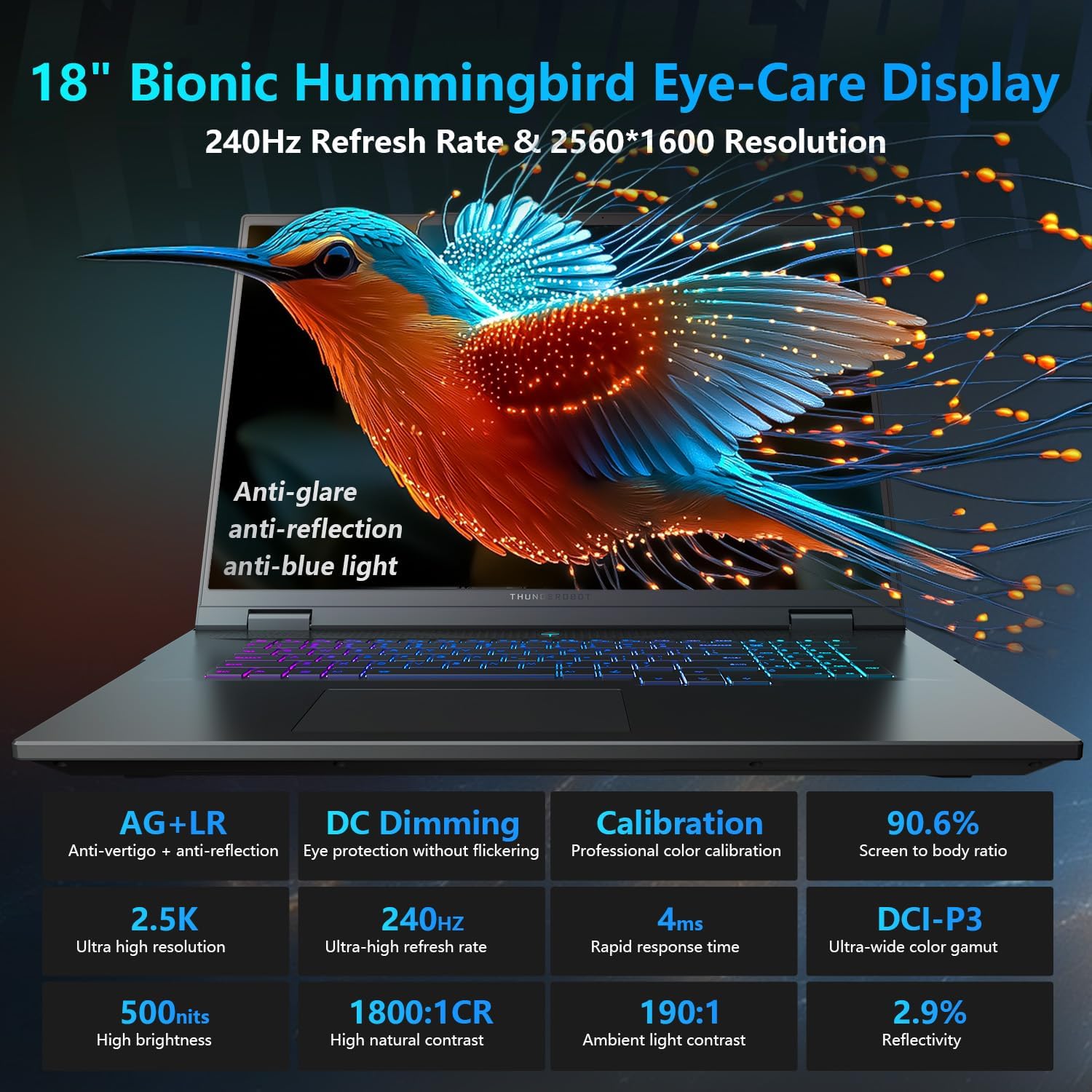
The 18-inch QHD+ (2560x1600) Bionic Hummingbird Eye-Care display offers a 240Hz refresh rate and 4ms response time for clear and fluid visuals. It includes anti-glare, anti-reflection, and anti-blue light technologies for eye comfort.

Connectivity (Ports)
The laptop is equipped with various ports for extensive connectivity:
- 3 x Superspeed USB Type-A ports
- 2 x Superspeed USB Type-C ports (including Thunderbolt 5 support)
- 1 x HDMI port (HDMI 2.1)
- 1 x tauranga RJ-45 Ethernet
- 1 x Audio Port (3.5mm)
- UHS-II SD Card Reader
- Wi-Fi 6E for high-speed wireless internet
- Bluetooth for wireless peripheral connections

Pūnaha whakamatao
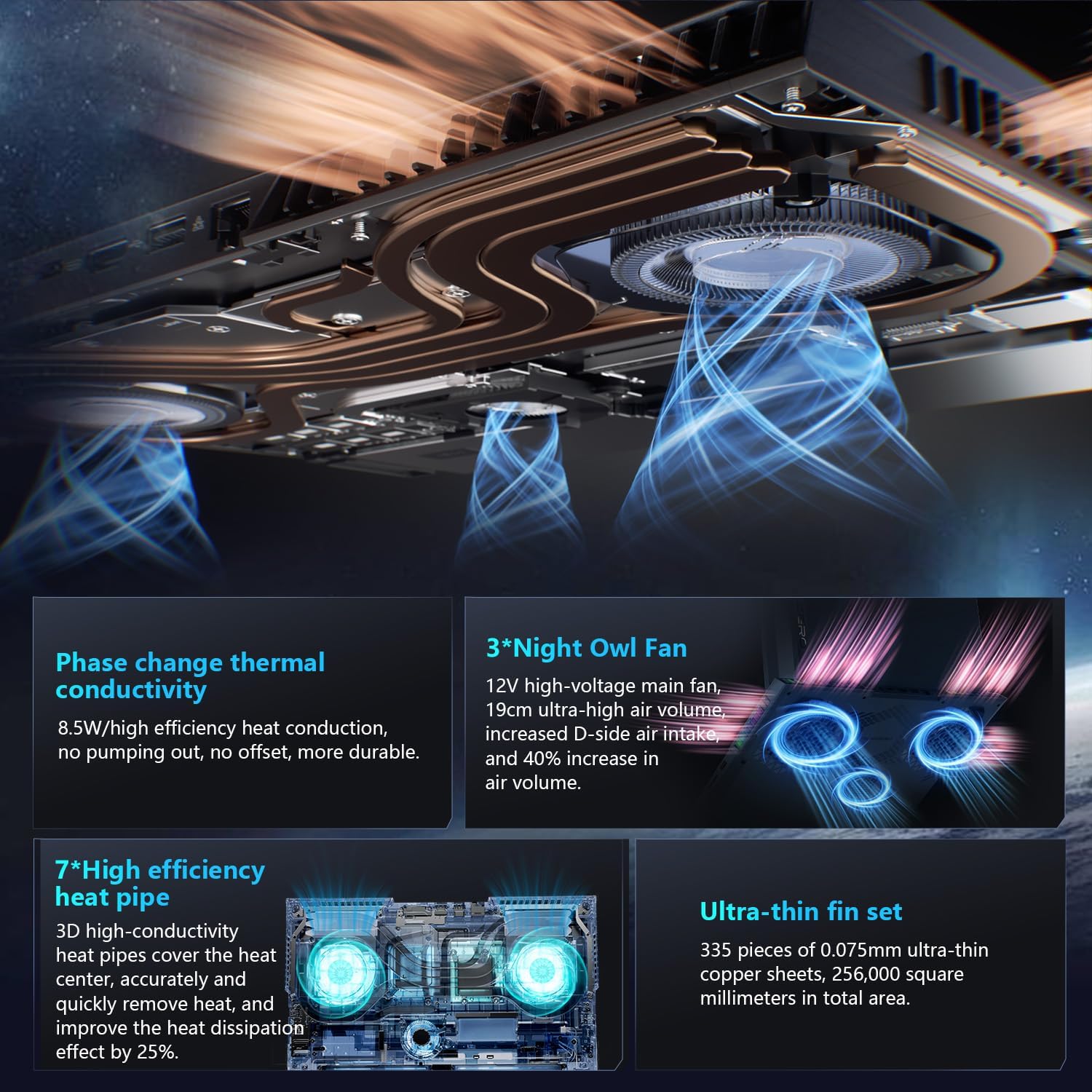
The advanced cooling system features 3 Night Owl fans, 7 high-efficiency heat pipes, and 338 ultra-thin copper fins to ensure optimal thermal management during intensive use, allowing for 270W super performance release.
AI Intelligent Control Center
The AI Intelligent Control Center software allows for comprehensive system management, including performance tuning, intelligent light adjustment, and personalized customization. This includes monitoring CPU/GPU temperatures and fan speeds.
- Performance Tuning: Adjust power settings for quiet, balanced, or turbo modes.
- Intelligent Light Adjustment: Customize keyboard, strip, and logo RGB lighting effects.
- Aroturuki Pūnaha: View real-time CPU and GPU status.
Note: System mode switching in Control Center requires the device to be connected to a power source.
Te tiaki
Te horoi i to Pona
- Mata: Kia ngawari te whakamahi i te kakahu ngohengohe, karekau he ngongo damphoroia ki te wai, ki te kaihoroi mata rānei. Āta karohia ngā matū kino.
- Papapātuhi me te Chassis: Use a soft cloth to wipe surfaces. For dust in crevices, use compressed air.
- Putanga: Periodically clean the cooling vents with compressed air to prevent dust buildup, which can affect performance.
Tiaki Pūhiko
- A ape i te tino tuku i te pākahiko i nga wa katoa.
- Mena kāore e whakamahia ana mō te wā roa, rongoatia te pona ki te wāhi hauhautanga, maroke hoki.
- For optimal battery health, avoid extreme temperatures.
Whakahōu Pūmanawa
Regularly check for and install operating system updates (Windows Update) and driver updates (via Thunderobot's official website or the AI Intelligent Control Center) to ensure system stability and performance.
Raparongoā
| Raruraru | Take pea | Rongoā |
|---|---|---|
| Karekau te pona i te hiko. | No power, discharged battery, or hardware issue. |
|
| He paratea, he pango ranei te mata. | Display settings, external monitor connected, or hardware issue. |
|
| Te wera i te wa e whakamahia ana. | Blocked vents, high performance settings, or dust buildup. |
|
| Nga take hononga Wi-Fi. | Wi-Fi disabled, driver issues, or router problems. |
|
For further assistance, please contact Thunderobot customer support.
Whakatakotoranga
| Āhuahira | Taipitopito |
|---|---|
| Ingoa Tauira | Zero 18 Pro |
| Tukatuka | Intel Core Ultra 9 275HX (24 Cores, 24 Threads, up to 5.40GHz) |
| Whakairoiro | NVIDIA GeForce RTX 5070 Ti (8 GB GDDR6 Dedicated) |
| RAM | 32 GB DDR5 (4800 MHz) |
| Rokiroki | 2 TB PCIe M.2 SSD |
| Whakaatu | 18-inch QHD+ (2560x1600) 240Hz Bionic Hummingbird Eye-Care Display |
| Pūnaha Mahi | Windows 11 Home |
| Hononga | Wi-Fi 6E, Bluetooth, 3x USB-A, 2x USB-C (Thunderbolt 5), HDMI 2.1, RJ-45, Audio Port |
| Papapātuhi | Per-Key RGB Backlit, Numeric Keypad |
| Ahu (LxWxH) | 16.04 x 11.78 x 1.41 inihi |
| Taumaha Tūemi | 15 pauna |
| Puna Mana | AC & Pūhiko |
Pūtāhui me te Tautoko
Every Thunderobot laptop includes a 12-marama whakamana, offering expert support, thorough diagnostics, and genuine parts if a repair is needed. Additionally, a 90-ra whakamana is provided on all warranty replacement parts, ensuring hassle-free repairs. Your complete satisfaction is our commitment.
For technical support, warranty claims, or service inquiries, please visit the official Thunderobot website or contact their customer service department. Keep your purchase receipt and serial number handy for faster service.