
Neoteck TL338
Neoteck Digital Thickness Gauge TL338 User Manual
Model: TL338 | Brand: Neoteck
1. Nga korero haumaru
Please read and understand all instructions before operating this device. Keep this manual for future reference.
- Handle the gauge with care to avoid damage to the measuring surfaces or internal components.
- Kaua e tukuna te taputapu ki te wera nui, te makuku, te ra tika ranei.
- A ape i te tuku i te taputapu, te tuku ranei ki nga paanga kaha.
- Keep the device clean and free from dust, oil, and other contaminants.
- Kaua e ngana ki te wetewete, ki te whakarerekē rānei i te taputapu, nā te mea ka whakakorea te pūtāhui, ā, ka pāngia pea.
- Whakakorehia nga pākahiko kia rite ki nga ture o te rohe.
2. Hua Neke Atuview
The Neoteck Digital Thickness Gauge TL338 is a precision instrument designed for accurate measurement of various materials. It features a high-resolution LCD display and a durable construction for reliable performance.
Āhuatanga matua:
- Ultra-Precise Measurements: 0.00005inch (0.001mm) resolution across a 0-1inch (0-25.4mm) range.
- 10mm Aluminum Alloy Measuring Surface: Ensures wear resistance and long-term stability.
- Effortless One-Handed Operation: Constant-force press lever and ergonomic handle for swift measurements.
- User-Friendly Smart Design: One-touch ZERO, instant mm/inch unit switching, backlit LCD, and auto power-off.
- Durable Construction: Aluminum Alloy/Iron body for demanding environments.
- Versatile Application: Suitable for paper, leather, plastic, metal sheets, film, and more.
Waehanga:
The package includes the Digital Thickness Gauge, one 1.5V LR44 battery, and this instruction manual.
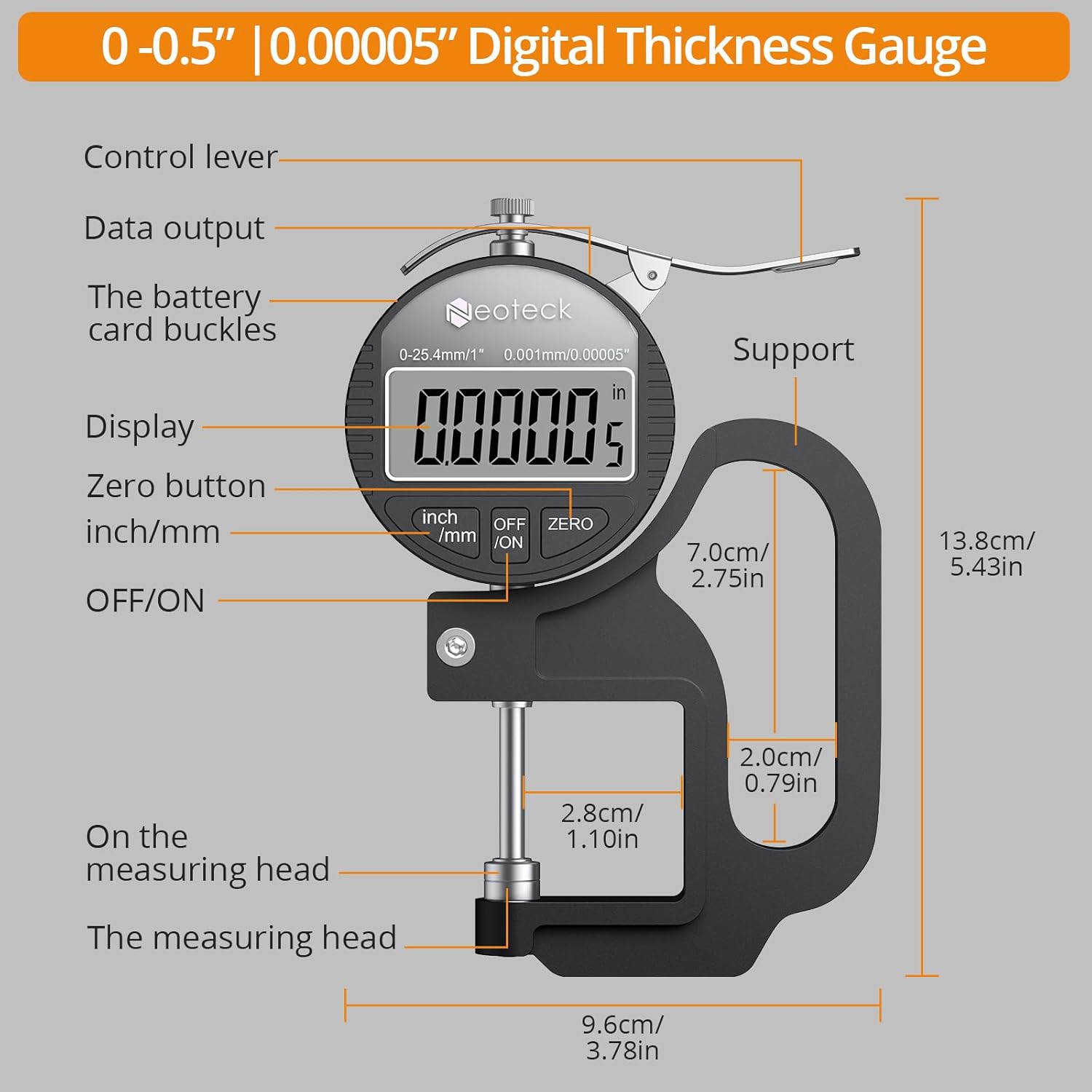
Whakaatu 1: Taipitopito view of the Neoteck Digital Thickness Gauge components and dimensions.
3. Tatūnga
Tāuta Pūhiko:
- Locate the battery compartment on the back of the gauge.
- Whakatuwheratia te uhi pākahiko.
- Insert one 1.5V LR44 battery, ensuring correct polarity (+/-).
- Katia kia mau te taupoki pākahiko.
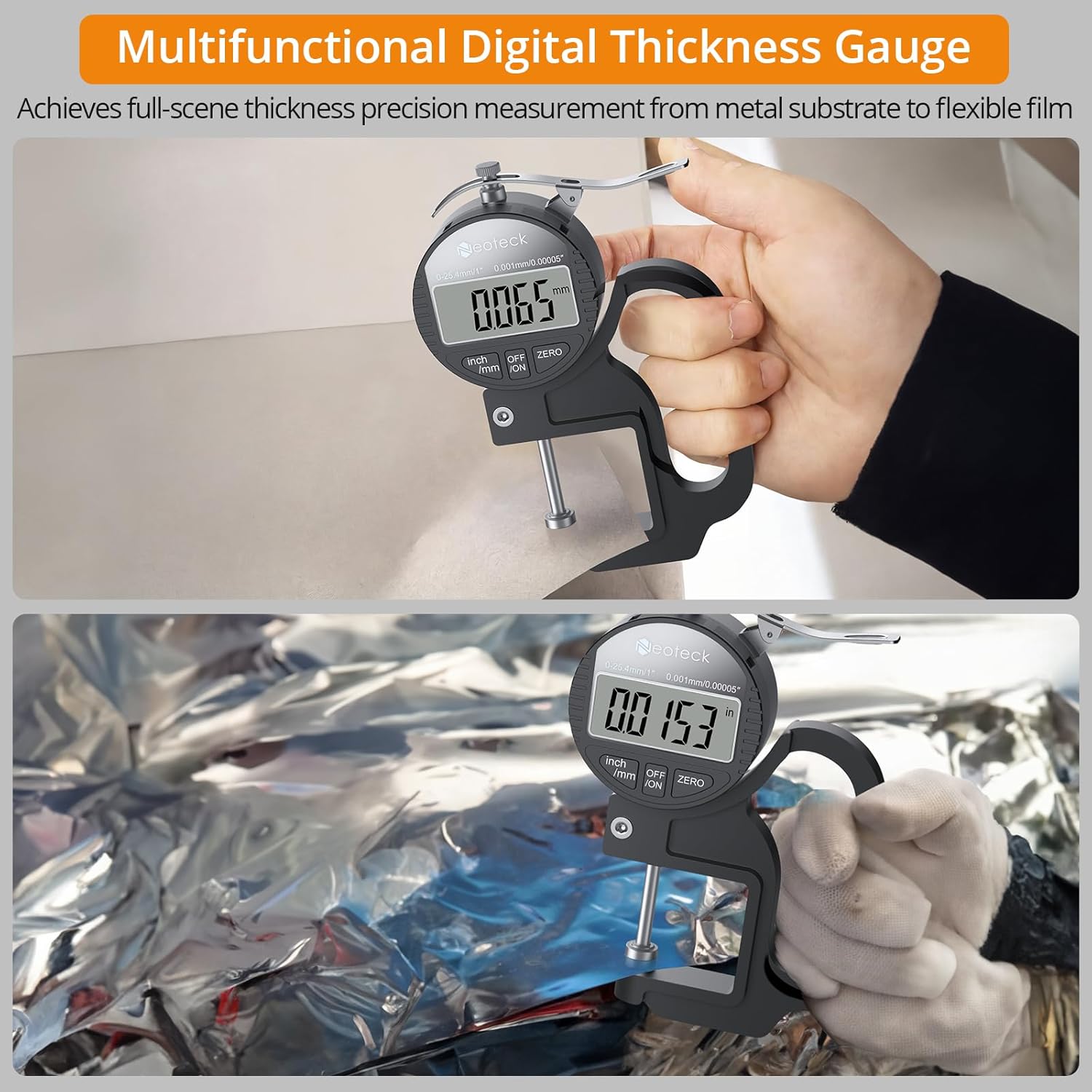
Figure 2: Contents of the Neoteck Digital Thickness Gauge package, including the gauge, battery, and manual.
4. Nga Tohutohu Whakahaere
Hiko Whakaka/Weto:
Press the 'OFF/ON' button to turn the device on or off. The device will automatically power off after 5 minutes of inactivity to conserve battery life.
Inch/MM Unit Conversion:
Press the 'inch/mm' button to switch between imperial (inches) and metric (millimeters) units. The selected unit will be displayed on the LCD screen.

Figure 3: The large LCD display and unit conversion buttons.
Tautuhinga Kore:
Before taking a measurement, ensure the measuring surfaces are clean and then press the measuring rod to the bottom. Press the 'ZERO' button to set the display to zero. This calibrates the gauge for accurate readings.
Te Inenga:
- Ensure the gauge is powered on and zeroed.
- Hold the gauge comfortably with one hand using the ergonomic grip.
- Press the control lever to open the measuring jaws.
- Carefully place the material to be measured between the measuring surfaces.
- Release the control lever slowly, allowing the measuring surfaces to gently contact the material.
- Read the thickness value directly from the LCD display.

Figure 4: One-hand operation for quick and easy measurements.

Figure 5: Measuring various materials with the alloy measuring surface.
Important Measurement Notes:
- The thickness gauge should be placed vertically during measurement, as gravity can affect data.
- For optimal accuracy, take multiple measurements and calculate the average value.
- Avoid applying excessive pressure when closing the measuring surfaces on the material.
Whakaaturanga Ataata:
Video 1: A demonstration of the Neoteck Digital Thickness Meter in use, showcasing its features and measurement process.
5. Tiaki
Te horoi:
Regularly clean the measuring surfaces with a soft, dry cloth. For stubborn dirt, a slightly damp ka taea te whakamahi i te kakahu, ā, muri iho ka whakamaroke tonu. Kaua e whakamahi i ngā whakarewa, i ngā kaihoroi whakakoi rānei.
Rokiroki:
When not in use, store the thickness gauge in its protective case in a dry, cool place, away from direct sunlight and extreme temperatures. Remove the battery if the device will not be used for an extended period.
Whakakapinga Pūhiko:
If the display becomes dim or unresponsive, replace the LR44 battery as described in the 'Battery Installation' section.
6. Te Raru
| Raruraru | Take pea | Rongoā |
|---|---|---|
| He putea, he atarua ranei te whakaaturanga | He iti te pākahiko, he hē rānei te tāutanga o te pākahiko. | Whakakapia te pākahiko LR44, kia tika ai te polarity. |
| Nga korero tika | Measuring surfaces are dirty or not zeroed correctly. | Clean measuring surfaces and perform zero setting. Ensure the gauge is held vertically. |
| Ko nga paatene kaore e aro | Device malfunction or low battery. | Whakakapia te pākahiko. Mena ka mau tonu te raruraru, whakapā atu ki te tautoko kiritaki. |
7. Whakatakotoranga
| Āhuahira | Whakatakotoranga |
|---|---|
| Waitohu | Te Ruku |
| Tauira | TL338 |
| Awhe Ine | 0-1 inihi (0-25.4mm) |
| Whakatau | 0.00005 inihi (0.001mm) |
| Tikanga ine | 0.0005"/0.00005" |
| Rauemi | Aluminum Alloy/Iron |
| Momo Pūhiko | 1 x 1.5V LR44 (included) |
| Te Waahi Mahi | 0°C ki te 40°C (32°F ki te 104°F) |
| Nga Waahanga kei roto | Thickness Gauge, 1.5V Battery, Instruction Manual |
8. Pūtāhui me te Tautoko
Pūtāhui:
This Neoteck Digital Thickness Gauge is covered by an 18-month warranty from the date of purchase. The warranty covers manufacturing defects and material faults under normal use. It does not cover damage caused by misuse, accidents, unauthorized modifications, or improper maintenance.
Tautoko Kiritaki:
For technical assistance, warranty claims, or any questions regarding your Neoteck Digital Thickness Gauge, please contact our customer support team. Refer to the contact information provided on the product packaging or our official webpae.
Ask a question about this manual
Ask about setup, troubleshooting, compatibility, parts, safety, or missing instructions. Manuals+ will review the question and use this page’s manual context to help answer it.