
1. Kupu Whakataki
Mauruuru koe mo te hokoasing the Claiks Electric Height Adjustable Low Desk. This manual provides essential information for the safe and efficient assembly, operation, and maintenance of your new desk. Please read this manual thoroughly before use and keep it for future reference.
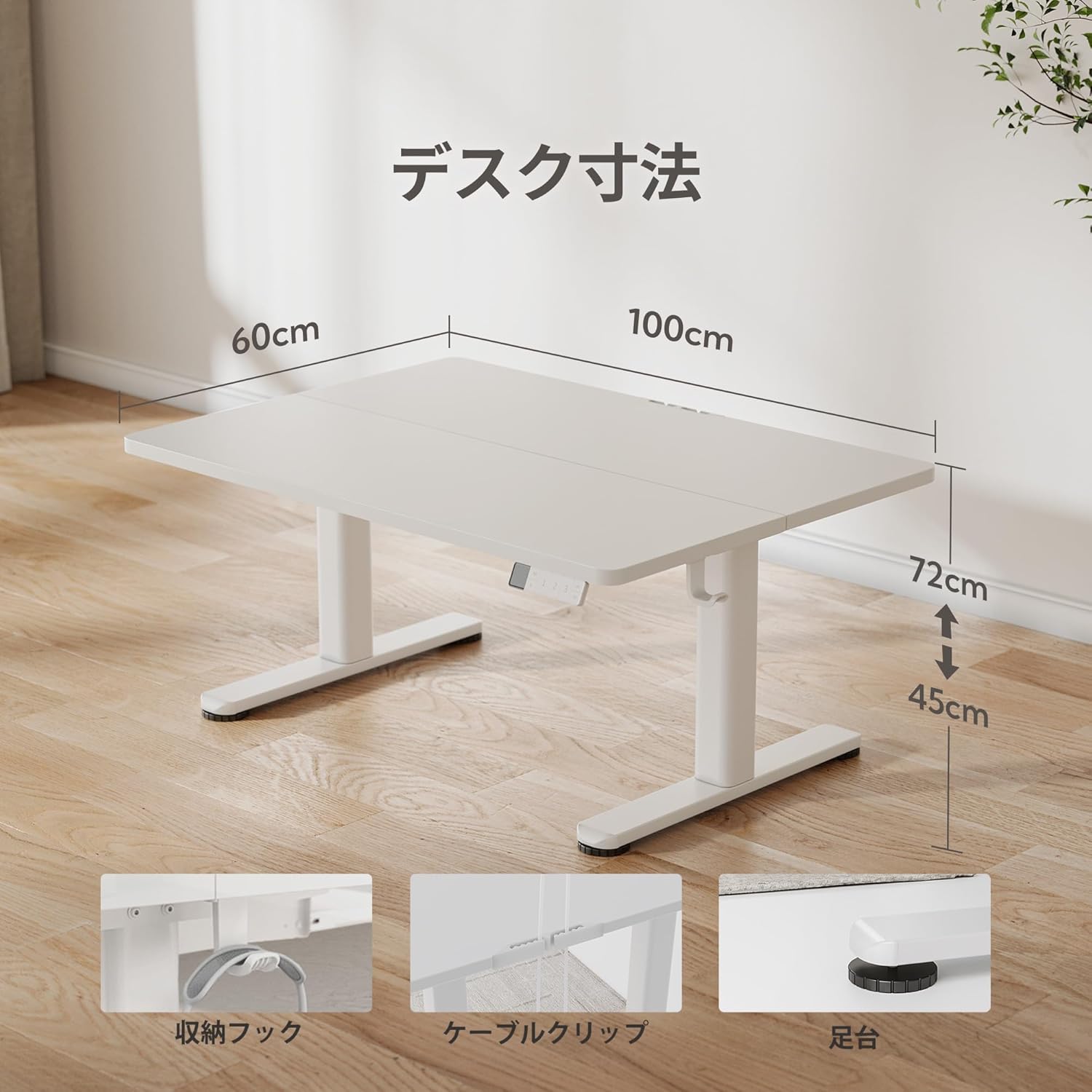
This electric low desk is designed to offer flexible working positions, accommodating various seating arrangements from floor chairs to standard office chairs, with a height adjustment range of 45cm to 72cm. Its quiet operation and memory function enhance user comfort and productivity.
2. Nga korero haumaru
Kia mau ki nga whakaritenga haumaru e whai ake nei hei aukati i te whara, i te kino ranei o te hua:
- Me whakarite kia mau nga waahanga katoa i mua i te whakamahi.
- Puritia nga ringa me nga taonga mai i nga waahanga neke i te wa e whakatikatika teitei ana.
- Do not overload the desk. The maximum recommended weight capacity is 70 kg.
- A ape i te tuku wai tika ki runga i te paewhiri mana, tata ranei ki nga waahanga hiko.
- Do not allow children to operate the desk unsupervised.
- Momotuhia te hiko i mua i te horoi, te mahi tiaki ranei.
- The desk features rounded corners for safety, reducing the risk of accidental bumps.
3. Ihirangi mokete
Manatokona kei roto katoa nga mea kei roto i te kete:
- Runga Papamahi
- Desk Frame (Legs and Motor Assembly)
- Paewhiri Mana
- Pūurutau Hiko
- Pukapuka Tohutohu
- Assembly Tools (if applicable, though the product states 'No' for all assembly tools included)
- Ngā Matau Taha (2 ngā wahi)
- Topenga taura
4. Tatūnga me te Runanga
Assembly of the Claiks Electric Height Adjustable Low Desk is designed to be straightforward. Please follow the detailed instructions provided in the included instruction manual for step-by-step guidance.
Ahuatanga Huihuinga Matua:
- Sturdy T-shaped Legs: The reinforced steel legs provide stability and prevent wobbling.
- Whakaha Uepu: Utilize the included cable clips to keep your workspace tidy.
- Papa Waewae Whakaritea: Ensure stability on uneven surfaces by adjusting the foot pads.
- Matau Taha: Attach the two included side hooks for convenient storage of headphones or bags.

5. Nga Tohutohu Whakahaere
The Claiks Electric Height Adjustable Low Desk features an intuitive control panel for easy height adjustment and memory functions.
Nga Mahi Paewhiri Mana:

- Whakaatu LED: Shows the current desk height in centimeters.
- Pihi Whakatika / Raro: Press and hold to manually adjust the desk height. The adjustment speed is 20mm/s.
- Memory Function (1, 2, 3): Save up to three preferred height settings. To save a height, adjust the desk to the desired height, then press the 'M' button followed by one of the number buttons (1, 2, or 3). To recall a saved height, simply press the corresponding number button.
- Aratau Taima: (If applicable, based on image interpretation) This feature may allow setting reminders for standing or sitting intervals. Refer to the full manual for specific instructions.
Whakatikatika Teitei:
The desk can be adjusted between 45cm and 72cm, allowing for comfortable use with various seating options, including floor chairs, low sofas, or standard office chairs. This flexibility helps reduce discomfort from prolonged sitting.


Mahi Ataahua:
The desk operates quietly, with noise levels below 45dB during height adjustment. This ensures a peaceful working environment, even during late-night use.

6. Tiaki
To ensure the longevity and optimal performance of your Claiks Electric Height Adjustable Low Desk, follow these maintenance guidelines:
- Te horoi i te papa tēpu: The tabletop is made of environmentally friendly melamine resin, which is resistant to water, heat, and dirt. Wipe clean with a damp kakahu me te horoi ngawari. A ape i te horoi horoi.
- Tapare Tapare: Wipe the metal frame with a dry or slightly damp kakahu.
- Takitaki auau: Takitaki ia ia nga wa katoa nga wiri me nga raka kia pai ai. Whakapaia ano mehemea e tika ana.
- Whakaha Uepu: Ensure cables are neatly organized using the provided clips to prevent snagging or damage during height adjustments.

7. Te Raru
If you encounter any issues with your Claiks Electric Height Adjustable Low Desk, please refer to the following common troubleshooting steps:
- Kāore te tēpu e nekeneke: Check if the power cord is securely plugged into both the desk and the wall outlet. Ensure the power adapter is functioning correctly.
- Error message on LED display: Refer to the detailed instruction manual for specific error codes and their solutions. Often, a simple power cycle (unplugging and replugging the power) can resolve minor issues.
- Whakatikatika teitei koretake: Ensure the desk is not overloaded beyond its 70kg capacity. Check for any obstructions under the desk or near the legs.
- Memory function not working: Re-program the memory presets by adjusting to the desired height, pressing 'M', then the desired number (1, 2, or 3).
If the problem persists after attempting these steps, please contact Claiks customer support for assistance.
8. Whakatakotoranga
| Āhuahira | Taipitopito |
|---|---|
| Waitohu | Claiks |
| Tau tauira | P1.01.030.002.JP |
| Momo Papamahi | Standing Desk, Height Adjustable Low Desk |
| Hanga | Tapawhā |
| Rahi Hua (D x W x H) | 60 cm (Depth) x 100 cm (Width) x 45-72 cm (Height) |
| Tae | Mā |
| Kāhua | Minimalist |
| Rauemi turanga | Te whakarewa |
| Momo Whakaoti | Te peita |
| Te Matotoru Ripanga | 1.8 cm |
| Teitei iti | 45 cm |
| Teitei Morahi | 72 cm |
| Te Tere Whakatikatika Teitei | 20 mm/s |
| Taumata Haruru | Kei raro iho i te 45 dB |
| Taumaha Mōrahi i Manakohia | 70 kg |
| Mahi Mahara | 3 Tatūkē |
| Nga Utauta Huihuinga kei roto | Kao |
| Nga taputapu | Instruction Manual, Main Product Body |
9. Pūtāhui me te Tautoko
E whakapau kaha ana a Claiks ki te whakarato i ngā hua kounga teitei me te ratonga kiritaki tino pai.
Manufacturer Direct Sales:
Our products are sold directly by the manufacturer, allowing us to offer high-quality items at competitive prices.
Tautoko Kiritaki:
If you have any questions, concerns, or encounter any defects with your product, please do not hesitate to contact our customer support. We offer support in Japanese to assist you promptly.
Please refer to your purchase documentation or the Claiks official webpae mo nga kupu whakamana motuhake me nga korero whakapā.