
1. Kupu Whakataki
This manual provides detailed instructions for the installation, operation, and maintenance of your EDISION CAM-100 Broadband TV Antenna Amplifier. The CAM-100 is designed to enhance Digital Terrestrial Television (DVB-T/T2) signals, featuring adjustable gain and integrated 5G LTE protection to ensure optimal reception quality.
2. Nga Tohutohu Haumaru
Please read these safety instructions carefully before installing or operating the device. Failure to follow these instructions may result in electric shock, fire, or damage to the product.
- Whakaritehia te voltage rite ana ki nga whakaritenga kua tohua ki runga i te taputapu.
- Kaua e whakaatuhia te taputapu ki te ua, ki te makuku, ki ngā pāmahana tino kino rānei.
- A ape i te whakanoho i te taputapu ki te taha o nga puna wera, ki te ra tika ranei.
- Kaua e whakatuwheratia te taputapu casing. Tukuna atu nga ratonga katoa ki nga kaimahi whai tohu.
- Disconnect the power supply before making any connections or disconnections.
3. Ihirangi mokete
Manatokona kei roto katoa nga mea kei roto i te kete:
- EDISION CAM-100 TV Antenna Ampkaikawe
- Aratohu Timata Tere
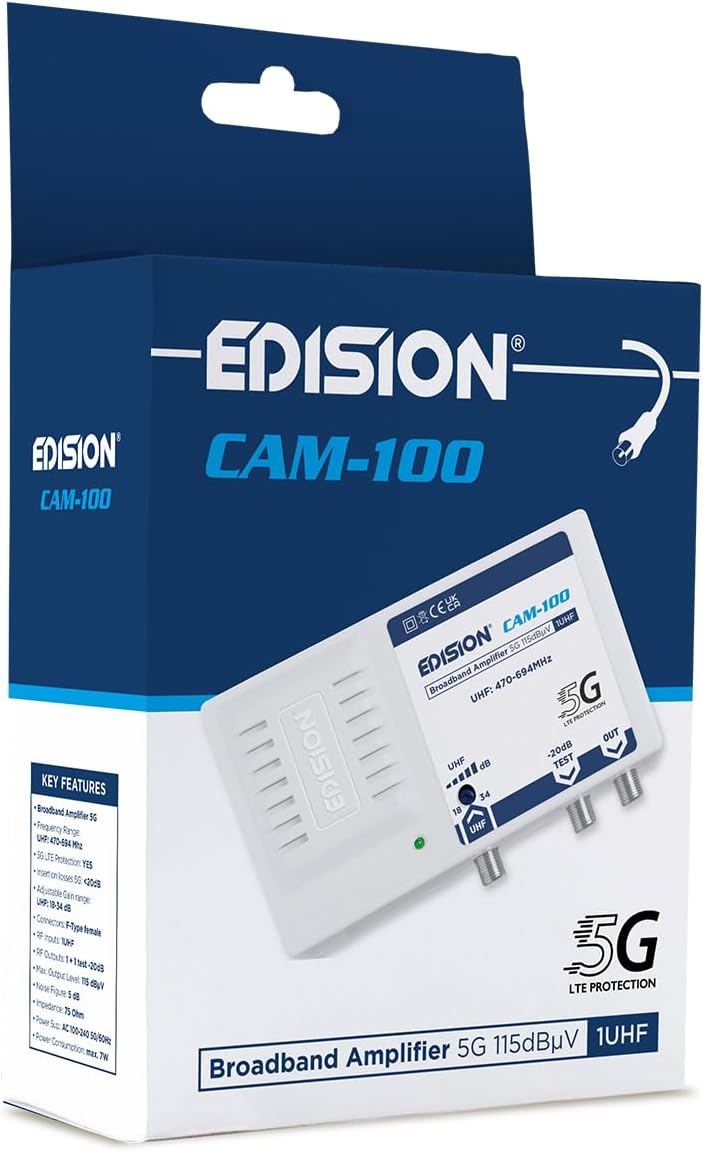
The EDISION CAM-100 amplifier presented in its retail box, showcasing the product branding and key features listed on the packaging.
4. Hua Neke Atuview
The EDISION CAM-100 is a compact broadband amplifier designed for UHF signals. It features adjustable gain and a built-in 5G LTE filter.

The EDISION CAM-100 broadband amplifier, shown with its power plug, features a single UHF input, adjustable gain from 18-34dB, and two output ports (one main, one -20dB test port). It includes 5G LTE protection and operates within the UHF 470-694MHz frequency range.

Kati ki mua view of the EDISION CAM-100, clearly displaying the UHF input, the adjustable gain knob, the -20dB test output, and the main output port. The 5G LTE PROTECTION label is also visible.

The rear side of the EDISION CAM-100 amplifier, featuring keyhole slots for wall mounting, indicating easy installation.
5. Tatūnga me te Tāuta
Follow these steps to properly install your EDISION CAM-100 ampKaiwhakaora:
- Whakapiki: Choose a suitable indoor location for the amplifier, away from direct heat or moisture. Use the keyhole slots on the back of the unit to securely mount it to a wall or flat surface.
- Hononga Antenna: Connect your outdoor UHF antenna cable to the UHF IN tauranga i runga i te ampwhakapūmau. Me whakarite kei te haumaru te hononga.
- TV Connections: Connect your television(s) to the KI WAHO port(s) of the amplifier using coaxial cables. The main output provides the amplified signal. There is also a -20dB TEST port for signal measurement or connecting a single device with reduced signal.
- Hononga Hiko: Monohia te amplifier's power cord into a standard AC 100-240V, 50/60Hz electrical outlet. The power indicator LED on the front of the unit should illuminate.
- Whakaritea te Whiwhinga: Turn the adjustable gain knob (labeled UHF dB) to set the desired amplification level. Start with a lower setting and gradually increase it until optimal signal quality is achieved on your television.

An illustrative diagram demonstrating a typical installation scenario for the EDISION CAM-100. It shows an outdoor UHF antenna connected to the amplifier, which then distributes the signal to multiple televisions indoors, including connections for a test point.
6. Nga Tohutohu Whakahaere
Once installed, the EDISION CAM-100 operates continuously when powered. The primary operational adjustment is the gain control.
- Tohu Hiko: A green LED on the front panel indicates that the ampKei te whiwhi hiko te kaiwhakaora, ā, kei te mahi tonu.
- Whiwhi Whakatikatika: Use the rotary knob to adjust the UHF signal gain between 18dB and 34dB. Adjust this setting while monitoring your TV's signal quality meter (if available) or picture quality. The goal is to achieve a strong, stable signal without over-amplification, which can cause distortion.
- Test Output: The -20dB TEST output provides a reduced signal level, useful for connecting a single TV or for signal strength measurements without affecting the main output.
7. Tiaki
The EDISION CAM-100 requires minimal maintenance to ensure long-term performance.
- Te horoi: Periodically wipe the exterior of the unit with a soft, dry cloth. Do not use liquid cleaners or abrasive materials.
- Whakahau: Ensure that the ventilation slots on the device are not obstructed to prevent overheating.
- Hononga: Tirohia ngā hononga taura katoa i ētahi wā kia tino mau, kia kore ai hoki e waikura.
8. Te Raru
If you experience issues with your EDISION CAM-100, refer to the following common problems and solutions:
| Raruraru | Take pea | Rongoā |
|---|---|---|
| Kaore he rama tohu hiko | Kaore he mana ki te waeine | Check power cord connection and wall outlet. Ensure the outlet is live. |
| No signal or weak signal on TV |
|
|
| Distorted picture or sound | Signal over-amplification or interference | Reduce the gain setting. Ensure the 5G LTE filter is effective; if interference persists, check for external sources. |
9. Whakatakotoranga Hangarau
| Āhuahira | Whakatakotoranga |
|---|---|
| Tauira | CAM-100 (26-01-0403) |
| Awhe Auautanga | UHF 470-694 MHz |
| Whakauru | 1 UHF |
| Nga Putanga | 1 Main Output, 1 Test Output (-20dB) |
| Whiwhi Whakaritea | 18-34 dB (UHF) |
| Max. Taumata Putunga | 115 dBµV |
| Tātari | 5G LTE Parenga |
| Tuku Hiko | AC 100-240V, 50/60Hz |
| Ahu | 11 x 14 x 5 cm |
| Taumaha | 270 g |
| Pūrere Hototahi | TV antenna, Televisions |
10. Nga Korero Whakaputanga
EDISION products are covered by a standard manufacturer's warranty against defects in materials and workmanship. Please refer to the warranty card included with your product or visit the official Edision webpae mo nga tikanga me nga tikanga whakamana. Puritia to tohu hoko mo nga kereme whakamana.
11. Tautoko
Mo etahi atu awhina, tautoko hangarau, ki view additional products, please visit the official Edision store or contact customer service:
- Edision Store: Visit the Edision Store on Amazon
- Ratonga Kiritaki: Refer to the contact information provided in your Quick Start Guide or on the official Edision webpae.