
Kupu Whakataki
Thank you for choosing the Billboard Soul Advance True Wireless Stereo (TWS) Earbuds. These earbuds are designed to provide a superior audio experience with Active Noise Cancellation (ANC), Environmental Noise Cancellation (ENC), and a comfortable, splash-resistant design. This manual will guide you through the setup, operation, and maintenance of your new earbuds.
Nga korero haumaru
- Do not expose the earbuds or charging case to extreme temperatures or direct sunlight for extended periods.
- A ape i te tukunga, te whakapau kaha ranei ki te taputapu.
- Keep the earbuds and charging case away from water and liquids, except for light splashes as per IPX4 rating. Do not submerge.
- Kaua e ngana ki te wetewete, ki te whakarerekē rānei i te hua. Ka whakakorea te pūtāhui.
- Whakamahia anake te taura utu kua whakaratohia, he taurite whaimana ranei.
- Listening at high volumes for prolonged periods can cause hearing damage. Adjust volume to a safe level.
Ihirangi mokete
- Billboard Soul Advance TWS Earbuds (Left and Right)
- Puhi utu
- Tauira Whakatau USB
- Pukapuka Kaiwhakamahi
Ka mutu te huaview
Familiarize yourself with the components of your Billboard Soul Advance TWS Earbuds and charging case.
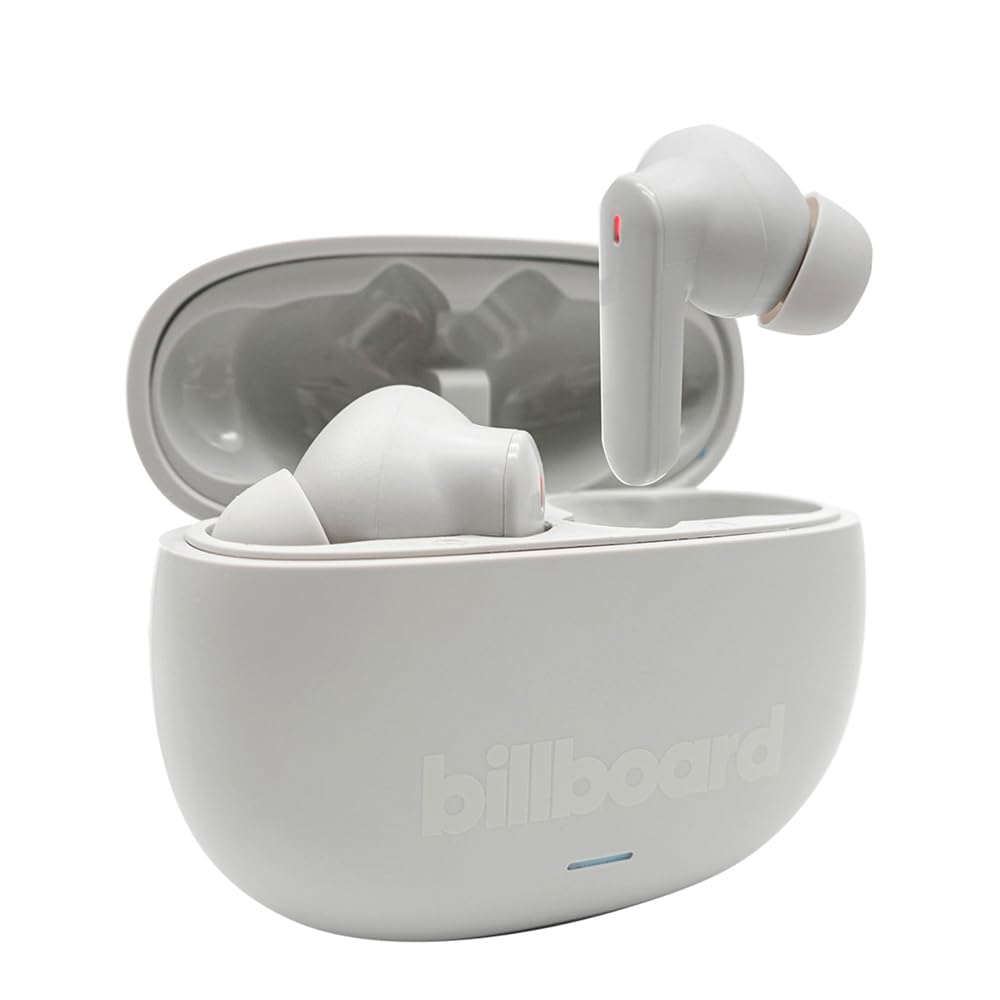
Image: The Billboard Soul Advance TWS Earbuds resting inside their open charging case. The earbuds are grey with red indicator lights visible, and the case is also grey with the 'billboard' logo embossed on the front.

Image: The Billboard Soul Advance TWS Earbuds charging case in a closed position. The case is grey with the 'billboard' logo embossed on the front and a small indicator light at the bottom.
Image: A person holding a single Billboard Soul Advance TWS earbud and the open charging case, demonstrating the compact size and design.
Tatūnga
1. Te Whakataki i nga Paorooro me te Puhi
I mua i te whakamahi tuatahi, whakakiia katoatia nga pukoro taringa me te putea utu.
- Whakanohoia nga purongo ki roto i te pukoro utu. Me whakarite kia tika te noho ki o raatau waahi.
- Honoa te taura utu USB ki te tauranga utu i runga i te take me te puna hiko USB (hei tauira, rorohiko, urutau pakitara).
- The indicator light on the case will show charging status. Once fully charged, the indicator will change or turn off. A full charge takes approximately 5 hours for the case and earbuds.
2. Tauhoa ki te Pūrere
To connect your earbuds to a smartphone or other Bluetooth-enabled device:
- Open the charging case. The earbuds will automatically enter pairing mode, indicated by flashing lights on the earbuds.
- I runga i to taputapu, haere ki nga tautuhinga Nihokikorangi me te whakarite kia taea te Nihokikorangi.
- Rapua available devices and select "Billboard Soul Advance" from the list.
- Once connected, the earbud indicator lights will stop flashing.
- Ka hono aunoa nga taringa ki te taputapu takirua whakamutunga ina tangohia mai i te keehi, mena ka taea te Nihokikorangi ki runga i te taputapu.
Te whakahaere
Mana Pa
The earbuds feature touch-sensitive controls on their outer surface. Specific functions may vary slightly by device or app.
| Mahi | Mahi |
|---|---|
| Pao Kotahi (Mauī/Matau) | Purei / Okioki puoro, Whakautu / Waea mutunga |
| Paoa Taurua (Matau) | Te ara o muri |
| Paoa Taurua (Maui) | Te ara o mua |
| Patohia kia Toru (Mauī/Matau) | Whakahohe Kaiāwhina Reo |
| Pēhi Roa (Mauī/Matau) | Whakawhitihia te Aratau ANC/Mārama |
| Incoming Call Long Press | Whakakahoretia te waea |
Active Noise Cancellation (ANC) & Environmental Noise Cancellation (ENC)
The Soul Advance earbuds feature both ANC and ENC for an optimized listening and calling experience.
- Whakakore Haruru Hohe (ANC): Reduces external ambient noise, allowing for a more immersive audio experience. Activate/deactivate by long-pressing an earbud.
- Whakakore Haruru Taiao (ENC): Utilizes 4 built-in microphones to filter out background noise during calls, ensuring clearer conversations for both you and the listener. This feature is active automatically during calls.

Image: A graphic illustrating the concept of Ultra ANC (Active Noise Cancellation), showing sound waves being blocked by headphones, emphasizing a quiet listening experience.
Te tiaki
Te horoi
- Me ata muru nga pukoro me te pukoro utu ki te kakahu ngohengohe, maroke, kore-rara.
- Kaua e whakamahia nga kai horoi, te waipiro, te whakarewa matū ranei.
- Ensure charging contacts on both earbuds and case are clean and dry for optimal charging.
Rokiroki
Mena karekau e whakamahia, penapenahia nga purongo ki roto i to pukoro hei tiaki kia mau tonu te utu.
Raparongoā
| Raruraru | Rongoā |
|---|---|
| Karekau nga taringa e hono ana | Kia tino utua ngā pane taringa. Whakawetohia, kātahi ka whakakāhia te Nihokikorangi o tō pūrere. Warewaretia te pūrere i ngā tautuhinga Nihokikorangi, ka hono anō. |
| Kotahi anake te pukoro e mahi ana | Place both earbuds back in the case, close it, then open again. Ensure both are charged. |
| Karekau he tangi | Tirohia te oro o te pūrere. Me whakarite kei te hono ngā pane whakarongo. Whakamātauria te purei i tētahi atu oro. |
| Nga take utu | Ensure charging cable is securely connected. Clean charging contacts. Try a different USB port or cable. |
Whakatakotoranga
- Ingoa Tauira: Soul Advance
- Hangarau Hononga: Ahokore
- Nga Waahanga Kei roto: Te Kaare Kaimana
- Whakamahinga Tauwhāiti: Outdoor activities, Sports
- Wā Whakataki: Tata ki te 5 haora
- Ngā Pūrere Hototahi: Phones, Tablets
- Taumata Atete Wai: IPX4 (Ātete ki te Pāhū)
- Wawaenga Te Ora o te Pūhiko: 27 haora (me te putea utu)
- Whakatakoto Taringa: Roto-taringa
- Tauwehe Puka: Roto-taringa
- Mana Haruru: Whakakore Haruru Hohe

Image: A graphic highlighting long battery life, showing headphones with '40H' and earbuds with '42H*' (battery + case), indicating extended usage times.
Ataata Hua Whaimana
Video: Product demonstration video (0:49 duration).
Video: Product feature overview (0:44 duration).
Video: Additional product details (0:44 duration).
Video: Short product highlight (0:24 duration).
Video: Product feature showcase (0:24 duration).
Video: Detailed product review/demonstration (1:57 duration).
Video: Quick product overview (0:34 duration).
Video: Comprehensive product guide (2:00 duration).
Pūtāhui me te Tautoko
Your Billboard Soul Advance TWS Earbuds come with a standard manufacturer's warranty. For detailed warranty information, please refer to the warranty card included in your package or visit the official Billboard website. For technical support or customer service, please contact the retailer or manufacturer directly.
For returns, a 30-day free return policy is available from the purchase date.