
Shadowhawk S1618
Shadowhawk S1618 2000 High Lumens Rechargeable LED Flashlight User Manual
Model: S1618 | Brand: Shadowhawk
Kupu Whakataki
Thank you for choosing the Shadowhawk S1618 LED Flashlight. This manual provides essential information for the safe and efficient use of your new flashlight. Please read it thoroughly before operation and retain it for future reference.
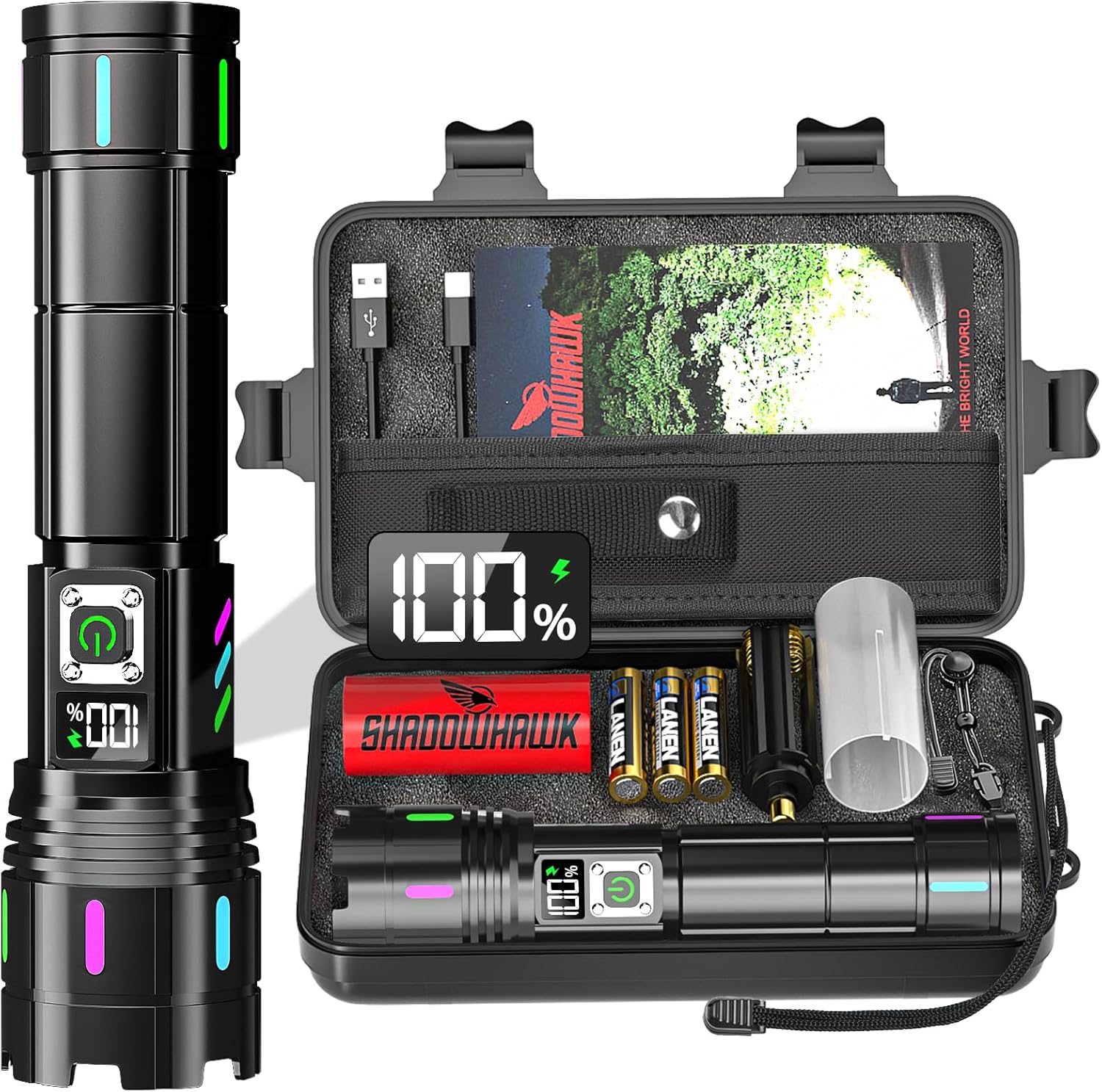
Image: The Shadowhawk S1618 flashlight and its included accessories, neatly arranged in a protective carrying case.
Tatūnga
Tāuta Pūhiko
The Shadowhawk S1618 flashlight supports two battery types: the included 6000mAh rechargeable battery or 3 AAA alkaline batteries (with holder).
- Wetekina te taupoki hiku o te rama ki te taha maui.
- Mō te Pūhiko Whakahoki Anō: Insert the 6000mAh rechargeable battery with the positive (+) pole facing towards the flashlight head. Ensure the transparent plastic protective film is removed from the battery surface before use.
- Mo nga pākahiko AAA: Place 3 AAA alkaline batteries into the provided AAA battery holder, observing the correct polarity (+/-). Insert the holder into the flashlight with the positive (+) end facing towards the flashlight head.
- Whakawirihia te taupoki hiku ki muri kia mau tonu.
Whakataunga Tuatahi
I mua i te whakamahinga tuatahi, whakakīia katoatia te pākahiko ka taea te whakahou.
- Locate the USB-C charging port on the flashlight, typically covered by a rubber protective cap.
- Connect the included USB-C charging cable to the flashlight's port.
- Honoa te pito kē atu o te taura USB-C ki tētahi pūtake hiko USB hototahi (hei tauira, te urutau pakitara, te rorohiko, te pēke hiko).
- The LCD display will show the charging progress. Charging typically takes 6-8 hours for a full charge.
- Once fully charged, disconnect the cable and replace the rubber protective cap to maintain water resistance.

Image: Visual guide for installing the 6000mAh rechargeable battery and AAA batteries, along with charging methods.
Nga Tohutohu Whakahaere
Te Hiko / Whakaweto
- Press the power button once to turn the flashlight on.
- To turn off the flashlight directly from any mode, press and hold the power button for approximately 3 seconds.
Whakawhiti Aratau Rarama
The flashlight features 5 lighting modes: High, Medium, Low, Strobe, and SOS. The brightness transitions gradually between modes to protect your eyes.
- With the flashlight on, press the power button repeatedly to cycle through the modes in the following order: High → Medium → Low → Strobe → SOS.

Image: Depiction of the five distinct lighting modes available on the Shadowhawk S1618 flashlight.
Arotahi Whakaritea
The flashlight offers an adjustable focus function to switch between a long-range spotlight and a wide-angle floodlight.
- To adjust the focus, gently slide the head of the flashlight forward or backward.
- Sliding the head forward (zoom in) will narrow the beam for a long-range spotlight (up to 3937ft/1200m).
- Sliding the head backward (zoom out) will widen the beam for a broad floodlight (2160 sqft coverage).

Image: Visual representation of adjusting the flashlight head to achieve either a wide floodlight or a focused spotlight beam.
Whakaaturanga Mana LCD
The integrated LCD screen displays the remaining battery power as a percentage, providing accurate power monitoring.
- The display activates when the flashlight is turned on or when charging.
- Monitor the percentage to anticipate charging needs and prevent unexpected power loss.

Whakaahua: He taipitopito view of the flashlight's LCD digital display, indicating the precise battery power percentage.
USB Discharging (Power Bank Function)
The flashlight can function as a power bank to charge other electronic devices in emergencies.
- Connect your device's charging cable to the USB-A output port on the flashlight.
- The flashlight will begin to discharge power to your connected device.
- Note that using this feature will deplete the flashlight's battery.

Image: The Shadowhawk S1618 flashlight demonstrating its USB discharging capability, charging a smartphone.
Te tiaki
Te horoi
- Horoia te tinana o te rama ki te ngohengohe, damp kakahu. A ape i te kai horoi, te whakarewa ranei.
- Kia ma te arotahi mo te putanga marama tino pai. Whakamahia he kakahu horoi arotahi ki te tika.
- Ensure the charging port and rubber cap are free from dirt and debris.
Tiaki Pūhiko
- Recharge the battery regularly, even if not frequently used, to maintain its lifespan.
- If storing for an extended period, charge the battery to approximately 50% and recharge every 3-6 months.
- Kaua e tukuna nga pākahiko ki te wera nui, ki te ra tika ranei.
Rokiroki
- Store the flashlight in a cool, dry place away from direct sunlight and moisture.
- If not using for a long time, remove the batteries to prevent leakage.
Raparongoā
| Raruraru | Take pea | Rongoā |
|---|---|---|
| Kare te rama e ka ana. | Kua pau te pākahiko, kua tāuta hē rānei. | Charge the battery or check battery orientation. Ensure protective film is removed. |
| Ko te marama he atarua, he korikori ranei. | He iti te pākahiko, he hononga kore ranei. | Recharge the battery. Tighten the tail cap. |
| Karekau te rama e utu ana. | Te taura utu, te take puna hiko ranei. | Whakamātauria tētahi atu taura USB-C, tētahi atu urutau hiko rānei. Me whakarite kua whakaurua katoatia te taura. |
| Focus adjustment is stiff. | Dirt or debris in the sliding mechanism. | Clean the exterior of the flashlight. Avoid forcing the mechanism. |
Whakatakotoranga
- Tauira: S1618
- Puna Maama: XHM90.2 LED
- Tirohanga: 2000 Lumens (Mōrahi)
- Putanga Hiko: 30 Watts
- Raupapa Beam: Tae atu ki te 3937ft (1200m)
- Aratau Rama: Teitei, Waenga, Iti, Strobe, SOS
- Arotahi: Adjustable (Spotlight & Floodlight)
- Pūhiko: 1 x 6000mAh Rechargeable Lithium-Ion (Included) or 3 x AAA Alkaline (Included with holder)
- Kei te utu: USB-C (Tauru me te Putanga)
- Wā Whakahaere: Tae atu ki te 12 haora (Aratau iti)
- Rauemi: Kohanga Aluminum-a-rangi
- Ātete wai: IP67 (Waiwai)
- Ahu: 6.5 x 1.3 x 1.7 inihi (hua)
- Taumaha: 1.14 pauna (hua)
- Nga waahanga motuhake: LCD Power Display, Luminous Strips, USB Discharging

Image: The flashlight demonstrating its IP67 waterproof capability, with water droplets on its surface.
Nga korero haumaru
- Do not shine the flashlight directly into eyes, as the high lumen output can cause temporary vision impairment.
- Kaua e taea e nga tamariki.
- Do not disassemble the flashlight, as this may void the warranty and cause damage.
- Use only recommended batteries and charging cables.
- Avoid exposing the flashlight to extreme heat or open flames.
Pūtāhui me te Tautoko
Your Shadowhawk S1618 Flashlight is covered by a manufacturer's warranty against defects in materials and workmanship. For specific warranty details, please refer to the documentation included with your purchase or contact Shadowhawk customer support.
For technical assistance, troubleshooting, or warranty claims, please contact Shadowhawk customer service through the retailer's platform or the official Shadowhawk webpae.