
1. Kupu Whakataki
This manual provides detailed instructions for the setup, operation, and maintenance of your JoFomp 17.3" Large Digital Wall Clock. Please read this manual thoroughly before use to ensure proper functionality and longevity of the product.
2. Nga korero haumaru
- Ensure the clock is connected to a stable power source (5V/2A adapter included).
- Kaua e tukuna te taputapu ki te wera nui, te ra tika, te makuku nui ranei.
- Kaua e taea e nga tamariki.
- Kaua e ngana ki te wetewete, ki te whakatika ranei i te taputapu. Whakapa atu ki te tautoko a nga kaihoko mo te awhina.
- Ko te mana mamao e hiahia ana kia 2 nga pākahiko AAA (kaore i whakauruhia).
- A 1 AAA battery (not included) is required for the memory function to retain settings during power outages.
3. Ihirangi mokete
Manatokona kei roto katoa nga mea kei roto i te kete:
- JoFomp 17.3" Digital Wall Clock
- Mana Mamao
- 5V/1A DC Pūurutau Hiko
- Waea hiko
- Mounting Hooks (2)
- Mounting Template Ruler
- Pukapuka Kaiwhakamahi (tenei tuhinga)

Whakaahua 3.1: Nga taputapu me te waahanga matua.
4. Hua Neke Atuview
The JoFomp 17.3" Large Digital Wall Clock features a clear LED display and multiple functions for convenience.

Figure 4.1: Front display of the digital wall clock.
4.1 Whakaaturanga Whakaaturanga
- Whakaatu Wā: Large 17.3" LED digits.
- Te Ra Whakaatu: Month and Day.
- Ra o te Wiki: Indicated by illuminated text (Mon-Sun).
- Te pāmahana: Ka whakaatuhia ki te Celsius, Fahrenheit ranei.
- Haumākū: Displays relative humidity percentage.
- Pūoho Matarua: Two independent alarm settings.
- Tohu DST: Daylight Saving Time status.

Figure 4.2: Labeled display functions.
4.2 Back Panel and Buttons
The back of the clock houses control buttons and connection ports.

Figure 4.3: Back panel with labeled components.
- Patene Tautuhinga: Five buttons for manual adjustments (Light, SET, +, -, Alarm).
- Memory Battery Compartment: For 1 AAA battery (not included) to retain settings.
- Tauranga Hiko: Mo te hono i te urutau hiko.
- Kohanga Whakapuru: Mō te tāutanga pakitara.
5. Tatūnga
5.1 Hononga Hiko
- Connect the power cord to the clock's power port.
- Plug the 5V/2A power adapter into a standard electrical outlet. The clock will power on and display.
Tuhipoka: The clock requires continuous power to operate. It is not battery-powered for primary display.
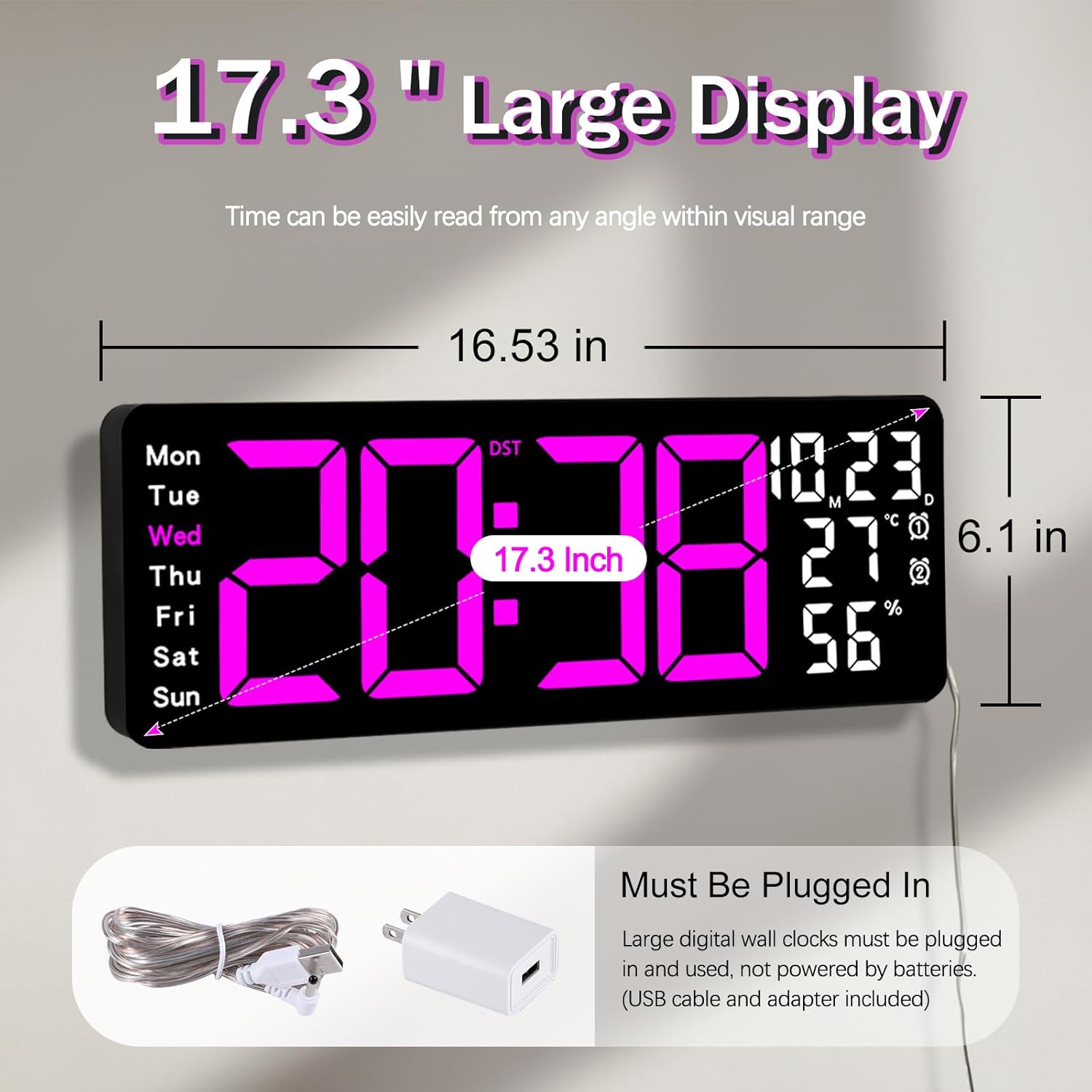
Figure 5.1: Power connection and dimensions.
5.2 Memory Battery Installation (Optional)
To retain time and settings during a power outage, install a 1 AAA battery (not included) into the memory battery compartment on the back of the clock.
- Locate the memory battery compartment on the back of the clock.
- Whakatuwheratia te uhi o te wahanga.
- Insert one 1.5V AAA battery, ensuring correct polarity (+/-).
- Katia kia mau te uhi o te wahanga.
5.3 Whakapuru Taiepa
Use the included mounting template ruler and hooks for easy wall installation.
- Determine the desired location for your clock.
- Place the mounting template ruler on the wall at the desired height.
- Mark the positions for the mounting hooks according to the ruler's indications.
- Install the mounting hooks into the wall at the marked positions.
- Carefully hang the clock onto the installed hooks, ensuring it is level and secure.
6. Nga Tohutohu Whakahaere
The clock can be operated using either the remote control or the buttons on the back.
6.1 Tautuhinga Wā me te Rā
Use the remote control or the "SET" button on the back of the clock.
- Pehia te SET button (on remote or back of clock) to enter setting mode.
- Whakamahia te + a - ngā pātene hei whakarerekē i te uara kanapa (hei tauira, hāora, meneti, tau, marama, rā).
- Perehi SET again to confirm the current setting and move to the next parameter.
- Whakahokia kia whirihorahia rā anō ngā tautuhinga katoa.
6.2 12/24 Hour Format Conversion
To switch between 12-hour and 24-hour time formats:
- Pēhia te whakatapua 12/24H pātene i runga i te mana mamao.
- Alternatively, during time setting, the format option will appear.

Figure 6.1: 12/24H format conversion.
6.3 Temperature Unit Conversion (°C/°F)
Hei huri i waenga i nga wae pāmahana Celsius me Fahrenheit:
- Pehia te ° C / ° F. pātene i runga i te mana mamao.
6.4 Alarm Setting (Dual Alarms)
Ka tautokohia e te karaka nga whakaoho motuhake e rua.
- Pehia te ohooho button on the remote control or the back of the clock.
- Whakamahi + a - ki te whakarite i te wa whakaoho e hiahiatia ana.
- Perehi ohooho again to confirm and move to the next alarm or exit.
- To activate/deactivate an alarm, press the corresponding alarm button (e.g., AL1 or AL2) i runga i te mamao.
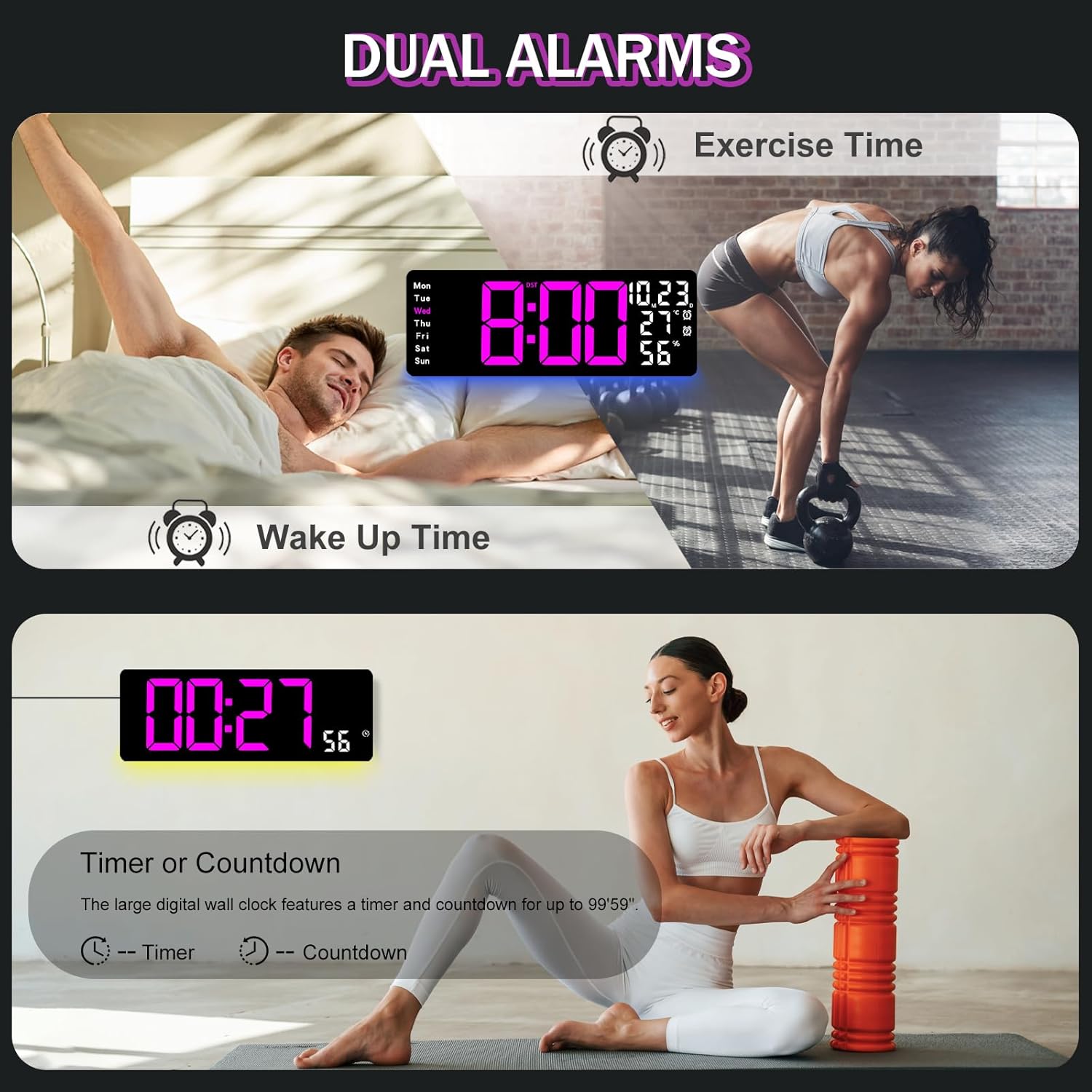
Figure 6.2: Dual alarm and timer functions.
6.5 Whakaritenga Tirohanga
The clock offers 10 levels of brightness, adjustable manually or automatically.
- Tirohanga Aunoa: The built-in light sensor adjusts brightness based on ambient light. Activate this mode by pressing the AUTO pātene i runga i te mamao.
- Te Kanapa ā-Ringa: Pehia te TE KARARANGA button on the remote, then use + a - to select one of the 10 levels.

Figure 6.3: Custom and auto-brightness settings.

Figure 6.4: Brightness regulator illustration.
6.6 Ambient Light Features
The clock includes a night light feature at the bottom with multiple color options.
- Pehia te KAMARAMA button on the remote control or the back of the clock to cycle through 8 fixed colors and 1 multi-color mode.
- In multi-color mode, the colors automatically convert. Press OK to fix a favorite color.
- Adjust the brightness of the ambient light using the + a - buttons when the ambient light is active.

Figure 6.5: Multiple ambient night light options.

Figure 6.6: 9 color ambient light options.
6.7 Timer and Countdown Function
The clock features a timer (count-up) and countdown function up to 99 minutes and 59 seconds.
- Pehia te WAIATA pātene i runga i te mana mamao.
- Whakamahi + a - to set the desired time for countdown.
- Perehi TITIAKI/TATA to begin or pause the timer/countdown.
- Perehi WHAKATURU ki te whakawātea i te matawā.

Figure 6.7: Timing function (count-up/countdown).
Video 6.1: Demonstration of multi-functional features including night light change, brightness control, count-up, and countdown. This video also shows the time, date, day, alarm clock, temperature, and humidity displayed on the same screen, along with 12/24 hour conversion, Celsius/Fahrenheit conversion, and DST enablement. The back design and buttons are also briefly shown.
6.8 Wā Tiaki Awatea (DST)
If DST is observed in your region, you can enable or disable it.
- Pehia roa te - button on the remote control to enable or disable DST. The DST indicator will appear/disappear on the display.

Figure 6.8: Enabling and disabling Daylight Saving Time.

Figure 6.9: Daylight Saving Time (DST) functionality.
6.9 Whakamahi Mana Mamao
The remote control provides convenient access to all clock functions without needing to reach the clock directly.

Figure 6.10: Remote control and its functions.

Figure 6.11: Remote control in use.
- Ensure the remote control has 2 AAA batteries installed (not included).
- Point the remote control directly at the clock for optimal response.
- Each button on the remote corresponds to a specific function as described in this manual.
7. Tiaki
- Clean the clock's display and body with a soft, dry cloth. Avoid abrasive cleaners or solvents.
- Ensure the power adapter and cord are free from damage.
- Replace the memory battery annually to ensure settings are retained during power interruptions.
8. Te Raru
| Raruraru | Take pea | Rongoā |
|---|---|---|
| Kua weto te whakaaturanga karaka. | Karekau he hiko. | Check if the power adapter is securely plugged into the clock and the outlet. Ensure the outlet is functional. |
| Kaore e mahi te mana mamao. | Low or dead batteries in remote; obstruction; remote out of range. | Replace remote batteries (2 AAA). Ensure no obstructions between remote and clock. Point directly at the clock within effective range. |
| I ngaro ngā tautuhinga i muri i te whakawetonga hikotage. | No memory battery or dead memory battery. | Install a fresh 1.5V AAA battery in the memory compartment. |
| Incorrect temperature/humidity reading. | Sensor interference or placement. | Ensure the clock is not placed near heat sources, direct sunlight, or in areas with extreme drafts. Allow time for the sensor to stabilize. |
| Ambient light not changing colors. | Stuck in fixed color mode. | Press the LIGHT button on the remote to cycle through modes. If stuck on a fixed color, press the OK button to release it from fixed mode. |
9. Whakatakotoranga
| Āhuahira | Taipitopito |
|---|---|
| Waitohu | JoFomp |
| Tau tauira | 6669 |
| Momo Whakaatu | Arahina Mamati |
| Rahi Whakaatu | 17.3 inihi |
| Hunga Hua | 16.5"W x 6.7"H |
| Puna Mana | Corded Electric (5V/2A adapter included) |
| Pūhiko Mahara | 1 x AAA (kaore i whakauruhia) |
| Taumata Tirohanga | 10 (Auto/Manual) |
| Ambient Light Colors | 8 Fixed + 1 Multi-color |
| Nga waahanga motuhake | Large Display, Adjustable Brightness, Temperature Display, Humidity Display, Dual Alarms, Timer, Countdown, DST, Remote Control |
| Momo Whakaeke | Maunga Taiepa |
| Taumaha Tūemi | 1.95 pauna |
10. Pūtāhui me te Tautoko
JoFomp products are designed for reliability and performance. For warranty information or technical support, please refer to the contact details provided with your purchase or visit the official JoFomp webpae. Puritia to riiki hoko hei tohu mo te hoko.