
ECHO Rainbow Lite
ECHO Rainbow Lite Smartwatch Manual Kaiwhakamahi
Model: Rainbow Lite
Waitohu: ECHO
1. Kupu Whakataki
The ECHO Rainbow Lite Smartwatch is designed to integrate seamlessly into your daily life, offering advanced features for communication, health monitoring, and fitness tracking. This manual provides essential information to help you get the most out of your device.
He aha kei roto i te Pouaka
- ECHO Rainbow Lite Smartwatch
- Two interchangeable silicone straps (one pre-installed, one additional)
- taura utu aukume
- Pukapuka Kaiwhakamahi (tenei tuhinga)

Image: The ECHO Rainbow Lite Smartwatch displayed with both a light pink and a light grey silicone strap, showcasing its customizable style.
2. Aratohu Tatūnga
2.1 Te Whakataki i te Maataki Ataata
Before initial use, fully charge your ECHO Rainbow Lite Smartwatch. Connect the magnetic charging cable to the charging points on the back of the watch and plug the USB end into a standard USB power adapter (not included). A full charge takes approximately 1.5 hours and provides up to 5 days of battery life depending on usage.
2.2 Te Tāuta i te Taupānga Da Fit
The ECHO Rainbow Lite Smartwatch requires the Da Fit application for full functionality. Download the Da Fit app from your smartphone's app store (available for Android and iOS devices).
- Scan the QR code provided in the quick start guide (if applicable) or search for "Da Fit" in the App Store (iOS) or Google Play Store (Android).
- Tāutahia te tono ki runga i to waea atamai.
2.3 Tauhoa ki to Waea atamai
Me mohio kei te whakahohea te Nihokikorangi o to waea atamai.
- Open the Da Fit app on your smartphone.
- Follow the on-screen instructions to add a new device. The app will search for available Bluetooth devices.
- Select "Rainbow Lite" or a similar device name from the list.
- Whakaūhia te tono takirua i runga i to waea atamai me te maataki atamai.
- Kia honoa, ka tukutahi te taupānga i ngā raraunga me tō mātaaratanga.
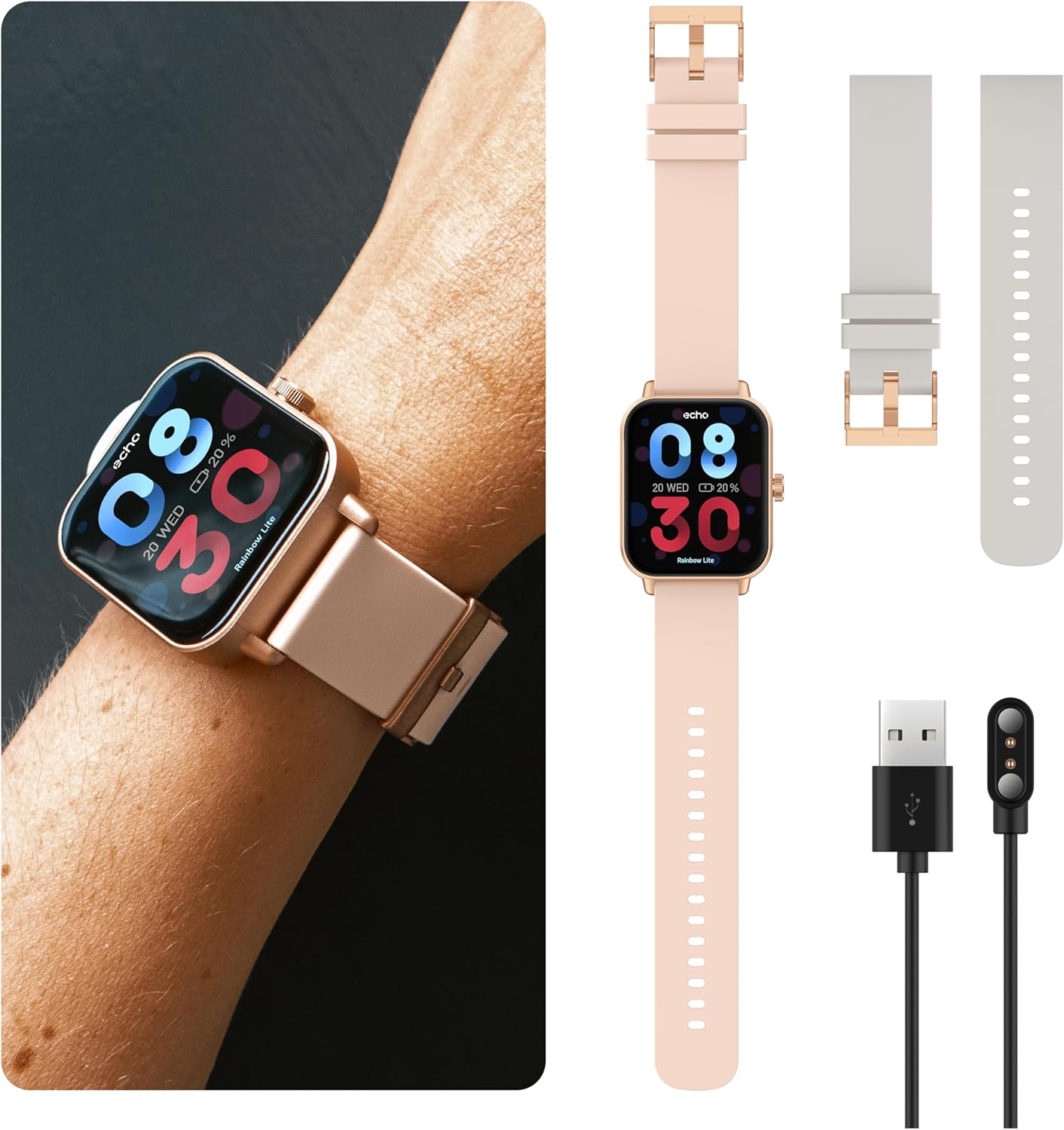
Image: The ECHO Rainbow Lite Smartwatch, its magnetic charging cable, and both the pink and grey silicone straps, illustrating the components included for setup.
3. Nga Tohutohu Whakahaere
3.1 Whakaterenga Taketake
- Mata Pa: Swipe ki maui, matau, whakarunga, whakararo ranei hei whakatere i nga tahua me nga ahuatanga. Pato hei kowhiri i tetahi whiringa.
- Pātene taha: Pēhia kia hoki ki te mata o te kāinga, whakaoho ranei i te taputapu. Pehi roa mo nga whiringa hiko.
3.2 Waea Nihokikorangi
The Rainbow Lite Smartwatch allows you to make and receive calls directly from your wrist, thanks to its integrated microphone and speaker. Ensure your watch is connected to your smartphone via Bluetooth.
- Waeatanga: Uru ki te waea waea, ki te rarangi hoapaki ranei i runga i to mataaratanga hei timata waea.
- Whiwhi Waea: Ka tae mai he waea, ka taea e koe te whakautu, te whakakore tika ranei mai i te mata mataara.
3.3 Panuitanga
Receive real-time notifications for calls, messages, and app alerts directly on your smartwatch. Manage notification settings through the Da Fit app on your smartphone.
3.4 Te Aroturuki Hauora
The smartwatch is equipped with sensors to track various health metrics. These features are for informational purposes and are not intended for medical diagnosis or treatment.
- Tere Manawa: Aroturuki i to reanga ngakau puta noa i te ra.
- Toto hāora (SpO2): Te ine i o taumata hauhautanga toto.
- Toto Toto: Track your estimated blood pressure.
- Aroturuki Moe: Tātarihia ō tauira moe, tae atu ki te moe hōhonu, te moe māmā, me ngā wā oho ake.
- Patohanga: Count your daily steps and estimate distance covered.

Image: The ECHO Rainbow Lite Smartwatch screen showing heart rate and blood oxygen saturation (SpO2) measurements, along with a smartphone screen displaying detailed health data within the Da Fit app.
3.5 Sport Modes and Coaching
The Rainbow Lite offers over 100 sport modes to track your workouts. The Da Fit app also provides coaching videos to enhance your fitness routines.
- Aroturuki Mahi: Record data for various activities like running, cycling, walking, and more.
- Coaching: Access guided exercises and training programs through the Da Fit app.

Image: A collage showing the ECHO Rainbow Lite Smartwatch interface with different sport modes, alongside smartphone screens illustrating fitness tracking and coaching features within the Da Fit app.
3.6 Nga Mata Maataki Whakaritea
Personalize your smartwatch with over 100 downloadable watch faces available through the Da Fit app.
4. Tiaki
4.1 Te horoi i to Waataki Maataki
To maintain optimal performance and appearance, regularly clean your smartwatch. Use a soft, lint-free cloth to wipe the screen and body. For stubborn dirt, slightly dampen te kakahu ki te wai. A ape i te whakamahi i nga matū kino, i nga taonga abrasive ranei.
4.2 Atete Wai
The ECHO Rainbow Lite Smartwatch is rated IP67 water-resistant. This means it is protected against immersion in water up to 1 meter for up to 30 minutes. It is suitable for daily use, such as washing hands or light rain, but not recommended for swimming, diving, or high-pressure water activities.
4.3 Tiaki Pūhiko
To prolong battery life, avoid exposing the watch to extreme temperatures. Charge the watch regularly, even if not in use for extended periods, to prevent deep discharge.
5. Te Raru
- Kia mataara kia kaua e huri: Me whakarite kia tino utua te mātaaratanga. Honoa ki te rihi aukume, tirohia mēnā ka puta te tohu utu.
- Kāore e taea te hono atu ki te waea atamai:
- Me mohio kei te whakahohea te Nihokikorangi i runga i to waea atamai.
- Me mohio kei roto te mataaratanga i te awhe Nihokikorangi (te tikanga 10 mita).
- Me whakaara ano to waea atamai me te maataki atamai.
- Check if the Da Fit app has necessary permissions enabled on your phone.
- Raraunga hauora hē:
- Me whakarite kia mau te wati ki runga i to ringaringa, kia kaua e piri rawa, kia kore rawa ranei.
- Horoia te pūoko kei muri o te mataaratanga.
- Note that environmental factors and individual physiology can affect readings. These measurements are not for medical use.
- Ko nga whakamohiotanga kaore e puta:
- Verify that notifications are enabled in the Da Fit app.
- Check your smartphone's notification settings to ensure the Da Fit app has permission to send notifications.
- Me mohio kei te hono te mataaratanga ma te Nihokikorangi.
6. Whakatakotoranga
| Waitohu | ECHO |
| Ingoa Tauira | Rainbow Lite |
| Tauira Tauira ā-roto | 512553e7-4c5f-4e86-b901-f586539e6b59 |
| Rahi Mata | 1.83 inihi |
| Hononga | Nihokikorangi V5.3 |
| Nga waahanga motuhake | Bluetooth Calling, Health Tracking (Heart Rate, SpO2, Blood Pressure), Sport Coaching, IP67 Water Resistance |
| Pūrere Hototahi | Smartphones (Android/iOS), Tablets, Laptops, PCs |
| Ora Pūhiko | Tae atu ki te 5 ra (whakamahinga tikanga) |
| Waa Whakatau | Tata ki te 1.5 haora |
| Whakatauranga Atete Wai | IP67 |
| Taumaha | Ultra-light (approx. 35g) |
7. Pūtāhui me te Tautoko
7.1 Nga Korero Whakaputanga
The ECHO Rainbow Lite Smartwatch comes with a standard manufacturer's warranty. Please refer to the warranty card included in your product packaging or contact your retailer for specific warranty terms and conditions.
7.2 Tautoko Kiritaki
If you encounter any issues or have questions not covered in this manual, please contact ECHO customer support through the contact information provided on the official ECHO webpae, to turanga hoko ranei. Tena koa kia rite to nama tauira me nga taipitopito hoko ina whakapā atu ki te tautoko.