
1. Kupu Whakataki
Welcome to the ACwO DwOTS Fire user manual. These innovative earbuds offer a unique dual-style design, providing both in-ear and half-in-ear options within a single charging case. Designed for versatility and high-quality audio, the DwOTS Fire earbuds feature advanced connectivity, extended battery life, and intuitive controls to enhance your listening experience.

Image: ACwO DwOTS Fire earbuds showcasing both half-in-ear and in-ear styles from a single case.
2. He aha kei roto i te Pouaka
Tena koa tirohia kei roto katoa nga taonga kei roto i to kete:
- 2 x Set of Wireless Earbuds (one in-ear, one half-in-ear)
- 1 x Momo-C Utaura Whakatau Tere
- 4 x Extra Earmuffs (for in-ear style)
- 1 x Kaari Rarangi
- 1 x Scan Me Card

Image: The ACwO DwOTS Fire earbuds and charging case.
3. Tatūnga me te Tauhoa
3.1 Takirua Tuatahi
- Me whakarite kei te utu nga purongo.
- Whakatuwherahia te putea utu. Ka uru aunoa nga taringa ki te aratau takirua.
- I runga i to taputapu (waea atamai, papa, aha atu), whakaahei i a Nihokikorangi.
- Rapua available devices and select "ACwO Fire" or "ACwO DwOTS Fire" to connect.
- Kia honoa, ka rongo koe i tētahi tohu oro, ā, ka huri te rama tohu i runga i ngā pane taringa.
3.2 Hononga Takirua
The ACwO DwOTS Fire earbuds offer unique dual connectivity options:
- Connect Each Pair to Two Different Devices: Ideal for sharing your listening experience.
- Connect Both Pairs to a Single Device: Perfect for watching movies or listening to music together with a loved one. This feature is available only for devices with dual audio connectivity (e.g., certain Android devices).

Image: Illustration of the dual connectivity feature, showing two pairs of earbuds.
Steps for Dual Sharing (Connecting Both Pairs to a Single Device):
- Connect both 'ACwO DwOTS Fire' and 'ACwO Fire +' with your device's Bluetooth.
- Once both pairs are connected, scroll down your device's notification panel and click on 'Media Output'.
- One pair will already be selected. Select the other pair to enable dual audio.
- You can now listen on both pairs of your earbuds simultaneously.

Image: Visual guide for setting up dual sharing on a compatible device.
4. Nga Tohutohu Whakahaere
4.1 Intuitive Touch Controls
The earbuds feature intuitive touch controls for easy management of music, calls, and voice assistants. Refer to the included 'Scan Me Card' for a detailed diagram of touch functions.
- Purei/Tatari: Pao kotahi ki runga i tetahi purongo.
- Riu Panuku: Pao rua ki te purongo matau.
- Riu o mua: Pao rua ki te purongo maui.
- Whakautu/Whakamutu Waea: Pao kotahi ki runga i tetahi purongo.
- Whakakore Waea: Pēhi roa i runga i tetahi purongo.
- Whakahohe i te Kaiawhina Reo: Takitoru te pao ki runga i tetahi purongo.
4.2 Aratau EQ
Customize your audio experience with 3 preset EQ modes, offering a total of 3+3 EQ options across the two earbud styles. Switch between modes to suit your preference for deep bass, balanced sound, or enhanced treble.
- Aratau petipeti: Optimized for immersive gaming audio with low latency.
- Aratau Whare Tapere: Enhanced soundstage for movies and videos.
- Aratau Taurite: Provides a neutral and clear audio profile for general listening.

Image: ACwO DwOTS Fire earbuds with a visual representation of available EQ modes.
4.3 Kaiawhina Reo
Easily access your device's voice assistant by triple-tapping either earbud. Compatible with "Ok Google" and "Hey Siri" for hands-free control.
5. Te utu
5.1 Earbuds and Case Charging
The ACwO DwOTS Fire earbuds provide up to 52 hours of music playtime with the charging case. The case supports both wired and wireless charging.
- Ka utua te Waea: Connect the provided Type-C fast charging cable to the charging port on the case and a power source.
- Whakataunga Ahokore: Place the charging case on a compatible wireless charging pad (wireless charger not included). The indicator light on the case will show charging status.

Image: ACwO DwOTS Fire charging case highlighting 52 hours of playtime.

Image: 'One On, One Charging' feature for extended use.
6. Tiaki
6.1 Ātete ki te Wai me te Werawera
The earbuds are IPX5 water and sweat resistant, making them suitable for workouts and outdoor activities. This rating protects against low-pressure water jets from any direction. Do not submerge the earbuds in water.

Image: ACwO DwOTS Fire earbuds demonstrating IPX5 water and sweat resistance.
6.2 Te horoi
Regularly clean your earbuds and charging case with a soft, dry, lint-free cloth. Avoid using abrasive materials or harsh chemicals. For the in-ear style, gently remove and clean the earmuffs with water and mild soap, ensuring they are completely dry before reattaching.
7. Whakatakotoranga
| Āhuahira | Taipitopito |
|---|---|
| Ingoa Tauira | DwOTS Ahi |
| Hangarau Hononga | Ahokore (Nihokikorangi V5.3) |
| Momo Atekōkiri Ororongo | 13mm Real Drivers |
| Mana Haruru | AI-ENC with Quad Mics, Passive Noise Cancellation |
| Te wa takaro | Tae atu ki te 52 Haora (me te putea utu) |
| Roopuu | Up to 45ms (Ultra-low) |
| Taumata Atete Wai | IPX5 (Water Repellent) |
| Te utu | Type-C Fast Charging, Wireless Charging Capability |
| Tikanga Mana | Touch Controls, Voice Assistant (Ok Google, Hey Siri) |
| Hanga Whakatangitangi | In-Ear, Half-in-Ear |
| Taumaha Tūemi | 43 g |
| Hunga Hua | 5.6 x 5.6 x 1.8 cm |
| Rauemi | Kirihou |
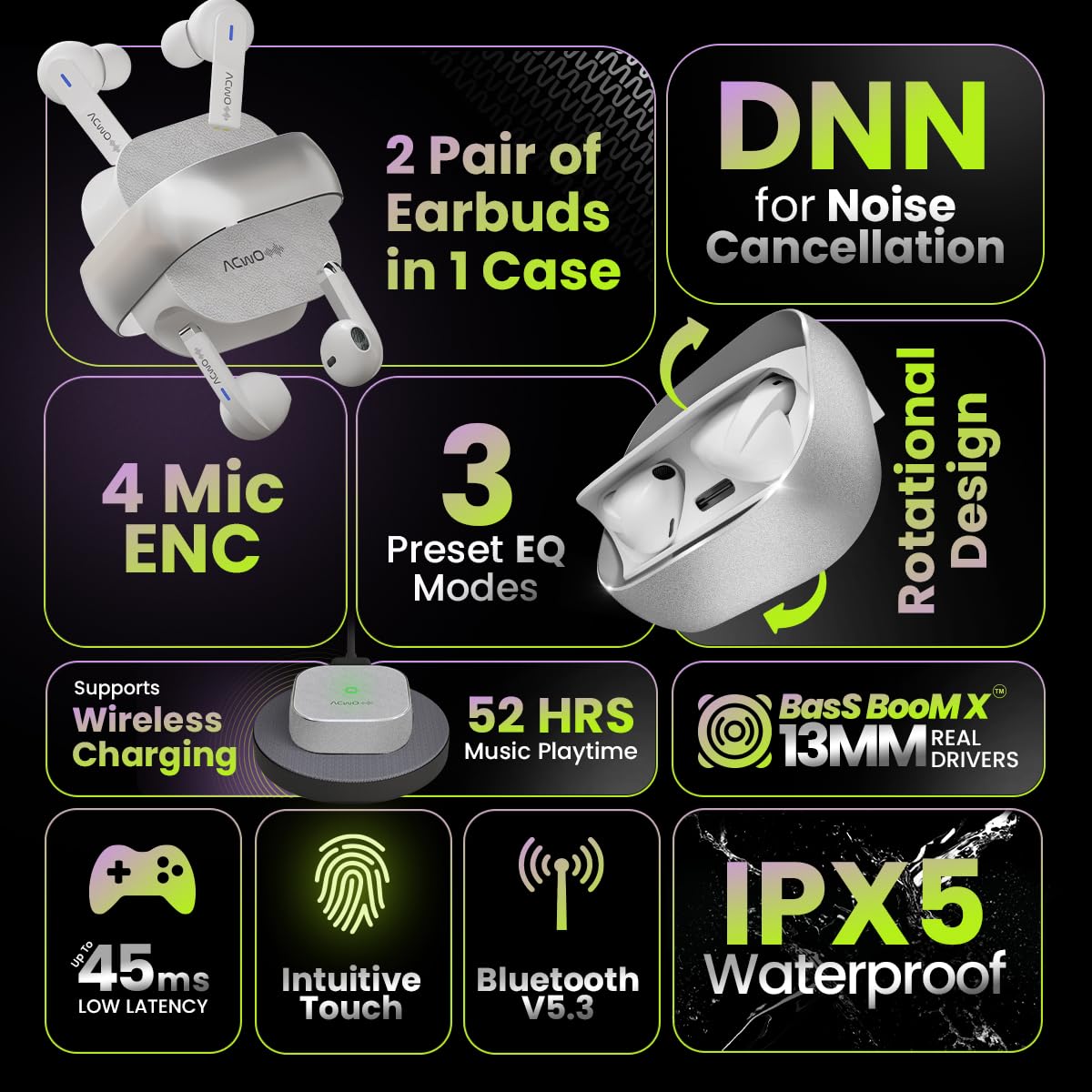
Image: Summary of ACwO DwOTS Fire key features.
8. Te Raru
8.1 Earbuds Kore e Tauhoa
- Me whakarite kua utuhia nga purongo ka tuwhera te taupoki o te keehi.
- Whakawetohia me te Nihokikorangi o to taputapu.
- Wareware atu ki te pūrere i tō rārangi Nihokikorangi, ka ngana anō ki te hono atu.
- Reset the earbuds (refer to the 'Scan Me Card' for specific reset instructions).
8.2 Karekau he oro, he iti ranei te reo
- Tirohia nga taumata oro i runga i to taputapu me nga purongo.
- Me whakarite kia noho tika nga taringa ki o taringa.
- Clean any debris from the earbud speakers and charging contacts.
- Honoa ano nga purongo ki to taputapu.
8.3 Nga take utu
- Me mohio kei te hono pai te taura utu ki te take me te puna hiko.
- If using wireless charging, ensure the case is correctly placed on a compatible wireless charging pad.
- Check for any obstructions on the charging contacts of the earbuds and inside the case.
- Whakamātauria he taura utu rereke, he urutau hiko ranei.
9. Pūtāhui me te Tautoko
The ACwO DwOTS Fire earbuds come with a standard brand warranty. Please refer to the included Warranty Card for specific terms and conditions.
Tautoko Kiritaki:
For any queries, technical assistance, or warranty claims, please contact ACwO customer support:
- Īmēra: help@acwo.com
- Waea: +91 9320420001
- Kaihanga: ACWO LIFESTYLE PRIVATE LIMITED, Borivali, Mumbai, Maharashtra - 400092, India