
1. Hua Neke Atuview
The Blue Star 1.5 Ton 5 Star Inverter Window AC (Model WID518L) is designed to provide efficient and powerful cooling for medium-sized rooms. This unit incorporates advanced features for enhanced comfort and energy savings. Please read this manual thoroughly before operating your AC unit to ensure proper use and maintenance.

Whakaahua 1: Mua view of the Blue Star 1.5 Ton 5 Star Inverter Window AC.
Āhuatanga matua:
- Copper Condenser: Ensures efficient cooling and durability.
- 1.5 Ton Capacity: Suitable for rooms ranging from 111 to 150 sq.ft.
- 5 Whetu Whakatauranga Pungao: High energy efficiency as per 2022 BEE guidelines, with an annual energy consumption of 1104.23 units and an ISEER Value of 3.51.
- Hangarau Inverter: Provides consistent cooling while optimizing power consumption.
- Whakamatao Turbo: Rapidly cools the room for immediate comfort.
- Comfort Sleep Mode: Adjusts temperature for optimal sleep conditions.
- 2D Swing: Ensures uniform air distribution.
- Hydrophilic Blue Fins: Protects the evaporator coil from corrosion and enhances heat transfer.
- Tātari Puehu: Helps in maintaining air quality by filtering out dust particles.
- Tātari Whaiaro: Identifies and displays error codes for easier troubleshooting.
- R32 Refrigerant: He hauhautanga e pai ana mō te taiao, ā, kāore e taea te whakaiti i te ōzone.
- Auto Re-start with Memory: Ka whakaara ano i nga tautuhinga o mua i muri i te hiko outage.
2. Nga korero haumaru
Hei aukati i te whara o te kaiwhakamahi tetahi atu tangata ranei me nga taonga o te rawa, me whai nga tohutohu e whai ake nei. Ko te mahi he na te kore e aro ki nga tohutohu ka pa he kino, he kino ranei.
- Always use a dedicated power circuit for the AC unit. Do not share the circuit with other appliances.
- Ensure the power plug is fully inserted and secure. A loose connection can cause electric shock or fire.
- Do not operate the AC with wet hands or in a wet environment.
- Keep children away from the AC unit and remote control.
- Kaua e kuhu maihao maihao, taonga ranei ki roto i te urunga hau.
- Whakawetohia te hiko hiko i mua i te horoi, te mahi tiaki ranei.
- In case of abnormal operation (e.g., burning smell, unusual noise), immediately turn off the unit and disconnect power. Contact authorized service personnel.
- Me whakarite kia tika te hau huri noa i te waahanga kia kore ai e wera rawa.
3. Tāutanga
Installation of the Blue Star Window AC requires professional expertise to ensure correct placement, electrical connection, and sealing. It is highly recommended to arrange for installation by authorized Blue Star service technicians.
Ngā Aratohu Tāuta:
- Tuwhera Matapihi: Ensure the window opening meets the minimum and maximum dimensions for proper fit. Minimum width: 66 cm, Minimum height: 73 cm. Maximum width: 132 cm, Maximum height: 75 cm.
- Turanga: The unit should be installed in a location that can support its weight (48 kg) and allows for proper air circulation.
- Hononga Hiko: A dedicated 230V / 50Hz / Single Phase power supply is required. Ensure the socket is compatible and safely connected.
- Whakaheke wai: Ensure proper drainage for condensed water.
- Tirohanga turuturu: After installation, the technician will perform a leak check to ensure no refrigerant leakage.

Image 2: Standard installation and dismantling charges for Window/Portable AC. Please note that GST will be additional as applicable.
Inclusions for Standard Installation: Placement and securement of the AC without leaks, electrical connection ensuring socket compatibility and safe connection, product demonstration covering features, safety protocols, and troubleshooting steps.
Exclusions for Standard Installation: Upgrading or modifying existing setup beyond the standard, structural modification to install the Window AC, dismantling old AC, society/association permissions, installation of external protective covers, customized on-site work as per customer requirements.
4. Nga Tohutohu Whakahaere
Your Blue Star Window AC comes with a remote control for convenient operation. Familiarize yourself with the remote control buttons and their functions.
Aratau Mahi:
- Aratau Ahuru: Provides cooling. Adjust temperature using the remote control.
- Aratau Fan: Circulates air without cooling. Fan speed can be adjusted (Auto/High/Medium/Low).
- Dry Mode (Humidity Control): Ka whakaiti i te makuku i roto i te ruma.
- Aratau Auto: The AC automatically selects the appropriate operating mode (Cool, Fan, Dry) based on the room temperature.
- Turbo Hauhau: Activates maximum cooling power for rapid temperature reduction.
- Comfort Sleep: Optimizes room temperature and fan speed for a comfortable sleeping environment, gradually increasing temperature over time.

Image 3: The 5-in-1 Convertible Cooling feature allows adjusting cooling capacity from 40% to 110% to suit varying needs.
Nga Mahi Apiti:
- 2D Swing: Controls the horizontal movement of the air flaps to distribute air evenly across the room.
- Air Flow Direction Control: Manually adjust the vertical louvers to direct airflow as desired.
- Auto Re-start with Memory: In case of a power interruption, the unit will automatically restart with the last used settings once power is restored.

Image 4: Visual representation of Comfort Sleep, Humidity Control, and Auto-Restart with Memory features.
5. Tiaki
Regular maintenance ensures optimal performance and longevity of your AC unit. Always turn off the power supply before performing any cleaning or maintenance.
Cleaning the Dust Filters:
- Auautanga: Clean the dust filters every two weeks, or more frequently if the AC is used in a dusty environment.
- Tikanga: Open the front panel of the AC unit. Carefully remove the dust filters. Wash them with lukewarm water and a mild detergent. Rinse thoroughly and allow them to air dry completely before reinserting.
Cleaning the Hydrophilic Blue Fins:
The evaporator fins are coated with a hydrophilic blue layer for enhanced protection against corrosion and improved heat transfer. While these fins are designed for durability, they should be inspected periodically.
- Tirotiro: Visually check the fins for any accumulation of dust or debris.
- Te horoi: For light dust, use a soft brush or vacuum cleaner with a brush attachment. For heavier buildup, professional cleaning is recommended to avoid damaging the delicate fins.
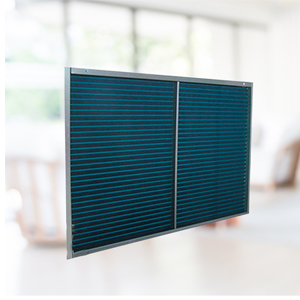
Image 5: The Hydrophilic Blue Fins are designed to resist corrosion and improve cooling efficiency.
General Unit Cleaning:
- Horoia te taha o waho o te waeine ki te ngohengohe, damp kakahu. Kaua e whakamahi i nga matū kino me nga horoi horoi.
- Ensure the air inlet and outlet grilles are free from obstructions.
6. Te Raru
If your AC unit is not operating correctly, refer to the following common issues and solutions. The unit features a Self-Diagnosis function that can display error codes to assist in identifying problems.
Nga take me nga otinga noa:
- AC not turning on: Check if the power cord is securely plugged in. Ensure the circuit breaker has not tripped. Check remote control batteries.
- He iti rawa te whakamatao: Clean the air filters. Ensure no obstructions are blocking the air intake or outlet. Check if the temperature setting is too high. Ensure windows and doors are closed.
- Haruru rereke: Check for loose parts or foreign objects. If the noise persists, contact service.
- Te rerenga wai: Ensure the unit is properly tilted for drainage. Check if the drain hose is clogged or kinked.
- Mana mamao kaore e mahi: Replace batteries. Ensure there are no obstructions between the remote and the AC unit's receiver.
Self-Diagnosis Feature:
The Self-Diagnosis feature helps identify operational issues by displaying specific error codes on the unit's display. Refer to the detailed error code list in your physical user manual for specific meanings and recommended actions. If an error code appears, note it down and contact customer support if the issue cannot be resolved by basic troubleshooting.
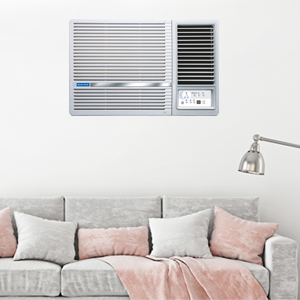
Image 6: The Self-Diagnosis feature assists in identifying and resolving operational issues.
7. Whakatakotoranga
Detailed technical specifications for the Blue Star 1.5 Ton 5 Star Inverter Window AC (Model WID518L).

Image 7: Energy Savings Guide label showing ISEER, Annual Energy Consumption, and other details.
| Whakatakotoranga | Uara |
|---|---|
| Waitohu | Whetu Kahurangi |
| Tau tauira | WID518L |
| Te kaha | 1.5 Toni |
| Whakatauranga Ataata | 5 Star (as per 2022 BEE guidelines) |
| Te Whakamahi Pungao a-Tau | 1104.23 Kirowatt Haora Ia Tau |
| ISEER Uara | 3.51 |
| Te Mana Matao | 1590 Watts |
| Whakamaoho | R-32 |
| Taumata Haruru | 56 Decibels |
| Rahi Hua (D x W x H) | 43D x 66W x 73H Henemita |
| Taumaha Tūemi | 48000 Karamu |
| Voltage | 230 Volts |
| Puna Mana | Hiko Hiko |
| Momo Kōpeke | Rotary Scroll |
| Tikanga Mana | Mana Mamao |
| Nga Waahanga kei roto | 1 AC unit, 1 Remote Control, 1 User manual, 1 Warranty Card |
8. Pūtāhui me te Tautoko
Your Blue Star 1.5 Ton 5 Star Inverter Window AC (WID518L) comes with a comprehensive warranty and dedicated customer support.
Taipitopito Whakaputanga:
- Pūtāhui Matawhānui: 1 Year on the entire unit.
- Pūtāhui Kōpeke: 4 Years on the compressor.
- The warranty period starts from the date of purchase. Please retain your purchase invoice and warranty card for future reference.
Tautoko Kiritaki:
For any queries, service requests, or technical assistance, please contact Blue Star customer support:
- Īmēra: customerservice@bluestarindia.com
- Waea: 89 7678 1177
- Wāhitau Kaihanga: BLUE STAR LIMITED, KASTURI BUILDINGS, MOHAN T ADVANI CHOWK, JAMSHEDJI TATA ROAD, CHURCHGATE, MUMBAI 400 020.
Please provide your model number (WID518L) and purchase details when contacting customer support for faster service.