
1. Kupu Whakataki
The mooas Visual Shower Clock is a multi-functional digital device designed for use in various environments, including kitchens and bathrooms. It features a clock, timer, and displays both temperature and humidity. Its waterproof design (IPX5) ensures safe operation in wet conditions. The large, clear LCD screen provides excellent visibility, and the intuitive touch buttons allow for easy operation. This manual provides detailed instructions for setup, operation, and maintenance of your device.
2. Ihirangi mokete
- Main body (mooas Visual Shower Clock)
- Matau whakairi taiepa
- Pukapuka Kaiwhakamahi
3. Nga Hua o te Hua
- Multi-functional device: Timer, Clock, Temperature, and Humidity display.
- Large and clear LCD screen for optimal readability.
- Visual Timer Ring to intuitively show time progression.
- Fast and simple timer setting with dedicated 10min, 1min, and 10sec buttons.
- Backlight display for visibility in low-light conditions.
- Multiple placement options: Standing, Wall mount, and Magnet attachment.
- Silent Mode for use in quiet environments.
- 3-Level Alarm Volume Control (Silent/Minimum/Maximum).
- IPX5 waterproof rating for safe use in kitchen and bathroom.
4. Tatūnga
4.1 Tāuta Pūhiko
- Kimihia te wahanga pākahiko kei muri o te taputapu.
- Whakatuwheratia te uhi pākahiko.
- Whakauruhia kia toru ngā pākahiko AAA (kāore i te whakaurua), me te whakarite kia tika te polarity (+/-).
- Katia kia mau te taupoki pākahiko.
Tuhipoka: Ensure the battery compartment is sealed properly to maintain the device's waterproof integrity.

Whakaatu 1: Te Whakataunga Pūhiko
4.2 Initial Settings (Time, Date, Temperature Unit)
Upon first power-on or after battery replacement, you may need to set the time, date, and preferred temperature unit.
- Te whakarite i te Wa me te Ra: Press and hold the '10min' button to enter time setting mode. Use the '1min' and '10sec' buttons to adjust the values. Press 'ST/SP' to confirm and move to the next setting (e.g., hour, minute, year, month, day).
- Tautuhi Wae Maama: The device displays temperature in Celsius (°C) or Fahrenheit (°F). To switch between units, press and hold the '1min' and '10sec' buttons simultaneously until the unit changes.
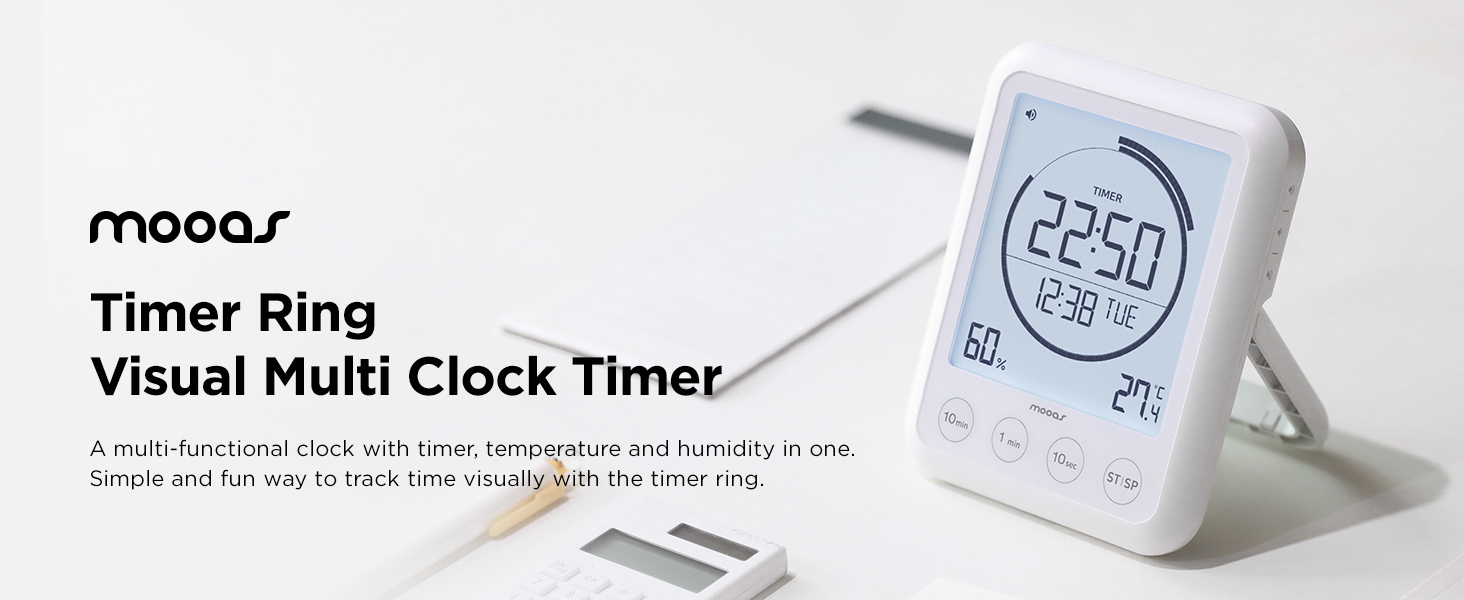
Figure 2: Display Overview (Time, Date, Humidity, Temperature)
5. Nga Tohutohu Whakahaere
5.1 Mahi Matama
The device features a countdown timer with a visual ring indicator.
- Te Tautuhi i te Taima: Use the '10min', '1min', and '10sec' buttons to add time to the timer. Each press adds the corresponding duration.
- Starting/Pausing the Timer: Press the 'ST/SP' button to start the countdown. Press it again to pause the timer.
- Kei te tautuhi ano i te Matama: While the timer is paused or stopped, press and hold the 'ST/SP' button to reset the timer to zero.
- Mahi Tatau-ake: If the timer is started from 00:00, it will function as a count-up timer.

Figure 3: Timer Control Buttons
5.2 Alarm Volume Control
Adjust the alarm volume to suit your environment.
- The device offers three alarm volume levels: Silent, Minimum, and Maximum.
- To change the volume, locate the volume control button on the side of the device. Press it repeatedly to cycle through the volume options.

Figure 4: Volume Control
5.3 Rama Whakamuri
The backlight activates automatically with any button press, providing temporary illumination for the display.

Figure 5: Backlight in Use
6. Kōwhiringa Whakapuru
The mooas Visual Shower Clock offers versatile mounting options to suit various locations:
- Tu ana: Use the integrated kickstand for tabletop placement.
- Maunga Maunga: Utilize the wall mount hole on the back of the device with the provided wall mount hook.
- Taimana: The strong magnet on the back allows attachment to metallic surfaces like refrigerators or metal shower caddies.

Figure 6: Mounting Options (Stand, Wall Mount, Magnet)
7. Tiaki
- Te horoi: Horoia te taputapu ki te ngohengohe, damp kakahu. Kaua e whakamahi i nga kai horoi me nga whakarewa.
- Whakakapinga Pūhiko: Replace batteries when the low battery indicator appears on the display. Ensure the battery compartment is sealed tightly after replacement.
- Rokiroki: Mena ka roa te wā e rongoa ai te taputapu, tangohia ngā pākahiko hei ārai i te turuturu.
8. Te Raru
| Raruraru | Take pea | Rongoā |
|---|---|---|
| He putea, he atarua ranei te whakaaturanga. | He iti ngā pākahiko, he hē rānei te tāutanga o te pākahiko. | Whakakapihia nga pākahiko ki nga pākahiko AAA hou, kia tika te polarity. |
| Timer buttons are unresponsive. | Water droplets on the touch buttons. | Wipe the screen and buttons dry. Ensure hands are dry when operating. |
| Kāore i te tika te wā/rā e whakaaturia ana. | Time/date not set or reset after battery change. | Refer to Section 4.2 to set the correct time and date. |
| Alarm sound is too low or off. | Volume setting is on Minimum or Silent. | Adjust the alarm volume using the side button (refer to Section 5.2). |
9. Whakatakotoranga
| Āhuahira | Taipitopito |
|---|---|
| Rauemi | Acrylonitrile Butadiene Styrene (ABS) |
| Taumaha | 220 Karamu (tata ki te 7.8 hekere) |
| Hunga Hua | 4.92"W x 0.94"H (approx. 3.94 x 0.94 x 4.92 inches W x D x H) |
| Puna Mana | 2 pākahiko AAA (kaore i whakauruhia) |
| Momo Whakaatu | LCD Mamati me te Marama Whakamuri |
| Whakatauranga parewai | IPX5 |
| Te Waahi Mahi | 32-104°F (0-40°C) |
| Paemahana Rokiroki | 15.8°F-122°F (-9-50°C) |
| Momo Whakaeke | Tabletop, Wall Mount, Magnet |
10. Hua Ataata
Video: mooas Visual Timer Clock. This official product video demonstrates the features and usage of the mooas Visual Shower Clock, including its timer function, display, and various applications in different environments.
11. Pūtāhui me te Tautoko
This product is covered by a standard manufacturer's warranty. For specific warranty details, please refer to the documentation included with your purchase or contact mooas customer support. If you encounter any issues or have questions not addressed in this manual, please reach out to our customer service team for assistance.
For further support, visit the official mooas webpae, whakapā atu ranei ki to kaihoko.