
1. Kupu Whakataki
This manual provides instructions for the safe operation, maintenance, and troubleshooting of your FLEX 24V Brushless Cordless 1/2-Inch Hammer Drill Turbo Mode Kit, model FX1271T-2B. Please read this manual thoroughly before using the tool to ensure proper and safe operation.
The FLEX FX1271T-2B is a powerful 24V brushless cordless hammer drill designed for demanding drilling and driving applications. It features a 1/2-inch full-metal ratcheting chuck, two-speed settings, a Turbo Mode for increased speed, and an anti-kickback safety feature. This kit includes the drill, a 2.5Ah Lithium-Ion Battery, a 5.0Ah Lithium-Ion Battery, and a 160W Fast Charger.
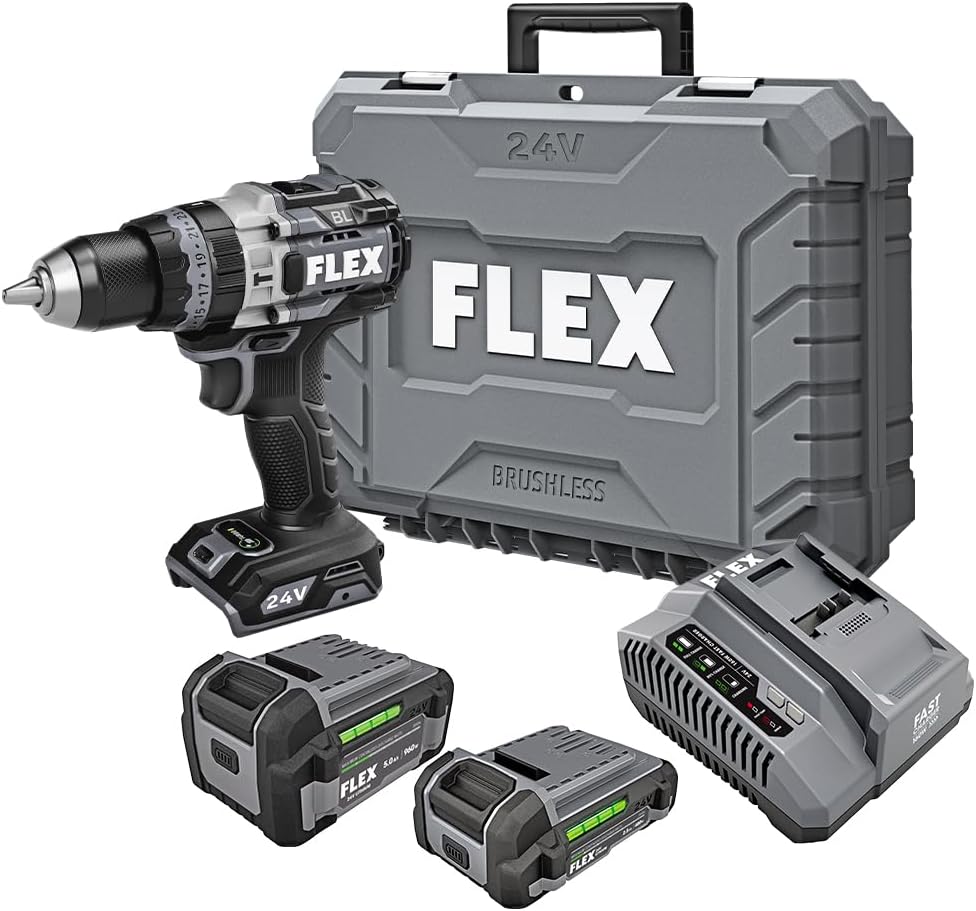
Figure 1: FLEX 24V Brushless Cordless 1/2-Inch Hammer Drill Kit (FX1271T-2B) including drill, two batteries, charger, and carrying case.
2. Nga Tohutohu Haumaru Whanui
WHAKATŪPATO: Panuitia nga whakatupato haumaru katoa, nga tohutohu, nga whakaahua, me nga korero e whakaratohia ana me tenei taputapu hiko. Ki te kore e whai i nga tohutohu katoa kua whakarārangihia i raro ake nei ka puta pea he ru hiko, he ahi, he whara kino/ranei.
2.1 Haumaru Wāhi Mahi
- Kia ma te waahi mahi me te whakamarama pai. Ko nga waahi pouri, nga waahi pouri ranei ka pa mai nga aitua.
- Kaua e whakahaere i nga taputapu hiko i roto i nga hau puhipuhi, penei i te waahi o te wai mura, hau, puehu ranei. Ka hangaia e nga taputapu hiko nga korakora e mura ai te puehu me te kohu.
- Tiakina nga tamariki me nga tangata e tu ana i te wa e whakahaere ana i te taputapu hiko. Ka taea e nga whakararu ka ngaro koe i te mana whakahaere.
2.2 Haumaru Hiko
- Me rite nga mono taputapu hiko ki te putanga. Kaua rawa e whakarereketia te mono i tetahi huarahi. Kaua e whakamahi i nga mono urutau me nga taputapu hiko kua oti te whakamaarama. Ko nga mono kare i whakarereketia me nga putanga orite ka whakaiti i te tupono o te ru hiko.
- A ape i te pa atu ki te tinana ki nga papa whenua, ki te whenua ranei, penei i nga paipa, nga radiators, nga awhe, me nga pouaka whakamatao. Ka nui ake te mate o te wiri hiko mena ka noho to tinana ki te whenua ranei.
- Kaua e tukuna nga taputapu hiko ki te ua, te makuku ranei. Ko te wai ka uru ki roto i te taputapu hiko ka nui ake te tupono o te ru hiko.
2.3 Haumaru Whaiaro
- Mau tonu te whakamarumaru kanohi. Whakamahia he mohiti haumaru, he mohiti, he parepare kanohi ranei.
- Ka mau i te parenga whakarongo ina whakahaere ana i te taputapu mo te wa roa.
- Kia tika te kakahu. Kaua e kakahuria nga kakahu taratara me nga whakapaipai. Tiakina o makawe me o kakahu mai i nga waahanga neke.
- Kia mataara, kia mataara i taau e mahi ana, me te whakamahi i te whakaaro mohio i te wa e whakahaere ana koe i te taputapu hiko.
2.4 Whakamahi Utauta me te Tiaki
- Kaua e kaha te taputapu hiko. Whakamahia te taputapu hiko tika mo to tono.
- Momotuhia te putea pākahiko mai i te taputapu hiko i mua i te whakarereketanga, te whakarereke i nga taputapu, te penapena taputapu hiko ranei.
- Whakaorangia nga taputapu hiko mangere kia kore e taea e nga tamariki, kaua hoki e tukua te hunga tauhou ki te taputapu hiko, ki enei tohutohu ranei ki te whakahaere i te taputapu hiko.
- Kia mau ki nga taputapu hiko me nga taputapu. Tirohia mo te hee, te here ranei o nga waahanga neke, te pakaru o nga waahanga, me etahi atu ahuatanga ka pa ki te mahi o te taputapu hiko.
2.5 Te Whakamahi me te Tiaki Taputapu Pūhiko
- Whakaorangia anake me te riihi kua tohua e te kaihanga. Ko te rihi e tika ana mo tetahi momo kete pākahiko ka puta he morearea ki te ahi ina whakamahia me tetahi atu kete pākahiko.
- Whakamahia nga taputapu hiko me nga kete pākahiko kua tohua. Ko te whakamahi i etahi atu putea pākahiko ka tupono pea te whara me te ahi.
- Ki te kore e whakamahia te kete pākahiko, kia matara atu i etahi atu mea whakarewa, penei i nga pepa pepa, moni, ki, whao, wiri me etahi atu mea whakarewa iti, ka taea te hono mai i tetahi tauranga ki tetahi atu. Ko te whakapoto i nga pito o te pākahiko ka puta he weranga, he ahi ranei.
- I raro i nga tikanga kino, ka puta te wai mai i te pākahiko; karo whakapā. Mēnā ka tūpono te whakapā, horoia ki te wai. Mena ka pa te wai ki nga kanohi, me rapu awhina hauora. Ko te wai ka puta mai i te pākahiko ka whakapataritari, ka wera ranei.
3. Nga Waenga kei roto
Your FLEX 24V Brushless Cordless 1/2-Inch Hammer Drill Kit (FX1271T-2B) includes the following items:
- FLEX 24V Brushless Cordless 1/2-Inch Hammer Drill
- (1) FLEX 24V 2.5Ah Lithium-Ion Battery (FX0111-1)
- (1) FLEX 24V 5.0Ah Lithium-Ion Battery (FX0121-1)
- FLEX 160W Fast Charger
- Kakau awhina
- Te Kawe i te Keehi

Figure 2: The FLEX Advantage highlights the included 2.5Ah and 5.0Ah Lithium-Ion batteries, emphasizing their power, runtime, and fast charging capabilities.
4. Tatūnga me te Whakamahi Tuatahi
4.1 Te Whakataki i te Pūhiko
- Connect the 160W Fast Charger to a standard power outlet.
- Kiriatahia te putea pākahiko ki runga i te riihi kia pao noa.
- The charger's indicator lights will show the charging status. A fully charged battery will be indicated by a solid green light.
- Kia oti te whakakii, tangohia te pākahiko mai i te rihi.
4.2 Te Whakauru i te Patahiko
- Whakahāngaihia te putea pākahiko ki te putanga pākahiko kei te turanga o te kakau wiri.
- Slide the battery into the port until it locks securely into place. Ensure it is fully seated to prevent accidental dislodgement during operation.
- Hei tango i te pākahiko, pehia te (ng) paatene tuku i nga taha o te kete pākahiko ka paheke ki waho.
4.3 Te Whakapiri i te Kakau Awhina
For improved control and safety, especially during high-torque applications or hammer drilling, attach the auxiliary handle.
- Wewetehia te kakau awhina clamp ma te huri i te taha karaka.
- Slide the handle over the front of the drill body, positioning it to your preferred angle.
- Whakapikitia te clamp mā te hurihuri i te taha matau kia mau ra ano te kakau.

Figure 3: The drill with the auxiliary handle attached, providing enhanced control and stability, particularly when the anti-kickback feature engages.
4.4 Te Whakanoho i nga Paraka Drill, i etahi taputapu ranei
- Ensure the drill is off and the battery is removed for safety.
- Grip the rear collar of the 1/2-inch full-metal ratcheting chuck and rotate the front collar counter-clockwise to open the chuck jaws.
- Insert the drill bit or accessory fully into the chuck jaws.
- Rotate the front collar clockwise to tighten the chuck jaws firmly around the bit. The ratcheting mechanism will provide an audible click when securely tightened.
- Gently pull on the bit to ensure it is properly secured.

Figure 4: Detail of the 1/2-inch full-metal ratcheting chuck, designed for secure bit retention and durability.
5. Nga Tohutohu Whakahaere
5.1 Te Whakakaha/Whakaweto me te Mana Tere
- Whakawhiti Keu: Squeeze the trigger switch to turn the drill on. Release it to turn the drill off.
- Te Huringa Kounga: The trigger switch is pressure-sensitive, allowing for variable speed control. Pressing the trigger further increases the speed.
- Kaiwhiri Whakamua/Whakamuri: Located above the trigger, push the selector left for forward rotation (drilling/driving) and right for reverse rotation (removing screws). Center position locks the trigger for safety.
5.2 Gear Selection (2-Speed)
The drill features a 2-speed gearbox for optimal performance across various applications.
- Gear 1 (Low Speed, High Torque): Slide the gear selector switch to position '1'. Ideal for driving screws, drilling large holes, or applications requiring maximum torque.
- Gear 2 (High Speed, Lower Torque): Slide the gear selector switch to position '2'. Suitable for fast drilling of smaller holes in wood or metal.
NOTE: Always ensure the drill is stopped before changing gear settings to prevent damage to the gearbox.
5.3 Mode Selection (Drill, Drive, Hammer Drill)
Rotate the collar behind the chuck to select the desired operating mode:
- Aratau Drill (Ata Drill): For drilling holes in wood, metal, and plastics.
- Aratau Puku (Ata Tīwiri): For driving screws. The clutch settings (numbered ring) allow you to adjust the torque to prevent over-driving screws or damaging materials.
- Aratau Hammer Drill (Icon Hammer): For drilling into masonry, brick, and concrete. This mode combines rotary action with a hammering motion.
5.4 Aratau Turbo
The Turbo Mode button, located on top of the drill, provides an immediate increase in speed for faster results when needed.
- Pehia te TURBO button during operation to engage maximum speed.
- Release the button to return to the previously selected speed setting.

Figure 5: The Turbo Mode button, when pressed, provides increased speed for rapid task completion.
5.5 Anti-Kickback Feature
The drill is equipped with an advanced anti-kickback braking technology. If the drill bit binds during operation, the system will detect the sudden rotational force and rapidly stop the motor to reduce the risk of kickback and potential injury.
5.6 Rama LED Whakauru
An LED light is integrated into the drill to illuminate the work area, improving visibility in dimly lit conditions. The light activates when the trigger is pressed.

Figure 6: The integrated LED light provides illumination for improved visibility in dark work environments.
5.7 Drilling into Masonry (Hammer Drill Mode)
When drilling into masonry, brick, or concrete:
- Select Hammer Drill Mode.
- Ensure the auxiliary handle is securely attached and held firmly with both hands.
- Use appropriate masonry drill bits.
- Apply steady, firm pressure to the drill, allowing the hammering action to break up the material.

Figure 7: The FLEX hammer drill in action, demonstrating its capability to drill into tough materials with 1,400 in-lbs of torque.
6. Tiaki
6.1 Te horoi
- Always disconnect the battery pack before performing any cleaning or maintenance.
- Whakamahia he paraihe ngohengohe, he hau kōpeke ranei hei horoi i te puehu me te otaota mai i nga tuwhera o te hau.
- Horoia te whare taputapu ki te pānuitangaamp kakahu. Kaua e whakamahi i nga matū kino me nga horoi horoi.
- Kia noho ma nga kauae o te kaokao kia kore he para kia pai ai te hopu moka.
6.2 Rokiroki
- Whakaorangia te taputapu, nga pākahiko, me te riihi ki te waahi makariri, maroke, kia matara atu i te ra me te makuku.
- Ensure batteries are partially charged (not fully depleted or fully charged for long-term storage) before storing.
- Store the tool in its carrying case to protect it from damage.
7. Te Raru
| Raruraru | Take pea | Rongoā |
|---|---|---|
| Kaore e timata te drill. | Ko te pākahiko kaore i te utu, kaore ranei i tika te whakauru. Forward/Reverse selector in center (locked) position. | Charge battery and ensure it is securely installed. Move selector to forward or reverse position. |
| Te ngaro o te mana i te wa e mahi ana. | He iti te utu o te pākahiko. Kua whakahohehia te parenga taumaha. | Whakaorangia te pākahiko. Reduce pressure on the tool; allow it to cool down. |
| Ka paheke te moka ki roto i te maaka. | Kaore i tino tika te kati. Kua paru, kua mau ranei nga kauae o Chuck. | Whakamaua anō te pūmau. Ma nga kauae chuck. Mena kei te haere tonu te raru, me whakakapi pea te putu. |
| Te wiri nui, te haruru ranei. | Damaged or bent drill bit. Nga waahanga wetekina. | Replace drill bit. Check for loose screws or parts. If problem persists, discontinue use and contact service. |
8. Whakatakotoranga
| Āhuahira | Taipitopito |
|---|---|
| Tau tauira | FX1271T-2B |
| Voltage | 24 Volts |
| Rahi Huka | 1/2-Inihi |
| Momo Chuck | Full-Metal Ratcheting |
| Torque Morahi | 1400 Inihi Pauna |
| Tere Hurihuri Morahi | 2500 RPM |
| Te maha o nga tere | 2 |
| Raukaha Pūhiko (Kei roto) | 2.5 Ah, 5.0 Ah Lithium-Ion |
| Charger Type (Included) | 160W Kaituku Tere |
| Nga waahanga motuhake | Turbo Mode, Anti-Kickback, LED Light, Brushless Motor |
| Taumaha Tūemi | 15.37 pauna (Ket) |
| Hunga Hua | 7.2"L x 4"W x 10"H (Tool) |
| Te kaha keri (Rakau) | 2 Inihi |
| Te kaha keri (Metal) | 2 Inihi |
9. Pūtāhui me te Tautoko
9.1 Pūtāhui Mō Te Wā Katoa o te FLEX
This FLEX tool is protected by the FLEX Limited Lifetime Warranty. To qualify for this warranty, you must register your new FLEX tool, battery, or charger within 30 days of purchase through December 31, 2025. Registration can be completed at registermyFLEX.com.
Please refer to the official FLEX website or your product packaging for full terms and conditions of the warranty.
9.2 Tautoko Kiritaki
For technical assistance, replacement parts, or warranty claims, please contact FLEX customer support. Contact information can typically be found on the FLEX official webpae, i runga ranei i to putunga hua.
When contacting support, please have your model number (FX1271T-2B) and purchase date available.


