
Kupu Whakataki
This manual provides comprehensive instructions for the installation, operation, and maintenance of the Zapco HB-410-ADSP 10-Channel DSP / 8-Channel Class D Amplifier. The HB-410-ADSP is designed to integrate advanced digital sound processing with efficient amplification, offering a versatile solution for car audio systems. Please read this manual thoroughly before using the device to ensure proper functionality and longevity.

Atahanga: Mua view of the Zapco HB-410-ADSP ampwhakarara, whakaatucasintōna hoahoa kiato me tōna waitohu.
Nga waahanga me nga Whakatakotoranga
Āhuatanga matua:
- 10-Channel Digital Sound Processor (DSP): Equipped with a 31-band equalizer for precise audio tuning.
- 8-Channel Class D AmpKaiwhakaora: Delivers 70 Watts (Max) per channel.
- Kōwhiringa Tāuru: Includes 4-channel high-level inputs and 2-channel RCA inputs for versatile source connectivity.
- Kōwhiringa Huaputa: Features 10-channel RCA outputs for system expansion.
- Mono & Purei Hototahi: Designed for straightforward integration into existing audio systems.
- Bluetooth 5.1 Streaming: Enables wireless audio playback from compatible devices.
- Integrated Music Player: Supports various audio formats including MP2, MP3, MP4, WMA, APE, FLAC, AAC, M4A, WAV, AIF, and AIFC.
- DSP Control Tools: Accessible via PC software and a dedicated mobile application.
Whakatakotoranga Hangarau:
| Tau tauira | HB-410-ADSP |
| AmpMana Hiko | 8 x 70 Watt (Mōrahi) |
| Te maha o nga hongere | 10 (DSP), 8 (Ampkaikawe) |
| Rahi Hua (L x W x H) | 160 mm x 115 mm x 45 mm (6.3 x 4.53 x 1.77 inihi) |
| Taumaha | Tata ki te 6 Pauna |
| Momo Whakaeke | Maunga Mata |
| Putanga Nihokikorangi | 5.1 |
| Ngā Hōputu Ororongo Tautokohia | MP2, MP3, MP4, WMA, APE, FLAC, AAC, M4A, WAV, AIF, AIFC |
Tatūnga me te Tāuta
He mea nui te tāutanga tika mō te mahi tino pai. E taunakihia ana kia tāutahia e te tohunga ngaio. Me whakarite kia momotu te pākahiko o te waka i mua i te tīmatanga o te waea.
Hononga Neke Atuview:
- Hononga Hiko: Connect the +12V, GND, and REM (Remote Turn-On) wires to the appropriate terminals.
- Ngā Tāuru Taumata-Teitei: Use the 4-channel high-level inputs for direct connection to factory head unit speaker outputs.
- Nga Whakauru RCA: Utilize the 2-channel RCA inputs for aftermarket head units or other audio sources.
- Nga Putanga RCA: The 10-channel RCA outputs allow for connection to additional amplifiers or external audio processors.
- Putanga Tukuoro: Connect your speakers to the designated speaker output terminals.
- PC USB: Connect to a computer for DSP software control and configuration.

Atahanga: Taipitopito view of the Zapco HB-410-ADSP's input and output terminals, including RCA, high-level, power, and USB connections.
Nga Tohutohu Whakahaere
The HB-410-ADSP offers extensive control over your audio system through its Digital Sound Processor and integrated features.
Digital Sound Processor (DSP) Control:
The DSP can be configured using either a PC application or a mobile application. Both interfaces provide access to the 31-band equalizer and other DSP tools for fine-tuning your audio.
- Pūmanawa PC: Honoa te amplifier to your computer via the PC USB port. Install the Zapco DSP software to access the full graphical user interface (GUI) for detailed adjustments.
- Taupānga Pūkoro: Download the Zapco Harmony DSP mobile application from your device's app store. Connect via Bluetooth to control basic DSP functions and the integrated music player.
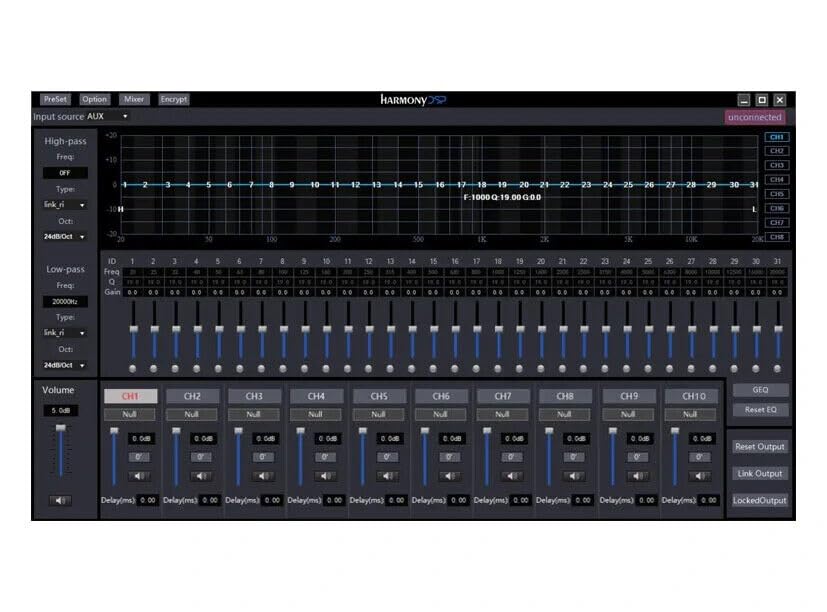
Atahanga: Screenshot of the Zapco Harmony DSP PC software, showing the 31-band equalizer and channel controls for precise audio tuning.
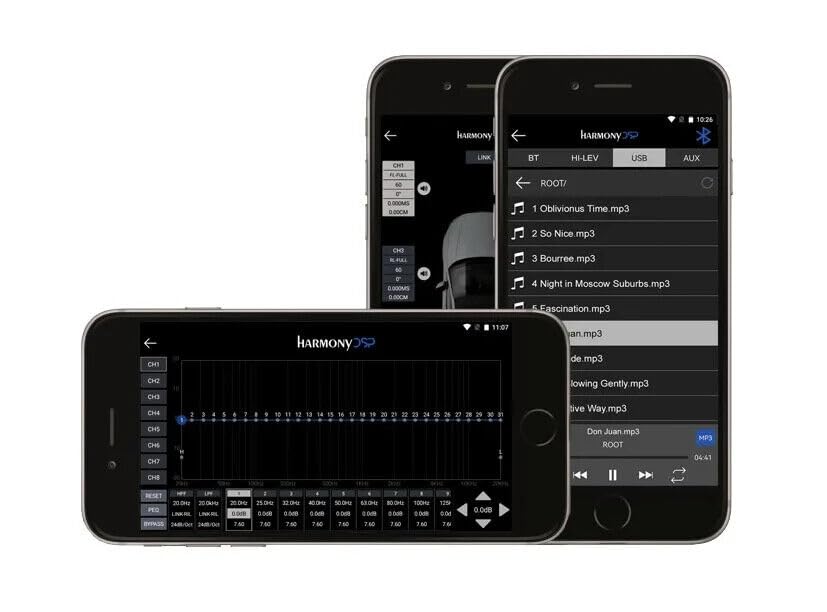
Atahanga: Screenshots of the Zapco Harmony DSP mobile application on a smartphone, illustrating the interface for Bluetooth streaming and DSP adjustments.
Rererenga Nihokikorangi:
To stream audio wirelessly, enable Bluetooth on your mobile device and pair it with the HB-410-ADSP. The device name will typically appear as "Zapco HB-410-ADSP" or similar. Once paired, you can play audio from your device through the ampkaikawe
Integrated Music Player:
Ko te amplifier includes a built-in music player that supports various file formats. You can manage and play music files directly through the mobile application.
Te tiaki
The Zapco HB-410-ADSP is designed for durability and requires minimal maintenance. Follow these guidelines to ensure its continued performance:
- Te horoi: Whakamahia he kakahu ngohengohe, maroke hei horoi i waho o te amplifier. Avoid using harsh chemicals or abrasive cleaners.
- Whakahau: Me whakarite ko te amplifier's ventilation openings are not obstructed to prevent overheating.
- Hononga: Takitaki i ia wa i nga hononga waea katoa kia noho haumaru, kia kore e pirau.
- Taiao: Tāutahia te amplifier in a location that is protected from excessive moisture, dust, and extreme temperatures.
Raparongoā
If you encounter issues with your Zapco HB-410-ADSP, refer to the following common problems and solutions:
- Kore Mana:
- Check all power connections (+12V, GND, REM) for proper contact and voltage.
- Me manatoko kua utua te pākahiko o te waka.
- Inspect any inline fuses for continuity.
- Kore Putanga Ororongo:
- Ensure all input and output cables are securely connected.
- Check the source device (head unit, phone) for audio output.
- Verify DSP settings; ensure channels are not muted or gain is not set too low.
- Confirm speaker connections are correct and speakers are functional.
- Ororongo Pohehe:
- Reduce input gain if the signal is clipping.
- Check speaker impedance compatibility with the ampkaikawe
- Review DSP equalizer and crossover settings for anomalies.
- Mobile App Issues (Input/Output Mapping):
- Some users have reported inconsistencies with input channel mapping to outputs when using the mobile application. If precise mapping is required, it is recommended to use the PC software for configuration.
- Ensure the mobile app is updated to the latest version.
- Raruraru Hononga Nihokikorangi:
- Me whakarite te amplifier is in pairing mode or discoverable.
- Delete previous pairings on your mobile device and re-attempt pairing.
- Move the mobile device closer to the amplifier to rule out range issues.
Pūtāhui me te Tautoko
For warranty information, please refer to the documentation provided with your purchase or visit the official Zapco website. If you require technical assistance or have questions not covered in this manual, please contact Zapco customer support through their official channels.
Rauemi ipurangi: For additional support and software downloads, visit the Toa Zapco i runga i a Amazon or the official Zapco webpae.