
1. Nga Tohutohu Haumaru
Tena panuihia nga tohutohu katoa i mua i te whakaurunga me te whakamahi. Puritia tenei pukapuka hei tohutoro a meake nei.
1.1 Haumaru Hiko
- Momotuhia i nga wa katoa te hiko i te waahi iahiko i mua i te whakaurunga, te mahi ranei.
- Installation must be performed by a qualified electrician or a person with electrical experience.
- Me whakarite kia mau nga hononga waea katoa me te whai ki nga waehere hiko o te rohe me te motu.
- Kaua e tāuta te pā hau ki te wāhi e pā ai ngā mata ki ngā taonga, ki te tangata rānei.
1.2 Haumaru Whānui
- Use only Kviflon-approved replacement parts.
- Do not bend the fan blades during installation or cleaning.
- Ensure the mounting structure can support the fan's weight (approximately 9 pounds).
- Tiakina nga tamariki mai i te powhiriwhiri i te wa e mahi ana.
2. Ihirangi mokete
Me manatoko kei te wātea ngā wāhanga katoa i mua i te tīmatanga o te tāutanga:
- Fan Motor Huihui
- Karekau
- Screw Bag (Mounting Hardware)
- Ngā Mata Pā (5 ngā wahi)
- Lampwhakamarumaru
- Kaiwhiwhi
- Mana Mamao (2 nga pākahiko AAA kei roto)
- Ngā Tohutohu Tāutanga (Tēnei pukapuka)

3. Whakatakotoranga
| Āhuahira | Whakatakotoranga |
|---|---|
| Waitohu | Kviflon |
| Ingoa Tauira | 8217-RGB |
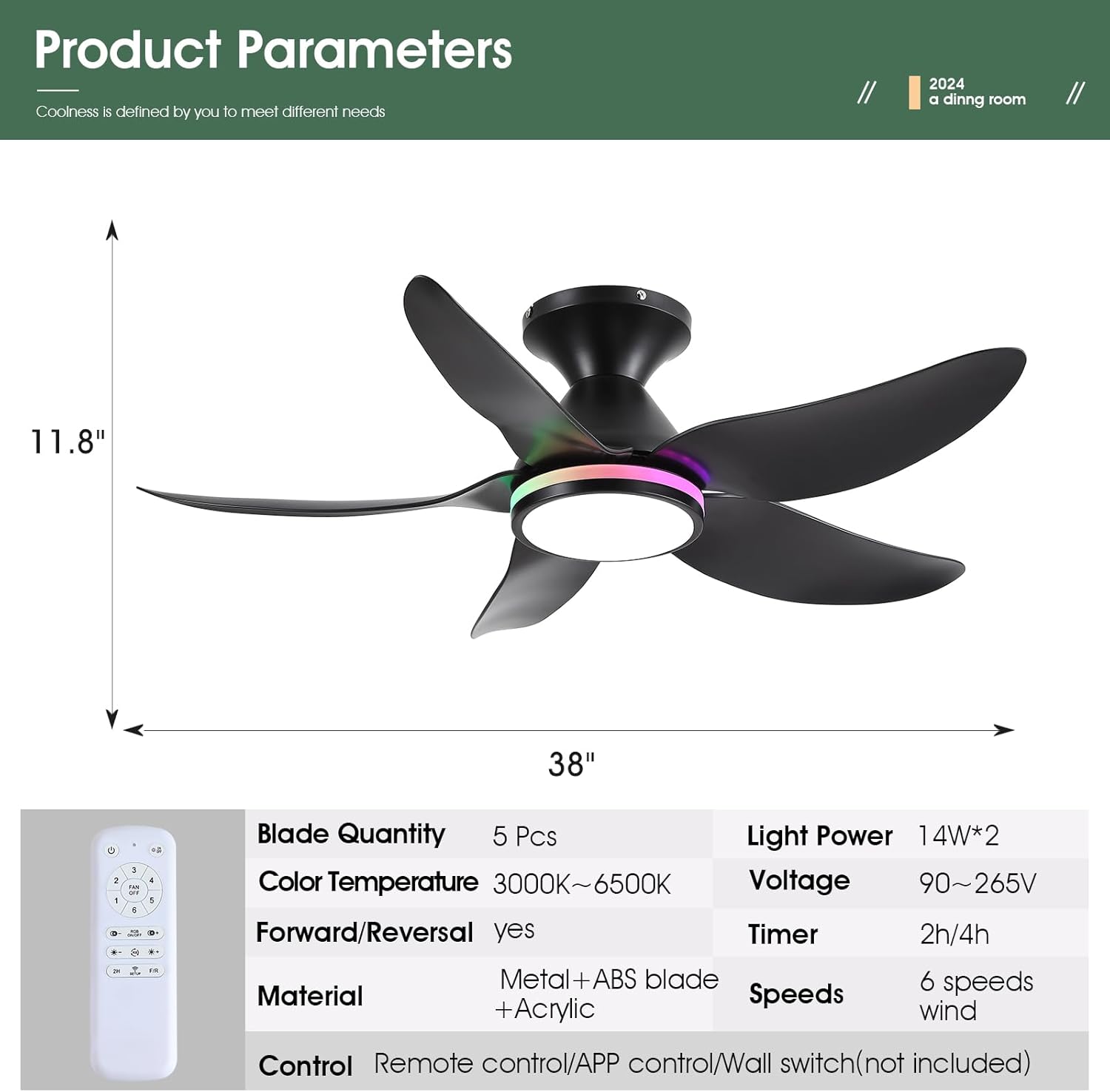
| Hunga Hua | 38"D x 38"W x 11.8"H |
| Te maha o nga Matatahi | 5 |
| Momo Motuka | DC Motor |
| Nga Tere o te Kaiwhaiwhai | 6 |
| Whakamarama | Dimmable White (3000K-6500K) + RGB Ring Light |
| Tikanga Mana | Remote Control, Mobile APP |
| Nga waahanga motuhake | Reversible, Timer (2/4 hours), Night Light Mode |
| Taumata Haruru | Iti iho i te 30 dB |
| Taumaha Tūemi | 9 Pauna |

4. Aratohu Whakauru
Follow these steps for a safe and successful installation. A safety hook is included for ease of installation by one person.
4.1 Tuhinga o mua
- Whakawetohia te hiko i te waahi iahiko.
- Me whakarite kia pakari te hanganga o te wāhi whakairi, ā, ka taea e ia te tautoko i te taumaha o te pā hau.
4.2 Whakauranga Taiapa Whakamutunga
- Āpitihia te whāriki whakairi ki te pouaka hononga tuanui mā te whakamahi i ngā tīwiri kua whakaratohia. Me whakarite kia mau te mau.
4.3 Waea Whakahoahoa
- Connect the fan's wiring to the household wiring according to the wiring diagram in the manual. Match neutral (white), live (black), and ground wires.
- Connect the receiver module to the fan and household wiring as instructed.
4.4 Huihuinga Kete Mata me te Maama
- Attach the 5 fan blades to the motor assembly using the provided screws. Ensure they are firmly secured.
- Connect the LED light module to the fan's wiring.
- Whakaorangia te lampatarangi ki te tinana pā.
4.5 Huihuinga Whakamutunga
- Carefully lift the fan assembly and hang it on the safety hook of the mounting bracket.
- Connect the remaining wires (if any) and tuck them neatly into the junction box.
- Secure the canopy to the mounting bracket with the screws.


5. Nga Tohutohu Whakahaere
5.1 Nga Mahi Mana Mamao
The included remote control provides full functionality for the fan and lights:
- Weto Katoa: Turns off both fan and lights.
- Rama / Weto: Toggles the main light.
- Whakawetohia te Kaiwhaiwhai: Whakawetohia te powhiriwhiri.
- 6 Mana Tere: Adjusts fan speed from 1 (low) to 6 (high).
- RGB Ka Ka/Weto: Toggles the RGB ring light.
- Paemahana Tae +/-: Adjusts white light color temperature (3000K Warm, 4500K Natural, 6500K Cool).
- Tīahoaho +/-: Dims or brightens the main white light.
- RGB Changing: Cycles through RGB colors.
- 2H/4H Matawā: Ka tautuhi i te hau kia whakaweto aunoa i muri i te 2, i te 4 rānei hāora.
- F/R (Whakamua/Whakamuri): Changes fan blade direction for summer (downdraft) or winter (updraft) modes.
- Code Matching (Setup): Used for pairing the remote with the fan.


5.2 Tatūnga Mana Taupānga
To control the fan via your smartphone, download the companion app:
- Scan the QR code provided in the manual or product images to download the 'FanLamp Pro' app.
- Whakatuwheratia te taupānga ka whai i nga tohutohu i runga-mata hei taapiri i tetahi taputapu hou.
- Ensure the fan is powered on. Within 5 seconds of powering on, press the pairing button in the app to connect. The fan lights will flash to indicate successful connection.
5.3 Fan Speed and Direction
The fan offers 6 speeds to suit various needs:
- Tere 1-2: Gentle airflow, suitable for sleeping.
- Tere 3-4: Natural wind, ideal for general comfort.
- Tere 5-6: Strong wind, for maximum cooling.
Use the F/R button on the remote or the app to switch between summer (downdraft) and winter (updraft) modes.


5.4 Momo Rarama
The fan features versatile lighting options:
- Dimmable White Lights: Adjust brightness from 0% to 100% and choose between 3 color temperatures (Cool White 6500K, Natural Light 4500K, Warm Light 3000K).
- Independent RGB Ring Lights: The side RGB aperture can be controlled independently, offering various colors and modes.
- Aratau Maama Po: A dedicated setting for low-level illumination.


6. Tiaki
Ko te tiaki i nga wa katoa ka whakarite i te mahi tino pai me te roa o to powhiri tuanui.
- Te horoi: Whakamahia he ngohengohe, damp cloth to clean the fan blades and light cover. Do not use abrasive cleaners or solvents.
- Tiu Tiu: Periodically check and tighten all screws on the fan blades and mounting hardware to prevent wobbling and noise.
- Tango Puehu: Dust the fan motor housing and blades regularly to prevent accumulation, which can affect performance and cause overheating.
7. Te Raru
Mena ka raru koe, tirohia nga raru me nga otinga e whai ake nei:
| Raruraru | Take pea | Rongoā |
|---|---|---|
| Kaore e timata te Fan | No power, loose wiring, remote not paired | Check circuit breaker, ensure connections are secure, re-pair remote/app. |
| Kaore nga rama e mahi | Loose wiring, LED module failure | Check light wiring connections, contact support if LED module is faulty. |
| Ka wiri te Fan | Loose blades, uneven installation | Tighten all blade screws, ensure mounting bracket is level and secure. |
| Kāore te Mamao/Taupānga e aro mai | Low batteries, pairing issue, signal interference | Replace remote batteries, re-pair the remote/app, reduce interference sources. |
| Ka haruru te Fan | Loose screws, motor issue | Check and tighten all screws, ensure blades are clean and balanced. |
8. Pūtāhui me te Tautoko
Kviflon provides technical support for its products. If you encounter any problems not covered in this manual, please contact Kviflon customer service for assistance. Refer to your purchase documentation for specific warranty details.