
Kupu Whakataki
The Kviflon 38-inch Low Profile Ceiling Fan is designed to provide efficient air circulation and adjustable lighting for indoor spaces such as bedrooms and dining rooms. It features a modern design, 5 reversible blades, 6 fan speeds, 3 dimmable light colors, and can be controlled via remote or a smartphone application. This manual provides detailed instructions for safe installation, operation, and maintenance of your ceiling fan.

Figure 1: Kviflon 38-inch Low Profile Ceiling Fan.
Nga korero haumaru
Please read and understand all safety instructions before attempting to assemble, install, or operate this fan. Failure to follow these instructions could result in electric shock, fire, or personal injury.
- Me momotu te hiko i te whati ara iahiko matua, i te pouaka fiusi rānei i mua i te tīmatanga o te tāutanga, i te mahi rānei i tētahi mahi tiaki.
- Ko te whakaurunga me mahi e tetahi tohunga hiko, i runga ranei i nga tikanga me nga tikanga hiko o te rohe.
- Ensure the mounting structure (ceiling outlet box) is securely attached and capable of supporting the fan's weight (minimum 35 lbs / 15.9 kg).
- Kaua e whakahaeretia te powhiriwhiri me nga matatahi kua pakaru, etahi atu waahanga pakaru ranei.
- A ape i te whakatakoto taonga ki te ara o nga matatahi tahi.
- Use only Kviflon replacement parts for repairs.
Ihirangi mokete
Verify that all components listed below are included in your package. If any parts are missing or damaged, contact Kviflon customer service before proceeding with installation.
- Fan Motor Huihui
- Karekau
- Screw Bag (Mounting Hardware)
- Ngā Mata Pā (5 ngā wahi)
- Lampwhakamarumaru
- Kaiwhiwhi
- Mana Mamao
- Pukapuka Tohutohu
- Arotahi LED

Figure 2: Included Package Accessories.
Whakatakotoranga
| Waitohu | Kviflon |
| Tau tauira | 8219 |
| Tae | Pango |
| Hoahoa Kaiwhaiwhai | Pro Itifile Horoihia te Poihi Pouaka Pouaka |
| Rahi Mata | 5 |
| Nga Tere o te Kaiwhaiwhai | 6 |
| Momo Motuka | DC Motor |
| Taumata Haruru | Less than 30 Decibels |
| Te Mana Maama | 2 x 14W LED |
| Te Paemahana Tae | 3000K (Mahana), 4500K (Natural), 6500K (Ma) |
| Karekau | 0-100% Te Maeneene Maeneene |
| Voltage | 90-265V |
| Mahi Matawā | 2am / 4pm |
| Tikanga Mana | Remote Control, APP Control |
| Rauemi | Metal + ABS Blades + Acrylic |
| Ahu | 38 inihi (Diameter) x 11.8 inihi (Teitei) |

Pikitia 3: Ngā Tawhā me ngā Ahu o te Hua.

Figure 4: Fan Noise Level Comparison.
Tatūnga me te Tāuta
Follow these general steps for installation. Refer to the detailed instruction manual included in your package for specific wiring diagrams and mounting procedures.
- Whakaritea mo te Tāuta: Turn off power at the main circuit breaker. Ensure the mounting location is suitable and the electrical box is rated for ceiling fan support.
- Maunga te Taiapa: Securely attach the mounting bracket to the ceiling outlet box using the provided hardware.
- Hononga Waea: Connect the fan's electrical wires to the household wiring according to the wiring diagram in your manual. Ensure all connections are secure and insulated.
- Tāpirihia te Tinana Pā: Āta hikitia te huihuinga mōtini pā, ka tāpiri atu ki te whāriki whakairi.
- Tāutahia ngā Mata: Securely attach the 5 fan blades to the motor assembly.
- Tāuta Lampshade and LED Lens: Attach the LED lens and then the lampshade to the bottom of the fan body.
- Taki Whakamutunga: Takiruatia nga hononga katoa me te whakarite kia kore nga waea e kowhakina mai. Whakahokia te hiko i te kaaiti iahiko.
This fan is designed for flush mount installation only. Angle mounting is not supported.

Figure 5: Fan Blade Design for Enhanced Airflow.
Nga Tohutohu Whakahaere
Mahi Mana Mamao
The included remote control allows full functionality of your ceiling fan and light. Ensure batteries are installed correctly.
- Rama / Weto: Pēhia te patene rama hei whakakā, kia weto ranei te rama.
- 3 Colors Changing: Cycle through 3 color temperatures (Warm, Natural, White).
- Tīahoaho +/-: Adjust the light brightness from 0% to 100%.
- Paemahana Tae +/-: Fine-tune the light color temperature.
- Ring Lights Switch: Control the side-illuminated ring lights independently.
- Forward/Reverse (F/R): Change the fan's rotation direction for summer (downward airflow) or winter (upward airflow).
- Wind Speed Control (1-6): Select from 6 fan speeds.
- Weto Katoa: Turns off both the fan and light.
- Timer Setting (2H/4H): Tautuhia te hau kia whakaweto aunoa i muri i ngā haora e 2, e 4 rānei.
- Aratau Hau Maori: Activates a fluctuating fan speed to simulate natural breezes.
- Whakawetohia te Kaiwhaiwhai: Turns off the fan only.

Pikitia 6: Ngā Mahi Mana Mamao.
Mahinga Whakahaere APP
Download the dedicated smartphone application (refer to the included manual for QR code or app store details) to control fan speeds, light settings, and timer functions directly from your mobile device. The app offers similar controls to the remote, providing convenience and smart home integration.
Tautuhi Tere Tere
The fan offers 6 speed settings to meet various comfort needs:
- Tere 1-2: Sleeping Wind (Gentle airflow for quiet environments).
- Tere 3-4: Natural Wind (Moderate airflow for general comfort).
- Tere 5-6: Strong Wind (Powerful airflow for maximum cooling).

Figure 7: Fan Speed Modes.
Mahi Mōta Whakahurihuri
The fan features a reversible DC motor for multi-seasonal use:
- Summer (Forward Mode): Ka huri ngā mata i te taha maui o te karaka, ka panaia te hau matao ki raro hei waihanga i te pānga whakamatao.
- Winter (Reverse Mode): Blades rotate clockwise, drawing air upwards to circulate warm air trapped near the ceiling, helping to warm the room.

Figure 8: Reversible Motor for Seasonal Use.
Nga waahanga rama
The integrated LED lighting offers versatile illumination options:
- 3 Mahinga Tae: Easily switch between 3000K (Warm Light), 4500K (Natural Light), and 6500K (White Light) to suit your preference or activity.
- 0-100% Smooth Dimmable: Adjust the light intensity from completely off to full brightness without flickering or delay.
- Side-Illuminated Ring Lights: The fan includes a unique side-illuminated ring light feature, which can be used independently or in conjunction with the main light.
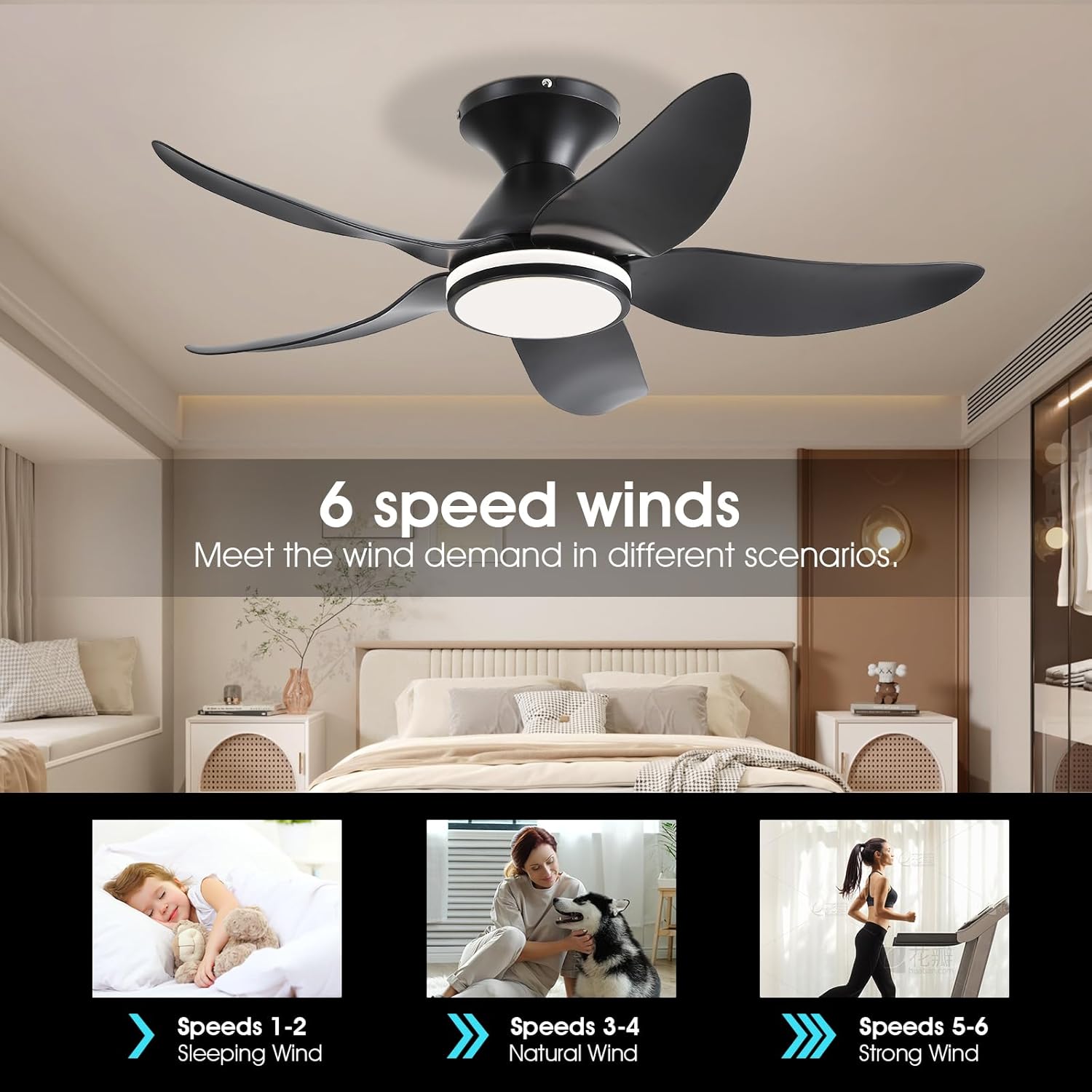
Figure 9: Dimmable and Color Temperature Settings.

Figure 10: Side-Illuminated Lighting Options.
Te tiaki
Mā te tiaki auau ka tino pai te mahi, ā, ka roa ake te ora o tō pā hau tuanui.
- Te horoi: Periodically clean the fan blades and light fixture with a soft, damp kakahu. Kaua e whakamahia he kai horoi whakakoi, he wai whakarewa rānei, nā te mea ka kino pea te whakaotinga, ngā wāhanga hiko rānei.
- Tirohanga Maama: Annually check all mounting hardware and blade attachment screws for tightness. Loose connections can cause wobbling or noise.
- Kaore he whakahinuhinu e hiahiatia ana: Ko te motini o te mea powhiriwhiri kua whakahinuhinu tuturu, kaore e hiahiatia he hinu taapiri.
Raparongoā
If you experience issues with your Kviflon ceiling fan, consult the following common problems and solutions:
| Raruraru | Take pea | Rongoā |
|---|---|---|
| Kaore e timata te Fan | No power to the fan; Remote control battery low or dead; Incorrect wiring. | Check circuit breaker/fuse; Replace remote battery; Verify wiring connections as per manual. |
| Kaore te marama e mahi | No power to the light; Incorrect light setting; Damaged LED lens. | Check power supply; Ensure light is turned on via remote/app; Contact customer service for replacement if LED is faulty. |
| Ka wiri te Fan | Nga wiri o te mata; Matatahi kore taurite; Te awhi whakapuru wewete. | Tighten all blade screws; Use a balancing kit (not included) if necessary; Ensure mounting bracket is securely fastened to the ceiling. |
| Ko te mana mamao kaore i te whakautu | Low or dead battery; Remote not paired with receiver. | Replace remote battery; Refer to the manual for remote pairing instructions. |
| Ka haruru te Fan | Tiwiri wewete; Huna moto; Nga matatahi e patu ana i te arai. | Check and tighten all screws; Ensure no wires are rubbing against the fan body; Verify blades are clear of obstructions. |
Pūtāhui me te Tautoko
For specific warranty terms and conditions, please refer to the warranty card included with your product. Kviflon is committed to providing high-quality products and customer satisfaction.
For technical assistance, troubleshooting beyond this manual, or to inquire about replacement parts, please contact Kviflon customer service. Contact information can typically be found on the product packaging or the official Kviflon webpae.