
1. Hua Neke Atuview
The Dioche 1080P HD Smart Camera is designed for home security and monitoring, offering high-definition video, motion detection, and night vision capabilities. This manual provides essential information for setting up, operating, and maintaining your camera.

Whakaahua 1.1: Mua view of the Dioche 1080P HD Smart Camera.
Ataata 1.1: Kua mutuview of the Dioche 1080P HD Smart Camera's design and features.
2. Nga waahanga matua
- Ataata HD 1080P: Captures clear, high-definition video for detailed monitoring.
- Matakitenga Ake Po: Provides clear images in low-light conditions, extending visibility up to 40ft.
- Kitenga Nekehanga: Automatically detects movement and sends alerts to your mobile device.
- Ororongo Ara-rua: Allows for communication through the camera via the mobile application.
- Aroturuki Mamao: Whakauruhia te kai ataata ora me te rekoata footage from anywhere using your smartphone.
- Rokiroki Kapua: Offers an option for secure storage of surveillance footage.
- Tāutatanga ngawari: I hangaia mo te tatūnga tere me te ngawari.
3. Ihirangi mokete
Tena koa tirohia kei roto katoa nga taonga kei roto i to kete:
- 1 x Dioche 1080P HD Smart Camera
- 1 x Taura Whakatau
- 1 x Pukapuka Tohutohu (tenei tuhinga)
- 2 x Ngongo Whakawhanui
- 2 x Tiuri

Whakaahua 3.1: Ngā wāhanga katoa kei roto i te kete hua.
4. Hoahoa Hoahoa
Familiarize yourself with the different parts of your Dioche Smart Camera:
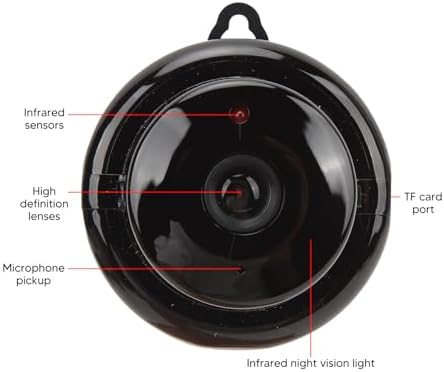
Image 4.1: Labeled diagram of the camera's components.
- Pūoko Infrared: Detect ambient light levels for automatic night vision activation.
- High Definition Lenses: Capture 1080P resolution video.
- Tango hopuoro: Records audio and enables two-way communication.
- Tauranga Kaari TF: Slot for inserting a MicroSD card (not included) for local storage.
- Infrared Night Vision Light: Emits infrared light for clear viewi roto i nga ahuatanga pouri.
5. Tohutohu Tatūnga
Follow these steps to set up your Dioche Smart Camera:
- Whakahiko: Connect the camera to a power source using the provided charging cable. The camera will power on automatically.
- Tikiake App: Download the recommended mobile application (e.g., "V380 Pro" or similar, refer to packaging for specific app name) from your smartphone's app store (Android or iOS).
- Waihanga Pūkete: Whakatuwheratia te taupānga ka rēhita he pūkete hou, takiuru rānei mēnā kei a koe tētahi.
- Tāpiri Pūrere: Follow the in-app instructions to add your new camera. This typically involves scanning a QR code on the camera or manually selecting the device type and connecting to its Wi-Fi hotspot.
- Tūhono ki Wi-Fi: Configure the camera to connect to your home 2.4GHz Wi-Fi network. Ensure your smartphone is also connected to the same network during setup.
- Maunga Camera: Choose a suitable location for your camera. It can be placed on a flat surface or mounted to a wall or ceiling using the included screws and expansion tubes. Ensure the camera has a clear view o te waahi e hiahia ana koe ki te aroturuki.

Whakaahua 5.1: Example of mounting the camera to a surface.
6. Nga Tohutohu Whakahaere
Once set up, you can control and monitor your camera using the mobile application:
- Ora View: Whakatuwheratia te taupānga ka tīpako i tō kāmera hei view te kai ataata ora.
- Matohi Whakakitenga Nekehanga: Enable motion detection in the app settings to receive push notifications on your phone when movement is detected. Adjust sensitivity as needed.
- Matakitenga po: The camera automatically switches to night vision mode in low light. You can typically toggle this feature manually within the app if desired.
- Ororongo Ara-rua: Use the microphone and speaker icons in the app to listen to the camera's environment or speak through the camera.
- Te hopu me te purei hoki: Uru rekoata footage from the cloud storage or MicroSD card (if installed) through the app's playback feature.
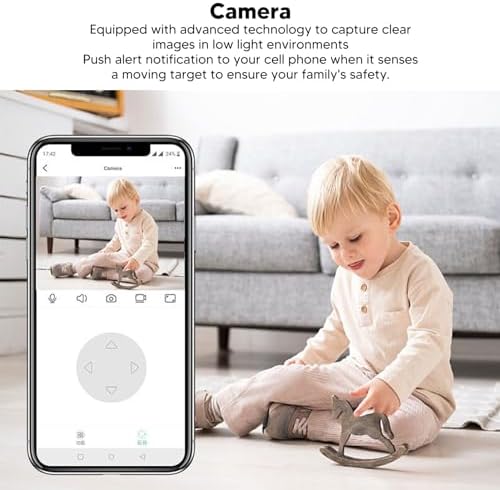
Image 6.1: Using the mobile application for live monitoring.
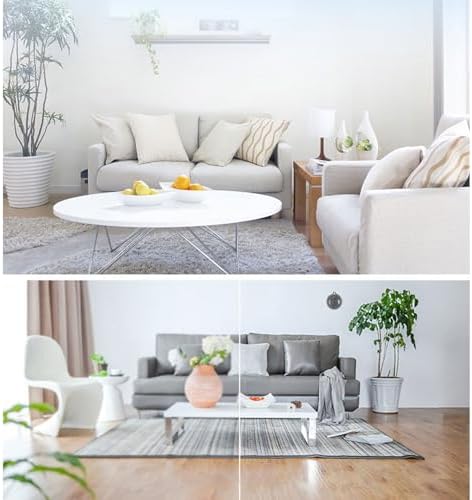
Image 6.2: Demonstration of the camera's night vision capability.
7. Tiaki
Hei whakarite i te mahi tino pai me te roa o te wā e whakamahia ana e tō kāmera:
- Te horoi: Āta horoia te karāhe me te tinana o te kāmera ki tētahi kakahu ngohengohe, maroke. Kaua e whakamahi i ngā matū kino, i ngā rauemi whakakoi rānei.
- Turanga: Me whakarite kia tū te kāmera ki tētahi wāhi pumau, kia matara atu i te rā tika, i ngā pāmahana tino kino, me te makuku.
- Whakahōu Pūmanawa: Regularly check the mobile application for firmware updates for your camera to ensure you have the latest features and security enhancements.
8. Te Raru
Mena ka raru koe ki to kamera, tirohia nga raru me nga otinga e whai ake nei:
| Raruraru | Rongoa pea |
|---|---|
| Kaamera tuimotu/Kare e taea te hono | Ensure the camera is powered on. Check your Wi-Fi connection and signal strength. Restart the camera and your router. Re-add the camera in the app if necessary. |
| Karekau he matohi kitenga nekehanga | Verify motion detection is enabled in the app settings. Adjust sensitivity. Check app notification settings on your phone. |
| Te kounga ataata kino | Ensure the lens is clean. Check your internet connection speed. Adjust video quality settings in the app if available. |
| Ko te ororongo rua-ara kaore e mahi | Tirohia ngā whakaaetanga hopuoro me te kaikōrero mō te taupānga i runga i tō waea. Kia tino teitei te oro i ngā pito e rua. |
Mena kei te haere tonu te raru, me waea atu ki te tautoko a nga kaihoko.
9. Whakatakotoranga
Detailed technical specifications for the Dioche 1080P HD Smart Camera:

Image 9.1: Camera dimensions.
| Āhuahira | Taipitopito |
|---|---|
| Ingoa Tauira | Diocherkmcdyn6vq |
| Whakataunga Hopu Ataata | 1080p |
| Kawa Hononga | Wi-Fi (2.4GHz) |
| Āhuahira Motuhake | Motion Sensor, Night Vision, Two-Way Audio |
| Pūrere Hototahi | Waea atamai (Android, iOS) |
| Momo Maunga | Maunga Taiepa |
| Rauemi Whakapiri | Acrylonitrile Butadiene Styrene (ABS) |
| Nga Whakamahinga Manakohia | Baby Monitoring, Home Security, Pet Monitoring |
| Kei te Hiahia nga Pikohiko | No (Powered via USB cable) |
10. Pūtāhui me te Tautoko
For warranty information and technical support, please refer to the product packaging or contact the retailer where you purchased the Dioche 1080P HD Smart Camera. Keep your proof of purchase for warranty claims.