
Kupu Whakataki
Thank you for choosing the RAF 10 Liter Digital Touch Screen Air Fryer R.5339. This appliance is designed to provide a healthier way to cook your favorite foods, using rapid air circulation technology to fry, bake, grill, and roast with little to no oil. Please read this manual thoroughly before first use to ensure safe and optimal operation. Keep this manual for future reference.
Nga Tohutohu Haumaru Nui
- Me whakarite i nga wa katoa te voltage tohuhia ana i runga i te taputapu e rite ana ki to putunga hiko o to rohetage i mua i te hono.
- Do not immerse the appliance, cord, or plug in water or any other liquid to prevent electric shock.
- Tiakina te taputapu kei tawhiti atu i nga tamariki me nga kararehe. Me kati te tirotiro ina whakamahia te taputapu ki te taha o nga tamariki.
- Do not operate the appliance if the plug, power cord, or the appliance itself is damaged. Contact authorized service personnel for repair.
- Place the air fryer on a stable, heat-resistant surface, away from walls and other appliances, to allow for proper air circulation.
- Kaua e araia te kohao hau, te putanga putanga ranei i te wa e mahi ana.
- Ka wera pea nga papa i te wa e whakamahia ana. Whakamahia nga miihini oumu ina whakahaere i nga waahanga wera.
- Wewetehia te taputapu mai i te putanga ka kore e whakamahia, i mua i te horoi. Tukua kia tino whakamatao i mua i te whakahaere, te penapena ranei.
- Do not use accessories or parts not recommended by the manufacturer, as this may cause hazards or injuries.
Ka mutu te huaview
The RAF Air Fryer R.5339 consists of the main unit, a removable cooking basket, and a digital touch control panel. Familiarize yourself with these components before use.
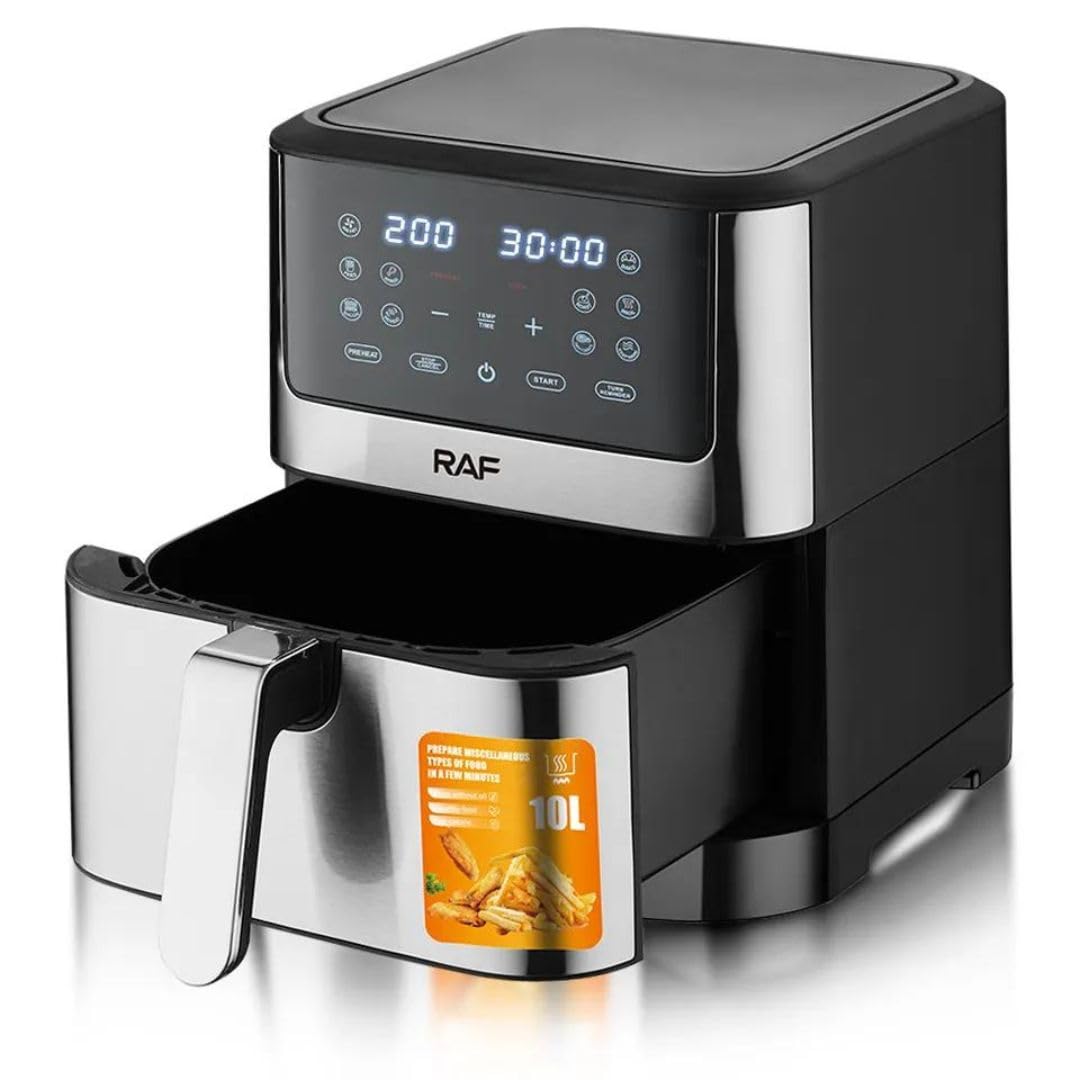
Whakaahua 1: Mua view of the RAF R.5339 Air Fryer, showing its silver and black design with a digital touch screen panel and a pull-out basket handle.
Paewhiri Mana
The digital touch screen allows for easy adjustment of cooking settings and selection of preset programs.
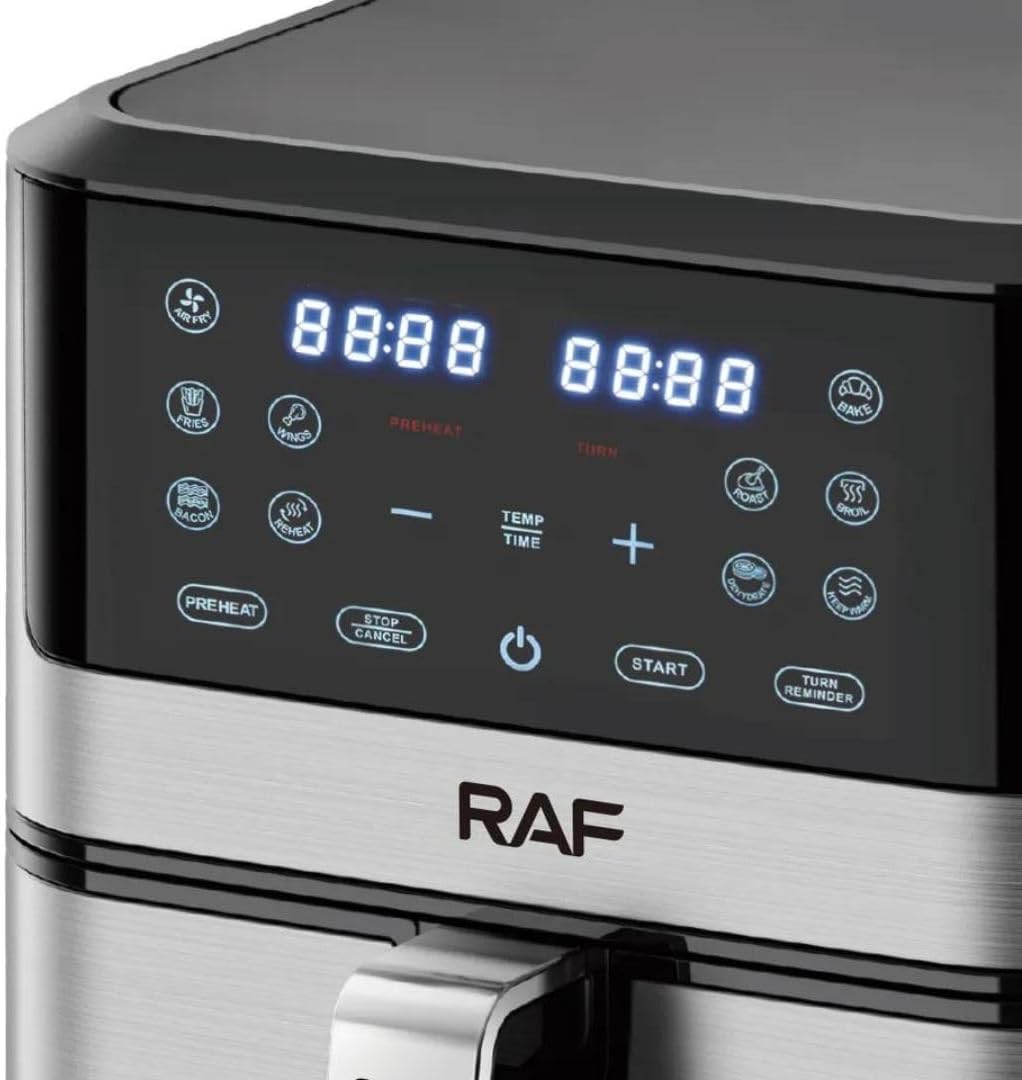
Whakaahua 2: Close-up of the digital touch control panel of the RAF Air Fryer, displaying time and temperature settings, along with various cooking preset icons and control buttons like Preheat, Stop/Cancel, Power, Start, and Turn Reminder.
Tatūnga
- Wewete: Me ata tango i nga rawa whakangao me nga tapanga whakatairanga mai i te parai hau.
- Ma: Horoia te waho o te taputapu ki te panuiamp kakahu. Horoia te kete tunu kai me ngā taputapu tango katoa ki te wai mahana, hopi. Horoia rawatia, kātahi ka whakamaroke rawatia.
- Turanga: Place the air fryer on a flat, stable, heat-resistant surface. Ensure there is at least 10 cm (4 inches) of clear space around the back and sides, and above the appliance for adequate ventilation.
- Hononga Hiko: Monohia te taura hiko ki roto i te putanga hiko. Kua reri te taputapu mo te whakamahi.
Mahi
Mahi Taketake
- Whakahiko: Plug in the air fryer. The power button will illuminate. Touch the power button to turn on the digital display.
- Uta Kai: Pull out the cooking basket using the handle. Place your food inside the basket. Do not overfill.
- Tīpakohia te Aratau tunu: You can choose from preset programs or manually set the time and temperature.
- Tīmata te tunu: Press the Start button to begin the cooking cycle.
- Tatari/Kati: During cooking, you can press the Stop/Cancel button to pause or end the cooking cycle.
Te whakamahi tatūkē
The air fryer comes with several pre-programmed settings for common foods. Simply touch the icon corresponding to your desired food type. The air fryer will automatically set the optimal time and temperature.

Whakaahua 3: Runga view of the RAF Air Fryer, illustrating various cooking presets with recommended time and temperature ranges for different food types like fries, chicken, fish, and cake.
Manual Time and Temperature Setting
To manually adjust settings:
- After powering on, use the 'TEMP' and 'TIME' buttons to toggle between temperature and time adjustment.
- Use the '+' and '-' buttons to increase or decrease the temperature (typically 80°C to 200°C) or time (typically 1 to 60 minutes).
- Press Start to begin cooking with your custom settings.
Mahi Whakawera
Some recipes may require preheating. Touch the 'PREHEAT' button on the control panel. The air fryer will heat to a default temperature (e.g., 180°C) for a short period. Once preheated, add your food and start the main cooking cycle.
Shake/Turn Reminder
For even cooking, especially with smaller items like fries, the air fryer may beep during the cooking cycle to remind you to shake or turn the food. Pull out the basket, shake or turn the food, and then reinsert the basket to resume cooking.
Te horoi me te tiaki
Ma te horoi i nga wa katoa ka tino pai te mahi me te whakaroa i te oranga o to parai hau.
- Wetewete me te whakamatao: Momotuhia te mono mai i te pūwero hau, ā, waiho kia whakamatao rawa i mua i te horoinga.
- Horoia te Kete me te Paraharaha: The cooking basket and pan are dishwasher safe. Alternatively, wash them with hot water, dish soap, and a non-abrasive sponge. For stubborn residue, soak them in hot water for about 10 minutes.
- Ma o roto: Horoia te roto o te taputapu ki te panuiamp kakahu. Kaua e whakamahi i nga kai horoi, i te huruhuru rino ranei.
- Ma waho: Mukua te waho ki te panuiamp kakahu. Kaua e whakamahi i nga matū kino, i nga mea awhiowhio ranei.
- Rokiroki: Me whakarite kia ma, kia maroke nga wahi katoa i mua i te penapena i te parai hau ki te waahi matao, maroke.
Raparongoā
| Raruraru | Take pea | Rongoā |
|---|---|---|
| Ko te parai hau e kore e ka. | Kāore te taputapu i monohia, kāore rānei te putanga hiko e mahi ana. | Me mohio kua honoa te taura hiko ki tetahi putanga hiko mahi. |
| Kare te kai e maoa riterite. | Basket is overloaded or food was not shaken/turned. | Kaua e utaina rawatia te kete. Rūrūtia, hurihia rānei te kai i waenganui o te tunu. |
| He paowa ma e puta mai ana i te taputapu. | Grease residue from previous use or fatty food being cooked. | Clean the basket and pan thoroughly after each use. For fatty foods, drain excess oil from the pan. |
| Ehara te kai i te kirikiri. | Not enough oil (if required) or incorrect temperature/time. | Lightly brush or spray food with oil. Adjust temperature or cooking time as needed. |
Whakatakotoranga
| Āhuahira | Whakatakotoranga |
|---|---|
| Waitohu | RAF |
| Tauira | R.5339 |
| Te kaha | 10 rita |
| Mana | 1800W |
| Voltage | 220V |
| Tikanga Mana | Touch Screen Digital Control |
| Rauemi | Konumohe |
| Tae | Hiriwa |
| Nga Ahinga (D x W x H) | 30 x 30 x 35 cm |
| Nga waahanga motuhake | Temperature Control, Scratch-resistant, Dishwasher Safe components, 360° Air Circulation, 80% Less Oil Cooking |
Pūtāhui me te Tautoko
For warranty information or technical support, please refer to the warranty card included with your purchase or contact the retailer where the product was purchased. Keep your proof of purchase for any warranty claims.