
Kupu Whakataki
This manual provides essential information for setting up, operating, maintaining, and troubleshooting your Motorola Moto G84 5G smartphone. Please read this guide thoroughly to ensure proper use and to maximize your device's capabilities.
Tatūnga
1. Te Wetewete me te Tirotiro Tuatahi
Tangohia marietia ngā mea katoa i roto i te takai. Me whai i roto i te pouaka:
- Waea Atamai Motorola Moto G84 5G
- Tauira USB
- Take Waea
- Utauta Whakaputa SIM
Tirotirohia te taputapu mo te kino o te tinana i mua i te haere.
2. Tāuta Kāri Sim
The Moto G84 5G supports Dual SIM functionality using Nano SIM cards.
- Kimihia te paepae SIM i te taha o to taputapu.
- Insert the SIM eject tool into the small hole on the SIM tray. Press firmly until the tray pops out.
- Whakatakotoria ō kāri Nano SIM ki roto i ngā mokowā kua tohua i runga i te paepae, me te whakarite kia anga whakararo ngā hononga koura.
- Āta panaia te paepae SIM ki roto i te waea kia pāwhiritia rā anō ki tōna tūranga.

Whakaahua 1: Taha view of the Motorola Moto G84 5G, illustrating the location of the SIM card tray for installation.
3. Hia Tuatahi
Press and hold the Power button located on the side of the device until the Motorola logo appears. Follow the on-screen prompts to complete the initial setup, including language selection, Wi-Fi connection, and Google account setup.

Whakaahua 2: Taha view of the Motorola Moto G84 5G, highlighting the power and volume buttons for device control.
4. Ka tohatohahia te Pūrere
Before first use, it is recommended to fully charge your device. The Moto G84 5G features a 5000 mAh battery and supports 30W TurboPower charging.
- Honoa te taura USB ki te tauranga USB-C kei raro o to waea.
- Connect the other end of the USB cable to a compatible power adapter (sold separately) and plug it into a power outlet.
- Ka puta te tohu utu i runga i te mata.
Nga Tohutohu Whakahaere
1. Whakaatu
The Moto G84 5G features a 6.55-inch pOLED FHD+ display with a 120 Hz refresh rate, offering vibrant colors and smooth scrolling.
- Whakaterenga Mata Paa: Interact with the device using touch gestures such as tap, swipe, pinch-to-zoom.
- Whakaritenga Tirohanga: Whakatikatikahia te kanapa o te mata mai i te paewhiri Tautuhinga Tere, i ngā tautuhinga Whakaatu rānei.
- Rere tāmata: The 120 Hz refresh rate provides a fluid visual experience. This can be adjusted in display settings to optimize battery life.
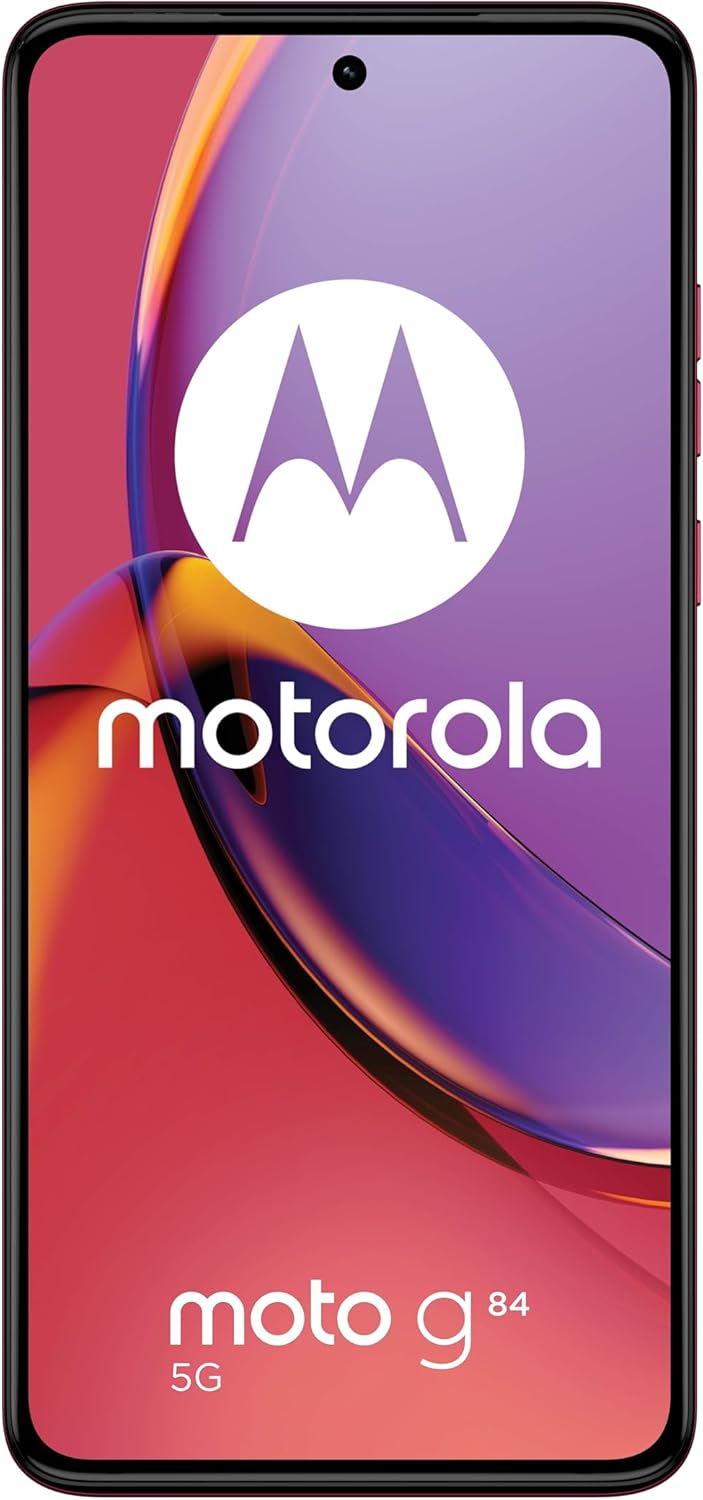
Whakaahua 3: Mua view o te Motorola Moto G84 5G, e whakaatu anaasing its vibrant pOLED display.
2. Kāmera
The device is equipped with a 50 MP Ultra Pixel main camera with Optical Image Stabilization (OIS) and an 8 MP ultra-wide/macro lens on the rear, and a front-facing camera for selfies.
- Whakaahua: Whakatuwheratia te taupānga Camera, hangahia to kopere, ka patohia te paatene kati.
- Hopu Ataata: Switch to video mode in the Camera app. The device supports 4K video recording at 30 fps.
- Ngā Aratau Kāmera: Explore various modes such as Portrait, Night Vision, Panorama, and Pro mode for advanced controls.

Whakaahua 4: Whakamuri view of the Motorola Moto G84 5G, highlighting the 50MP Ultra Pixel camera system.
3. Ororongo
Experience immersive audio with Dolby Atmos, Motorola Spatial Audio, and Hi-Res Audio support through stereo speakers.
- Mana Rōrahi: Use the volume buttons on the side of the device or the on-screen volume slider.
- Tautuhinga Ororongo: Whakaritea oro profiles and Dolby Atmos settings in the Sound & Vibration menu.
4. Hononga
The Moto G84 5G offers comprehensive connectivity options.
- Whatunga 5G: Connect to 5G networks for faster data speeds (requires 5G service plan).
- Wi-Fi: Connect to wireless networks via Wi-Fi settings.
- Nihokikorangi: Honoa ki ngā taputapu Nihokikorangi pēnei i ngā pane whakarongo, ngā kaikorero rānei.
- NFC: Whakamahia te Whakawhitiwhiti Tata ki te Marae mō ngā utu kore pa, me te hono tere ki ngā pūrere hototahi.
5. Biometric Features
The device supports biometric identification for enhanced security.
- Maihao Matapihi: Register your fingerprints in the Security settings for quick and secure unlocking.
- Wewete Kanohi: Set up face recognition for convenient unlocking.
6. Pūmanawa
The Moto G84 5G runs on Android 13, offering a clean user interface and access to a wide range of applications via the Google Play Store.
- Whakahōu Pūnaha: Tirohia me te tāuta i ngā whakahōutanga pūnaha i ia wā, i ia wā, kia pai ai te mahi me te haumarutanga.
- Whakahaere Taupānga: Install, uninstall, and manage applications through the Settings menu or Google Play Store.
Te tiaki
1. Te horoi i to Pūrere
To keep your phone clean, gently wipe the screen and body with a soft, lint-free cloth. Avoid using harsh chemicals or abrasive materials.
2. Atete Wai
The Moto G84 5G has an IP52 rating, meaning it is resistant to dust and splashing water. It is not waterproof. Avoid submerging the device in water or exposing it to high-pressure water jets.
Raparongoā
Nga take me nga otinga noa
- Kaore te taputapu e huri ana: Ensure the battery is charged. Connect the phone to a charger and wait a few minutes before attempting to power it on again.
- Nga take utu: Check the USB cable and charger for damage. Try a different cable or power outlet. Ensure the charging port is clean and free of debris.
- Tohu whatunga kino: Move to an area with better network coverage. Check if your SIM card is properly inserted. Restart the device.
- Taupānga e takataka ana, e whakatio ana ranei: Close and reopen the app. Clear the app's cache and data in Settings > Apps. If the issue persists, uninstall and reinstall the app.
- Karekau te mata i te aro: Me tīmata anō mā te pupuri i te pātene Mana mō te 10-15 hēkona pea.
Whakatakotoranga
| Āhuahira | Whakatakotoranga |
|---|---|
| Ingoa Tauira | Moto G84 5G |
| Pūnaha Mahi | Android 13 |
| Tukatuka | Snapdragon 695 (up to 2.2 GHz) |
| RAM | 12 GB |
| Rokiroki Roto | 256 GB |
| Whakaatu | 6.55-inch pOLED FHD+ (1080x2400), 120 Hz |
| Kāmera Whakamuri | 50 MP Ultra Pixel (OIS) + 8 MP Ultra-wide/Macro |
| Kāmera Mua | 1 |
| Pūhiko Raukaha | 5000 mah |
| Te utu | 30W TurboPower |
| Hononga | 5G, Wi-Fi, Nihokikorangi, NFC |
| Momo Kaari SIM | Taarua Nano SIM |
| Ātete wai | IP52 (Atete pakaru) |
| Ahu | 16 x 7.4 x 0.8 cm |
| Taumaha | 160 Karamu |
| Kei roto i te Pouaka | USB Cable, Phone Case, SIM Eject Tool |
Pūtāhui me te Tautoko
Nga korero Whakaputanga
Your Motorola Moto G84 5G comes with a 2-year manufacturer's warranty. Please retain your proof of purchase for warranty claims. The warranty covers manufacturing defects but typically excludes damage caused by misuse, accidents, or unauthorized repairs.
Tautoko Kiritaki
For further assistance, technical support, or warranty service, please visit the official Motorola support website or contact their customer service. Refer to the documentation included with your device for specific contact details in your region.
Nga Korero Haumaru Nui
Always follow basic safety precautions when using your phone to reduce the risk of fire, electric shock, and injury. Do not disassemble the device. Use only approved accessories. Avoid extreme temperatures. Dispose of the device and battery responsibly according to local regulations.