
RCYAGO ECF-SGW07
RCYAGO Sprinkler Timer User Manual
Model: ECF-SGW07
Kupu Whakataki
The RCYAGO Sprinkler Timer is an advanced, programmable water timer designed for efficient garden and lawn irrigation. Featuring two independent outlets, it allows for precise control over watering schedules, ensuring your plants receive optimal hydration while conserving water. This manual provides comprehensive instructions for installation, operation, and maintenance of your new sprinkler timer.
Nga waahanga matua
- Dual Independent Outlets: Two large outlets, each with a maximum flow rate of 35 liters per minute, allowing separate watering schedules for different zones.
- Flexible Watering Duration: Set watering times from 1 minute to 5 hours 59 minutes per zone.
- Customizable Cycle Intervals: Program watering cycles every 1 to 7 days, or select specific days of the week (Monday to Sunday).
- Six Independent Programs: Each of the two outlets can be set with up to three distinct watering plans (P1, P2, P3) to meet varied plant needs throughout the day.
- Aratau Whakamakuku A-ringa: Provides on-demand watering from 0 to 59 minutes, ideal for additional care without disrupting preset schedules.
- Mahi Whakaroa Ua: Pause watering for 1 to 7 days based on local rainfall, preventing overwatering and saving water.
- Durable and Waterproof Design: IP55 waterproof rating with multiple sealing washers and threaded sealing tape to prevent leaks.
- Tāutatanga ngawari: Features a 360° rotatable interface for quick and simple setup, compatible with 3/4" or 1/2" faucets.
- Whakaaturanga ratarata-kaiwhakamahi: Equipped with a 2.5-inch LCD display and a low battery reminder for convenient operation.
Tatūnga me te Tāuta
1. Tāuta Pūhiko
The timer requires 4 new AA (1.5V) alkaline batteries (not included). Locate the battery compartment on the back of the unit. Open the cover, insert the batteries according to the polarity markings, and securely close the cover, ensuring the rubber ring is properly seated to maintain waterproofing.

Whakaahua: Te raro view of the sprinkler timer, highlighting the battery compartment for 4 AA batteries and the IP55 waterproof rating, along with a stainless steel filter.
2. Te hono ki te Korere
The timer is designed for easy connection to standard outdoor faucets. It includes thread reducers for compatibility with both 3/4" and 1/2" sized faucets. Ensure the O-ring is properly seated in the connector before attaching the timer to your faucet. The 360° rotatable interface allows for flexible positioning.
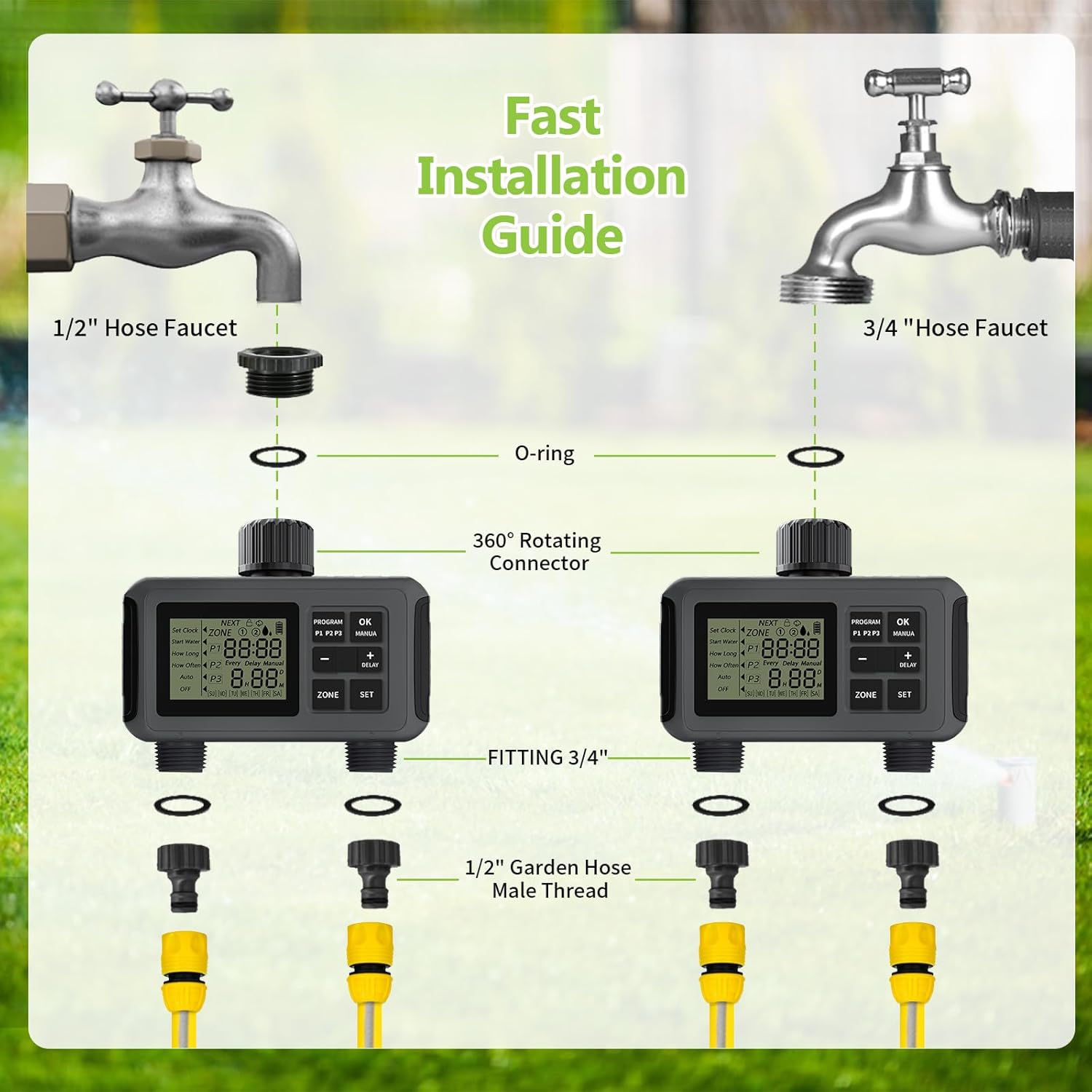
Image: A visual guide demonstrating the fast installation process for the sprinkler timer, showing connections to both 1/2" and 3/4" hose faucets using the O-ring, 360° rotating connector, and 1/2" garden hose male thread fittings.
3. Nga ngongo hono
Connect your garden hoses to the two independent outlets at the bottom of the timer. Each outlet is compatible with any standard 3/4" or 1/2" garden outdoor hose. Use the provided threaded sealing tape and sealing washers to ensure a leak-proof connection.
Mahi
Te Mārama ki te Whakaaturanga me ngā Mana Whakahaere
The timer features a clear 2.5-inch LCD display and intuitive buttons for programming. The display shows current settings, time, and program status. The main buttons include PROGRAM, OK, MANUA, -, +, DELAY, ZONE, and SET.
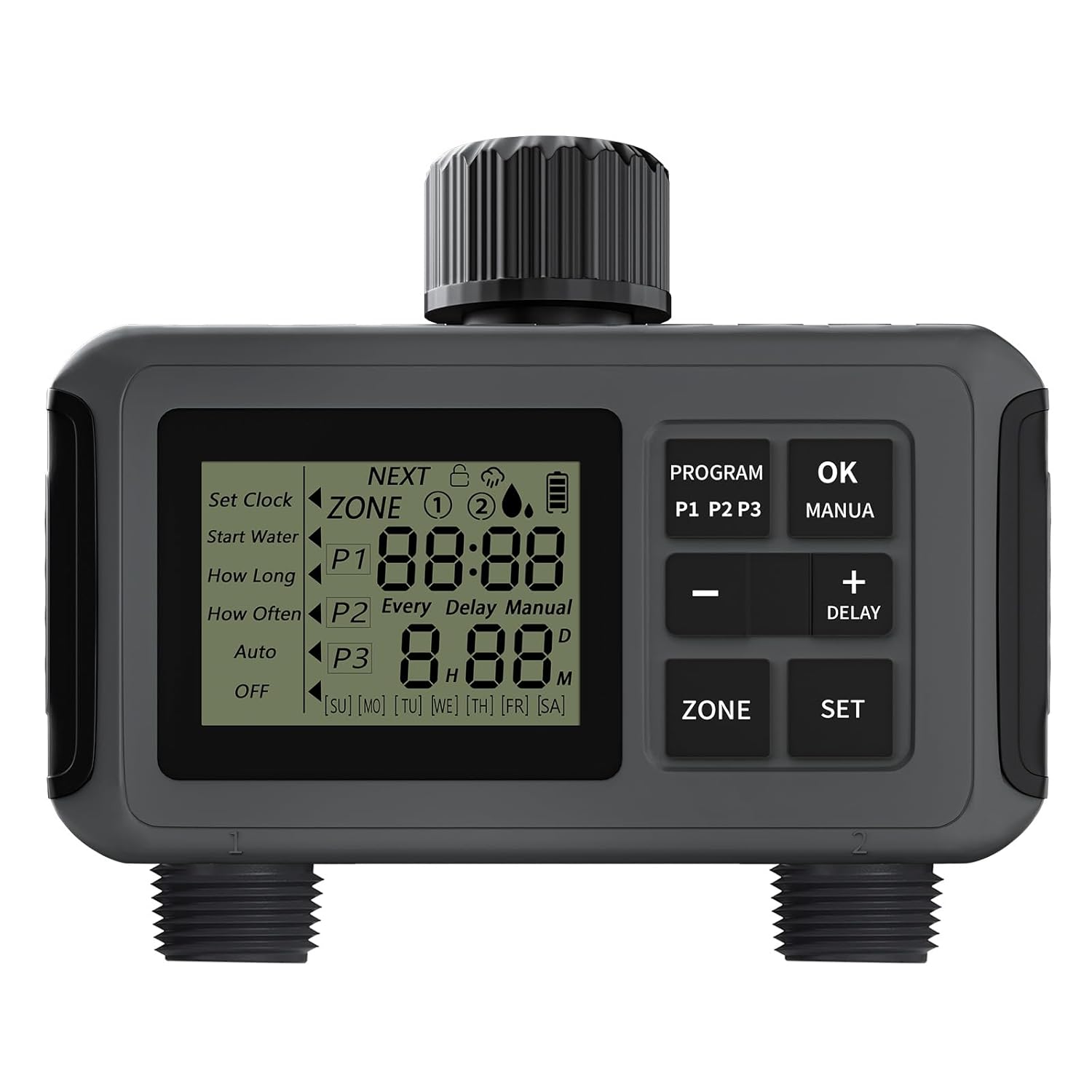
Image: The RCYAGO Sprinkler Timer showing its main LCD display, control buttons (PROGRAM, OK, MANUA, -, +, DELAY, ZONE, SET), and the two independent outlets.
Setting Watering Programs (P1, P2, P3)
The timer allows you to set up to three independent programs (P1, P2, P3) for each of the two zones. This enables highly customized watering schedules.
- Tīpako Rohe: Pehia te Rohe button to switch between Zone 1 and Zone 2.
- Whakauruhia te Aratau Papatono: Pehia te KAUPAPA button to cycle through P1, P2, P3, and Auto/Manual/OFF modes.
- Tautuhi Wā Tīmata: When a program (P1, P2, or P3) is selected, use the + a - buttons to adjust the start time. Press SET or OK ki te whakau.
- Set Watering Duration (How Long): Adjust the watering duration from 1 minute to 5 hours 59 minutes using the + a - patene. Perehi SET or OK ki te whakau.
- Set Watering Frequency (How Often): Choose the watering frequency (e.g., every 1-7 days or specific days of the week) using the + a - patene. Perehi SET or OK ki te whakau.
- Whakahohe Papatono: Ensure the timer is set to "Auto" mode for the programs to run automatically.

Image: The sprinkler timer connected to two hoses, illustrating how each zone (Zone 1 and Zone 2) can be independently programmed with three different watering plans (P1, P2, P3) for varied start times and durations.

Image: A visual representation of the automatic watering schedule, showing a calendar for setting cycle intervals (every 1 to 7 days or specific days) and sliders for adjusting start water time, watering duration, and watering frequency.
Aratau Whakamakuku A-ringa
To initiate manual watering for either zone:
- Pehia te MANUA pātene.
- Whakamahia te + a - buttons to set the desired manual watering duration from 0 to 59 minutes.
- Perehi OK ki te timata i te whakamakuku a-ringa.
- Once the manual watering time ends, the timer will automatically revert to its preset Auto mode.
Te Mahi Whakaroa ua
To temporarily pause your watering schedule due to rain:
- Patohia me te pupuri i te WHAKATOARO pātene (ranei + button for 5 seconds) until the delay option appears on the screen.
- Whakamahia te + a - buttons to select the desired delay duration from 1 to 7 days.
- Perehi OK to confirm the rain delay. The timer will resume its scheduled programs automatically after the delay period.
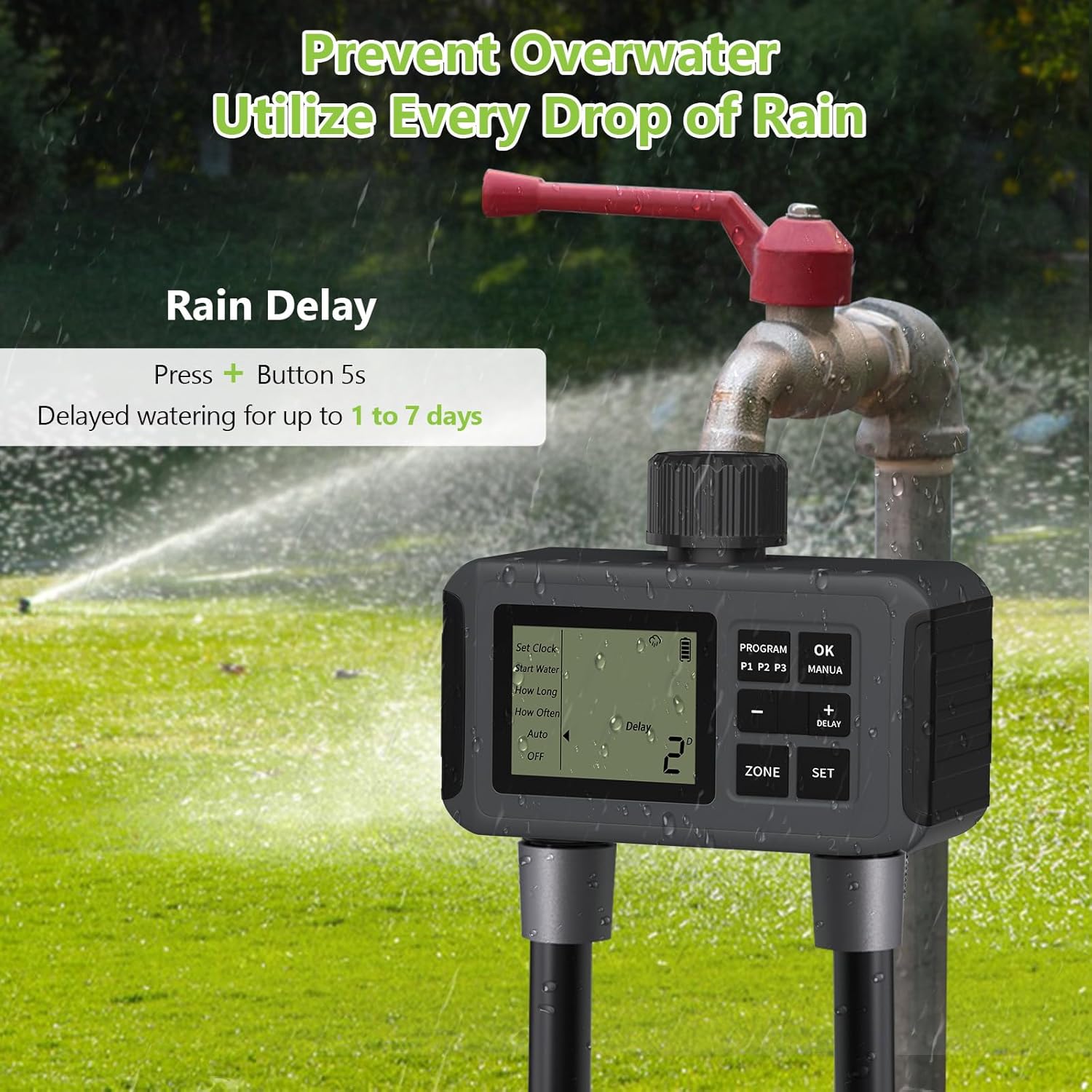
Image: The sprinkler timer connected to a faucet, displaying the rain delay function on its screen, indicating that watering can be delayed for up to 1 to 7 days to prevent overwatering.
Te tiaki
- Whakakapinga Pūhiko: Replace batteries when the low battery indicator appears on the LCD display to ensure continuous operation. Always use new AA alkaline batteries.
- Ārai turuturu: Regularly check the sealing washers and threaded tape at the connections to ensure they are intact and preventing leaks. Replace if worn.
- Tātari Tātari: The timer is equipped with a stainless steel filter at the inlet. Periodically remove and clean this filter to prevent debris from entering the timer and affecting water flow.
- Rokiroki Takurua: In freezing conditions, disconnect the timer from the faucet and store it indoors to prevent damage from ice expansion.
Raparongoā
- Timer not watering: Check battery level. Ensure the timer is in "Auto" mode and not in "OFF" or "Delay" mode. Verify that the faucet is turned on.
- Kaore he wai rere: Check for kinks in the hose. Ensure the stainless steel filter is not clogged. Verify water pressure from the faucet.
- Leaks at connections: Ensure all connections are tightened properly. Check that O-rings and sealing washers are correctly seated and not damaged. Apply new threaded sealing tape if necessary.
- Whakaatu kaore e mahi: Replace batteries. Ensure batteries are inserted with correct polarity.
Whakatakotoranga
| Waitohu | RCYAGO |
| Tau tauira | ECF-SGW07 |
| Taumaha Tūemi | 558 g |
| Rahi Tūemi (LxWxH) | 6.1 x 14 x 11.7 Henemita |
| Awhe Pehenga Wai | 7.25psi - 116psi |
| Rere Rere (Mōrahi) | 35 liters per minute (per outlet) |
| Te Whakamakuku Roa | 1 min to 5 hrs 59 min |
| Watering Interval | Every 1 to 7 days or specific days |
| Puna Mana | 4 x AA (1.5V) Pūhiko Kawakawa |
| Whakatauranga parewai | IP55 |
| Rahi Mata | 2.5 Inihi |
Pūtāhui me te Tautoko
For warranty information or technical support, please refer to the product packaging or contact RCYAGO customer service directly. Keep your purchase receipt as proof of purchase.
Ask a question about this manual
Ask about setup, troubleshooting, compatibility, parts, safety, or missing instructions. Manuals+ will review the question and use this page’s manual context to help answer it.