
1. Kupu Whakataki
Mauruuru koe mo te hokoasing the Dpofirs LMD-750 Portable DVD Player. This device is designed to provide versatile entertainment on the go, at home, or in the office. Featuring a 270° rotating HD LCD screen, multi-format disc support, USB/SD card playback, analog TV function, FM radio, and game capabilities, it offers a comprehensive multimedia experience. Please read this manual carefully to ensure proper use and to maximize the performance and longevity of your device.
2. Nga korero haumaru
- Kaua e whakaatuhia te taputapu ki te ua, ki te makuku, ki ngā pāmahana tino kino rānei.
- A ape i te whakanoho i te taputapu ki te taha o nga puna wera, ki te ra tika ranei.
- Use only the provided power adapter and car adapter.
- Kaua e ngana ki te wetewete, ki te whakatika ranei i te taputapu. Whakapa atu ki nga kaimahi ratonga whai tohu.
- Tiakina te taputapu mai i nga papa autō kaha.
- Me whakarite kia tika te hau i te wa e whakahaere ana te taputapu.
- Remove discs when transporting the player to prevent damage.
3. Ihirangi mokete
Tena koa tirohia te kete mo nga mea e whai ake nei:
- 1 x Dpofirs LMD-750 Portable DVD Player
- 1 x Mana Mamao
- 1 x Power Adapter (EU Plug)
- 1 x Car Adapter
- 1 x AV Cable
- 1 x Taramu
- 1 x Gamepad
- 1 x Game Disc
- 1 x Pukapuka Kaiwhakamahi
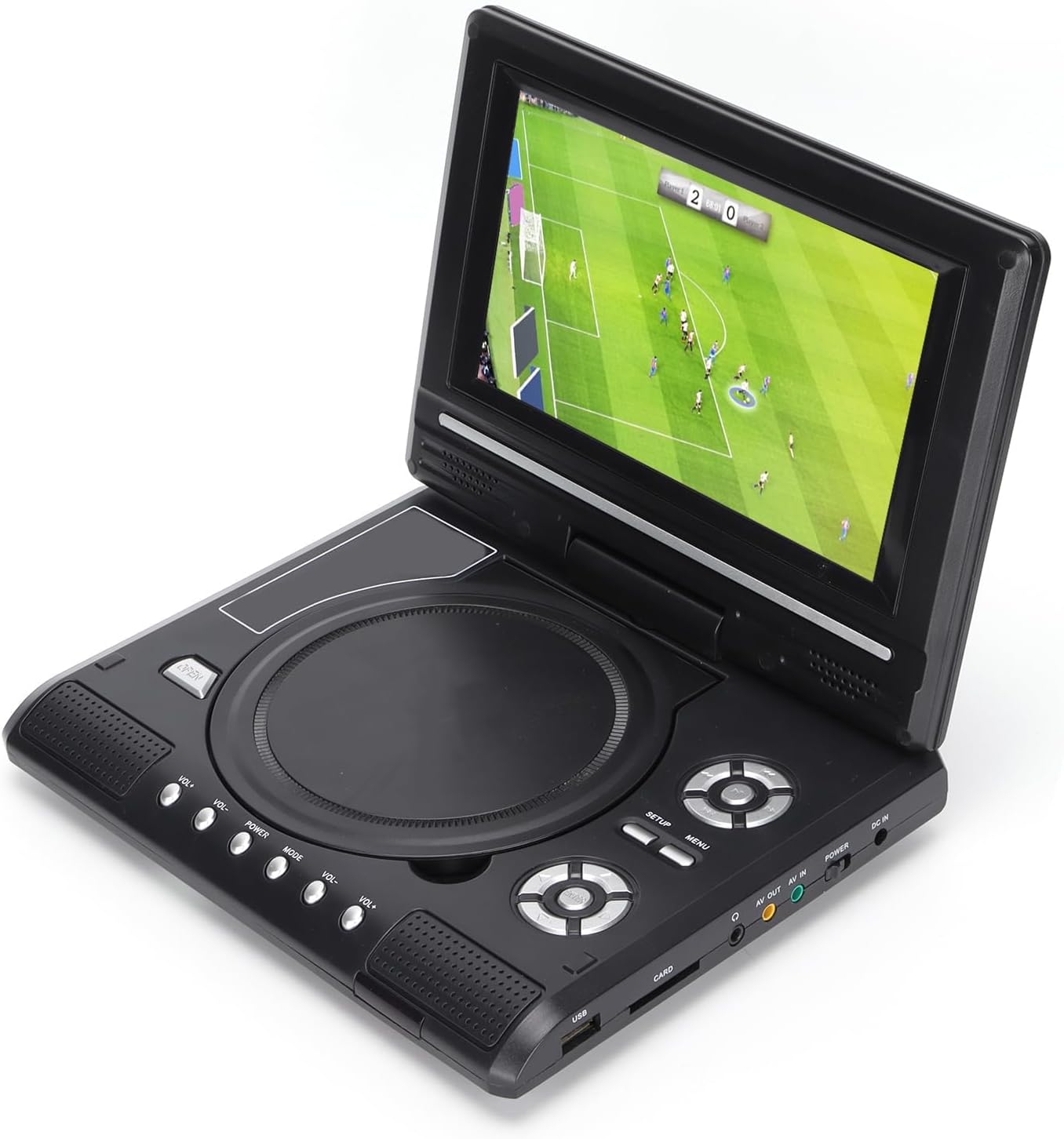
Image: All accessories included with the Dpofirs LMD-750 Portable DVD Player.
4. Hua Neke Atuview
The Dpofirs LMD-750 features a compact design with intuitive controls and multiple connectivity options.

Whakaahua: Mua view of the Dpofirs LMD-750 Portable DVD Player with the screen open.

Whakaahua: Taha view detailing the input/output ports.

Whakaahua: Runga view of the player when closed.
Mana me Tauranga:
- Mata: 6.8"/8.5" HD LCD, 270° rotatable.
- Paepae Kōpae: For DVD/CD media.
- Patene Mana: Play/Pause, Stop, Fast Forward/Rewind, Next/Previous, Setup, Menu, Volume +/-.
- Tauranga USB: Mo te hono i nga puku kohiko USB.
- CARD Slot: For inserting memory cards (e.g., SD card).
- Tihakihihi Mo te whakarongo motuhake.
- AV PAI: Audio/Video output to external display.
- AV IN: Audio/Video input from external source.
- Whakawhiti POWER: To turn the device On/Off.
- DC IN: Power input for adapter.
5. Tatūnga
5.1 Te Whakataki i te Pūhiko
Before first use, fully charge the built-in 1500mAh lithium battery. Connect the power adapter to the DC IN port on the player and plug it into a wall outlet (110-240V 50/60Hz). The charging indicator will illuminate. Once fully charged, the indicator may change color or turn off. A full charge provides approximately 30-60 minutes of continuous playback, depending on usage.
5.2 Te Mana Hononga
- Whakamahi Kainga: Connect the AC power adapter to the DC IN port and a wall socket.
- Whakamahi Waka: Connect the car adapter to the DC IN port and your vehicle's cigarette lighter socket.
5.3 Connecting to an External Display (AV OUT)
Ki view ihirangi i runga i te mata nui ake:
- Connect one end of the AV cable to the AV OUT port on the DVD player.
- Connect the other end of the AV cable to the corresponding AV IN ports (Yellow for Video, White/Red for Audio) on your TV or monitor.
- Tīpakohia te pūtake tāuru AV tika i runga i tō mata o waho.
5.4 Connecting External Devices (AV IN)
To display content from an external source on the DVD player's screen:
- Connect one end of the AV cable to the AV IN port on the DVD player.
- Connect the other end of the AV cable to the AV OUT ports of your external device (e.g., another DVD player, game console).
- Switch the DVD player to AV IN mode (refer to Operating Instructions).
6. Nga Tohutohu Whakahaere
6.1 Hiko / Whakaweto
Kiriata te MANA switch to the "ON" position to turn on the player. Slide it to "OFF" to power down.
6.2 Hurihuri Mata
The LCD screen can rotate up to 270 degrees. Gently adjust the screen to your desired viewing angle. This allows for flexible viewte mahi i roto i ngā taiao rerekē.
6.3 Mana Rōrahi
Whakamahia te VOL+ a VOL- buttons on the player or remote control to adjust the audio volume.
6.4 Whakatere Tahua
Pehia te MENU button to access the main menu. Use the directional buttons (up, down, left, right) to navigate and the OK pātene hei whakaū i ngā kōwhiringa. Perehi WHAKATAHI ki te uru ki nga tautuhinga punaha.
7. Whakahoki Media
7.1 Te Purei Kōpae (DVD/CD)
- Whakatuwheratia te uhi kōpae.
- Carefully place a compatible disc (DVD, DVD±R, DVD±RW, VCD, CD, CD±R, CD±RW) onto the spindle with the label side facing up.
- Close the disc cover securely.
- The player will automatically detect and begin playback. If not, press the TAKARO pātene.

Image: Player displaying video content.

Image: Player displaying a sports event.
7.2 USB/Kari SD Purei
- Whakauruhia he puku kohiko USB ki te USB port or a memory card into the KARI mokamoka.
- The player will automatically switch to USB/Card mode or prompt you to select the source.
- Whakatere i roto i to files using the directional buttons and press OK ki te takaro.
Ngā Hōputu Tautoko: DIVX, AV/VOB, MPG, MP3, MP4, WMA, JPEG, TXT, RMVB.
The player features an intelligent power-off memory function, resuming playback from where it stopped after a power interruption.
8. TV Function
The Dpofirs LMD-750 includes an analog TV tuner.
- Connect the included antenna to the antenna port on the player.
- Switch the player to TV mode (usually via the MODE button or menu selection).
- Perform an automatic channel scan in the TV settings menu to find available analog channels.
- Channel reception quality depends on local signal strength.
Supported TV Standards: PAL, NTSC, SECAM (optional).
9. Game Function
Enjoy gaming with the included gamepad and game disc.
- Connect the gamepad to the designated game port on the player.
- Insert the game disc into the disc tray.
- Select the game function from the main menu.
- Choose from the available games on the disc (up to 300 games).
10. Tiaki
10.1 Te horoi i te taputapu
- Horoia te waho o te kaitakaro ki te kakahu ngohengohe, maroke.
- Kaua e whakamahi i nga kai horoi wai, i nga taonga abrasive ranei.
- For the screen, use a soft, lint-free cloth specifically designed for LCD screens.
10.2 Tiaki Kōpae
- Ka mau i nga kopae ki o ratou taha kia kore ai e puta nga tapumati.
- Horoia nga kopae ki te kakahu ngohengohe, karekau, ka murua mai i te pokapū ki waho.
- Store discs in their cases to prevent scratches.

Image: Internal disc mechanism.
11. Te Raru
| Raruraru | Take pea | Rongoā |
|---|---|---|
| Karekau he kaha | Battery drained; Power adapter not connected; Power switch OFF. | Charge the battery; Connect power adapter; Slide POWER switch to ON. |
| Karekau he purei kōpae | Disc inserted incorrectly; Disc dirty or scratched; Incompatible disc format. | Insert disc correctly (label up); Clean or replace disc; Use supported disc format. |
| Karekau he tangi | He iti rawa te rōrahi; Mahi wahangu hohe; Ka hono te waea. | Whakanuia te rōrahi; Whakawetohia te wahangu; Momotuhia nga taringa ki te whakamahi kaikorero. |
| Te pōwhiri TV iti | Weak signal; Antenna not positioned correctly. | Adjust antenna position; Rescan channels; Check local signal strength. |
| Ko te mana mamao kaore e mahi | Kua whakahekehia, kua he te whakaurunga o nga pākahiko; Te aukati i waenga i te mamao me te kaitakaro. | Replace batteries (2x AAA); Ensure correct polarity; Remove obstructions. |
12. Whakatakotoranga
| Tau tauira | LMD-750 (Dpofirsrgi5bmonx0-13) |
| Rauemi | ABS |
| Tae | Pango |
| Rahi Mata | 6.8" / 8.5" (diagonal, depending on variant) |
| Momo Whakaatu | LCD |
| Whakaatu Whakatau | 234 x 480 x RGB (native), supports up to 1280 x 720, 1366 x 768 |
| Whakauru Voltage | 110-240V 50/60Hz |
| Putanga Voltage | 12V |
| Pūhiko Raukaha | 1500mAh Lithium Battery (built-in) |
| Pūhiko Mana Mamao | 2 x AAA pākahiko (kaore i whakauruhia) |
| Whakahōputu Kōpae Tautoko | DVD, DVD±R, DVD±RW, VCD, MP3, MP4, CD±R, CD±RW |
| Supported Media Formats (USB/Card) | DIVX, AV/VOB, MPG, MP3, MP4, WMA, JPEG, TXT, RMVB |
| Pūnaha pouaka whakaata | PAL, NTSC, SECAM (full system) |
| Te Whiwhinga Hoera | LHF1-5, VHF6-12, UHF13-69, ATV |
| Audio Encoding Technology | 96kHz/24bit |
| Awhe Hihiko | ≥ 80dB |
| Tohu Waitohu-ki-Toi | ≥ 70dB |
| Wehewehenga hongere | ≥ 70dB |
| Hangarau Hononga | USB, Composite Video |
| Kaihanga | Dpofirs |
| Whenua Taketake | Haina |
13. Pūtāhui me te Tautoko
Mō ngā mōhiohio pūtāhui me te tautoko kiritaki, tirohia ngā tuhinga i whakaratohia me tō hoko, whakapā atu rānei ki tō kaihokohoko. Puritia tō taunakitanga hoko mō ngā kereme pūtāhui katoa.