
Kupu Whakataki
Thank you for choosing the Dpofirs Portable MP3 Player. This device is designed to provide high-quality, lossless audio playback in a compact and durable form factor. This manual will guide you through the setup, operation, and maintenance of your new MP3 player.
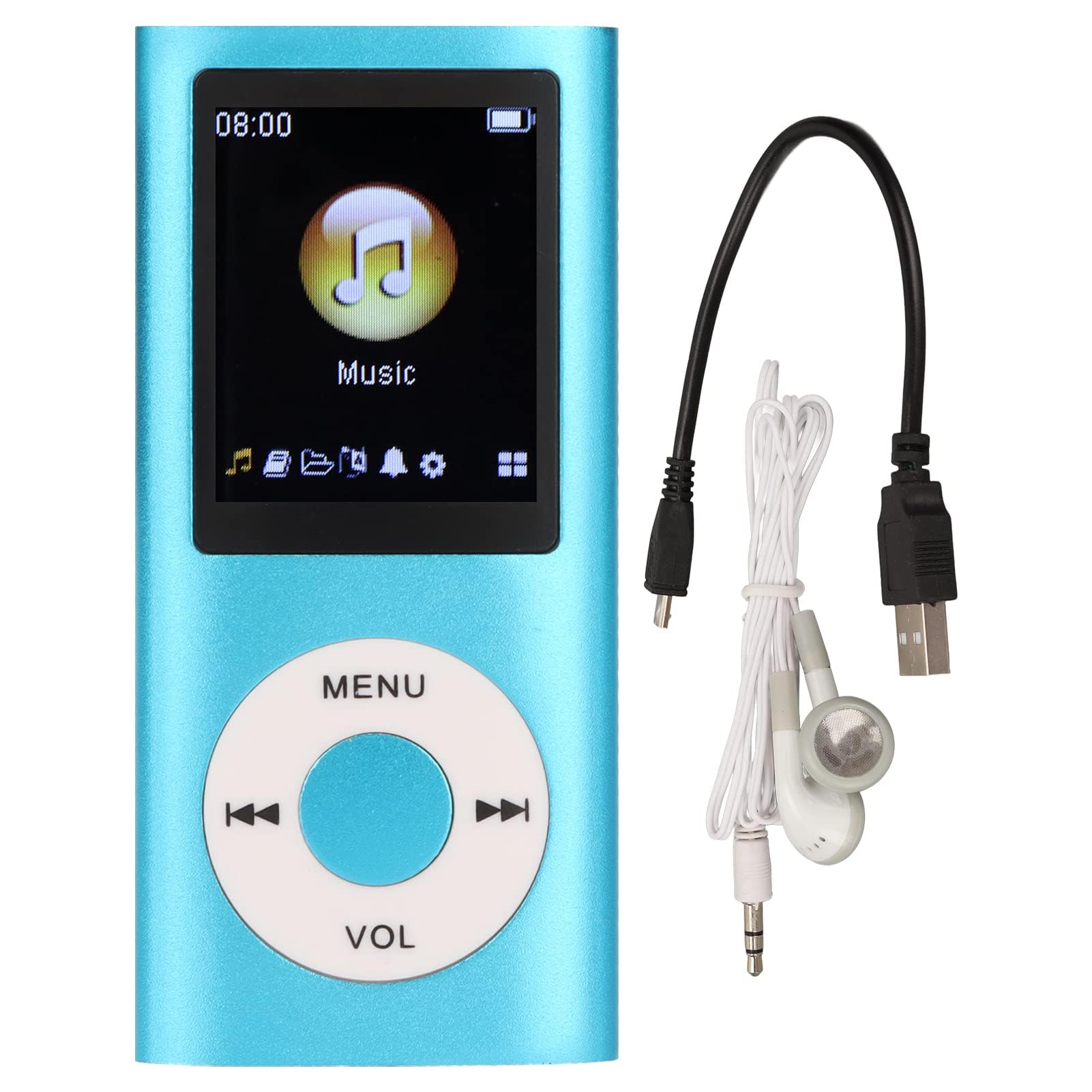
Image: The Dpofirs Portable MP3 Player, featuring a blue aluminum alloy casing and a circular control pad. A person is visible in the background, enjoying music with headphones.
Ihirangi mokete
Tena koa tirohia te kete mo nga mea e whai ake nei:
- 1 x Dpofirs MP3 Player
- 1 x Taura Whakatau
- 1 x Waea taringa
Nga waahanga matua
- Kounga Oro Ngarokore: Supports MP3, WMA, FLAC, APE, AAC, OGG, and ACELP audio formats.
- Pūmahara Whakaroha: Supports up to 64GB memory card (not included). MYMAHDI memory cards are recommended.
- Atanga ratarata-kaiwhakamahi: Easy navigation for selecting songs, creating playlists, and managing playback.
- Roa te Ora o te Pūhiko: Tae atu ki te 8 haora o te purei tonu i runga i te utu katoa.
- Hoahoa Roa: Constructed from premium aluminum alloy for enhanced durability.
- Aratau purei: Supports sequential and random playback, and sleep shutdown function.
Tatūnga
1. Ka tohatohahia te Pūrere
Before first use, fully charge your MP3 player.
- Connect the provided charging cable to the MP3 player's charging port.
- Honoa te tahi pito o te taura ki te urutau hiko USB (kaore i whakauruhia), ki te tauranga USB rorohiko ranei.
- The device will indicate charging status. A full charge typically takes approximately 2 hours.
Hiranga: Ensure the charging cable is functioning correctly. If the device does not charge, try a different USB port or adapter.
2. Te whakauru i te Kaari Mahara
The MP3 player requires a memory card for storing music.
- Locate the memory card slot on the side of the MP3 player.
- Gently insert a microSD card (up to 64GB, not included) into the slot until it clicks into place.
- Hei tango, panahia te kaari ki roto kia puta ra ano.
Tuhipoka: A memory card is not included with the player. MYMAHDI brand memory cards are recommended for optimal performance.
3. Tuhono Waea Puoro
Connect the provided earphones or your preferred 3.5mm audio headphones to the headphone jack on the MP3 player.
Nga Tohutohu Whakahaere
1. Te Hiko / Whakaweto
- To power on, press and hold the power button (usually the Play/Pause button or a dedicated power button) until the screen lights up.
- Hei whakaweto, pehia me te pupuri ano i te paatene hiko kia weto te mata.
2. Whakaterenga Taketake
The MP3 player features a circular control pad with several buttons:
- MENU: Access the main menu or go back to the previous screen.
- VOL (+/-): Whakaritehia te taumata oro.
- Purei/Tatari: Tīmatahia, whakatātarihia te purei anō.
- Tō muri/Tāmua: Skip to the next track or go back to the previous track. Long press to fast forward/rewind.
3. Te Whakawhiti Puoro Files
Hei whakawhiti waiata ki tō kaitākaro MP3:
- Connect the MP3 player to your computer using the charging cable.
- The player should appear as a removable disk drive on your computer.
- Tōia me te tuku i to puoro files (MP3, WMA, FLAC, APE, AAC, OGG, ACELP) into the player's memory card folder.
- Tangohia marietia te pūrere i tō rorohiko i mua i te momotu i te taura.
4. Purei Waiata
- From the main menu, navigate to the "Music" or "Audio" section.
- Browse your music by artist, album, genre, or all songs.
- Tīpakohia he waiata hei timata i te purei.
- Use the Play/Pause, Next/Previous, and VOL buttons to control playback.
5. Playback Options
- Rārangipāpāho: Create and manage custom playlists directly on the device.
- Shuffle/Repeat: Toggle between sequential playback, shuffle, and repeat modes.
- Whakaweto Moe: Set a timer for the device to automatically power off.
Te tiaki
- Keep the device dry. Moisture can damage internal circuits.
- A ape i te wera nui.
- Clean the device with a soft, dry cloth. Do not use harsh chemicals or cleaning agents.
- Āraia te mata mai i ngā rakuraku.
- Whakaorangia te taputapu ki tetahi waahi haumaru ka kore e whakamahia.
Raparongoā
Kaore te taputapu i te hiko:
- Ensure the battery is charged. Connect the player to a power source and allow it to charge for at least 30 minutes.
- Whakamātauria te pēhi me te pupuri i te pātene mana mō te wā roa (5-10 hēkona).
Cannot hear any sound:
- Check if the earphones are properly connected to the headphone jack.
- Whakanuia te oro mā te whakamahi i te pātene VOL+.
- Test with a different pair of earphones to rule out faulty headphones.
- Me whakarite te ororongo filekāore ngā s i pirau, ā, kei roto i tētahi hōputu tautokona.
Waiata files are not recognized:
- Ensure the memory card is properly inserted and recognized by the device.
- Manatokohia ko te puoro files are in one of the supported formats (MP3, WMA, FLAC, APE, AAC, OGG, ACELP).
- Try reformatting the memory card (this will erase all data) and re-transferring the music.
- Ensure the memory card is not full.
Ka whakatio te taputapu, ka kore ranei e aro:
- Pēhia me te pupuri i te paatene hiko mo te 10-15 hēkona kia kaha ki te whakaara ano.
- If available, use a small pin to press the reset button (if present on the device).
Whakatakotoranga
| Waitohu | Dpofirs |
| Tau tauira | Dpofirs5yhtvp70d23123-13 |
| Rauemi | Aluminum Aluminum |
| Pūhiko | Hanga-i roto i te 200mAh Lithium Battery |
| Waa Whakatau | Approx. 2 haora |
| Wā Whakahoki | Tae atu ki te 8 haora (ka whakakiia katoatia) |
| Tautoko Kaari Mahara | Up to 64GB (microSD, not included) |
| Ngā Hōputu Ororongo Tautokohia | MP3, WMA, FLAC, APE, AAC, OGG, ACELP |
| Hangarau Hononga | Auxiliary, Bluetooth, Wi-Fi (Note: Bluetooth/Wi-Fi functionality not detailed in product description, focusing on core MP3 player features) |
| Tae | Kahurangi |
| Whenua Taketake | Haina |
Pūtāhui me te Tautoko
Specific warranty information for this product is not provided in the available documentation. Please refer to the retailer's return policy or contact the seller directly for details regarding warranty coverage.
For technical support or further assistance, please contact Dpofirs customer service through the platform where you purchased the product.