
Kupu Whakataki
This manual provides detailed instructions for the proper setup, operation, and maintenance of your TOMLOV DM04 Digital Microscope. Please read this manual thoroughly before using the device to ensure optimal performance and longevity.
The TOMLOV DM04 is a versatile digital microscope featuring a 9-inch LCD screen, 16MP camera, and up to 1300X digital magnification. It is designed for various applications including coin inspection, circuit board repair, and general observation of small objects. It is compatible with Windows and Mac OS for advanced functions.
Ihirangi mokete
Manatokohia ko nga mea katoa kei raro nei kei roto i to kete:
- 9-inch Microscope Unit
- Papa Papa
- 10-inch Stand Pole
- Mana Mamao
- USB Cable for Microscope (Micro USB)
- USB Cable for Base (USB-C)
- Arai Maama
- Pukapuka Kaiwhakamahi
- Kāri SD 32GB (kua tāutahia, kua whakaurua motuhake rānei)

Image: All components included in the TOMLOV DM04 Digital Microscope package, including the microscope unit, stand, base, cables, remote, and manual.
Tohutohu Tatūnga
- Huihuia te Tu: Attach the 10-inch stand pole to the base plate. Ensure it is securely fastened.
- Mount the Microscope: Slide the microscope unit onto the stand pole and tighten the securing screw at the desired height.
- Hono Hono:
- Connect the Micro USB cable to the microscope unit and a power source (e.g., USB adapter, computer USB port).
- Connect the USB-C cable to the base plate (for auxiliary lights) and a separate power source.
- Kōkuhu Kāri SD: If not pre-installed, insert the provided 32GB SD card into the slot on the back of the microscope unit.
- Position Auxiliary Lights: Adjust the flexible auxiliary lights on the base to illuminate your observation area as needed.
- Whakahiko: Press and hold the power button on the microscope unit to turn it on.
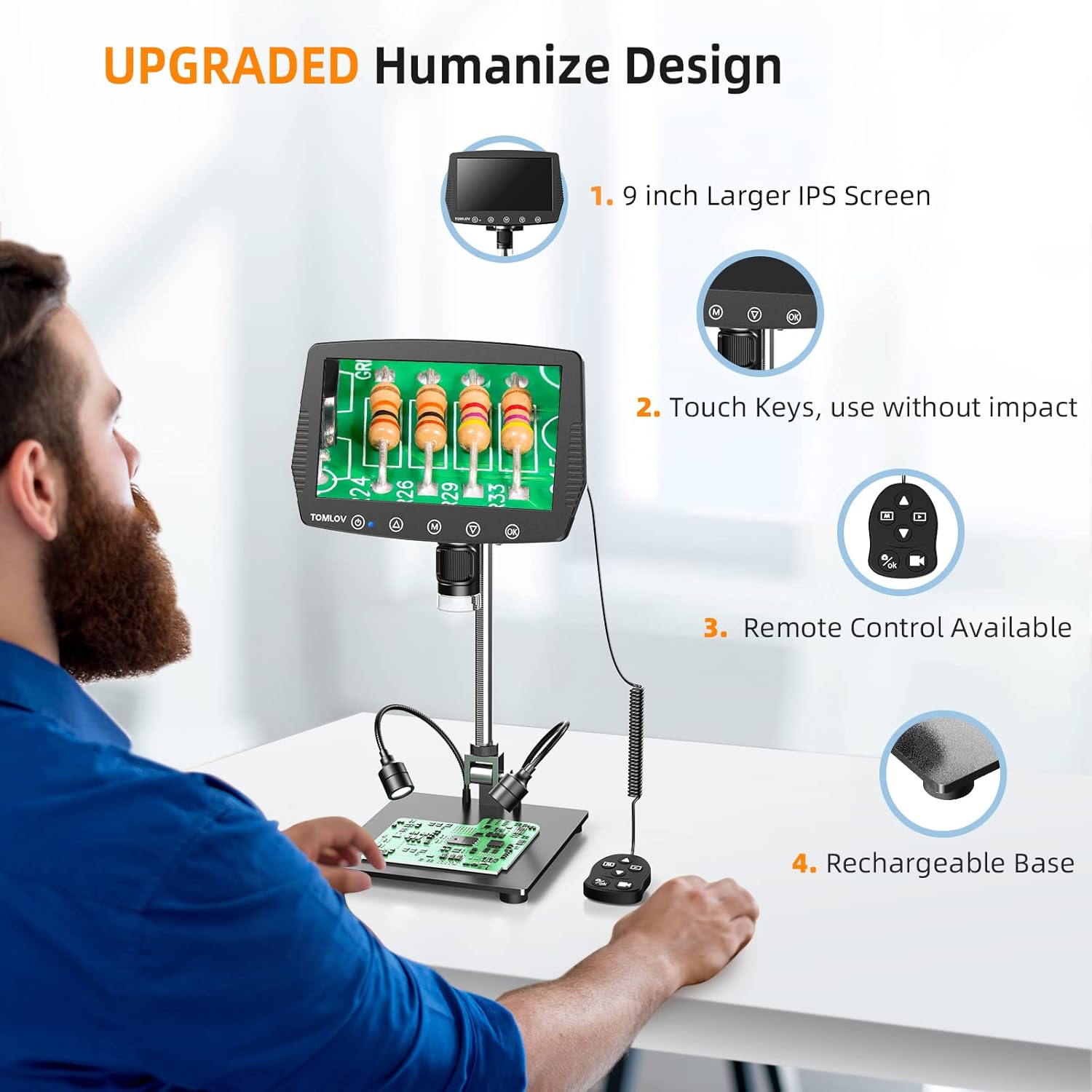
Image: A user setting up the TOMLOV DM04 microscope, demonstrating the assembly of the stand and placement of the microscope unit.
Nga Tohutohu Whakahaere
Mahi Taketake
- Hiko Whakaka/Weto: Patohia me te pupuri i te paatene hiko (⑂) hei whakakā, hei whakaweto rānei i te pūrere.
- Whakatikatika Arotahi: Rotate the focus wheel on the microscope unit to achieve a clear image on the 9-inch LCD screen.
- Whakanui: The microscope offers digital magnification up to 1300X. Adjust the height of the microscope on the stand and use the digital zoom functions (if available via menu) to change magnification.
- Rama:
- Nga Rarama LED kua whakauruhia ki roto: The microscope head has built-in LED lights. These can be adjusted via the menu or dedicated buttons.
- Auxiliary Base Lights: The two flexible lights on the base can be adjusted independently using their respective controllers to provide additional illumination.
- Hopu Ataata/ Ataata:
- Pehia te OK button on the microscope or remote control to take a picture.
- Patohia me te pupuri i te OK pātene hei tīmata/mutu i te tuhi ataata.
- Captured images and videos are saved to the inserted SD card.
Āhuatanga Arā Atu Anō
- Tahua Whakaterenga: Whakamahia te M (Menu) button and arrow buttons (▲, ▼) to navigate through settings and options on the LCD screen.
- Mana Mamao: The included remote control allows for stable operation, reducing image shake during capture.
- Rotatable Screen & Bracket Pole: The screen can be rotated up to 80 degrees and the bracket pole up to 180 degrees for flexible viewnga koki.
- PC Connection (Windows/Mac OS):
- Connect the microscope to your computer using the appropriate USB cable.
- Select "PC Camera" mode on the microscope's screen.
- Install the dedicated software (refer to the included software CD or manufacturer's website for download) to enable measurement and marking functions, and to view the live feed on your computer.
- Files can be transferred directly from the SD card when connected to a PC.

Image: The TOMLOV DM04 microscope connected to a laptop, showing the "PC Camera" function and measurement capabilities on the computer screen.

Whakaahua: Kati-ake view of the TOMLOV DM04 microscope's dual auxiliary lighting system, highlighting the built-in LED ring light and the two flexible base lights.
Video: A demonstration of the TOMLOV DM04 digital microscope's capabilities, showing a detailed view of a fly. This video illustrates the clarity and magnification achievable with the device.
Te tiaki
- Te horoi:
- Use a soft, dry cloth to clean the exterior of the microscope and screen.
- Mō te arotahi, whakamahia he kakahu horoi arotahi me te wai horoi arotahi motuhake. Āta karohia ngā rauemi whakakoi.
- Do not use liquid cleaners directly on the screen or lens.
- Rokiroki: Store the microscope in a clean, dry environment away from direct sunlight and extreme temperatures.
- Tiaki Pūhiko: For optimal battery life, charge the microscope regularly and avoid fully discharging it for extended periods.
- Whakahōu Pūmanawa: Periodically check the TOMLOV official website for any available software or firmware updates for your DM04 model.
Raparongoā
| Raruraru | Take pea | Rongoā |
|---|---|---|
| Kaore he ahua o te mata | Device not powered on; lens cap on; focus not adjusted. | Ensure device is powered on. Remove lens cap. Adjust focus wheel. |
| He koretake te whakaahua | Improper focus; insufficient lighting; dirty lens. | Adjust focus wheel. Increase illumination using built-in or auxiliary lights. Clean the lens. |
| Cannot save images/videos | No SD card inserted; SD card full or corrupted; incorrect file tautuhinga hōputu. | Whakauruhia he kāri SD hototahi. Mukua ngā mea kāore e hiahiatia files or replace SD card. Check menu settings for file whakatakotoranga. |
| PC connection not working | Incorrect USB cable; "PC Camera" mode not selected; driver issues. | Ensure correct USB cable is used. Select "PC Camera" mode on microscope. Install necessary drivers/software. |
Whakatakotoranga
- Tauira: DM04
- Rahi Mata: 9-inihi LCD
- Whakataunga kāmera: 16 Megapixels
- Taumira Ataata: 1080P
- Digital Magnification: Tae atu ki te 1300X
- Stand Length: 10 inihi
- Awhe Arotahi: Up to 8 inches (with enhanced stand)
- Rama: Built-in 8-LED fill lights, Rechargeable base lights (2)
- Mana: Touch buttons, Remote control
- Rokiroki: Tautoko kāri Micro SD (kei roto ko te 32GB)
- Hototahi PC: Windows, Mac OS
- Puna Hiko: Whakahikohia te Pūhiko (5 Volts)
- Rauemi: 10'' Metal Stand + 9'' LCD Screen + Large Metal Base
Nga korero Whakaputanga
TOMLOV products typically come with a standard manufacturer's warranty. Please refer to the warranty card included in your product packaging or visit the official TOMLOV webtirohia te paetukutuku mō ngā tikanga me ngā herenga taipitopito o te pūtāhui, tae atu ki te wā kapinga me ngā tukanga kereme.
Tautoko Kiritaki
For technical assistance, troubleshooting not covered in this manual, or warranty inquiries, please contact TOMLOV customer support:
- Webpae: www.tomlov.com (Tuhipoka: He waahi tenei URL, please refer to your product documentation for the official support webpae.)
- Īmēra: Refer to your product documentation.
- Waea: Refer to your product documentation.
When contacting support, please have your product model (DM04) and purchase information ready.