
Kupu Whakataki
This manual provides detailed instructions for the Goodmans Bluetooth Aqua Speakers. Please read this manual thoroughly before using the product to ensure proper operation and to maximize its lifespan. Keep this manual for future reference.
Nga korero haumaru
- Kaua e tukuna te kaikorero ki te wera nui, te ra tika, te makuku nui ranei.
- While the speaker features internal water jets, it is not designed to be submerged in water. Avoid exposing the exterior to excessive water or liquids.
- Use only the provided Micro USB charging cable.
- Kaua e ngana ki te wetewete, ki te whakatika, ki te whakarerekē rānei i te kaikorero. Ka whakakorea te pūtāhui, ā, ka pā pea he kino, he whara rānei.
- Kaua e taea e nga tamariki.
- Me whakarite kia tika te hau i te wa e mahi ana.
Ihirangi mokete
Manatokona kei roto katoa nga mea kei roto i te kete:
- Goodmans Bluetooth Aqua Speakers (2 units)
- Moroiti USB Charging Cable
- 3.5mm Line-in Audio Cable
- Pukapuka Tohutohu (tenei tuhinga)
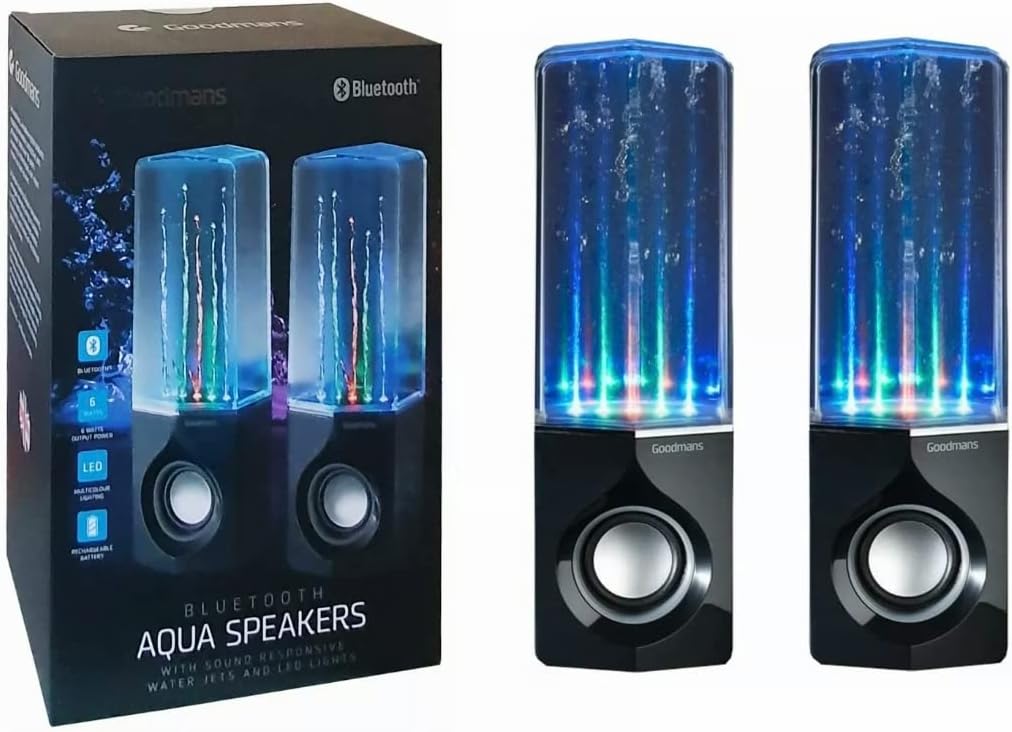
Image: Goodmans Bluetooth Aqua Speakers shown alongside their retail packaging, illustrating the product as it appears when unboxed.
Ka mutu te huaview
The Goodmans Aqua Speakers feature a sleek design with integrated LED lights and sound-reactive water jets that pulse to your music. Each speaker unit includes a main speaker driver and control buttons.

Whakaahua: Mua view of two Goodmans Bluetooth Aqua Speakers, showcasing the active water jets and vibrant LED lights during operation.
Nga Waenga Korero
- Water Chamber: Transparent upper section containing water and LED lights.
- Roopu Korero: Protects the audio driver.
- Paewhiri Mana: Located on the side or rear of the main speaker unit.
- Tauranga USB Iti: Mo te utu i te pākahiko o roto.
- 3.5mm Whakauru Ororongo: Mō te hononga waea ki ngā taputapu oro.

Whakaahua: Taha view of one Goodmans Bluetooth Aqua Speaker, highlighting the location of control buttons and input/output ports.
Tatūnga
1. Te Whakataki i te Pūhiko
- Connect the Micro USB charging cable to the speaker's Micro USB port.
- Honoa te tahi pito o te taura ki te urutau hiko USB (kaore i whakauruhia), ki te tauranga USB rorohiko ranei.
- Ka marama te rama tohu utu. Ka oti te whakakii, ka huri ke te tae o te rama, ka weto ranei.
- A full charge typically takes 2-3 hours and provides several hours of playback.
2. Te Whakakaha/Weto
- To power on, press and hold the Power button (usually marked with a power symbol) for a few seconds until you hear an audible prompt or see the LED lights activate.
- Hei whakaweto, pehia me te pupuri ano i te paatene Hiko kia mutu ra ano te hiko o te kaikorero.
Te whakahaere
1. Takirua Nihokikorangi
- Ensure the speaker is powered on and within close proximity (within 10 meters) of your Bluetooth-enabled device.
- Ka uru aunoa te kaikorero ki te aratau takirua Nihokikorangi, e tohuhia ana e te rama rama rama rama, te omaoro rongo ranei.
- On your device (smartphone, tablet, computer), go to the Bluetooth settings and enable Bluetooth.
- Rapua available devices. The speaker should appear as "Goodmans Aqua Speakers" or a similar name.
- Select the speaker from the list to pair. Once paired, you will hear a confirmation sound, and the LED light may change to a solid color.
- You can now play audio from your device through the Aqua Speakers.
2. Auxiliary (AUX) Input
Mō ngā pūrere kāore he Nihokikorangi, mēnā rānei he pai ki a koe te hononga waea:
- Honoa tetahi pito o te taura oro 3.5mm ki te tauranga AUX-in i te kaikorero.
- Honoa te tahi pito o te taura ki te torooro ororongo ranei o to taputapu.
- The speaker should automatically switch to AUX mode, or you may need to press a mode button if available.
3. Te Whakatangitangi Puoro me te Whakahaere Oro
- Purei/Tatari: Press the Play/Pause button (often marked with a triangle or || symbol) to start or stop playback.
- Rōrahi Whakarunga/Whakararo: Whakamahia ngā pātene oro (+/-) i runga i te kaikorero, i tō pūrere hono rānei hei whakarite i te oro.
- Riu Tipu: Some models may have dedicated buttons for skipping tracks forward or backward. Refer to the specific button layout on your speaker.
4. LED Lights and Water Jets
The LED lights and water jets are sound-reactive, meaning they will pulse and change color in sync with the audio being played. This feature is automatic and does not typically require manual control.
Te tiaki
- Te horoi: Use a soft, dry cloth to wipe the exterior of the speaker. Do not use abrasive cleaners or solvents. For the transparent water chamber, a slightly damp cloth can be used, but ensure no water enters the electronic components.
- Rokiroki: Whakaorangia te kaikorero ki te waahi hauhautanga, maroke atu i te ra tika me te wera nui ina kore e whakamahia mo te wa roa.
- Tiaki Pūhiko: Hei whakaroa i te ora o te pākahiko, kaua e whakawetohia te pākahiko i ngā wā katoa. Whakakīia te kaikorero i ia wā, ahakoa kāore e whakamahia tonutia.
Raparongoā
| Raruraru | Rongoa pea |
|---|---|
| Kare te kaikorero e ka ana. | Kia tino utua te pākahiko. Honoa te kaikorero ki tētahi pūtake hiko mā te whakamahi i te taura Micro USB. |
| Kaore e taea te hono ma te Nihokikorangi. | Make sure the speaker is in pairing mode. Disable and re-enable Bluetooth on your device. Ensure no other device is currently connected to the speaker. Move the speaker closer to your device. |
| Karekau he oro, he iti te reo. | Check the volume levels on both the speaker and your connected device. Ensure the correct input mode (Bluetooth or AUX) is selected. If using AUX, check the cable connection. |
| Water jets or LED lights not working. | Ensure music is playing and the volume is sufficient for the sound-reactive features to activate. Check if the speaker is fully charged. |
| Ororongo kerekere. | Reduce the volume on both the speaker and your device. Ensure the speaker is not too far from the Bluetooth source. |
Whakatakotoranga
| Āhuahira | Taipitopito |
|---|---|
| Ingoa Tauira | Kaikorero Aqua |
| Hangarau Hononga | Nihokikorangi |
| Momo Kaikorero | Tirooro |
| Aratau Putanga Ororongo | Tirooro |
| Kaikorero Te Mana Putanga Morahi | 6 Watts |
| Puna Mana | Whakahikohia te Pūhiko (Ka taea te utu) |
| Nga waahanga motuhake | Integrated Rechargeable Battery, Bluetooth Enabled, 3.5mm Line-in Cable Included, Micro USB Charging Cable Included, Sound-Reactive LED Lights and Water Jets |
| Tikanga Mana | Patene Pana |
| Taumaha Tūemi | 1.58 Kirokaramu |
| Tae | Pango |
| Rauemi | Waterproof Material (for internal water chamber) |
| Hunga Hua | 35 x 22.7 x 13.7 cm |
Pūtāhui me te Tautoko
Goodmans products are designed to meet high-quality standards. For warranty information, please refer to the warranty card included with your purchase or contact your retailer. Keep your proof of purchase for any warranty claims.
For further assistance or technical support, please contact the retailer where you purchased the product or visit the official Goodmans webpae mo nga korero whakapiri.