
1. Kupu Whakataki
This manual provides detailed instructions for the setup, operation, maintenance, and troubleshooting of your Rampage KB-R29 GRAND Series RGB LED Mechanical Gaming Keyboard. Please read this manual thoroughly before using the product to ensure proper functionality and longevity.
2. Ihirangi mokete
Manatokona kei roto katoa nga mea kei roto i te kete:
- Rampage KB-R29 GRAND Series RGB LED Mechanical Gaming Keyboard
- Pukapuka Kaiwhakamahi
3. Hua Neke Atuview
Ko te Rampage KB-R29 GRAND is a high-performance mechanical gaming keyboard featuring RGB LED backlighting and durable Blue Optical Switches. It is designed for gaming and general computer use, offering a responsive and tactile typing experience.
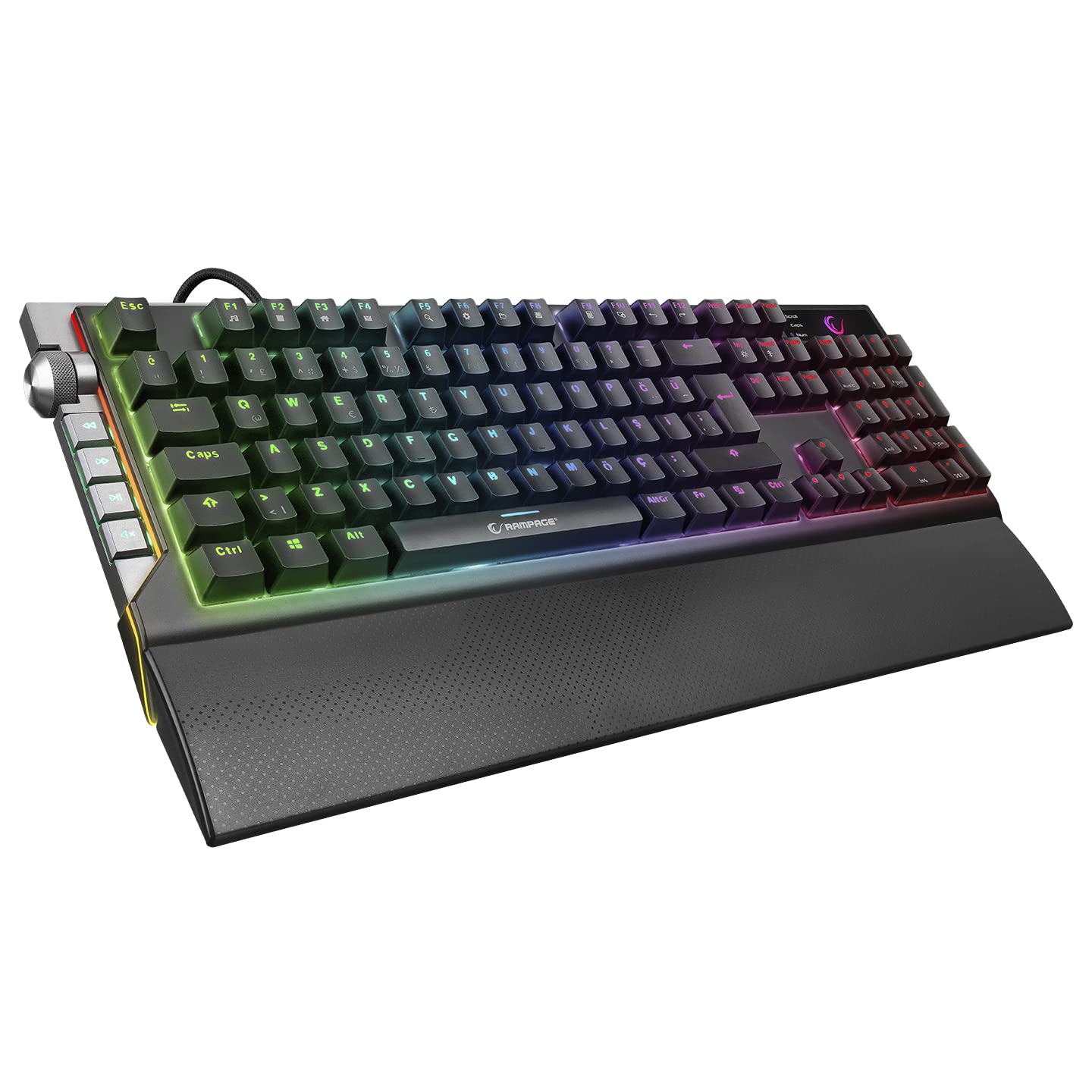
Whakaahua: Kati-ake view o te Rampage KB-R29 GRAND keyboard, highlighting the Blue Optical Switches beneath removed keycaps. This illustrates the mechanical switch design.
Āhuatanga matua:
- Momo Whakawhiti: Blue Optical Switches for tactile feedback and durability.
- Tahora: Turkish-Q (87 keys).
- Whakamuri: RGB LED customizable lighting.
- Hononga: Wired USB.
- Ahu: Approximately 445mm x 212.8mm x 33mm.
4. Tohutohu Tatūnga
- Wewetehia te Papapātuhi: Kia ata tangohia te papapātuhi mai i tana tākai.
- Hono ki Rorohiko: Monohia te hononga USB o te papapātuhi ki tetahi tauranga USB e waatea ana i runga i to rorohiko.
- Tāuta Atekōkiri: The keyboard is typically plug-and-play. Your operating system should automatically detect and install the necessary drivers. No additional software installation is usually required for basic functionality.
- Turanga: Place the keyboard on a stable, flat surface. Ensure comfortable wrist positioning.
5. Nga Tohutohu Whakahaere
Basic Keyboard Functions:
- Pato: Whakamahia ngā kī mō te tāuru tuhinga paerewa.
- Pātuhi Taumahi (Fn): The keyboard features an Fn key. Combine the Fn key with other keys (e.g., F1-F12) to access multimedia controls or other special functions. Refer to the keycap legends for specific combinations.
RGB LED Backlighting Control:
Ko te Rampage KB-R29 GRAND keyboard offers various RGB lighting effects and customization options. Specific key combinations are used to cycle through modes, adjust brightness, and change colors.
- Hurihia nga Aratau Rama: Typically, a combination of the Fn key and specific function keys (e.g., Fn + F9, Fn + F10) or dedicated lighting keys will cycle through different RGB effects.
- Whakaritea Tirohanga: Use Fn + Up/Down arrow keys or similar combinations to increase or decrease LED brightness.
- Te Whakatikatika i te Tere/Ahunga: Some lighting effects allow adjustment of speed or direction using Fn key combinations.
Tuhipoka: Refer to the keycap legends on your specific keyboard for the exact key combinations for lighting control, as these can vary slightly.
6. Tiaki me te Tiaki
- Te horoi:
- Momotuhia te papapātuhi mai i to rorohiko i mua i te horoi.
- Whakamahia he ngohengohe, damp cloth to wipe the surface of the keyboard. Avoid harsh chemicals or abrasive materials.
- Mo te puehu me te para i waenga i nga taviri, whakamahia te hau kōpeke.
- Keycaps can be carefully removed for deeper cleaning, but exercise caution to avoid damaging the switches.
- Rokiroki: Whakaorangia te papapātuhi ki roto i te waahi maroke, hauhautanga kia matara atu i te ra tika me te wera nui.
- A ape i te Wai: Do not expose the keyboard to liquids. Liquid damage can void the warranty.
- Te hapai me te tiaki: A ape i te tuku i te papapātuhi, te tuku ranei ki nga paanga kaha.
7. Te Raru
| Raruraru | Take pea | Rongoā |
|---|---|---|
| Karekau te papapātuhi whakautu | He hononga USB kore, he tauranga USB he, he take taraiwa. |
|
| Kī kāore i te rēhita | Dust/debris under keycap, switch malfunction. |
|
| Ko te rama RGB kaore e mahi | Lighting mode off, brightness set to minimum, software conflict. |
|
8. Whakatakotoranga
| Waitohu | Ramptau |
| Tau tauira | KB-R29 GRAND |
| Momo Whakawhiti | Blue Optical Switch |
| Te maha o nga Kī | 87 |
| Tahora | Turkish-Q |
| Hononga | USB Waea |
| Pūrere Hototahi | Pona, PC Papamahi |
| Ahu (LxWxH) | 445mm x 212.8mm x 33mm |
| Tae | Pango |
9. Nga Korero Whakaputanga
This product comes with a manufacturer's warranty. Please refer to the warranty card included with your product or contact Rampage customer support for detailed warranty terms and conditions. Keep your purchase receipt as proof of purchase for warranty claims.
10. Tautoko
For technical assistance, troubleshooting, or product inquiries, please contact Rampage customer support. Contact information can typically be found on the manufacturer's official webte waahi kei runga ranei i te kohinga hua.
Rauemi ipurangi: Visit the official Ramptau website for updated drivers, FAQs, and additional support resources.