
LFF DAB Plus Digital FM Radio
Pukapuka Kaiwhakamahi mō te Reo Irirangi FM Mamati LFF DAB Plus
Model: DAB Plus Digital FM Radio
Brand: LFF
1. Kupu Whakataki
This manual provides detailed instructions for the LFF DAB Plus Digital FM Radio. It covers setup, operation, maintenance, and troubleshooting to ensure optimal performance and user experience. Please read this manual thoroughly before using the device.

Mua view of the LFF DAB Plus Digital FM Radio, showing the speaker grille, color display, and extended antenna.
2. Ihirangi mokete
Tena koa tirohia te kete mo nga mea e whai ake nei:
- 1 x LFF DAB Plus Digital FM Radio
- 1 x Takahapa Hau
- 1 x Aratohu Timata Tere
3. Hua Neke Atuview
Familiarize yourself with the radio's components and controls.
3.1 Nga waahanga matua

This diagram illustrates the radio's key functions: DAB+ radio, 60 station presets, FM radio, sleep timer, headphone jack, Bluetooth connectivity, full-color screen, and dual alarm capability.
3.2 Mana me nga Tauranga

Runga me te taha view of the radio, showing control buttons and knobs on the top panel, and the 3.5mm headphone jack located on the side.
Refer to the diagram above for the location of the following:
- Pātene Hiko: Ka whakakā/whakaweto te reo irirangi.
- Patene Aratau: Ka huri i waenga i ngā aratau DAB+, FM, me te Nihokikorangi.
- Pēhi Whakaoho/Tīpako: Rotates to tune stations or navigate menus, press to select.
- Matapihi Rōrahi: Whakaritea te ororongo.
- Patene Tatūkē: Hei tiaki me te whakahoki mai i ngā teihana tino pai.
- Alarm/Sleep Timer Button: Accesses alarm and sleep timer settings.
- Whakaatu Tae: He whakaatu i nga korero teihana, te wa, me nga whiringa tahua.
- Jack Puoro (3.5mm): Mo te whakarongo motuhake.
- DC IN Tauranga: Mo te hono i te urutau hiko AC.
- Antenna Telescopic: Mo te whakapai ake i te reo irirangi.
4. Tatūnga
4.1 Te Whakakaha
The radio can be powered by the included AC adapter or by batteries.
- Mana AC: Connect the AC power adapter to the DC IN port on the back of the radio and plug it into a wall outlet.
- Mana Pūhiko: Open the battery compartment on the back of the radio and insert 4 x 1.5V AA (LR6) batteries, ensuring correct polarity.
Whakamuri view of the radio, detailing the battery compartment for 4x AA batteries, the AC adapter input (5V/1000mA), and the 360° rotatable antenna. Product dimensions are also indicated.
4.2 Whakaritenga Antenna
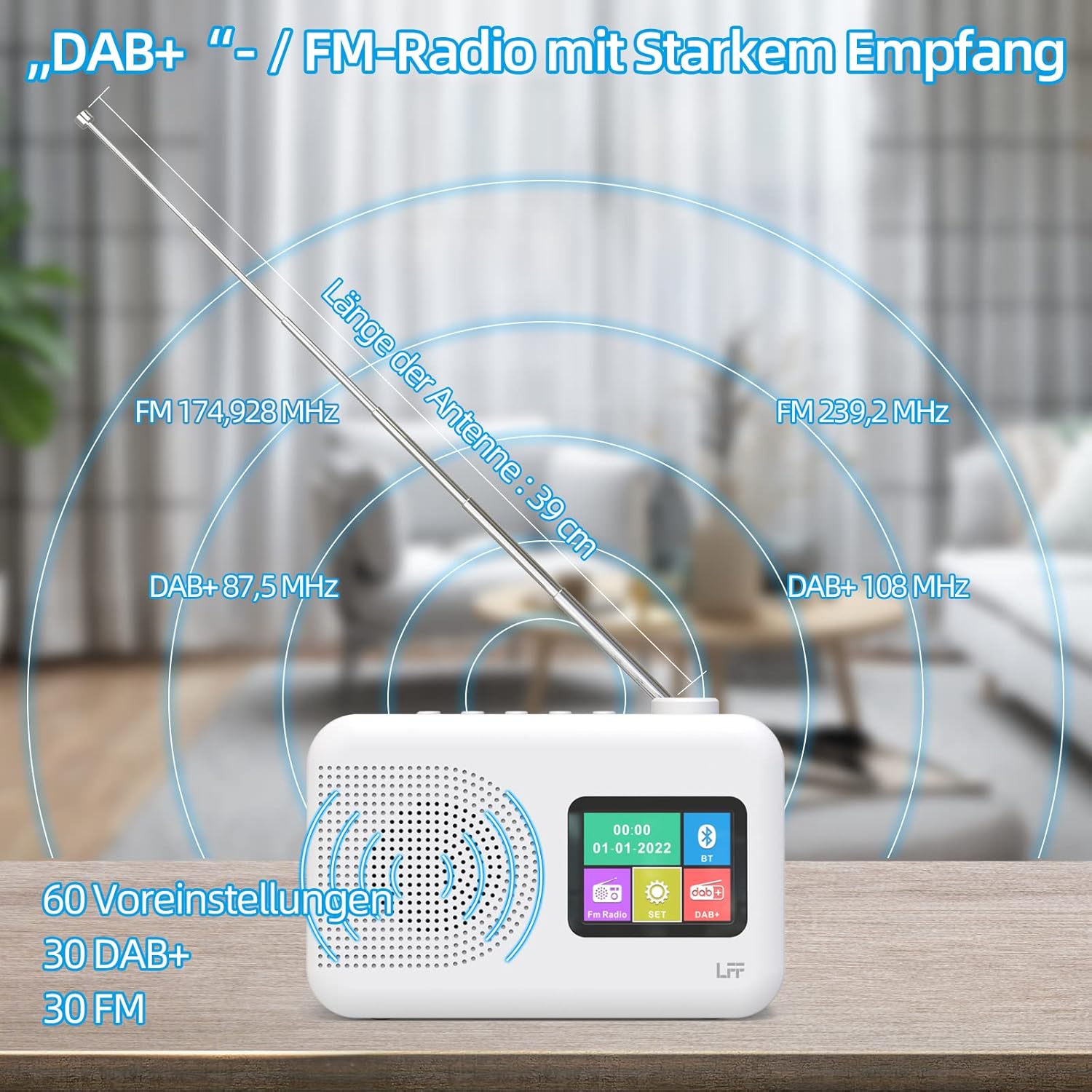
Extend the telescopic antenna fully (approximately 39 cm) and adjust its angle for optimal reception, especially for DAB+ and FM stations.

This diagram illustrates the radio's strong DAB+ and FM reception capabilities with the fully extended 39cm antenna, showing frequency ranges and the capacity for 60 total presets (30 DAB+, 30 FM).
4.3 Initial Scan (DAB+)
- Whakakāhia te reo irirangi.
- Ensure the mode is set to DAB+. If not, press the Aratau pātene ki te huri.
- The radio will automatically perform a full scan for available DAB+ stations. This may take a few minutes.
- Once the scan is complete, the radio will display a list of found stations.
5. Nga Tohutohu Whakahaere
5.1 Aratau Reo Irirangi DAB+
- Pehia te Aratau pātene hei tīpako i te aratau DAB+.
- Hurihia te Tune/Tīpako knob to browse through the available stations.
- Pehia te Tune/Tīpako puku ki te whiriwhiri teihana.
- Tiaki Tatūkē: To save a station, press and hold a Tatūkē button until the display confirms. To recall, briefly press the corresponding Tatūkē button. Up to 30 DAB+ stations can be saved.
5.2 FM Radio Aratau
- Pehia te Aratau ki te kowhiri i te aratau FM.
- Hurihia te Tune/Tīpako puku ki te whakatangi a-ringa ki te auau.
- Patohia me te pupuri i te Tune/Tīpako knob for a few seconds to auto-scan for the next available station.
- Tiaki Tatūkē: Similar to DAB+ mode, press and hold a Tatūkē button to save, and briefly press to recall. Up to 30 FM stations can be saved.
5.3 Aratau Nihokikorangi

This diagram illustrates the three primary playback options for the radio: through its internal speaker, via Bluetooth connection to an external device, or using headphones connected to the headphone jack.
- Pehia te Aratau pātene hei tīpako i te aratau Nihokikorangi. Ka whakaatuhia te "Pairing Nihokikorangi" me ētahi atu mea rite.
- I tō pūrere o waho (hei tauira, waea atamai), whakahohea te Nihokikorangi, ka rapu mō ngā pūrere e wātea ana.
- Select "LFF Radio" (or similar name) from the list to pair.
- Kia honoa, ka taea e koe te purei i te oro mai i tō pūrere mā te kaikorero o te reo irirangi.
- Tuhipoka: This radio acts as a Bluetooth receiver. It does not support connecting to Bluetooth headphones or other Bluetooth speakers.
5.4 Taima Moe
Ma te taima moe ka whakaweto aunoa te reo irirangi i muri i te waa kua whakaritea.

This image depicts the sleep timer function, offering selectable durations of 15, 30, 45, 60, 90, and 120 minutes before the radio automatically powers off.
- Pehia te Alarm/Sleep Timer button repeatedly to cycle through sleep timer options (15 min, 30 min, 45 min, 60 min, 90 min, 120 min, OFF).
- Select your desired duration. The radio will turn off automatically after this time.
5.5 Karaka Whakaoho
The radio features a dual alarm function.
- Patohia me te pupuri i te Alarm/Sleep Timer pātene hei whakauru i ngā tautuhinga whakaoho.
- Whakamahia te Tune/Tīpako knob to set the alarm time, alarm source (DAB+, FM, or buzzer), and volume.
- Pehia te Tune/Tīpako pihi hei whakaū i ia tautuhinga.
- Repeat the process for the second alarm if needed.
5.6 Whakamahi Waeaoro
Plug 3.5mm headphones into the headphone jack on the side of the radio for private listening. The internal speaker will automatically mute.
6. Tiaki
6.1 Te horoi
- Wipe the radio's surface with a soft, dry cloth.
- Kaua e whakamahi i nga kai horoi, te wax, te whakarewa ranei na te mea ka pakaru te otinga.
6.2 Whakakapinga Pūhiko
When using battery power, replace all four AA batteries when the low battery indicator appears on the display or when performance degrades.
- Ensure the radio is turned off and disconnected from AC power.
- Whakatuwheratia te uhi o te wahanga pākahiko kei muri.
- Tangohia nga pākahiko tawhito me te tuku tika.
- Insert new 4 x 1.5V AA (LR6) batteries, observing correct polarity (+/-).
- Katia kia mau te uhi o te wahanga pākahiko.
6.3 Screen Protection Film
The radio's display comes with a transparent protective film. For optimal clarity, gently peel off this film before first use.
7. Te Raru
Mena ka raru koe, tirohia nga raru me nga otinga e whai ake nei:
| Raruraru | Take pea | Rongoā |
|---|---|---|
| Karekau he kaha | AC adapter not connected, batteries depleted or incorrectly inserted. | Tirohia te hononga urutau AC. Whakakapihia nga pākahiko, me whakarite ranei te polarity tika. |
| He pai te powhiri reo irirangi | Kāore te pūihi i toronga, ngoikore te horahanga tohu, pokanoa. | Fully extend and adjust the telescopic antenna. Move the radio to a different location. Avoid sources of interference. |
| Nihokikorangi kore hono | Radio not in Bluetooth mode, device too far, already paired with another device. | Ensure radio is in Bluetooth mode. Keep devices within range. Disconnect from other devices. |
| Karekau he tangi | He iti rawa te oro, he mea hono nga taringa, he wahangu kua whakahohehia. | Increase volume. Disconnect headphones. Check if mute is active. |
8. Whakatakotoranga
- Waitohu: LFF
- Tauira: DAB Plus Digital FM Radio
- Tae: Mā
- Hangarau Hononga: Nihokikorangi
- Ahu (L x W x H): 16.1 cm x 5.9 cm x 10.9 cm
- Hangarau Whakatū: DAB
- Puna Hiko: AC Adapter (5V/1000mA) or 4 x 1.5V AA (LR6) Batteries
- Roopu Reo Irirangi Tautokohia: DAB+, FM
- DAB+ Awhe Auautanga: 174.928 - 239.2 MHz
- Raupaparorohiko FM: 87.5 - 108 MHz
- Tatūkē: 30 DAB+, 30 FM
- Te Rahi Antenna: 39 cm (extendable)
- Nga waahanga motuhake: DAB Plus Radio, Sleep Timer, Dual Alarm, Headphone Jack, Color Display
- Nga Waahanga Kei roto: DAB Digital Radio, AC Power Adapter, Quick Start Guide
9. Pūtāhui me te Tautoko
For any quality-related issues or technical support, please contact the seller directly. We are committed to resolving any problems you may encounter with your LFF DAB Plus Digital FM Radio.
Ask a question about this manual
Ask about setup, troubleshooting, compatibility, parts, safety, or missing instructions. Manuals+ will review the question and use this page’s manual context to help answer it.