
Kupu Whakataki
Thank you for choosing the Audizio SB85 Soundbar with Subwoofer. This manual provides essential information for the safe and correct operation of your new audio system. Please read it thoroughly before use and retain it for future reference. The SB85 is designed to enhance your television's audio, providing a rich, immersive sound experience for movies, games, and music, complete with a dedicated subwoofer for powerful bass.
Nga Tohutohu Haumaru
- Me ata panui nga tohutohu katoa i mua i te whakahaere i te taputapu.
- Keep the unit away from water, moisture, and heat sources.
- Kaua e araia nga whakatuwheratanga hau.
- Whakamahia anake nga taapiri / taputapu kua tohua e te kaihanga.
- Wewetehia te taputapu i te wa e uira ana te tupuhi, i te kore e whakamahia mo te wa roa.
- Tukuna nga ratonga katoa ki nga kaimahi ratonga whai tohu.
- Do not expose the battery (if applicable) to excessive heat such as sunshine, fire, or the like.
Ihirangi mokete
Me mohio kei roto katoa nga taonga i roto i te pouaka:
- Audizio SB85 Soundbar
- Subwoofer Waea
- Mana Mamao
- Optical Cable (Toslink)
- Tauera AUX
- Pūurutau Hiko
- Pukapuka Kaiwhakamahi
Ka mutu te huaview
The Audizio SB85 system consists of a soundbar and a separate wired subwoofer, designed to deliver a powerful and clear audio experience.
Nga waahanga oro
- Integrated 150W speaker system with 4 speakers (2x 2cm range, 2x 2cm tweeter).
- Front LED display for status indication.
- Control buttons on the side panel.
- Multiple input options: HDMI (ARC), USB, Line In (AUX), Coaxial, Optical.
- Nihokikorangi 5.0 mo te rere ororongo ahokore.

Image: Close-up of the Audizio SB85 Soundbar's control panel and its remote control, highlighting Bluetooth 5.0 and ease of use.

Whakaahua: Roto view of the Audizio SB85 Soundbar's full-range speaker, emphasizing its 150W speaker system for an immersive audio experience.
Nga Waahanga Subwoofer
- 5.25-inch wired subwoofer for enhanced bass response.

Image: Close-up of the Audizio SB85 wired subwoofer, designed to amplify bass frequencies.
Tatūnga
1. Whakanoho
Place the soundbar centrally below your television. The subwoofer can be placed on the floor near the soundbar, ideally in a corner for optimal bass reflection, but ensure it is not obstructed.

Image: Audizio SB85 Soundbar and Subwoofer setup in a living room, demonstrating room-filling sound and clean design.

Image: Audizio SB85 Soundbar placed below a television, illustrating its universal compatibility with any TV.
2. Te hono ki te Mana
Connect the power adapter to the DC IN port on the soundbar and then plug it into a wall outlet (230 Vac/50 Hz).
3. Te hono i te Subwoofer
Connect the wired subwoofer to the dedicated subwoofer output port on the soundbar.
4. Te Hononga ki ngā Pūtake Ororongo
The SB85 offers several connection options:
- HDMI (ARC): For the best audio quality and control, connect an HDMI cable from the HDMI (ARC) port on the soundbar to the HDMI ARC port on your TV. This allows the TV to send audio to the soundbar and often enables TV remote control of the soundbar's volume.
- Optical (Toslink): Connect the included optical cable from the OPTICAL port on the soundbar to the Optical Digital Audio Out port on your TV or other audio source.
- Line In (AUX): Use the included AUX cable to connect the LINE IN port on the soundbar to the headphone jack or audio output of your device (e.g., smartphone, MP3 player).
- Kotahi: Connect a coaxial cable (not included) from the COAXIAL port on the soundbar to the Coaxial Digital Audio Out port on your TV or other audio source.
- USB: Kōkuhua he puku kohiko USB ki te tauranga USB hei purei i ngā kōnae MP3.
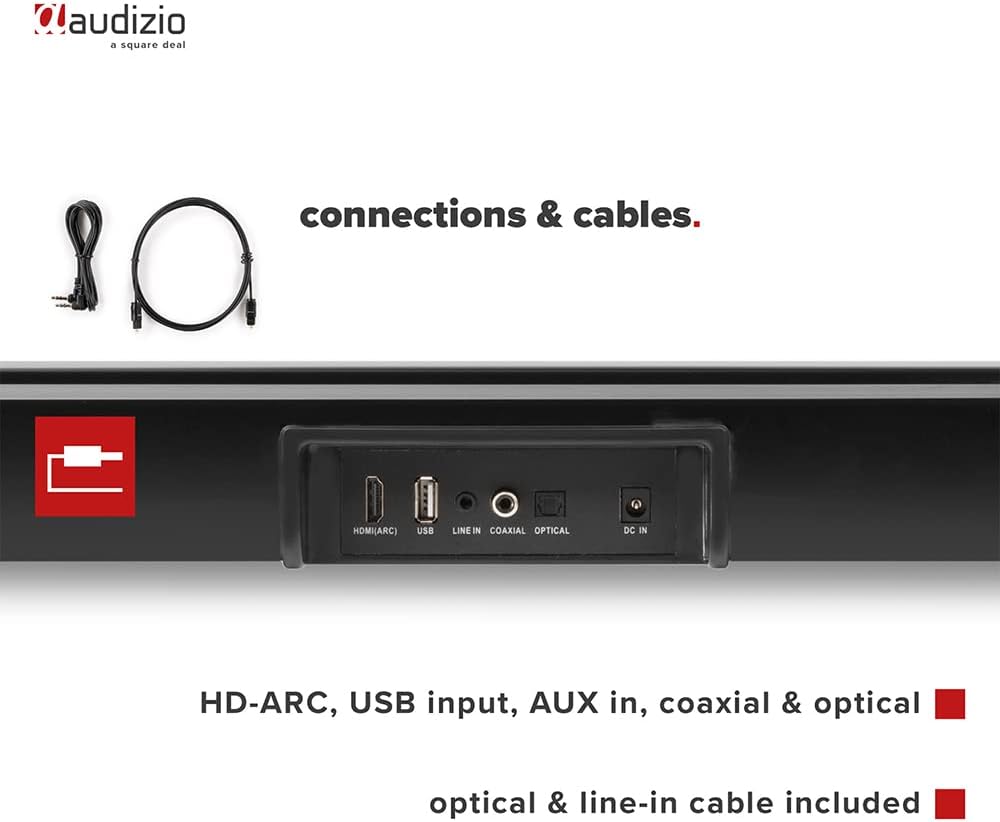
Whakaahua: Rear view of the Audizio SB85 Soundbar showing various connection ports: HDMI (ARC), USB, Line In, Coaxial, and Optical. Includes optical and line-in cables.
Nga Tohutohu Whakahaere
1. Te Hiko / Whakaweto
Pēhia te pātene Hiko i te pae oro, te mana mamao ranei hei whakakā, whakaweto rānei i te kōwae.
2. Kōwhiringa Pūtake Tāuru
Press the 'MODE' button on the soundbar or the remote control repeatedly to cycle through the available input sources: HDMI (ARC), Optical, Coaxial, AUX, USB, and Bluetooth. The selected input will be shown on the front LED display.
3. Mana Rōrahi
Use the 'VOL+' and 'VOL-' buttons on the soundbar or the remote control to adjust the volume. The 'MUTE' button on the remote control will temporarily silence the audio.
4. Takirua Nihokikorangi
- Switch the soundbar to Bluetooth mode using the 'MODE' button. The LED display will show 'BT'.
- I runga i to waea atamai, papa ranei, whakaaheitia te Nihokikorangi me te rapu mo nga taputapu e waatea ana.
- Select 'Audizio SB85' from the list of devices.
- Once paired, the soundbar will indicate a successful connection, and you can stream audio wirelessly.
5. Whakahoki USB
Whakauruhia he puku kohiko USB kei roto te ororongo MP3 files into the USB port. The soundbar will automatically switch to USB mode and begin playing the music. Use the remote control to navigate tracks (play/pause, next/previous).
6. Nga Mahi Whakamao Mamao
The remote control provides full functionality for the soundbar, including power, mode selection, volume, mute, and playback controls for USB and Bluetooth modes.
Te tiaki
Te horoi
Wipe the soundbar and subwoofer surfaces with a soft, dry cloth. Do not use abrasive cleaners, waxes, or solvents as they may damage the finish. Ensure the device is unplugged before cleaning.
Rokiroki
Mēnā he roa te wā e penapena ana i te kōwae, wetewetehia mai i te putanga hiko ka penapena ki te wahi matao, maroke, kia matara atu i te ra tika me te wera nui.
Raparongoā
| Raruraru | Take pea | Rongoā |
|---|---|---|
| Karekau he kaha | Ko te taura hiko kaore i te hono; He he te putanga hiko | Tirohia te hononga taura hiko; Whakamātauria he putanga kē. |
| Karekau he tangi | Incorrect input selected; Volume too low; Mute activated; Cable connection loose | Tīpakohia te pūtake tāuru tika; Whakanuia te oro; Whakawetohia te whakangū; Tirohia ngā hononga taura oro katoa. |
| Nihokikorangi kore hono | Soundbar not in Bluetooth mode; Device too far; Device already connected to another unit | Switch soundbar to BT mode; Move device closer; Disconnect from other devices and try again. |
| Ko te mana mamao kaore e mahi | Kua pau nga pākahiko; Te arai i waenganui i te mamao me te pae oro | Whakakapihia nga pākahiko; Tango i nga arai. |
Whakatakotoranga
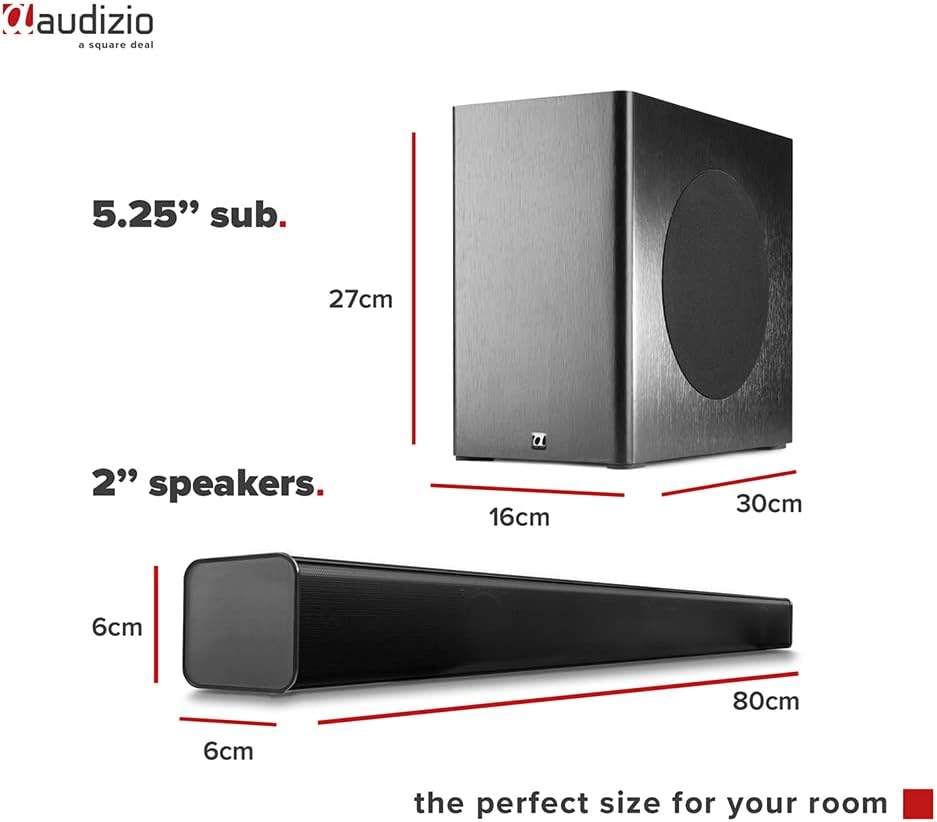
Image: Diagram showing the dimensions of the Audizio SB85 Soundbar and its subwoofer.
- Putanga Hiko: 150W (Mōrahi)
- Whirihoranga Tukuoro: 4 speakers (2x 2cm range, 2x 2cm tweeter)
- Rahi Taarua: 5.25 inihi
- Awhe Auautanga: 50 Hz - 16,000 Hz
- Mörahi SPL: 125 dB
- Hononga: Bluetooth 5.0, HDMI (ARC), USB, Line In (AUX), Coaxial, Optical
- Aratau Putanga Ororongo: Tirooro
- Ngā Pūrere Hototahi: MP3 Player, Smartphone, TV
- Puna Hiko: 230 Vac/50 Hz (via electric cable)
- Soundbar Dimensions (L x W x H): 80 x 6 x 6 cm
- Subwoofer Dimensions (L x W x H): 16 x 30 x 27 cm
- Taumaha Tapeke: 3.9 kg
- Tau tauira: 100.292
Pūtāhui me te Tautoko
Mō ngā mōhiohio pūtāhui, mō te tautoko hangarau rānei, tirohia ngā tuhinga i whakaratohia i te wā o te hoko, whakapā atu rānei ki tō kaihokohoko. Puritia tō taunakitanga hoko mō ngā kereme pūtāhui katoa.