
Kupu Whakataki
This manual provides comprehensive instructions for the Allimity AH59-02530A replacement remote control. This remote is designed to be compatible with various Samsung Blu-ray Home Entertainment System models, including HT-H4200R, HT-F4500, HT-FM45/ZA, HT-H4500R, HT-H4550R, HT-J4500, HT-J5500W, HT-JM41, and HT-J4100. No programming or setup is required; simply insert batteries to begin operation.
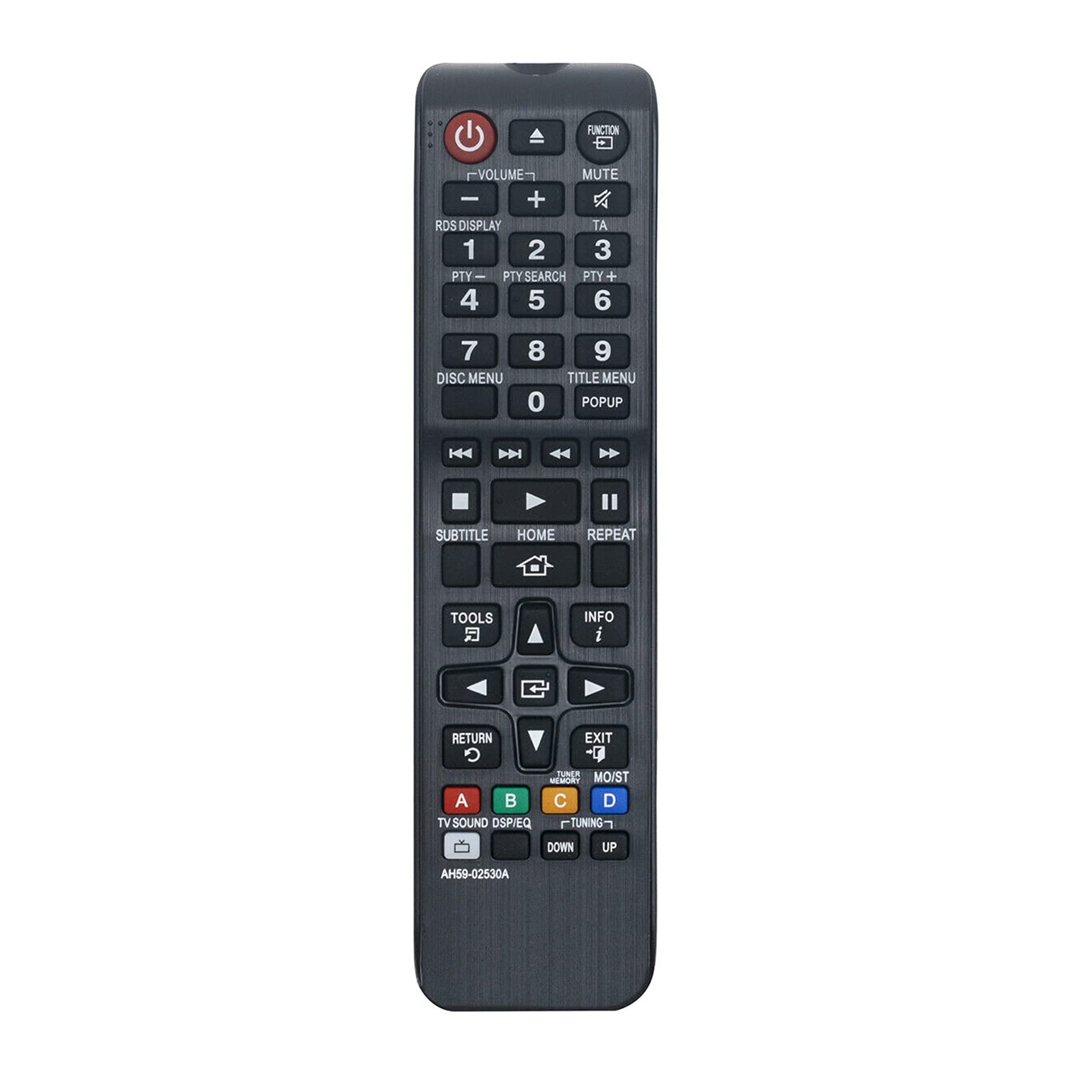
Whakaahua 1: Koki view of the Allimity AH59-02530A remote control, showcasing its layout and buttons.
Tatūnga
Tāuta Pūhiko
The Allimity AH59-02530A remote control requires two AAA alkaline batteries (not included) for operation. Follow these steps to install the batteries:
- Kimihia te uhi o te wahanga pākahiko kei muri o te mana mamao.
- Patohia te ripa ka paheke te uhi ki raro hei whakatuwhera i te waahanga.
- Whakauruhia kia rua ngā pākahiko AAA hou, me te whakarite kia ōrite ngā pito pai (+) me te pito kino (-) ki ngā hoahoa o roto i te wāhanga.
- Whakahokia te uhi o te wahanga pākahiko ki tona waahi kia paoho pai.

Whakaahua 2: Whakamuri view o te mana mamao me te wāhanga pākahiko e tuwhera ana, e whakaatu ana i ngā mokowā mō ngā pākahiko AAA e rua.
Once batteries are installed, the remote is ready for use with your compatible Samsung Home Entertainment System.
Nga Tohutohu Whakahaere
This remote control is designed to replicate the functions of your original Samsung remote. Point the remote directly at your Samsung Home Entertainment System for optimal performance. Below is a general guide to common button functions:

Whakaahua 3: Mua view of the remote control, highlighting the various function buttons.
- Pātene Hiko (⏻): Turns the home entertainment system on or off.
- Pātene Mahi: Cycles through available input sources or functions.
- Rōrahi (+/-): Whakaritea te taumata ororongo.
- Patene Wahangu: Silences or restores the audio.
- Patene Tau (0-9): Used for direct input, such as track selection or menu navigation.
- Disc Menu / Title Menu / POPUP: Accesses disc-specific menus or pop-up menus.
- Playback Controls (Play, Pause, Stop, Fast Forward, Rewind, Skip): Whakahaere i te purei anō o ngā pāpāho.
- Pātene HOME: Returns to the main home screen or menu of the system.
- Papa Whakatere (Runga, Raro, Mauī, Matau, Tomo)Hei whakatere i ngā tahua me te whakaū i ngā kōwhiringa.
- PARAU PANUITANGA: Ka hoki ki te mata, ki te tahua rānei o mua.
- Pātene PUTA: Puta atu i te tahua, i te mahi rānei o nāianei.
- Patene Utauta: Ka uru atu ki ngā tautuhinga tere, ki te tahua taputapu rānei.
- Pātene INFO: Displays information about the current content or system status.
- Patene Tae (A, B, C, D): These buttons (Red, Green, Yellow, Blue) provide access to specific functions depending on the content or menu displayed on your screen.
For specific functions related to your Samsung Home Entertainment System model, refer to your system's original user manual.
Te tiaki
Whakakapinga Pūhiko
Replace batteries when the remote control's response becomes sluggish or inconsistent. Always replace both AAA batteries at the same time with new alkaline batteries. Do not mix old and new batteries, or different types of batteries.
Te horoi
Hei horoi i te mana mamao, murua mārire ki te kakahu ngohengohe, maroke. Kaua e whakamahi i ngā wai horoi, i ngā rehu, i ngā rauemi whakakoi rānei, nā te mea ka kino pea te mata o te mana mamao, ngā wāhanga o roto rānei.
Rokiroki
Ki te kore e whakamahia mō te wā roa, he mea pai kia tangohia ngā pākahiko hei ārai i te turuturu, ka kino pea te mana mamao.
Raparongoā
- Mamao kaore i te whakautu:
- Me whakarite kia tika te whakaurunga o nga pākahiko me te polarity tika (+/-).
- Whakakapia ngā pākahiko tawhito ki ngā pākahiko kawakore AAA hou.
- Ensure there are no obstructions between the remote control and the home entertainment system's infrared receiver.
- Confirm the remote is pointed directly at the system.
- Te whānuitanga mahi iti:
- The maximum effective range is approximately 33 feet (10 meters). Ensure you are within this range.
- Bright light sources, such as direct sunlight or strong fluorescent lights, can interfere with the infrared signal. Try to minimize such interference.
- Ngā mahi motuhake kāore e mahi:
- Verify that your Samsung Home Entertainment System model is listed as compatible.
- Some advanced functions might be specific to the original remote or require specific system settings.
Whakatakotoranga
| Waitohu | KATOA |
| Tau tauira | AH59-02530A |
| Hangarau Hononga | Infrared |
| Pūrere Hototahi | Samsung Blu-ray Home Entertainment Systems (HT-H4200R, HT-F4500, HT-FM45/ZA, HT-H4500R, HT-H4550R, HT-J4500, HT-J5500W, HT-JM41, HT-J4100) |
| Momo Pūhiko | 2 x Pūhiko AAA Alkaline (kāore i whakaurua) |
| Awhe Morahi | 33 Puawai (10 mita) |
| Tae | Pango |
| Rahi Tūemi (L x W x H) | 6"R x 2"W x 0.5"T (tata) |
| Taumaha Tūemi | 2 Ounces (approximately) |
Nga korero Whakaputanga
Specific warranty details for the Allimity AH59-02530A remote control are typically provided by the seller or manufacturer at the time of purchase. Please refer to your product packaging, purchase receipt, or contact the seller directly for information regarding warranty coverage and terms.
Tautoko
For technical assistance, troubleshooting beyond this manual, or inquiries about your Allimity AH59-02530A remote control, please contact the seller or manufacturer directly. Contact information can usually be found on the product packaging or the platform where the item was purchased.