
CDIYTOOL 4yhujuyj
CDIYTOOL 100A MPPT Solar Charge Controller User Manual
Model: 4yhujuyj
Kupu Whakataki
This manual provides essential information for the safe and efficient operation of your CDIYTOOL 100A MPPT Solar Charge Controller. This controller is designed for 36V, 48V, and 60V battery systems and features an LCD display, multiple load control modes, and dual USB outputs. Please read this manual thoroughly before installation and use.
The controller automatically adapts to 36V/48V/60V systems and is not suitable for 12V/24V systems. It utilizes innovative MPPT technology for high tracking efficiency, detecting the maximum charging current.
Nga Tohutohu Haumaru
Always adhere to the following safety guidelines to prevent injury and damage to the controller or other components.
- Me whakarite he rawaka te voltage for the controller to recognize the correct battery type upon first use.
- Connect the battery to the controller first, then connect the solar panels. Reversing this order can damage the controller.
- Ko te nui o te whakauru voltage is 50V. Ensure your solar panel configuration does not exceed this limit. For example, a 19V photovoltaic panel matches a 12V battery, and a 38V photovoltaic panel matches a 24V battery. When a 38V panel is connected, the maximum voltage may reach 42V.
- The controller is suitable for various battery types (including open, lead-acid, gel, and lithium batteries). Refer to the controller's settings for specific battery types.
- The controller provides protection against overvoltage, short circuit, overload, overcharge, and over-discharge.
- Kaua e ngana ki te wetewete, ki te whakatika rānei i te pūmana whakahaere māu ake. Whakapā atu ki ngā kaimahi whai tohu mō te mahi tiaki.

Image: Excerpt from the user manual detailing safety instructions and a connection diagram.
Nga waahanga hua
- Multi-function LCD Display: Provides real-time display of charging current, discharge current, and power generation.
- Hangarau MPPT: Innovative Maximum Power Point Tracking with high efficiency (up to 99%) for optimal solar energy harvesting.
- Tiaki Tiaki: Kei roto te overvoltage, short circuit, overload, overcharge, and over-discharge protection.
- Automatic Focusing MPPT Tracking: Ensures high charging efficiency and bidirectional focusing tracking.
- Utu Pawera: Automatically adjusts charging voltage based on ambient temperature changes.
- Putanga USB Taarua: Provides 5V/2A output for charging mobile devices.

Whakaahua: Mua view of the CDIYTOOL 100A MPPT Solar Charge Controller, highlighting the LCD display and dual USB ports.
Tatūnga me te Tāuta
Whāia ēnei mahi hei tāuta tika i te pūmana utu rā:
- Whakaritea Waea: Ensure all wires are correctly sized for the expected current and are properly insulated.
- Tūhono Pūhiko: Connect the battery to the charge controller first. Ensure correct polarity (+ to + and - to -). The controller requires sufficient battery voltage to recognize the system type.
- Tūhono Paewhiri Solar: Connect the solar panel(s) to the charge controller. Ensure correct polarity. Do not exceed the maximum input voltage o 50v.
- Tūhono Uta (Kōwhiringa): Connect your DC load to the load terminals of the controller. The controller can manage load output based on settings.
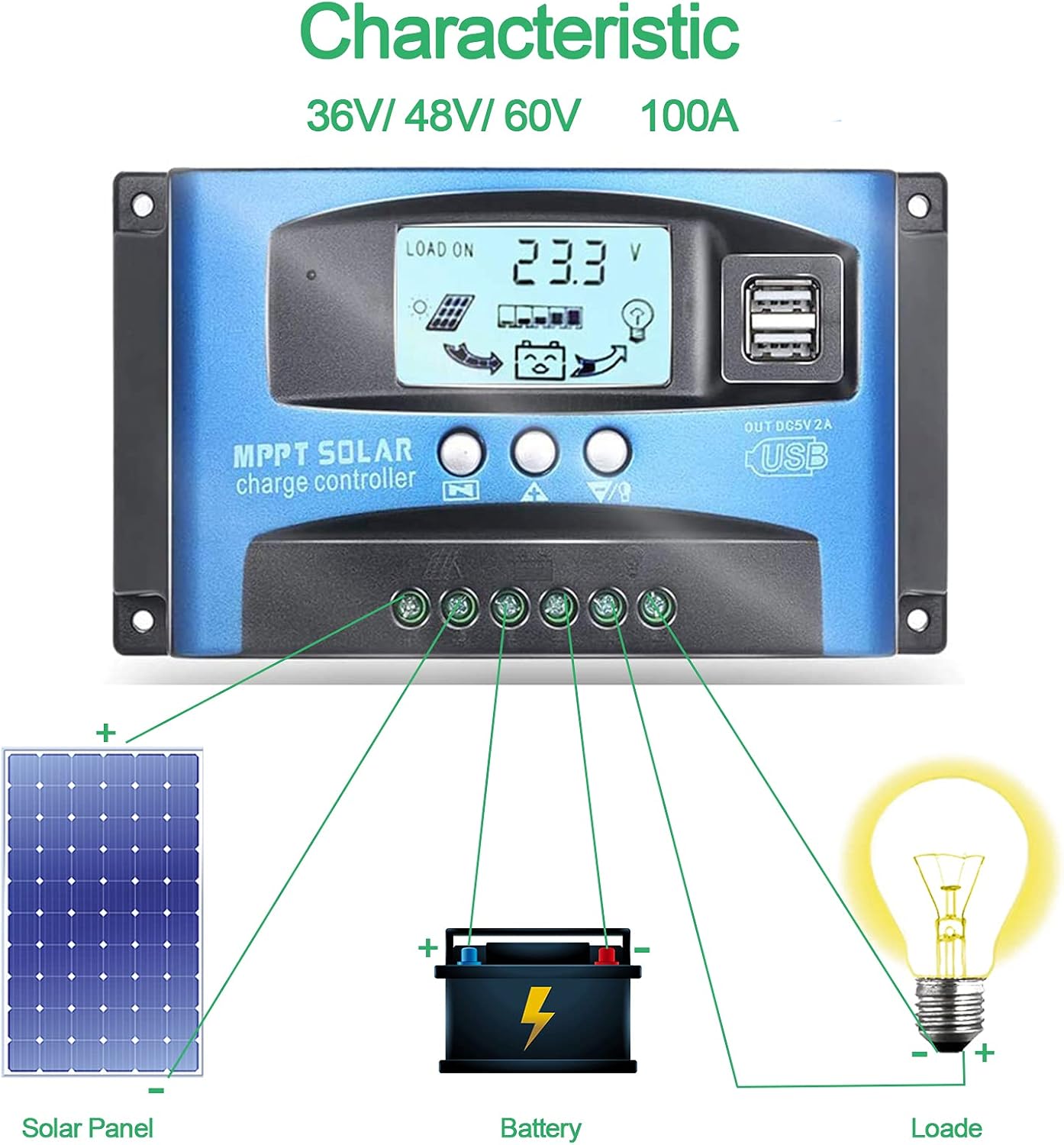
Image: Connection diagram illustrating how to connect solar panels, battery, and load to the charge controller.

Whakaahua: Taipitopito view of the controller with labels for its components, including buttons, LCD, USB ports, and connection points.
Nga Tohutohu Whakahaere
The controller features an LCD display and three buttons for operation: Menu, Page Up, and Page Down/Manual.
Whakaaturanga LCD
The LCD displays various parameters including battery voltage, charging current, discharge current, and system status. The icons on the display indicate solar panel activity, battery charge level, and load status.
Nga Mahi Patene
- Patene Tahua: Press to enter the menu interface and cycle through different settings. Long press to modify parameters.
- Pātene Whārangi Whakarunga: Used to increase values or navigate upwards in menus.
- Page Down/Manual Button: Used to decrease values or navigate downwards in menus. Also functions as a manual load control switch (on/off) when on the main interface.
Whakatau USB
The controller is equipped with dual USB ports providing 5V/2A output for charging compatible devices such as mobile phones and tablets.

Image: Demonstration of the controller's dual USB ports being used to charge a mobile phone.
Te tiaki
Ko te tiaki i nga wa katoa ka mau te roa me te tino pai o te mahi a to kaiwhakahaere utu solar.
- Tirotiro Hononga: Ia wa, tirohia nga hononga waea katoa mo te piri me te waikura. Ko nga hononga wetewete ka arahi ki te ngaronga hiko, ki te wera ranei.
- Pūwhakahaere Ma: Kia noho ma te kaiwhakahaere kia kore e pehu me te para. Whakamahia he kakahu maroke hei muru i te mata. Kaua e whakamahia nga kai horoi wai.
- Aroturuki Mahinga: Regularly check the LCD display for normal operation and expected voltagngā pānui e/o nāianei.
- Hauora Pūhiko: Ensure your battery is well-maintained and within its recommended operating parameters.
Raparongoā
Ko tenei waahanga e whakarato ana i nga otinga mo nga take noa ka pa ki a koe.
| Turanga | Te take pea | Rongoā |
|---|---|---|
| Karekau he whakaaturanga ki te mata | Kaore te pākahiko i hono, iti ranei te voltage | Connect battery, check battery voltage |
| No charge when sunny | Solar panel reversed or open circuit | Reconnect solar panel, check wiring |
| Kare e mahi ana te uta | Load short circuit, overload, or over-discharge protection | Check load wiring, reduce load, or charge battery |
| Karekau te kaiwhakahaere e utu ana | Paewhiri solar voltage too low or battery full | Ensure sufficient solar input, check battery status |
The controller includes built-in protections for reverse polarity, overvoltage, short circuit, overload, overcharge, and over-discharge. If an issue persists after troubleshooting, contact customer support.
Whakatakotoranga
| Tawhā | Uara |
|---|---|
| Tauira | 4yhujuyj |
| Waitohu | CDIYTOOL |
| Whakatauhia o naianei | 100A |
| Pūnaha Voltage | 36V/48V/60V Auto Adapt (Not for 12V/24V) |
| Max Solar Tāuru Voltage | 50V |
| Putanga USB | Tärua 5V/2A |
| Momo Whakaatu | LCD |
| Taumaha Tūemi | 14.4 hekere |
| Ahu mōkihi | 6.81 x 3.98 x 2.01 inihi |

Image: Diagram showing the physical dimensions of the solar charge controller.
Ētahi atu rauemi me te tautoko
For further assistance or to access the mobile application for monitoring, please refer to the following:
Taupānga Pūkoro
The BL-912V APP can be installed on your Android phone to monitor and control the solar charge controller. Scan the QR code below or visit the provided link to download and install the application.
Tikiake Hononga: http://fir.sdhzwl.cn/5w4b
The mobile phone app allows for remote monitoring of charging and discharging data, daily power generation, and other functions.
Image: Section of the user manual detailing the BL-912V APP installation process, including a QR code.
Pūtāhui me te Ratonga Kiritaki
For warranty information or technical support, please contact CDIYTOOL customer service through the platform where you purchased the product. Keep your purchase receipt for warranty claims.
Nga Tono Tikanga
The CDIYTOOL MPPT Solar Charge Controller is suitable for a variety of off-grid solar power applications, including:
- Residential solar power systems
- RV and marine solar setups
- Solar street lighting
- Remote monitoring stations
- Agricultural irrigation systems

Whakaahua: Examples of typical applications for the solar charge controller in various settings.