
SPRT POS58 IVU
Pukapuka Kaiwhakamahi mō te Pūreretā Rīhiti Wera SPRT POS58 IVU
Model: POS58 IVU
Kupu Whakataki
This manual provides essential information for the proper setup, operation, and maintenance of your SPRT POS58 IVU Receipt Thermal Printer. Please read this manual thoroughly before using the printer to ensure optimal performance and longevity.
The SPRT POS58 IVU is a compact and efficient thermal receipt printer designed for various point-of-sale applications. It features USB connectivity and is compatible with 5.7 cm wide thermal paper.
Tatūnga
1. Te Wetewete me te Tirotiro
- Tangohia marietia te pūreretā me ngā taputapu katoa i roto i te takai.
- Verify that all components are present: printer unit, power adapter, USB cable.
- Inspect the printer for any visible damage. If damaged, contact your supplier immediately.
2. Te Hononga i te Pūreretā
- Hono Hono: Insert the power adapter cable into the printer's power port and plug the other end into a suitable power outlet.
- Tūhono USB: Connect one end of the USB cable to the printer's USB port and the other end to an available USB port on your computer or POS system.
- Whakahiko: Locate the power switch on the printer (typically on the side or front) and turn it to the 'ON' position.
3. Te uta i te pepa wera
The SPRT POS58 IVU printer uses standard 5.7 cm wide thermal paper rolls.
- Open the paper cover by pressing the release button or lifting the latch (location may vary slightly).
- Insert the thermal paper roll with the printing surface facing the thermal head. Ensure the roll is seated correctly in the paper compartment.
- Tōia he iti o te pepa ki tua atu i te taputapu tapahi.
- Close the paper cover firmly until it clicks into place.
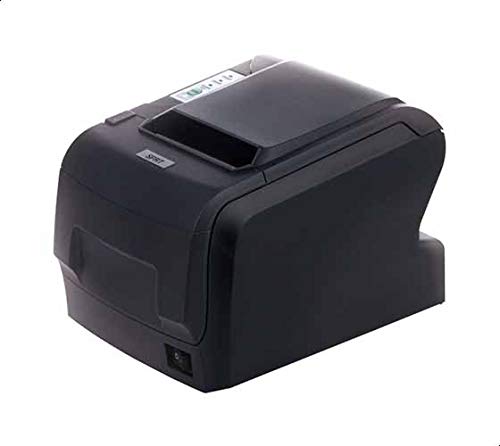
Figure 1: SPRT POS58 IVU Receipt Thermal Printer. This image displays the compact black thermal printer from an angled view, highlighting its paper output slot and the power switch located on the side.
Nga Tohutohu Whakahaere
Tānga Taketake
- Ensure the printer is powered on and connected to your computer/POS system.
- Install the necessary printer drivers on your operating system if not already installed. Refer to the driver installation guide provided separately or available from the manufacturer's webpae.
- From your application (e.g., POS software, word processor), select the SPRT POS58 IVU as your printer.
- Initiate the print command. The printer will automatically feed and print the receipt.
- Tear off the receipt against the serrated edge of the paper output slot.
Maama Tohu
The printer typically has indicator lights to show its status:
- Rama Maama: E tohu ana kua whakakāhia te pūreretā.
- Error Light: Illuminates or blinks to indicate an error condition (e.g., paper out, print head overheat).
- Paper Out Light: Indicates that the paper roll is empty or incorrectly loaded.
Te tiaki
Te horoi i te Upoko Ngawha
Regular cleaning of the thermal head ensures clear print quality and extends printer life. Clean the thermal head after every 50-100 km of printing or if print quality degrades.
- Whakawetohia te pūreretā, ka momotu i te taura hiko.
- Whakatuwheratia te uhi pepa.
- Wait a few minutes for the thermal head to cool down if the printer has been recently used.
- Gently wipe the thermal head surface with a cotton swab lightly moistened with absolute alcohol (ethanol).
- Allow the alcohol to evaporate completely before closing the cover and reconnecting power.
Te horoi i waho
Ūkuia te waho o te pūreretā ki te ngohengohe, damp kakahu. Kaua e whakamahi i nga whakarewa kaha, i nga horoi horoi ranei.
Te Whakahaere Pepa
- Use only high-quality thermal paper to prevent damage to the thermal head and ensure optimal print quality.
- Store thermal paper in a cool, dry place away from direct sunlight and heat.
Raparongoā
| Raruraru | Take pea | Rongoā |
|---|---|---|
| Kāore te pūreretā e whakakā. | Power cable not connected; power outlet faulty; printer switch off. | Tirohia te hononga o te taura hiko; ngana ki tētahi putanga rerekē; kia mohio kei te KAHA te pana hiko. |
| No printing / Blank output. | Paper loaded incorrectly (upside down); paper out; driver not installed/configured; printer not selected. | Reload paper correctly (printing side facing thermal head); replace paper roll; install/reinstall drivers; select printer in application. |
| He iti te kounga o te tuhi. | Thermal head dirty; low-quality paper; paper stored improperly. | Clean thermal head; use recommended thermal paper; store paper correctly. |
| Pepa tāmi. | Paper not loaded straight; foreign object in paper path. | Open cover, remove jammed paper carefully, reload paper straight; inspect for obstructions. |
Whakatakotoranga
| Āhuahira | Taipitopito |
|---|---|
| Waitohu | SPRT |
| Tau tauira | POS58 IVU |
| Momo Pūreretā | Receipt Thermal Printer |
| Hangarau Hononga | USB |
| Papapāho tā | Labels (commonly used for receipts) |
| Whanui Pepa | 5.7 cm |
| Tae | Pango |
| Taumaha Tūemi | 1.82 Kirokaramu |
| Ahu mōkihi | 28 x 21.4 x 17.8 cm |
Pūtāhui me te Tautoko
Specific warranty terms and detailed support contact information are not provided within the available product data. For warranty claims, technical support, or service inquiries, please refer to the documentation included with your purchase or contact your point of sale or the manufacturer directly.
You may find additional resources and contact details on the official SPRT webpae.
Tuhinga e pa ana - POS58 IVU
 |
SPRT SP-POS891 POS Receipt Thermal Receipt Manual Kaiwhakamahi Te pukapuka a te Kaiwhakamahi mo te SPRT SP-POS891 POS Thermal Receipt Printer, e whakaatu ana i nga ahuatanga, nga korero, te mahi, nga hononga, me te rapu raruraru. Akohia mo te mahi tuhi, te whakahaere pepa, te honohono, me etahi atu. |
 |
SPRT POS Receipt Receipt Printer SP-POS8811/POS8822 Manual Kaiwhakamahi Ka whakaratohia e tenei pukapuka nga korero taipitopito mo nga ahuatanga, mahi, me te mahi o nga tauira SPRT POS Thermal Receipt Printer SP-POS8811 me SP-POS8822. Ka hipokina te whakaurunga, nga hononga atanga (Ethernet, USB, Bluetooth, Cash Drawer), rama tohu, paatene, rapurongoā, me nga tautuhinga tawhā. |
 |
SPRT SP-POS890 Receipt Thermal Receipt Printer Manual's User's Ko te pukapuka a te Kaiwhakamahi mo te SPRT SP-POS890 Thermal Receipt Printer, e hipoki ana i nga ahuatanga, nga mahi, nga whakaritenga mahi, nga taipitopito atanga, nga paatene, nga tohu, te whakamatautau whaiaro, me nga tautuhinga tawhā. |
 |
SPRT SP-POS892 POS Receipt Thermal Receipt Manual a te Kaiwhakamahi Ko te pukapuka a te Kaiwhakamahi mo te SPRT SP-POS892 POS Thermal Receipt Printer, e whakaatu ana i ona ahuatanga, mahi, mahi, whakaritenga, atanga, whakahaere hapa, whakamatautau whaiaro, tautuhinga tawhā, me nga tikanga whakahou. |
 |
SPRT SP-POS891 POS Receipt Thermal Receipt Manual Kaiwhakamahi Comprehensive user manual for the SPRT SP-POS891 POS Thermal Receipt Printer, covering features, specifications, installation, interface options, operation, and troubleshooting. Includes details on print performance, paper handling, connectivity, buttons, indicators, and parameter settings. |
 |
SPRT SP-POS58IV Raina Awhina Kairererereta Weariki Te pukapuka a te kaiwhakamahi matawhānui mo te SPRT SP-POS58IV Line Thermal Printer. Ka hipoki i nga korero taipitopito, nga tikanga whakaurunga, nga hononga atanga (RS232, Parallel, USB, Bluetooth, Cash Drawer), nga paatene, nga tohu, nga mahi whakamatautau-whaiaro, te aratau putunga hexadecimal, te aratau whakahou, me te whakaurunga taraiwa. Kei roto ko te taiao whakahaere me te taurangi mahinga. |
Ask a question about this manual
Ask about setup, troubleshooting, compatibility, parts, safety, or missing instructions. Manuals+ will review the question and use this page’s manual context to help answer it.