
1. Kupu Whakataki
This manual provides essential information for the safe and efficient operation, installation, and maintenance of your POOLEX PC-QBC070 Q-Line 7 Full Inverter Pool Heat Pump. Please read this manual thoroughly before installation and use, and retain it for future reference.
The POOLEX Q-Line 7 heat pump is designed for heating swimming pools with a volume of 20 to 50 cubic meters. It incorporates Full Inverter technology, vertical air discharge, and integrated Wi-Fi for enhanced control and energy efficiency.
2. Nga korero haumaru
- Me whakarite kia whakamahia ngā hononga hiko katoa e te tohunga hiko whai tohu, ā, kia tutuki hoki i ngā ture ā-rohe.
- Do not operate the heat pump if any part is damaged or if it is not functioning correctly.
- Keep children and unauthorized personnel away from the unit during operation.
- Ensure proper ventilation around the unit. Do not obstruct the air intake or discharge areas.
- Momotuhia te hiko i mua i te mahi tiaki, ratonga ranei.
- Ko tenei taputapu ehara i te mea mo te whakamahi ma te hunga (tae atu ki nga tamariki) he iti te kaha o te tinana, te tairongo, te hinengaro, te kore wheako me te mohiotanga, mena ka tukuna atu ki a raatau te tirotiro, te tohutohu ranei mo te whakamahi i te taputapu e te tangata whai mana mo to raatau haumaru.
3. Ihirangi mokete
I te wetewete, tirohia kei te noho katoa nga waahanga me te kore e pakaru:
- POOLEX PC-QBC070 Q-Line 7 Full Inverter Pool Heat Pump
- Pukapuka Kaiwhakamahi
- Connection accessories (e.g., water pipe connectors, seals)
- Ngongo waikeri
4. Hua Neke Atuview
The POOLEX PC-QBC070 Q-Line 7 heat pump features a compact design with vertical air discharge, optimizing space utilization. Its Full Inverter technology precisely controls the compressor and fan speed, leading to significant energy savings. The unit includes an integrated Wi-Fi module for remote control via a smartphone application and front-facing LED indicators for operational status.
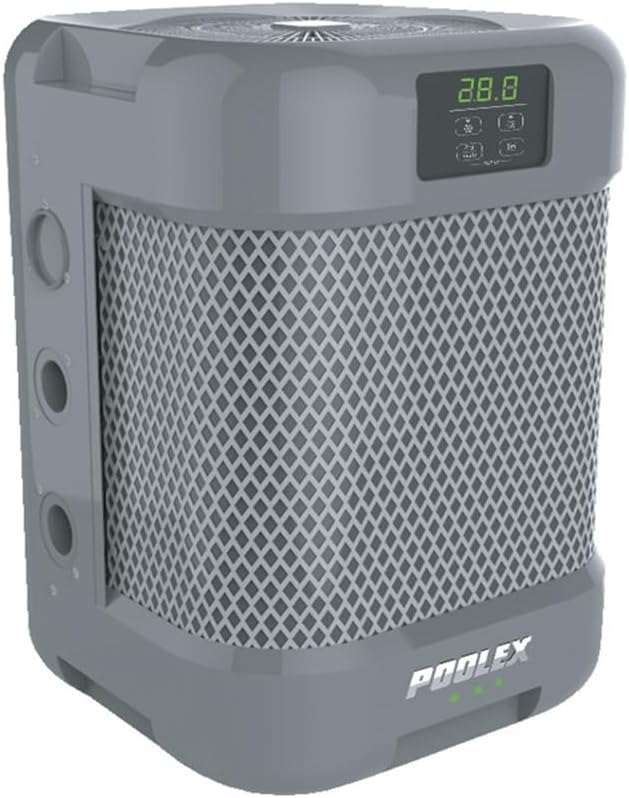
Whakaahua 4.1: Mua me te taha view of the POOLEX PC-QBC070 Q-Line 7 Pool Heat Pump.

Whakaahua 4.2: Whakatata view of the control panel and LED indicators on the POOLEX PC-QBC070.

Figure 4.3: Diagram illustrating the vertical airflow pattern of the heat pump, with air intake (red arrows) and vertical discharge (blue arrows).

Figure 4.4: Dimensions of the POOLEX PC-QBC070 heat pump, showing its compact cubic form (36.04 cm x 36.04 cm x 36.04 cm).
5. Tatūnga me te Tāuta
5.1 Whakanoho
- Due to its vertical air discharge, the Q-Line 7 can be installed in more confined technical spaces compared to traditional horizontal discharge units.
- Ensure there is adequate clearance around the unit for proper airflow and maintenance access. Refer to the manufacturer's recommended clearances.
- Install the unit on a stable, level surface capable of supporting its weight (43 kg).
5.2 Hononga Wai
- Connect the heat pump to your pool's filtration system after the filter and before any chemical injection points.
- Ensure all connections are watertight using appropriate seals and clamps.
- The heat pump requires a continuous flow of water from the pool pump to operate.
5.3 Hononga Hiko
- The unit operates on 230 Volts. Ensure the power supply matches the unit's requirements.
- A dedicated circuit with appropriate overcurrent protection (circuit breaker) is recommended.
- All electrical wiring must comply with national and local electrical codes.
5.4 Tatūnga Wi-Fi
- Download the dedicated POOLEX smartphone application from your device's app store.
- Follow the in-app instructions to connect your heat pump to your home Wi-Fi network. This typically involves putting the unit into pairing mode and entering your network credentials.
6. Nga Tohutohu Whakahaere
6.1 Kei te Hiko / Weto
- Ensure the pool pump is running and water is flowing through the heat pump before powering on.
- Pēhia te pātene hiko i te paewhiri mana hei whakakā, whakaweto rānei i te kōwae.
6.2 Setting Desired Temperature
- Use the up/down arrows on the control panel to adjust the target water temperature.
- The heat pump will automatically operate to reach and maintain the set temperature.
6.3 Tohu LED
The front-facing LED indicators provide visual feedback on the unit's status:
- Different color codes indicate whether the target temperature has been reached, if the unit is heating, or if there is an operational status change. Refer to the specific color code legend in the full manual for detailed interpretation.
6.4 Smartphone Control (Wi-Fi)
- Once connected via Wi-Fi, use the POOLEX application on your smartphone to monitor and control the heat pump remotely.
- Functions typically include turning the unit on/off, adjusting temperature, setting timers, and viewte whakamahi i ngā raraunga whakahaere.
7. Tiaki
7.1 Whakapai i nga wa katoa
- Periodically clean the exterior of the unit to remove dust and debris.
- Ensure the air intake and discharge grilles are free from obstructions (leaves, dirt, etc.) to maintain optimal airflow.
- Clean the evaporator coils if they become dirty, using a soft brush or compressed air.
7.2 Water System Maintenance
- Regularly check water connections for leaks.
- Ensure the pool's water chemistry is balanced to prevent corrosion or scaling within the heat pump.
7.3 Te whakatotoke
- Before freezing temperatures, drain all water from the heat pump to prevent damage from ice expansion.
- Disconnect the water lines and open any drain plugs.
- Cover the unit with a protective, breathable cover to shield it from harsh weather conditions.
8. Te Raru
Kei roto i tēnei wāhanga ngā otinga mō ngā take noa. Mō ngā raruraru uaua ake, whakapā atu ki ngā kaimahi ratonga whai tohu.
| Raruraru | Take pea | Rongoā |
|---|---|---|
| Heat pump not turning on | No power supply; Circuit breaker tripped; Unit switch off | Check power connection; Reset circuit breaker; Turn unit on via control panel |
| He iti rawa te whakamahana | Low water flow; Dirty evaporator coils; Incorrect temperature setting; Ambient temperature too low | Check pool pump and filter; Clean coils; Adjust temperature; Heat pump efficiency decreases in very cold weather |
| Haruru rerekee te waeine | Loose components; Fan obstruction; Compressor issue | Inspect for loose parts; Clear fan area; Contact service if noise persists |
| Nga take hononga Wi-Fi | Incorrect network credentials; Router too far; Signal interference | Re-enter Wi-Fi details; Move router closer or use extender; Check for interference sources |
9. Whakatakotoranga
- Tauira: PC-QBC070
- Waitohu: POOLEX
- Ahu (L x W x H): 36.04 x 36.04 x 36.04 cm
- Taumaha: 43 kg
- Rauemi: Stainless Steel (internal components), ABS (casing)
- Voltage: 230 Volts
- Te rahinga o te puna kaukau e taunakitia ana: 20 m3 ki te 50 m3
- Hangarau: Full Inverter, Vertical Air Discharge
- Hononga: Wāhanga Wi-Fi Whakauru
10. Pūtāhui me te Tautoko
The POOLEX PC-QBC070 Q-Line 7 Full Inverter Pool Heat Pump comes with a 2-tau pūtāhui mai i te ra o te hokonga, e kapi ana i nga hapa hangahanga. Tena koa pupurihia to tohu mo te hoko mo nga kereme whakamana.
For technical support, service, or warranty inquiries, please contact your authorized POOLEX dealer or the customer service department. Provide your model number (PC-QBC070) and a detailed description of the issue when seeking assistance.